AI Video Tools for Law Students: Outlines and Case Briefs to Narrated Reviews
Turn a case brief, outline or casebook PDF into a narrated review that explains the holding: which AI video tool fits, what is free, and what to check.

Two kinds of AI video tool turn your own outline or case brief into a narrated review: Scrimba Explain, listed in ChatGPT as Explain Video Generator, and Google's Gemini Notebook (formerly NotebookLM) with its Video Overviews. Both read what you give them and narrate an explanation over slides and diagrams, with no presenter and no camera. Avatar tools such as HeyGen and Synthesia put an AI presenter in front of a script instead. Use any of them to understand a rule or holding you keep getting wrong; drilling still belongs to practice questions and flashcards.
Last verified September 28, 2026. Checked that day: Scrimba's Explain docs and plugin listing, Google's Gemini Notebook pages, the HeyGen, Synthesia and Scholarly pricing pages, and the ABA and NCBE pages below. Scrimba's plans, editing and ChatGPT docs were re-checked on October 23, 2026. "Not stated" in the table means the vendor pages checked do not say.
Scrimba publishes this article and makes Scrimba Explain, one of the tools compared. It is named where it fits, and the tools that fit other jobs better are named too.
Which AI Video Tool Fits Which Law School Job?
The right AI video tool depends on the job: explaining your own brief, putting a presenter on a script, or drilling practice questions.
| Tool | Builds from | On screen | Free to start | Quiz | Narration languages | Inside ChatGPT | Download |
|---|---|---|---|---|---|---|---|
| Scrimba Explain on scrimba.com | Typed notes, PDF, photos | Typed slides, diagrams, narration; no presenter | 1 explainer without an account, 5 for the life of a free account | Can end with one; asking makes it more likely (not in TLDR) | 33 | Via the plugin (next row) | MP4 and .vtt captions, if public or unlisted; 1 exported explainer on free |
| Explain Video Generator (ChatGPT plugin) | Your chat, pasted or attached text | Same as above | Drafts don't count until claimed | No | 33 | Yes | MP4 after you claim it |
| Gemini Notebook Video Overviews | Sources you add to a notebook | Narrated overview: Explainer, Short or Cinematic | Yes: 3 Video Overviews a day, under usage limits, with a visible watermark | Separate quiz and flashcard tools | 80 listed for Explainer | Not stated | Yes |
| HeyGen | A script | AI avatar presenter | 3 videos a month, up to 1 minute each | Quizzes on Business ($149/mo) | 30+ on Free | Yes, HeyGen's ChatGPT app | Not stated for Free |
| Synthesia | A script | AI avatar presenter | Up to 10 minutes of video a month | Quizzes on Enterprise | 140+ | Yes, beta plugin; paid account | From Starter ($19/mo) |
| Scholarly | PDFs, recordings, notes | Narrated video lecture | 1 AI creation credit; 2-minute videos | 5 questions and 1 practice exam on Free | Not stated | Not stated | Not stated |
The first three rows build from what you attach; HeyGen and Synthesia fit when you want a face and already have a script. Explain's allowance comes from Scrimba's plans and pricing page: five for the life of a free account and 100 a month on Pro, so spend the free ones on the topics you miss most.
What Is a Narrated Review Good For in Law School?
A narrated review is good for understanding one rule, case or doctrine you keep misapplying. It does not replace briefing cases or answering practice questions.
The ABA's student guide is blunt:
"Sure, it's tempting to lean on a Google summary, a canned brief, or even ChatGPT, but doing the work yourself pays off."
The same guide to case briefing adds: "The real learning happens when you work with your brief." So write the brief, then ask for a video that explains it back to you.
A 2013 review by Dunlosky and colleagues rated practice tests and spaced study as high utility and rereading as low, and rewatching a video is closer to rereading. The bar rewards volume: the MBE is a six-hour, 200-question multiple-choice exam, and most jurisdictions move to the NextGen UBE between July 2026 and July 2028.
How to Turn a Case Brief into a Narrated Walkthrough
The ABA guide's brief has facts, issue, rule, holding and reasoning, and the holding is "the court's answer to the legal issue." That structure is also the best prompt. These steps use scrimba.com, which has teaching styles and an optional end quiz.
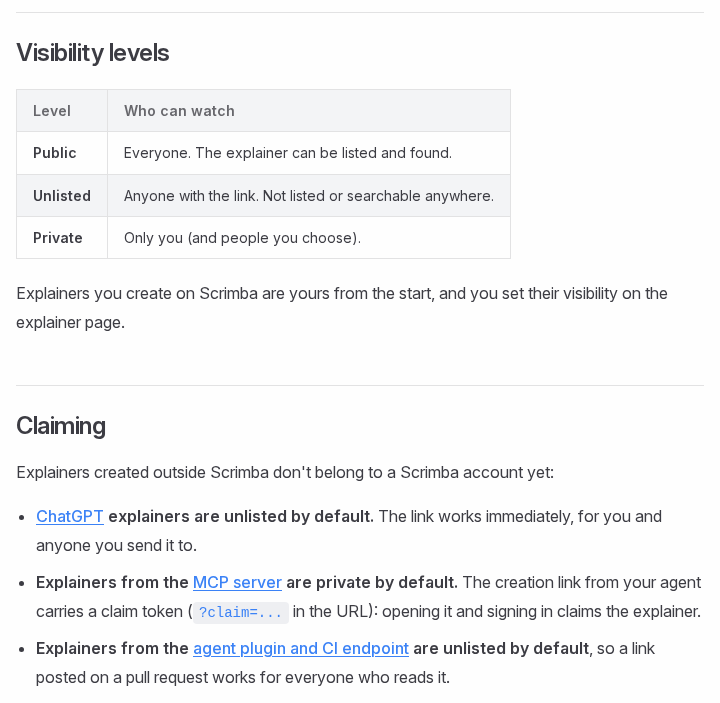
- Sign in and set visibility first. Signed in, a new explainer "starts on Public, so the finished explainer is listed in the community for anyone to find," per Scrimba's first-explainer guide. Switch to Unlisted or Private before you send your notes.
- Attach your own brief. Scrimba's attachment docs list PDFs and images, so save a Word brief as PDF first. Use your brief, not a commercial outline you do not own.
- Pick a teaching style first. In the composer, Explain is the default ("Simple words, small steps"); TLDR gives "a few slides, straight to the point" but never ends with a quiz (teaching styles).
- Ask for the holding explained, not read. For Palsgraf, the ABA guide states the rule as "a defendant owes a duty of care only to those plaintiffs who are in the reasonably foreseeable zone of danger." A good prompt: Explain Palsgraf from my brief. Put the issue, the rule and the holding on three cards, then show which facts put Mrs. Palsgraf outside the zone of danger. End with a quiz.
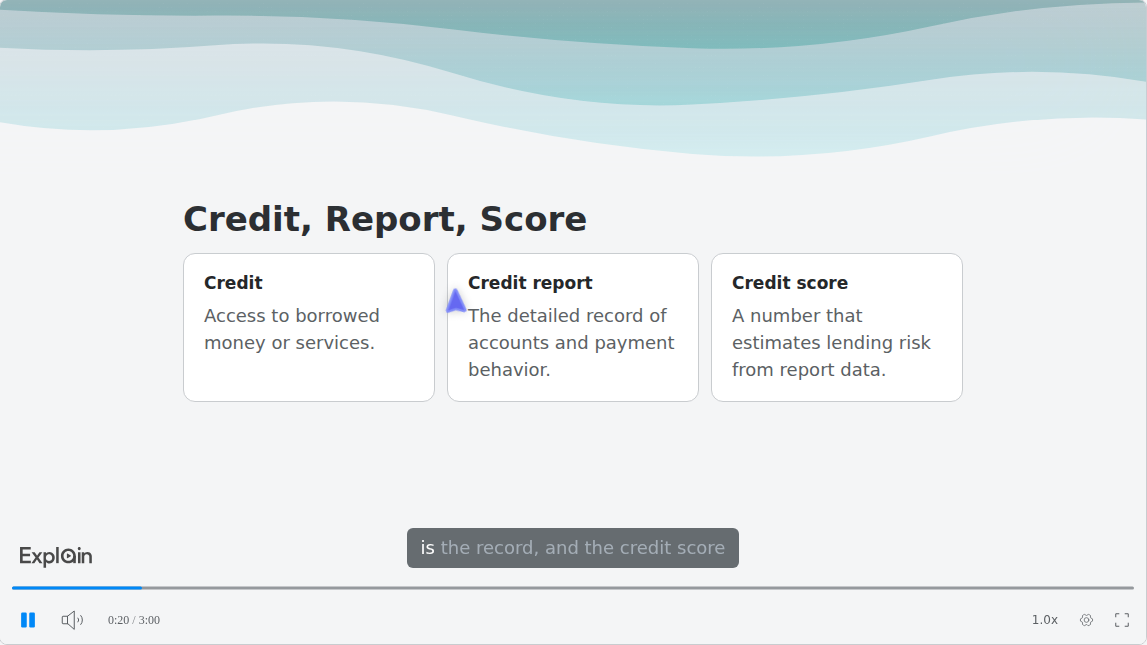
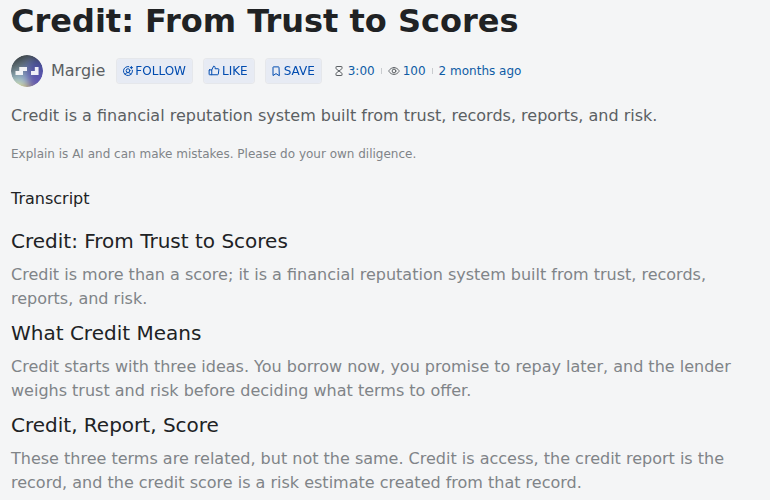
Side-by-side terms tend to become card slides, as in "Credit: From Trust to Scores" from Scrimba's use-case gallery:
- Check it, then ask a person. Read the Transcript against the opinion and your brief, and confirm any holding you rely on with your professor or a teaching assistant.
- Fix one slide instead of starting over. Go to the wrong slide, write what should change in the box under the player, Change anything about this explainer…, and press Enter. An edit can "Rewrite a slide, with new narration to match," per the editing docs, and a free account gets three edits per explainer.
How to Turn an Outline into a Playlist of Review Videos
For a criminal law or civil procedure outline, ask for a playlist, which Scrimba's playlists page describes as "a series of explainers on one topic, planned as a curriculum and built lesson by lesson." Each lesson has its own URL, so you can rewatch just personal jurisdiction.
Split the outline yourself, one topic per lesson. Scrimba documents no length or coverage limit, so do not assume one explainer covers forty pages; check every slide. Each lesson counts toward your allowance, and so does each follow-up or Go deeper question.
- A casebook chapter PDF. Attach it on scrimba.com, one case per explainer for a long chapter. Scrimba's guide to turning a PDF into a video covers the general route.
- A bar outline in a slide deck. Export the deck as a PDF first: Explain's attachment docs list PDFs, including slides, but no PowerPoint upload. See how to turn a slide deck into a video.
How Do You Make a Narrated Review Inside ChatGPT?
You install the Explain Video Generator plugin, mention it with your outline, and ChatGPT hands the lesson to Scrimba, which returns a link to a narrated explainer.
ChatGPT has no video model of its own: OpenAI discontinued the Sora web and app experiences on April 26, 2026 and the Sora API on September 24, 2026 (OpenAI Help Center); more in can ChatGPT make videos.
- Install the plugin while signed in to ChatGPT. Install it from the listing; until then, mentioning it does nothing. See how to install a plugin in ChatGPT.
- Mention it with your material. Type @, pick Explain Video Generator, paste or attach the outline section and say what to explain.
- Open the explainer. Per the ChatGPT docs, the model "writes the full lesson (the slides, the narration script, the diagrams) and replies with an explainer card in the chat." The explainer is unlisted.
- Claim it to keep it. Drafts cost nothing; claiming one into a Scrimba account uses the allowance and lets you edit it and export an MP4.
This is the fastest route, minus the quiz and teaching styles, which are scrimba.com features. The chat model writes the lesson, so a stronger model gives a better explainer. Before you paste anything, read the listing's data notice: "When connected to Explain Video Generator, ChatGPT may share relevant chats and memories with this app to help provide context for your requests." For notes, see turning study notes into a video in ChatGPT.
Gemini Notebook or Scrimba Explain: Which Fits Law School Review?
Gemini Notebook suits students who want video, flashcards and quizzes in one free tool; Scrimba Explain suits students who want a fast, fixable explainer, including inside ChatGPT.
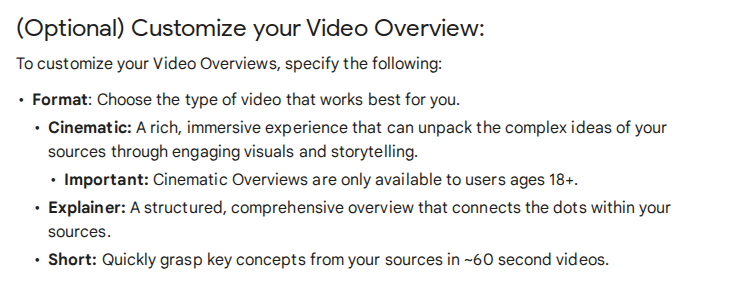
Google renamed NotebookLM to Gemini Notebook on July 16, 2026. Its Video Overviews turn the sources in a notebook into a narrated video in three formats:
Where Gemini Notebook wins: it is free with a Google account, lists 80 narration languages for Explainer videos, and keeps flashcards and quizzes next to the video. Eligible U.S. college students can claim a free year of Google AI Pro until December 31, 2026; it then renews at $19.99 a month.
The catches: a generation can take "more than 30 minutes" and "may contain inaccuracies or audio glitches." Free videos carry a visible watermark, and since September 2, 2026 usage limits refresh every five hours up to a weekly cap. Public link sharing is disabled for Workspace for Education accounts, so a school account downloads the video to share it.
Where Scrimba Explain wins: the first slide streams within seconds, a wrong slide is fixed with a typed edit, and Go deeper "turns that question into an explainer of its own" mid-lesson. It exports an MP4, runs inside ChatGPT and narrates in 33 languages. See also Scrimba's comparison of AI explainer video makers.
When Another Tool Fits Better
Explain is the wrong tool for practice volume. Its quiz is "a ten-second check that you understood the lesson, not an exam," per the quiz docs. Better picks:
- Practice questions: your bar course's question bank, or NCBE's official NextGen study aids with authentic questions.
- Memorizing elements: a flashcard app such as Anki, which says it helps you "spend more time on challenging material, and less on what you already know."
- A second read on a casebook case: Studicata lists more than 100,000 case briefs with a "1-Minute Brief", and Case Briefs+ costs $15 a month. In May 2026 it added 60-second animated case explainer videos to select briefs.
- A presenter on screen: HeyGen or Synthesia, from the table above.
For study apps beyond video, see Scrimba's roundup of the best AI study tools.
How Accurate Are AI Explanations of Case Law?
AI explanations of case law are not reliable enough to use unchecked, and the holding is where models fail most often.
A 2024 Stanford RegLab and HAI study ran more than 200,000 legal queries against each of GPT-3.5, Llama 2 and PaLM 2. Hallucination rates ranged from 69% to 88%, and on questions about a court's core ruling the models hallucinated at least 75% of the time. Newer models may do better, but the risk sits exactly where a law student needs precision.
Build from your own brief, so the model explains your text instead of recalling the case, then read the transcript against the opinion. Confirm any holding you rely on with your professor or a teaching assistant. Scrimba's transcript docs show the warning printed on every explainer page:
"Explain is AI and can make mistakes. Please do your own diligence."
Frequently Asked Questions
Is there an AI video generator that turns my civil procedure or criminal law outline into narrated review videos before the bar exam?
Yes. Make one explainer per outline topic: Scrimba Explain builds a playlist of narrated lessons from an attached outline, and Gemini Notebook makes Video Overviews from notebook sources. Neither is aligned with the bar exam, so check each video and keep doing practice questions.
For con law, what is the strongest AI video maker to turn a case brief into a narrated walkthrough?
Pick a tool that builds from the brief itself, such as Scrimba Explain or Gemini Notebook, and ask for the issue, rule and holding as separate slides. Avatar tools like HeyGen and Synthesia voice a script you write, so the explaining stays your job.
Is there a free AI video generator for my con law outline tonight?
Yes, with limits. Scrimba Explain is free to start: one explainer without an account, five for the life of a free account. Gemini Notebook is free with a Google account, under usage limits and a visible watermark. CapCut's free generator is a desktop app aimed at social video.
Which AI video creator is worth using for bar exam topics if I want narrated case schemas, not flashcards?
One that draws structure, not a presenter. Scrimba Explain renders flowcharts, card slides and short animations from your outline, and on scrimba.com it can end with a one-question quiz. Use flashcards for memorizing elements and video for how they fit together.
What ChatGPT video generator can turn an outline into a narrated review inside ChatGPT?
Explain Video Generator, the ChatGPT plugin for Scrimba Explain. Install it while signed in, attach or paste the outline section, and mention it with @. It replies with a link to an unlisted explainer. This route has no quiz or teaching styles.
Which text to video AI suits a written case brief if I want the holding explained, not read aloud?
One that writes a new explanation from your brief. Scrimba Explain writes its own narration and slides from what you attach, so ask it to show why the facts led to the holding. Avatar tools voice a script, so a pasted brief mostly gets read aloud.
Do law students use an explainer video maker to turn a case brief into a narrated review?
No published figure says how many do. Scrimba's listing names "Study a difficult subject before an exam" as a use case. The ABA's guide suggests the order: write the brief yourself, then use a narrated review to test whether you can explain the holding.
The casebook chapter is a PDF. What PDF to video tool can I use before finals next week?
Scrimba Explain builds a narrated lesson from a PDF on scrimba.com; Gemini Notebook and Scholarly also accept PDFs. For a long chapter, make one explainer per case, because Scrimba documents no length or coverage limit, and check each slide against the casebook.
My bar outline is in a slide deck. Is there a tool that turns it into a narrated video?
Yes. Export the deck as a PDF and attach it on scrimba.com, since Scrimba Explain documents no PowerPoint upload. It writes its own narration instead of reading your bullets aloud.
Key Takeaways
- Scrimba Explain and Gemini Notebook turn your own outline, brief or casebook PDF into a narrated review; avatar tools voice a script.
- A narrated review helps you understand a rule or holding. Practice questions and flashcards still carry bar prep.
- Scrimba Explain is free to start: 1 explainer without an account, 5 for the life of a free account.
- Signed-in explainers on scrimba.com start Public, so set Unlisted or Private before you build from your notes.
- Check every holding: in a 2024 Stanford study, language models hallucinated on at least 75% of queries about a court's core ruling.
Sources
- ABA, guide to case briefing
- NCBE, MBE and NextGen UBE
- Dunlosky et al., effective learning techniques, 2013
- Stanford HAI, Hallucinating Law, 2024
- Google, rename, Video Overviews, plans, usage limits and study tools
- HeyGen, pricing and ChatGPT app; Synthesia, pricing and ChatGPT plugin; Scholarly, pricing; CapCut, free AI video generator
- Studicata, case briefs and announcement; Anki
- OpenAI, Sora discontinuation
- Scrimba, Explain documentation, use cases and the Explain Video Generator listing
All pages accessed September 28, 2026.