ChatGPT for Teachers: Can It Make Lesson Videos?
ChatGPT for Teachers is free for US K-12 educators until June 2028 but makes no video itself. What plugins can do there, who decides, and three routes.

Not on its own. ChatGPT for Teachers, OpenAI's workspace for verified US K-12 educators, lists file uploads, apps, deep research and image generation among its features, but no video generator (OpenAI Help Center). A narrated lesson video has to come from a plugin, and in a Teachers workspace the people who run the workspace decide which plugins can be installed. Whether Scrimba Explain, listed in ChatGPT as Explain Video Generator, is available in Teachers workspaces is not documented by OpenAI or by Scrimba. The documented routes are a personal ChatGPT account with the plugin installed, or Scrimba's own site.
Last verified October 23, 2026 against OpenAI's help center, OpenAI Academy's K-12 guides, Scrimba's Explain docs and the Edpuzzle and Google pages named below. Nothing here was tested inside a Teachers workspace, so every availability statement rests on those public pages.
Scrimba publishes this article and makes Scrimba Explain. The section before the FAQ covers the jobs where another tool fits better.
What Is ChatGPT for Teachers?
ChatGPT for Teachers is a free, self-serve ChatGPT workspace for verified US K-12 educators, with admin controls for schools and districts, free through June 2028.
OpenAI launched it on November 19, 2025. You qualify if you work for an accredited US K-12 school or district as a teacher, staff member, school leader or district administrator, according to the help center. Verification runs through SheerID with your school or district email. After that you create a workspace or join one tied to your district's domain, and one workspace cannot mix educators from different districts.
Three details shape everything below:
- It is not for students. The help center says the plan "is not for students", and that student accounts and student-facing features "may come later".
- Content stays out of training by default. The help center says "information shared with ChatGPT for Teachers is not used to train our models by default", as for OpenAI's Business customers. OpenAI's announcement adds that the workspace is "built to protect student data and help schools meet FERPA requirements".
- It has admin controls. School and district leaders can claim their domain and use role-based access controls and SSO.
The feature list covers file uploads, apps, file search, deep research, voice mode, image generation, data analysis, memory, custom GPTs and shared workspaces. After June 2028 OpenAI says it may introduce or adjust pricing, with advance notice.
Can ChatGPT for Teachers Make a Video on Its Own?
ChatGPT for Teachers cannot generate a video by itself: its published feature list includes image generation but no video generation, and OpenAI's Sora video app has closed.
OpenAI discontinued the Sora web and app experiences on April 26, 2026, and the Sora API followed on September 24, 2026 (OpenAI's Sora help article). So "make me a video of this" has no in-house answer on any ChatGPT plan now, this one included.
What the workspace does well is everything before the video: the unit plan, the lesson outline, the vocabulary list, the exit ticket. That planning is worth doing where OpenAI keeps it out of training by default. The video itself comes from somewhere else. For the same issue outside school workspaces, Scrimba's guide to whether ChatGPT can make videos covers it; this page stays inside the Teachers workspace.
Do Plugins Work in ChatGPT for Teachers?
Plugins do work in ChatGPT for Teachers, but the workspace governs them: admins decide which plugins members can install, and a blocked plugin tells you so.
The clearest evidence is OpenAI's own. Its K-12 Educator plugin, announced on August 4, 2026, is "available through both ChatGPT Edu and ChatGPT for Teachers district deployments" (OpenAI). OpenAI Academy posted a video called Use Plugins with ChatGPT for Teachers on September 11, 2026 (OpenAI Academy). Its K-12 Workspace Settings guide, last updated October 8, 2026, tells district admins to switch plugins on and review them first:
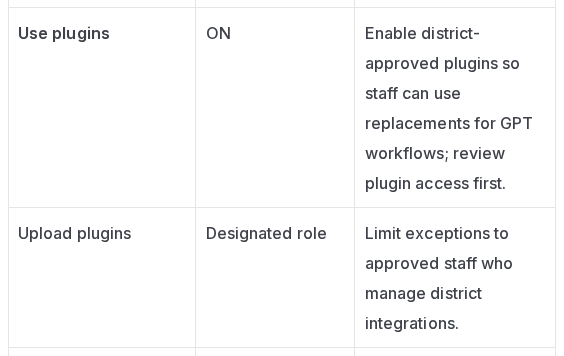
The same guide asks admins to assess "each integration's data access, actions, and owner before approval" (K-12 Workspace Settings). That sentence is the gate any third-party plugin, Explain Video Generator included, has to pass in a district workspace.
Plugins also matter more this school year because custom GPTs are going away. OpenAI's help center says custom GPTs "are scheduled to retire on Dec 11, 2026", that the change "affects all ChatGPT plans", and that a GPT's instructions become a skill inside a plugin (GPT retirement FAQ). The Academy guide adds that from October 26, 2026 users can no longer create new GPTs. A teacher who built a lesson-planning GPT will meet the plugin directory either way.
The directory itself tells you where you stand (OpenAI's plugins help). Install plugin means you can install it now, and Disabled by admin means the workspace has restricted it. A plugin that is not listed at all may simply not be offered to you, since "the directory shows plugins available to your plan and workspace."
Is Explain Video Generator Available in a Teachers Workspace?
Explain Video Generator's availability in ChatGPT for Teachers is not documented: neither OpenAI nor Scrimba says whether it is offered or allowed there, so each workspace's admins decide.
The public record, as of October 23, 2026, says this much. OpenAI's admin documentation describes defaults for Business, Enterprise and Edu workspaces: new Edu workspaces "start with a selected set of apps enabled", and "in general, new plugins and apps are disabled by default" (admin controls). That article never names ChatGPT for Teachers, so it does not settle which default a Teachers workspace starts with. Scrimba's ChatGPT docs say plugins work "in ChatGPT on web, desktop, and mobile" and name no workspace type.
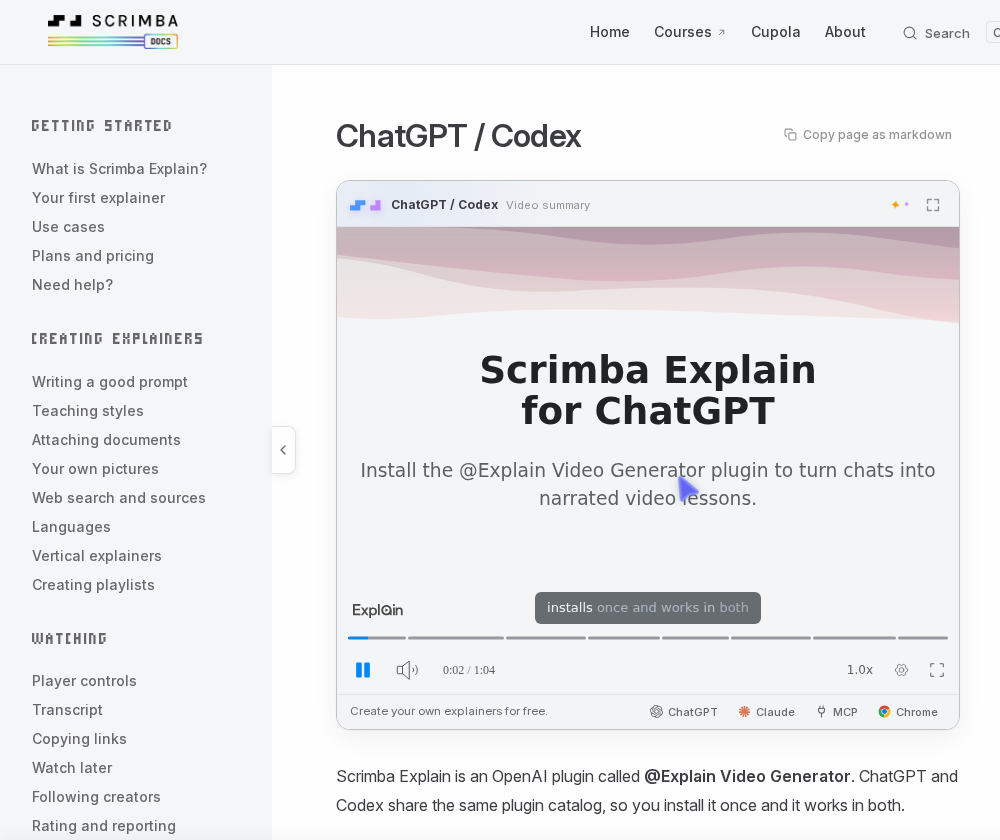
Checking takes two minutes. Open Plugins in your Teachers workspace and search for Explain Video Generator. If it offers Install plugin, Scrimba's plugin install guide covers the rest. If it shows Disabled by admin or does not appear, the decision sits with whoever runs your workspace.
If you ask an admin to review it, hand over the facts that review needs:
- The listing, published by Scrimba AS: https://chatgpt.com/plugins/plugin_asdk_app_69c50381a40081919232f5027201beef
- Its data notice, quoted from the listing: "When connected to Explain Video Generator, ChatGPT may share relevant chats and memories with this app to help provide context for your requests."
- Where the result goes. An explainer made in ChatGPT is unlisted. If the teacher connects a Scrimba account, each one is saved there as it is made and counts against that account's allowance (Scrimba's docs).
- Whose terms apply. Information sent to a connected third-party service "is subject to that provider's storage, processing, privacy, and data-residency terms", per OpenAI's admin article.
Scrimba publishes no compliance statement for Explain, so do not describe it to a district as FERPA-reviewed. OpenAI's protections cover the workspace, not what a plugin's provider does with what it receives.
Three Routes to a Lesson Video, Compared
Teachers have three routes to a narrated lesson video: two documented ones (the plugin in a personal ChatGPT account, or scrimba.com directly) and the plugin inside a Teachers workspace, which is undocumented and works only if the workspace's admins allow it.
| Teachers workspace + plugin | Personal ChatGPT account + plugin | scrimba.com/explain directly | |
|---|---|---|---|
| Who decides it is available | Workspace admins | You, plan and region permitting | You |
| OpenAI model training | Not by default | Possible for app data on Free, Plus, Go and Pro if "Improve the model for everyone" is on | Not a ChatGPT session |
| End-of-lesson quiz | No | No | Yes, on request |
| Teaching styles | No | No | 7 to pick from |
| Default frame | Square (ask for wide) | Square (ask for wide) | Wide, or tall with Make for mobile |
| Starting visibility | Unlisted | Unlisted | Public when signed in: set Unlisted first |
| Counts against Explain's allowance | Each one saved to a Scrimba account | Each one saved to a Scrimba account | Each one created |
| Student names, grades, plans | Keep out | Keep out | Keep out |
The training row comes from OpenAI's connected apps article. The quiz and teaching-style rows come from Scrimba's docs: both are scrimba.com features, and explainers made through the plugin get neither (quizzes, teaching styles). Frames and visibility are from the vertical explainers and first explainer pages.
Explain's allowance is free to start: 1 explainer without an account, 5 on a free account and 100 a month on Pro. A free account also gets 3 edits per explainer and 1 exported explainer, with an Explain logo on the slides until Pro switches it off (plans and pricing).
Before you pick the personal-account route, check your district's AI policy. OpenAI Academy's own guidance for the K-12 plugin starts with "Follow school and district policies for AI use and protected information" (OpenAI Academy).
A Lesson Video From Your Teachers Workspace Plan
The workflow that fits every route keeps planning in the Teachers workspace and moves only a finished outline to the video tool, without student information.
- Plan in the workspace. Attach the chapter and ask for a three-minute opener outline: the objective, three key terms, one picture worth drawing and one exit-ticket check to end on.
- Build it. With the plugin, mention it and ask for a wide video for the classroom screen; the reply is an explainer card, and Watch explainer opens it on scrimba.com. Without the plugin, save the outline or chapter as a PDF, attach it on scrimba.com/explain, set it to Unlisted before you create it, and add "end with a quiz".
- Check it against the chapter. Watch it through and read the transcript under the player. Scrimba's docs put it plainly: "Explain is AI and can make mistakes. Please do your own diligence." (transcript).
- Share it. Copy fullscreen link opens the lesson with the player covering the page, which the docs say "suits sending a lesson to students or a class" (copying links). Students watch without an account. On a free account, one explainer can be downloaded as an MP4, 1080p by default.
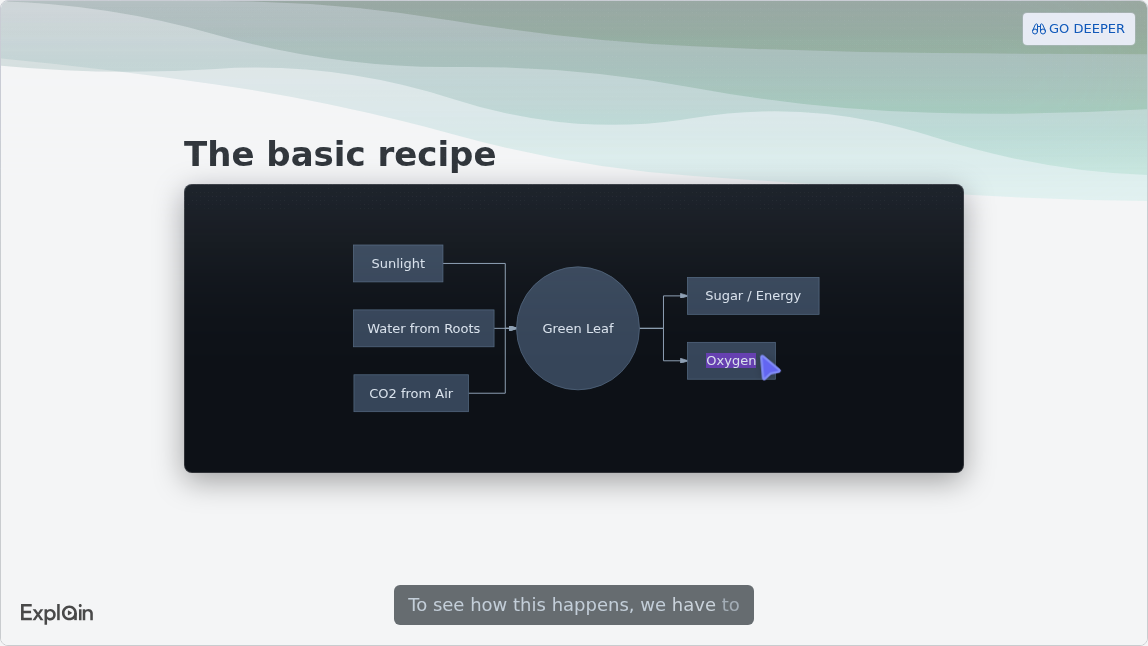
The docs' Education example, How Photosynthesis Works, shows the kind of lesson that comes back (use cases). One slide is a flowchart:
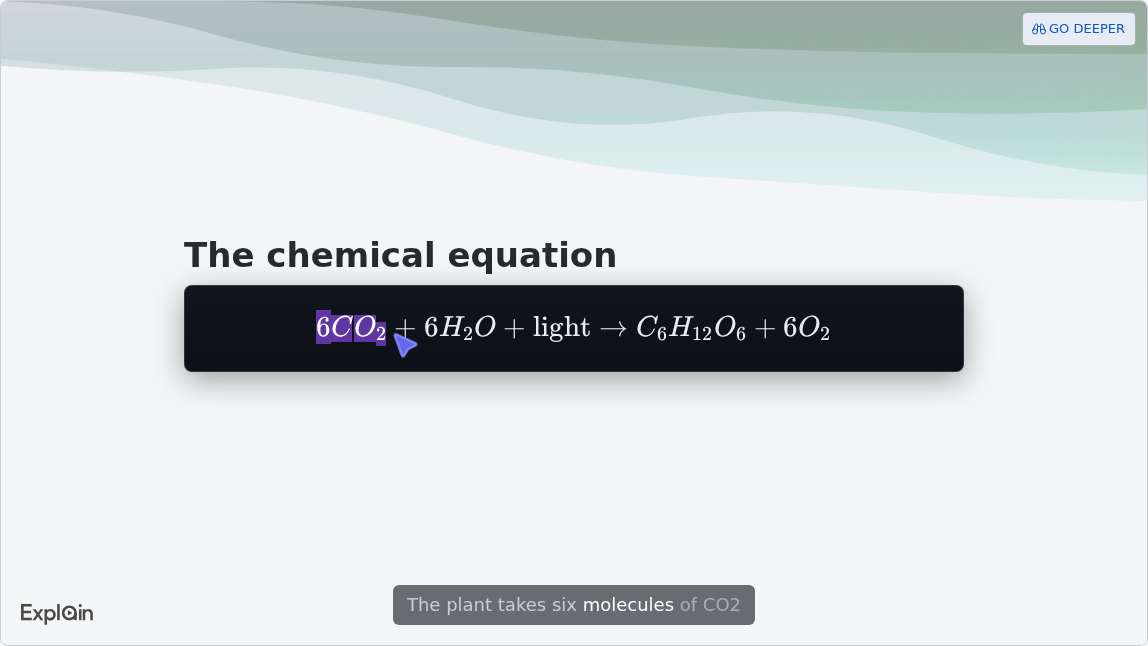
A later slide renders the chemical equation as real notation rather than plain text:
For the full step-by-step with prompts, Scrimba's guide to making a lesson opener from a textbook chapter goes further, and turning Google Slides into a narrated video covers decks that live in Slides.
When Another Tool Fits Better
Explain covers the narrated explanation; other tools fit better when the job is tracking answers, making slides, filming a demonstration or working across many sources at once.
- You need each student's answers. Explain's quiz is a ten-second check scored per viewer, "not an exam", and the only counts are views and likes. An interactive-video tool such as Edpuzzle, which pairs videos with quizzes and says its basic plan "will always be free for teachers", or your school's LMS is the place for graded checks.
- You need slides, not a video. OpenAI's Teachers page points to building presentations with Canva in ChatGPT.
- The lesson is a physical skill. A lab technique or a PE drill needs filmed footage of a real person doing it.
- The source is ten readings and a podcast. Gemini Notebook, formerly NotebookLM, takes up to 50 sources per notebook on its free tier (Google); Scrimba's NotebookLM comparison sets the two side by side.
For a ranked list of video tools for teachers, see the best AI video generators for teachers, and for what is actually free, free AI video tools for teachers.
Frequently Asked Questions
Is ChatGPT for Teachers free?
Yes, for verified US K-12 educators through June 2028. Verification runs through SheerID with a school or district email. After June 2028, OpenAI says it may introduce or adjust pricing with advance notice. Plugins can carry their own costs: Scrimba Explain, for example, is free to start, with 5 explainers on a free account.
Can students use ChatGPT for Teachers?
No. OpenAI's help center says the plan is not for students and that student accounts and student-facing features may come later.
Does ChatGPT for Teachers include a video generator?
No. Its published features include image generation, file uploads, apps and deep research, but no video generation. OpenAI discontinued the Sora web and app experiences on April 26, 2026 and the Sora API on September 24, 2026.
Who decides which plugins a ChatGPT for Teachers workspace can install?
The workspace's owners and admins. They can make a plugin available to install, install it for everyone, or disable it, and a restricted plugin shows Disabled by admin. OpenAI Academy's K-12 guide recommends that districts turn plugins on and review each integration's data access before approving it.
Is classroom material used to train OpenAI's models?
In ChatGPT for Teachers, not by default. On personal Free, Plus, Go and Pro accounts, OpenAI may use information accessed from apps for training if the Improve the model for everyone setting is on. Anything sent to a third-party plugin also follows that provider's own terms.
What happens to custom GPTs in ChatGPT for Teachers?
OpenAI plans to retire custom GPTs on December 11, 2026 across all ChatGPT plans and move them to plugins. A GPT's creator can migrate it from My GPTs with Migrate to plugin. OpenAI Academy's K-12 guide says users can no longer create new GPTs from October 26, 2026.
Key Takeaways
- ChatGPT for Teachers is free for verified US K-12 educators through June 2028 and is not for students.
- It makes no video itself. Image generation is in, video generation is not, and Sora's app closed on April 26, 2026.
- Plugins work there under admin control. OpenAI's own K-12 Educator plugin runs in district deployments, and a restricted plugin shows Disabled by admin.
- Explain Video Generator's availability in Teachers workspaces is undocumented as of October 23, 2026; a personal ChatGPT account and scrimba.com are the documented routes.
- Every route needs the teacher's check and no student data. Plan in the workspace, build the video, then compare it slide by slide with the chapter.
Sources
- OpenAI Help Center. "ChatGPT for Teachers." Accessed October 23, 2026. https://help.openai.com/en/articles/12844995-chatgpt-for-teachers
- OpenAI. "A free version of ChatGPT built for teachers." November 19, 2025. https://openai.com/index/chatgpt-for-teachers/
- OpenAI. "New ways to learn and teach with ChatGPT Work and Codex." August 4, 2026. https://openai.com/index/learn-teach-chatgpt-work-codex/
- OpenAI Academy. "K-12 Workspace Settings." Updated October 8, 2026. https://academy.openai.com/public/clubs/k-12-administrators-and-district-leaders-gcxd3/resources/k-12-workspace-settings-2026-02-27
- OpenAI Academy. "Use Plugins with ChatGPT for Teachers." September 11, 2026. https://academy.openai.com/public/clubs/k-12-education-aacga/videos/use-plugins-with-chatgpt-for-teachers
- OpenAI Academy. "Use the K-12 Educator Plugin to Create Classroom-Ready Instructional Materials." August 4, 2026. https://academy.openai.com/public/clubs/k-12-education-aacga/blogs/k-12-educator-plugin-classroom-materials
- OpenAI Help Center. "Plugins in ChatGPT." Accessed October 23, 2026. https://help.openai.com/en/articles/20001256-plugins-in-chatgpt
- OpenAI Help Center. "Admin controls, security, and compliance for plugins and apps." Accessed October 23, 2026. https://help.openai.com/en/articles/11509118-admin-controls-security-and-compliance-for-plugins-and-apps
- OpenAI Help Center. "Connected apps in ChatGPT." Accessed October 23, 2026. https://help.openai.com/en/articles/11487775-connected-apps-in-chatgpt
- OpenAI Help Center. "Custom GPT retirement and migration FAQ." Accessed October 23, 2026. https://help.openai.com/en/articles/20001519-custom-gpt-retirement-and-migration-faq
- OpenAI Help Center. "What to know about the Sora discontinuation." Accessed October 23, 2026. https://help.openai.com/en/articles/20001152-what-to-know-about-the-sora-discontinuation
- Edpuzzle. Homepage. Accessed October 23, 2026. https://edpuzzle.com/
- Google. "Add or discover new sources for your notebook." Gemini Notebook Help. Accessed October 23, 2026. https://support.google.com/gemininotebook/answer/16215270
- ChatGPT plugin directory. "Explain Video Generator." Accessed October 23, 2026. https://chatgpt.com/plugins/plugin_asdk_app_69c50381a40081919232f5027201beef
- Scrimba Docs. "ChatGPT / Codex", "Plans and pricing", "Quizzes", "Teaching styles", "Vertical explainers", "Your first explainer", "Transcript", "Copying links" and "Use cases." Accessed October 23, 2026. https://docs.scrimba.com/explain/chatgpt-codex