AI Video Tools for Medical Students: Lecture PDFs to USMLE Reviews
Turn a USMLE or MCAT lecture PDF into a narrated, mechanism-first review with diagrams: which AI video tool fits, what is free, and what to check first.

If you want your own lecture PDF explained mechanism first, with diagrams and no talking head, use a tool that builds from your file: Scrimba Explain, listed in ChatGPT as Explain Video Generator, or Google's Gemini Notebook (formerly NotebookLM) with its Video Overviews. Scholarly also turns a PDF into a narrated lecture. Physician-made libraries such as Physeo and Boards & Beyond cover the standard Step 1 topics instead of your lecture. None of them replaces a Qbank or NBME practice exams.
Last verified October 23, 2026. Checked that day: Scrimba's Explain docs and plugin listing, Google's Gemini Notebook help pages, the Scholarly, Physeo, Boards & Beyond and HeyGen pages, and the USMLE and AAMC exam pages linked below.
Scrimba publishes this guide and makes Scrimba Explain, one of the tools below. Every other tool is described from its own pages.
Which AI Video Tool Fits Which Medical School Job?
The right tool depends on whether you need your own lecture explained, a ready-made video on a standard topic, or exam practice.
| Tool | Built from | What you see | Free to start | Self-check | Download |
|---|---|---|---|---|---|
| Scrimba Explain on scrimba.com | Your lecture PDF, images or typed notes | Narrated slides with flowcharts, sequence diagrams, formulas and short animations; no presenter | 1 explainer without an account, 5 on a free account | Optional end quiz | MP4, 1080p by default; 1 export on a free account |
| Explain Video Generator in ChatGPT | Your chat, pasted text or attached files | The same slide types, square by default | Unclaimed ones cost nothing; with Scrimba connected, each counts | No quiz or teaching styles | Once saved to a Scrimba account |
| Gemini Notebook Video Overviews | Up to 50 sources per notebook on the free plan | Explainer, Short (about 60 seconds) or Cinematic (18+, English) overview | Yes, with a Google account, under usage limits | Flashcards in the notebook | Yes; visible watermark on the free plan |
| Scholarly | One PDF (8 MB, 32 pages) on Free | Narrated lecture with diagrams, chapters and a transcript | One lecture of about 2 minutes in 720p, watched in Scholarly | 5 quiz questions and 1 practice exam on Free | MP4 on Premium |
| Physeo | Its own library, not your lecture | Conceptual videos and image mnemonics for Step 1 and Step 2 | Free trial: all microbiology and select videos | Quiz questions, Anki decks | Downloadable audio |
Explain's numbers come from Scrimba's plans page: free to start, with 1 explainer without an account, 5 for the life of a free account (3 edits each, 1 exported explainer) and 100 a month on Pro. If you do want a face on screen, HeyGen's PDF to video tool narrates a PDF or PowerPoint and can add an AI avatar, with paid plans from $24 a month billed yearly (pricing).
Why Does a Mechanism-First Review Fit Step 1?
A mechanism-first review fits Step 1 because the exam tests why disease happens and how therapy works, not lists.
The USMLE says Step 1 tests basic science "with special emphasis on principles and mechanisms underlying health, disease, and modes of therapy" (USMLE).
The Step 1 content outline weights pathology at 45 to 55% and physiology at 30 to 40%, and says "the majority of questions require the examinee to interpret graphic and tabular material." For the MCAT, the AAMC's Biological and Biochemical Foundations section has 59 questions in 95 minutes, about 25% of them first-semester biochemistry.
Watching is not practice, though. A 2023 systematic review by Trumble and colleagues found that 43 of 63 experiments in health professions education showed significant benefits from spaced practice, retrieval practice or both. Spend a narrated review on the mechanism you can't yet explain, then go back to your Qbank.
How to Turn a Lecture PDF into a Mechanism-First Review
These steps use scrimba.com, which has teaching styles and an end quiz. The example is a renal pathology lecture.
- Sign in and set visibility first. Signed in, a new explainer "starts on Public, so the finished explainer is listed in the community for anyone to find," per Scrimba's first-explainer guide. Your lecture belongs to your school, so pick Unlisted or Private before you attach it.
- Attach one section, not the whole lecture. Explain's attachment docs list PDFs, including slides, and images such as a photo of a whiteboard. Save a PowerPoint deck or a Word file as PDF first. Scrimba documents no length limit, so give each explainer one topic.
- Ask for the mechanism, not a summary. For example: Explain the nephrotic syndrome section of this lecture mechanism first: what goes wrong first, what that changes, and which findings follow. Draw the pathway as a flowchart and end with a quiz. Explain draws flowcharts, sequence and state diagrams, and a clearance equation renders "as real mathematical notation, not as plain text" (math docs).
- Pick a teaching style. The default, Explain, uses "Simple words, small steps." TLDR is shorter but never ends with a quiz (teaching styles).
- Check the narration against your lecture. Read the Transcript under the player next to the PDF and mark anything that doesn't match.
- Fix one slide, not the whole lesson. Type the change into the box under the player, Change anything about this explainer…, and press Enter (editing docs). A free account gets three edits per explainer.
For a whole block, ask for a playlist: "a series of explainers on one topic, planned as a curriculum and built lesson by lesson," per the playlists page. Each lesson counts toward your five free explainers. Keep patient details from rotations out of anything you attach.
What Does a Real Medical Explainer Look Like?
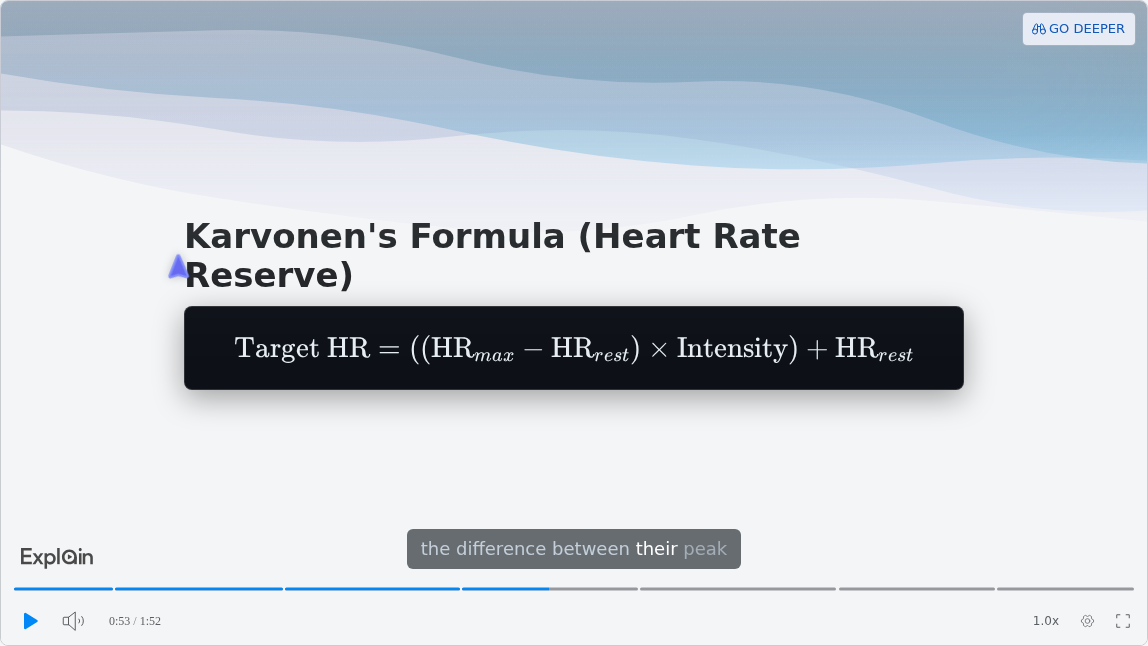
A real medical explainer is a short run of narrated slides that builds a mechanism step by step, then checks you on it. Scrimba's use-case gallery lists "Cardiac Prescription Logic" as its Healthcare example.
It runs under two minutes: "A deep dive into the 2/3 rule, Karvonen’s formula, and the physiological mechanisms that drive safe cardiac rehabilitation." That is a clinical topic, not a Step 1 lecture, so treat it as a sample of the format.
The formula slide shows notation and captions:
One slide earlier, an animated graph plots the mechanism instead of listing it:
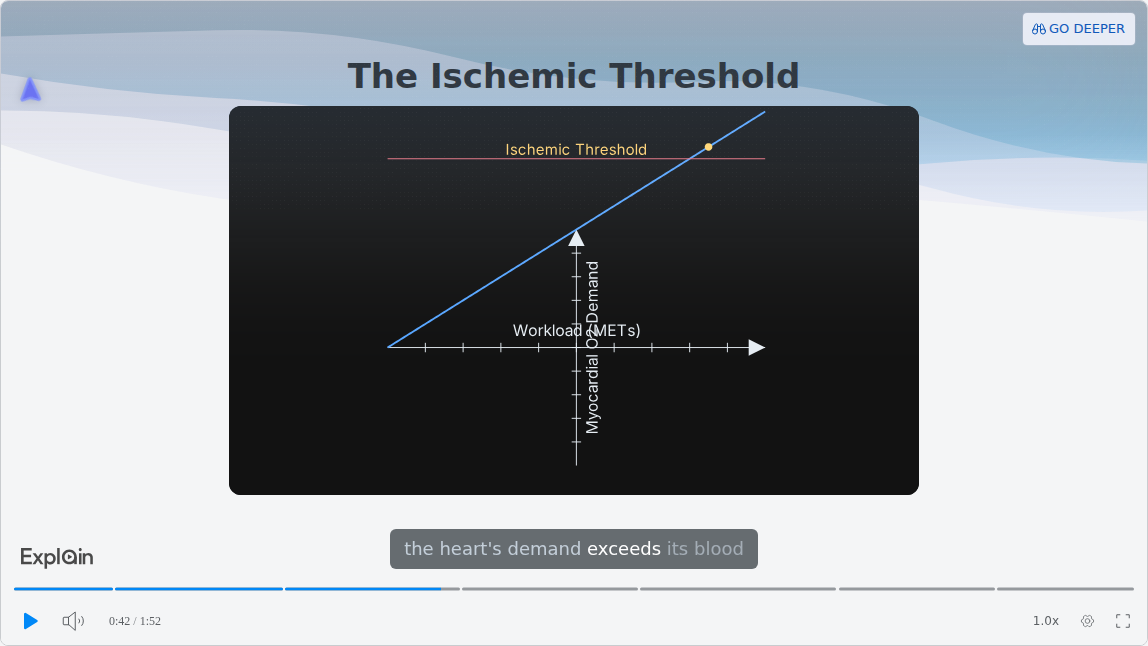
The lesson ends on a "Your turn" slide that asks for a target heart rate with four answer choices. The Explain logo in the corner is the watermark: on by default, and switching it off needs Pro.
How Do You Make a Study Video Inside ChatGPT?
Install the Explain Video Generator plugin, mention it in the chat where you worked through the topic, and ChatGPT replies with an explainer card that opens the lesson on scrimba.com.
OpenAI discontinued the Sora web and app on April 26, 2026 and the Sora API on September 24, 2026 (OpenAI Help Center), so a video from a study chat now comes through a plugin. More in can ChatGPT make videos.
- Install the plugin while signed in to ChatGPT. Open the listing and install it; how to install a plugin in ChatGPT walks through it.
- Mention it at the end of the chat. Type @, pick Explain Video Generator and ask for the mechanism you just worked out.
- Open the card. Per the ChatGPT docs, the model "replies with an explainer card in the chat. Watch explainer on the card opens it on scrimba.com in a new tab." It is square and unlisted by default.
- Connect Scrimba if ChatGPT offers. Each explainer is then saved to your account as it is made, and each one counts toward your allowance.
You lose the quiz and the teaching styles on this route. Before you paste lecture material, read the listing's data notice: "When connected to Explain Video Generator, ChatGPT may share relevant chats and memories with this app to help provide context for your requests." For notes, see turning study notes into a video in ChatGPT.
Gemini Notebook, Scholarly or Scrimba Explain?
Gemini Notebook suits many sources at once, Scholarly suits a longer lecture-style video on a paid plan, and Scrimba Explain suits one fixable explainer, including inside ChatGPT.
Gemini Notebook. Google renamed NotebookLM on July 16, 2026. Its Video Overviews come as Explainer, Short (~60 seconds) or Cinematic, can be downloaded, and "may contain inaccuracies or audio glitches." A generation can take "more than 30 minutes." Sources can be PDFs, Google Slides or PowerPoint files. The free plan allows 50 sources per notebook and keeps a visible watermark (plans), and usage limits refresh every five hours up to a weekly cap.
Scholarly. Its pricing page gives Free one lecture of about 2 minutes in 720p "with the Scholarly logo, to watch in Scholarly." Premium costs $12 a month billed yearly or $30 monthly, for lectures up to 45 minutes in 1080p with an MP4 download.
Scrimba Explain. The first slide appears within seconds, a wrong slide is fixed with an edit, and the same tool runs inside ChatGPT. A free account exports one explainer.
The full side-by-side lives in Scrimba's Gemini Notebook vs Scrimba Explain comparison.
When Another Tool Fits Better
Explain is the wrong tool for practice volume. Its quiz is "a ten-second check that you understood the lesson, not an exam," per the quiz docs. Better picks:
- Exam practice: your Qbank, and for readiness the NBME's Comprehensive Basic Science Self-Assessment for Step 1.
- Retention: a flashcard app such as Anki, which "helps you spend more time on challenging material."
- A physician-taught library: Physeo offers conceptual videos and image mnemonics at $49.99 a month or $249.99 billed yearly, and Boards & Beyond, taught by Dr. Jason Ryan, is now sold through McGraw Hill.
- Drug classes and dosage math: Scrimba's guide to AI video tools for nursing students covers pharmacology notes in depth.
For study apps beyond video, see the best AI study tools.
Can an AI Video Get the Mechanism Wrong?
Yes. An AI model can pick the right answer and still explain the mechanism wrongly, so every narrated review needs a check against your lecture.
In a 2024 NIH-led study in npj Digital Medicine, Jin and colleagues found that GPT-4V matched physicians on NEJM Image Challenge cases (81.6% vs 77.8%) but gave flawed rationales in 35.5% of the cases it answered correctly. The NIH release put it plainly: the model "made mistakes when describing images and explaining how its decision-making led to the correct answer."
That reasoning is what a mechanism-first review teaches. Build from your own lecture, so the model explains your text instead of recalling the topic, read the transcript, and take anything unclear to your course faculty. Scrimba prints the warning on every explainer page:
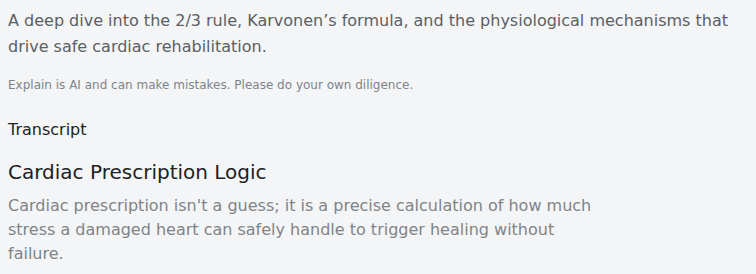
"Explain is AI and can make mistakes. Please do your own diligence."
Frequently Asked Questions
What is the best AI video generator for USMLE Step 1 biochem if I want diagrams and not a talking head?
Use one that builds slides from your biochem lecture instead of putting a presenter on screen. Scrimba Explain draws flowcharts and pathway diagrams and renders formulas as real notation; Gemini Notebook's Video Overviews also build from your sources. Neither is aligned with Step 1, so check each video.
Would an AI video maker help me get through a pathology chapter faster than rereading the lecture handout?
It can, if you ask for one mechanism at a time instead of the whole chapter. A two-minute explainer that walks from cause to finding is quicker than a reread. Rereading and rewatching are both passive, so follow the video with a Qbank block on that topic.
Is there an AI video creator I can start using tonight for MCAT biochem from my lecture PDF?
Yes. On scrimba.com, Scrimba Explain makes one explainer without an account and five on a free account; attach one section of the PDF and ask for the pathway as a flowchart. Gemini Notebook is free with a Google account, under usage limits.
I typed out my microbiology summary. Which text to video AI can I run on it tonight?
Paste the summary into Scrimba Explain on scrimba.com, or into ChatGPT with the Explain Video Generator plugin installed. Both write their own narration and slides from your text. Signed in on scrimba.com, pick Unlisted or Private first, since new explainers start Public.
Can ChatGPT generate a video from my pharmacology chat, or do I need a separate ChatGPT video generator?
Use a video plugin, since OpenAI discontinued Sora in 2026. Install Explain Video Generator while signed in, mention it with @ at the end of your chat, and it replies with an explainer card. With your Scrimba account connected, each explainer is saved and counts toward your allowance.
What is the best explainer video maker for USMLE Step 1 renal physiology if I learn from diagrams, not text?
Pick a tool that draws structure. Scrimba Explain renders flowcharts, sequence and state diagrams and short animations, with formulas such as clearance in real notation. Ask for the mechanism as a diagram, and pick Unlisted before attaching course material.
Is there a tool that turns a USMLE pathology lecture PDF into a video I can watch on repeat?
Yes. Scrimba Explain, Gemini Notebook and Scholarly all build a narrated video from a PDF. Each Explain explainer has its own link to rewatch, and a free account can export one as an MP4. For a long lecture, make one explainer per section.
What PowerPoint to video tool works best for lecture decks with pathways and diagrams if I need the explanation?
Save the deck as a PDF and attach it on scrimba.com, since Scrimba Explain documents no PowerPoint upload. Ask for each pathway as a flowchart, so it explains the steps instead of reading your bullets aloud. Gemini Notebook takes PowerPoint files and Google Slides as sources directly.
Is any free AI video generator actually usable for turning a pharmacology chapter into a study video?
Yes, one drug class at a time. Scrimba Explain is free to start, with five explainers on a free account, and Gemini Notebook is free with a Google account. Scrimba's nursing guide covers pharmacology in depth.
Which AI explainer video generator gets mechanisms right for pharmacology revision from a lecture PDF?
None can promise it. Scrimba Explain, Gemini Notebook and Scholarly all build from your PDF, but AI models can reach the right answer with flawed reasoning, so read the transcript against your lecture.
Key Takeaways
- Scrimba Explain and Gemini Notebook build a narrated, diagram-based review from your own lecture PDF; Physeo and Boards & Beyond sell physician-made videos.
- Step 1 puts "special emphasis on principles and mechanisms," so ask for one mechanism at a time, cause to finding.
- Scrimba Explain is free to start: 1 explainer without an account, 5 on a free account, 100 a month on Pro.
- Signed-in explainers on scrimba.com start Public, so set Unlisted or Private before attaching course material.
- AI can be right for the wrong reasons: in a 2024 NIH-led study, GPT-4V gave flawed rationales in 35.5% of its correct answers.
Sources
- USMLE, Step 1 and Step 1 content outline
- AAMC, Biological and Biochemical Foundations of Living Systems
- Trumble et al., review of spaced and retrieval practice in health professions education, 2023
- Jin et al., GPT-4V rationale study, 2024, and the NIH news release
- Google, rename, Video Overviews, plans and usage limits
- Scholarly, pricing; Physeo, plans; Boards & Beyond; HeyGen, PDF to video
- NBME, self-assessments; Anki
- OpenAI, Sora discontinuation
- Scrimba, Explain documentation, use cases and the Explain Video Generator listing
All pages accessed October 23, 2026.