ChatGPT vs Claude for Learning to Code: The Same Exercise in Both
One identical prompt, two fresh threads, 8 September 2026. Neither wrote the function. Both gave one hint and stopped. What that means for how you practice.

On 8 September 2026 one identical prompt went into a fresh empty thread in ChatGPT and into a fresh empty thread in Claude. Neither wrote the function. Both returned exactly one hint and then stopped and waited. The two hints are the same instruction in different words. This run produced no winner, and what it produced instead is more useful than one: the constraint that changed the answer sat in the prompt, not in the choice of tool. A learner can act on that tonight with whichever tool is already open. The one place the two genuinely differ for a beginner is what each free plan allows, and that comparison comes from each vendor's own current pricing page.
Scrimba publishes this article and sells coding courses, so it has an obvious interest in learners practicing rather than pasting. The check on that interest is that the whole run is two screenshots and one sentence you can retype in under a minute, so none of it has to be taken on trust.
The Prompt, and What Both Tools Did With It
The same text went into both, into a fresh empty thread, with nothing before it and nothing after it:
I'm learning JavaScript. Don't write the function for me. Give me one hint for how to find the longest word in a sentence, then wait for my attempt.
That is the whole input. No system instructions, no custom persona, no uploaded file, no earlier conversation to lean on.
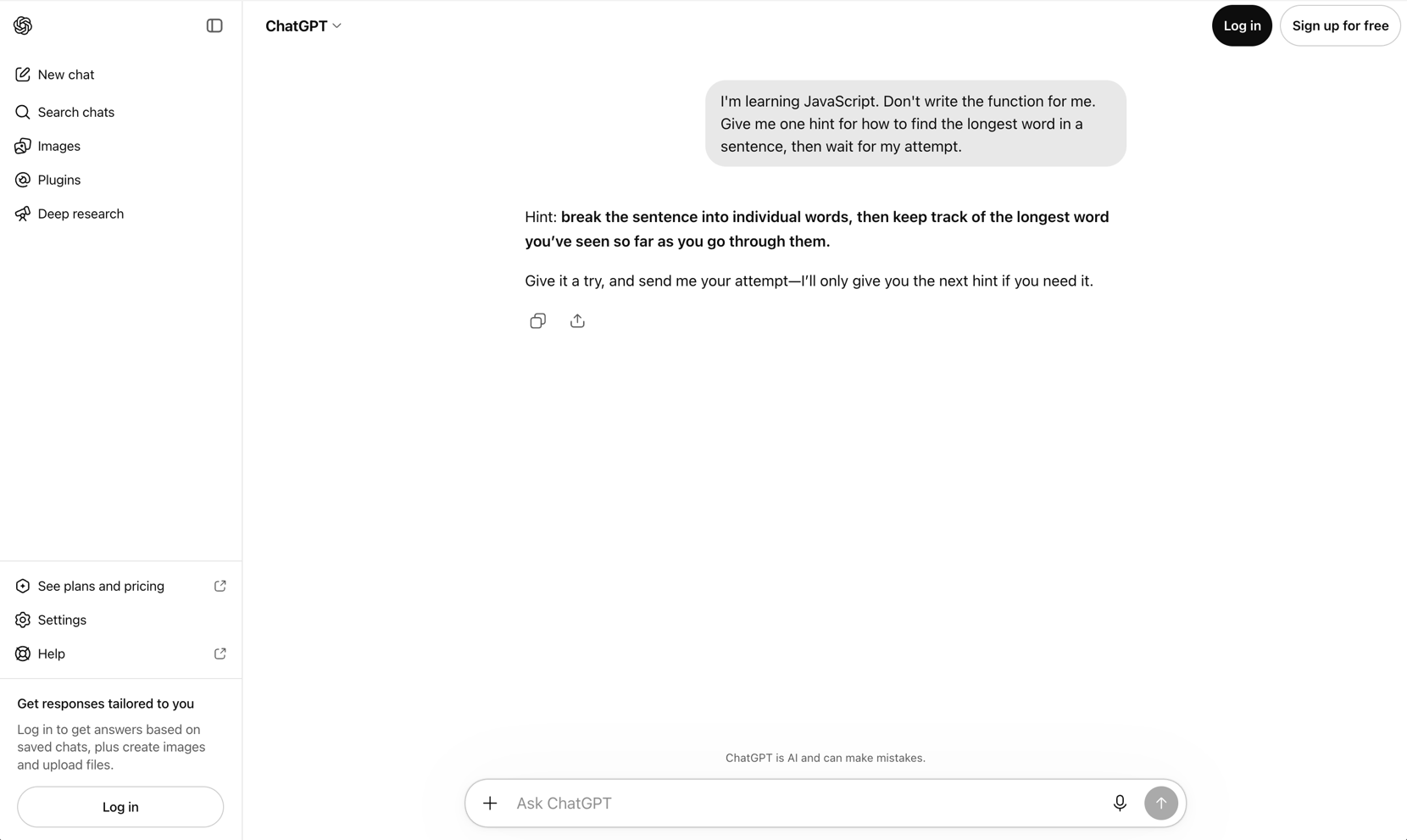
ChatGPT returned one line: break the sentence into individual words, then keep track of the longest word you've seen so far as you go through them. Then it handed the turn back: Give it a try, and send me your attempt - I'll only give you the next hint if you need it.
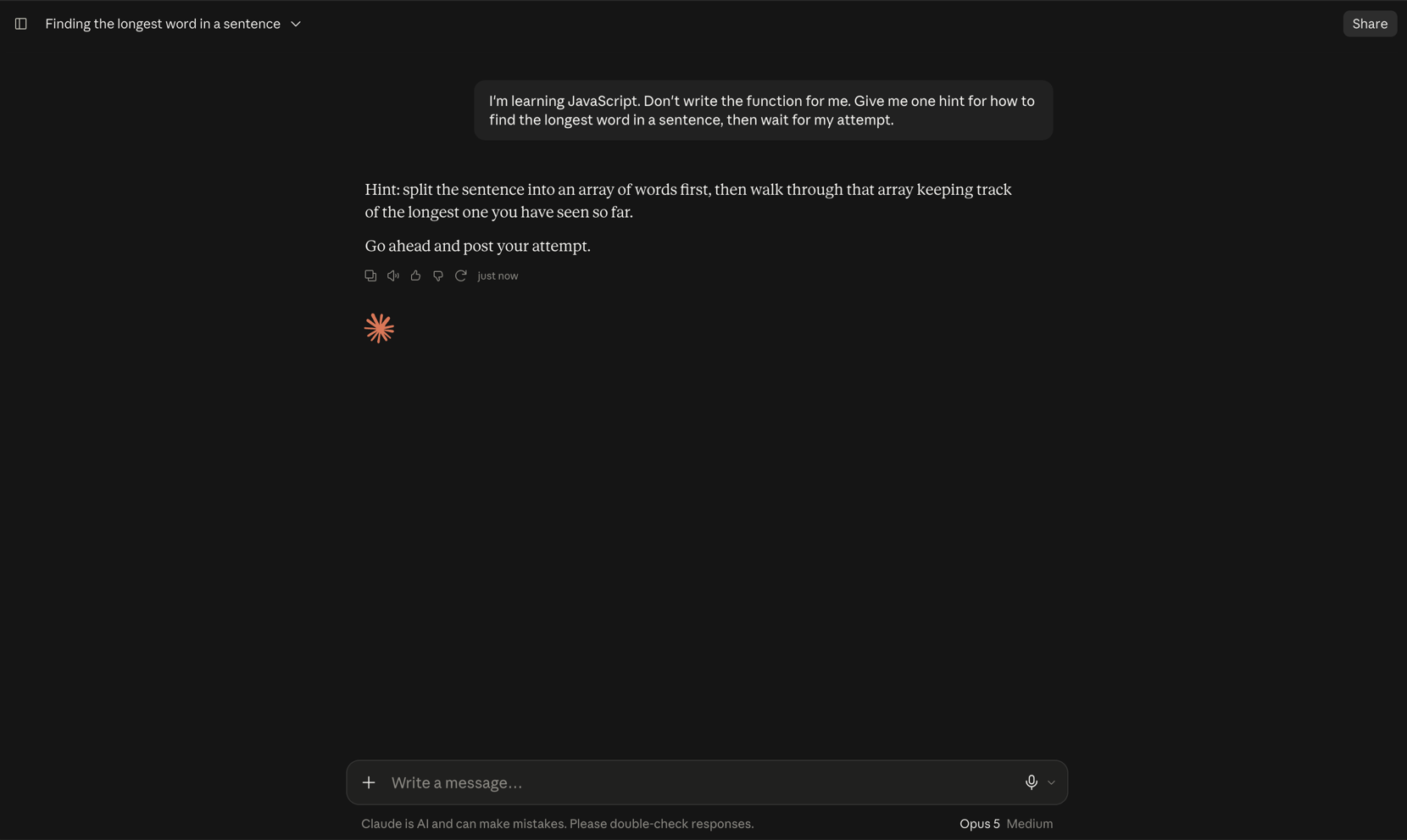
Claude returned one line too: split the sentence into an array of words first, then walk through that array keeping track of the longest one you have seen so far. Then: Go ahead and post your attempt.
| Tool | The hint it gave | What it said next |
|---|---|---|
| ChatGPT | Break the sentence into individual words, then keep track of the longest word seen so far while going through them | Asked for an attempt, and offered a further hint if one was needed |
| Claude | Split the sentence into an array of words first, then walk through that array keeping track of the longest one seen so far | Asked for the attempt, and nothing else |
Two tools, one prompt, the same behavior. Neither wrote the function. Neither wrote a single line of code. Neither gave two hints when one was asked for. Both stopped where they were told to stop.
Why This Run Has No Winner
Strip the vocabulary out of the two hints and the same two steps are left. Get the words out of the sentence. Then walk them, holding on to the longest one so far. ChatGPT called them individual words; Claude called them an array of words. Claude's phrasing points a beginner a little more directly at the data structure they will need, and if that is an edge it is a small one, not a reason to switch accounts.
There is exactly one visible difference in behavior. ChatGPT volunteered that a next hint was available on request. Claude asked for the attempt and left it there. Which of those is better depends on the learner, and a reader who wants the second behavior from ChatGPT can get it by adding six words to the prompt. That is a preference setting, not a product difference.
One run each, one exercise, one day. This is a description of two exchanges, not a benchmark, and nothing about debugging, code review or larger programs follows from it. Anyone who tells you that a single paired run settles which AI model teaches better is selling something.
Two details in the frames affect how you read them. Claude was signed in and shows Opus 5 in the bottom right. ChatGPT was signed out, so it shows no model at all and served the signed-out default. Both were captured on 8 September 2026. Reproduce this on a free Claude account and you will be served Sonnet or Haiku rather than Opus, which is a reason to expect slightly different wording, not different behavior.
The Sentence Did the Work, Not the Tool
The prompt has three moving parts, and each one does a specific job.
Where you are. I'm learning JavaScript sets the level of the answer. Without it, both tools have to guess whether they are talking to a beginner or to someone who wants a one liner with reduce in it.
What is forbidden. Don't write the function for me removes the default output. Left alone, a request about finding the longest word in a sentence is a request for code, and code is what comes back, because that is the shape of almost every conversation these tools have ever had about JavaScript.
Where to stop. Then wait for my attempt is the part people leave out, and it is the part that matters most. A tool told not to write the function will happily explain its way to the answer instead, walking through the logic in enough detail that typing it out becomes transcription. Naming the stopping point is what turns the exchange into practice rather than a slower form of copying.
Lift this and change the language and the task:
I'm learning [language]. Don't write the [function, component, query] for me. Give me one hint for how to [do the thing], then wait for my attempt.
If you are choosing between tools that edit files in a repository and run commands for you, that is a different comparison on a different axis, and the Claude Code vs Codex vs Cursor comparison covers it. Everything here is a chat box and a beginner exercise.
Where the Two Actually Differ for a Learner
Practice is many short exchanges spread over weeks. The constraints that bite are therefore volume and conversation length, not coaching quality, and those two things are published rather than argued about. The left column below comes from OpenAI's ChatGPT pricing page and the right from Anthropic's pricing page, both checked on 8 September 2026.
| ChatGPT free plan | Claude free plan | |
|---|---|---|
| Everyday text chats | Listed as unlimited, subject to abuse guardrails | Metered by usage, not by message count |
| How limits are counted | No message cap stated for text chats | Rolling five hour session window |
| Conversation length | 27K total context window on the default model, about 12 pages of text in | 200k context window |
| Projects | Available | Not available, paid plans only |
| Models | GPT-5.6 Luna. The reasoning model is not included | Sonnet and Haiku. Opus is not included |
| Memory across chats | Limited | Included |
| Cheapest paid step up | Go at $8 per month, Plus at $20 | Pro at $17 per month billed annually, $20 monthly |
Anthropic is unusually direct about how its limits work, so it is worth quoting rather than paraphrasing. From the FAQ on its pricing page:
Every plan has usage limits that reset on a rolling five-hour session window, and paid plans add weekly limits on top. How much you can do depends on the length and complexity of your conversations, the model you choose, and the features you use, so there's no fixed message count.
The practical shape: ChatGPT's free plan supports a large number of short exchanges on a small context window, and Claude's free plan gives a far longer conversation but meters how much of it you can have in any five hour stretch. For a beginner working through twenty short hint and attempt cycles in an evening, those are two different failure modes. One plan starts losing the beginning of a long session. The other asks you to come back later.
Neither of those is a judgment about coaching quality, and the run above is the evidence that the coaching was the same. Pick on how you practice: long single sittings favor the bigger context window, scattered ten minute sessions favor the uncapped chat count.
Both vendors change these plans often, so treat the table as a snapshot of 8 September 2026 and open the pricing page before you rely on any single row. For the wider field of tools and courses rather than these two, the roundup of AI tools and courses for learning to code covers more ground.
How to Run the Same Exercise Tonight
The whole thing takes five minutes and needs no account beyond the one you have.
- Open a fresh empty thread. An existing conversation carries context that changes the answer, which is why both runs above started clean.
- Paste the prompt exactly, with the language and the task swapped for whatever you are working on this week.
- Write your attempt before you read anything else. In an editor, not in the chat box. The hint is only worth having if you use it on your own code.
- Paste the attempt back and ask for the correction, not the fix. Something like: tell me which line is wrong and why, and do not rewrite it.
- Delete it and write it once more from memory. This is the step everyone skips and the only one that moves anything into long term memory.
Two things to watch for. The first is a tool that writes the function anyway, which happens more often on vague prompts than on this one. Restate the constraint and send it again rather than accepting the code. The second is subtler and more common: accepting a hint you did not understand, nodding along at keep track of the longest word so far without knowing how you would hold on to it. If you cannot restate the hint in your own words, the hint has not landed.
The exercise itself is deliberately ordinary. Finding the longest word in a sentence is a split, a loop and a comparison, which is exactly why it works here. It is well inside what any current model can do, so what the run tested was not capability but whether each tool would hold back what it obviously knew.
What Neither Tool Gives You
Neither has a curriculum. Each answers the prompt in front of it and nothing more. Neither knows what you covered last week, neither decides what you should learn next, and neither will notice that you have spent a month on the parts you already enjoy and skipped arrays entirely. That is not a flaw in either product. It is a description of what a chat box is.
There is a second limit that follows from the first. A hint only helps when there is something to hang it on. Split the sentence into an array of words is a good hint for a learner who knows what an array is and a meaningless one for a learner who does not, and neither tool can tell which of those two people it is talking to unless you say so.
That is the argument for pairing the tools with something sequenced. Scrimba's Learn JavaScript is free, runs 9.4 hours, is taught by Per Borgen and was built in partnership with Mozilla MDN. It carries more than 140 challenges and four projects, and it issues a completion certificate. It covers variables, functions, arrays, objects, DOM manipulation and modern syntax. It does not cover async JavaScript, fetch or working with APIs, which live in separate courses, so treat it as the foundation rather than the whole language.
If what you want taught is the AI workflow itself rather than the language underneath it, Scrimba's Learn to Code with AI is free, runs 4.5 hours and is taught by Guil Hernandez. It works in HTML, CSS and JavaScript, and it covers prompting for code generation alongside debugging and refining code with AI assistance. The prompt at the top of this page is one small piece of that skill.
Either way, the sequence beats the tool choice. For a fuller route through the language, the guide to how to learn JavaScript lays out the order.
Frequently Asked Questions
Is ChatGPT or Claude better for learning to code?
On the exercise recorded here, neither. Given an identical prompt on 8 September 2026, both refused to write the function, both gave exactly one hint, and both stopped and waited for an attempt. The hints were the same instruction in different words. One run is not a benchmark, but it is enough to show that the tool choice was not what decided the outcome.
Will ChatGPT or Claude write the code anyway if you tell them not to?
In this run, neither did. Both were told not to write the function and both complied, returning one hint and no code at all. The wording that made this work was specific: it named the level, forbade the finished answer, and said where to stop. Vaguer requests get code, because code is the default output for a coding prompt.
What should you put in a prompt so an AI model coaches instead of answering?
Three parts. State what you are learning so the answer is pitched correctly. Forbid the finished answer explicitly. Then name the stopping point, such as "then wait for my attempt", so the tool hands the turn back instead of explaining its way to the solution. The third part is the one most people leave out and the one that matters most.
Can you learn to code on the free plan of ChatGPT or Claude?
For the hint and attempt loop, yes. As of 8 September 2026 ChatGPT's free plan lists unlimited everyday text chats on a 27K context window, and Claude's free plan gives a 200k context window with usage metered in rolling five hour windows. What neither free plan gives you is a curriculum, so pair it with a structured course.
Do you need both ChatGPT and Claude?
Not for this. On the same beginner exercise the two behaved the same way, so keeping both open for coaching duplicates rather than complements. Pick the one whose free plan fits how you practice, long sessions or many short ones, and spend the saved effort on writing more attempts.
Key Takeaways
- The same prompt produced the same behavior in both tools. On 8 September 2026 neither ChatGPT nor Claude wrote the function, both gave exactly one hint, and both waited. There was no winner in this run.
- The two hints were the same instruction. Split the sentence into words, then track the longest as you go. One said individual words, the other said an array of words.
- The prompt did the work. Name what you are learning, forbid the finished answer, and say where to stop. The third part is what turns an explanation into practice.
- The real difference is the free plan, not the coaching. Checked on 8 September 2026, ChatGPT's free plan lists unlimited everyday text chats on a 27K context window, while Claude's free plan offers a 200k context window metered in rolling five hour sessions.
- Neither tool has a curriculum. They answer the prompt in front of them. Pair them with something sequenced, such as Scrimba's free Learn JavaScript course.
Sources
- OpenAI. "ChatGPT Pricing." Accessed 8 September 2026. https://openai.com/chatgpt/pricing/
- Anthropic. "Pricing." Accessed 8 September 2026. https://www.anthropic.com/pricing
- Paired first-party run in ChatGPT and Claude, captured 8 September 2026. Both screenshots reproduced above.
- Scrimba. "Learn JavaScript." https://scrimba.com/learn-javascript-c0v
- Scrimba. "Learn to Code with AI." https://scrimba.com/learn-to-code-with-ai-c02m