Gemini Notebook (NotebookLM) Video Overviews vs Scrimba Explain
Gemini Notebook (formerly NotebookLM) Video Overviews vs Scrimba Explain: sources, speed, editing, watermarks, exports and free limits, checked October 2026.

Gemini Notebook (formerly NotebookLM) is the better pick when you want one free notebook that holds dozens of sources and turns them into Video Overviews, Audio Overviews, quizzes and flashcards. Scrimba Explain, listed in ChatGPT as Explain Video Generator, is the better pick when you want one concept explained fast, with diagrams, real formulas or code, fixed slide by slide, inside ChatGPT or with an end quiz on scrimba.com. Neither puts a presenter or a camera in the video; each narrates over visuals and warns that it can get things wrong.
Last verified October 23, 2026. Checked that day: Google's Gemini Notebook help pages and blog posts linked below, Scrimba's Explain docs and the Explain Video Generator listing. "Not stated" means the pages checked do not say. The comparison rests on what each maker documents; no side-by-side run on the same notes was made for it.
Scrimba publishes this article and makes Scrimba Explain. Gemini Notebook is named as the better tool wherever its documented features fit the job better.
Gemini Notebook vs Scrimba Explain at a Glance
Gemini Notebook turns a notebook full of sources into a narrated overview, while Scrimba Explain turns one prompt and its attachments into an editable lesson.
| Gemini Notebook Video Overviews | Scrimba Explain | |
|---|---|---|
| Builds from | Up to 50 sources per notebook on the free plan, including PDF, Word, PowerPoint, YouTube and audio | One prompt plus attached PDFs, images, text or code; save a Word file as PDF |
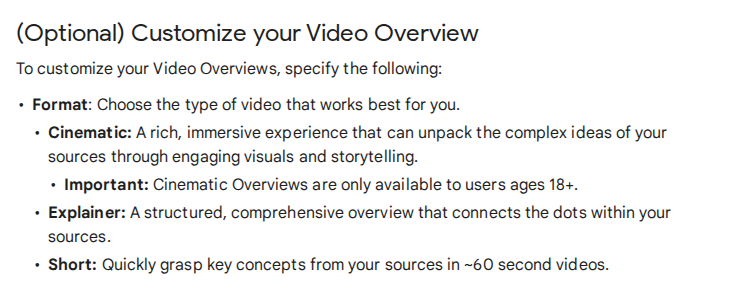
| Video formats | Explainer, Short (about 60 seconds), Cinematic (18+, English only) | One explainer in a wide, tall or square frame; a playlist for a series |
| Time to first video | "Sometimes, more than 30 minutes" | First slide "within seconds" |
| On screen | Narrated visuals in a chosen style | Typed slides, diagrams, formulas, code and cards |
| Change it afterwards | Not stated; producer notes can be reviewed before rendering | Edit box rewrites, adds, deletes, reorders or translates slides; 3 edits per explainer on free |
| Study tools | Quizzes, flashcards, Audio Overviews | End quiz and 7 teaching styles on scrimba.com |
| Narration languages | 80 listed for Explainer, 73 for Short | 33 |
| Free use | Free with a Google account, under compute-based limits | 1 explainer without an account, 5 on a free account, 100 a month on Pro |
| Watermark | Visible on generated videos; Pro and Ultra can switch it off | Explain logo on by default; off with Pro |
| Download | Yes | MP4, 1080p by default, plus a subtitles file; 1 exported explainer on a free account |
| Inside ChatGPT | Not stated | Yes, as the Explain Video Generator plugin |
| Pick it when | Many sources, audio, built-in drills | One concept, diagrams or code, made fast or inside ChatGPT |
What Changed in Gemini Notebook in 2026?
In 2026 Google renamed NotebookLM to Gemini Notebook, added 60-second Short Video Overviews, and moved free use to compute-based usage limits.
Google's rename post of July 16, 2026 says it plainly: "We're renaming NotebookLM to Gemini Notebook." It is the same standalone product, now also inside the Gemini app.
On October 16, Google's education team listed three new study features, led by the option to "generate a 60-second Short Video Overview" for one tricky concept. A September post says they use "educational animations" to make formulas, diagrams and scientific concepts "easier to digest."
Two other changes matter for students:
- Producer notes. An October 19 post adds a review of the video's plan before it renders, "rolling out globally to all Gemini Notebook users." On October 23 the help page still listed it for AI Ultra subscribers only.
- Usage limits. Free use is now compute-based: "the quota refreshes every 5 hours until you reach your weekly limit" (usage limits).
Where Gemini Notebook Is the Better Tool
Gemini Notebook is the better tool when the job spans many sources, needs an audio version, or should end in quizzes and flashcards.
Many sources in one place. The free plan holds 100 notebooks with 50 sources each, and each source can run to 500,000 words or 200MB. Google accepts Word, PowerPoint, PDF, Google Slides up to 100 slides, YouTube videos with captions, audio files and web pages (sources). Scrimba's attachment docs list PDFs, images, text, code and Jupyter notebooks, with no Word or PowerPoint upload, so a deck goes in as a PDF.
Scrimba documents no length limit, so split a long reader by chapter and ask for a playlist, "a series of explainers on one topic, planned as a curriculum and built lesson by lesson."
Your Google Drive, already connected. Docs, Slides and other Drive files import directly and re-sync every few minutes (sources). Fast Research can search your Drive too. Explain documents no Drive import.
Audio as well as video. Audio Overviews come in four formats: Deep Dive, The Brief (under two minutes), The Critique and The Debate, and an interactive mode in English lets you join in and ask the hosts to explain a point differently. Scrimba documents no audio-only format.
A study loop. Gemini Notebook adds short-answer, multi-select and fill-in-the-blank quizzes, flashcards you can edit, and Interactive Learning Overviews that weave "summaries and studio outputs like slides, quizzes, and flashcards" together. For drilling, that loop beats any single video. Explain's quiz is "a ten-second check that you understood the lesson, not an exam" (Scrimba).
More narration languages. Google lists 80 languages for Explainer Video Overviews; Explain narrates in 33 (languages).
Where Scrimba Explain Is the Better Tool
Scrimba Explain is the better tool when you need one concept explained within seconds, drawn as a diagram or formula, and fixable one slide at a time.
Speed. "Explainers stream: the first slide appears within seconds, and the rest of the lesson builds while you watch," says Scrimba's first-explainer guide. Google's help page says a Video Overview can take "sometimes, more than 30 minutes." For a concept you need before tomorrow's class, that gap decides it.
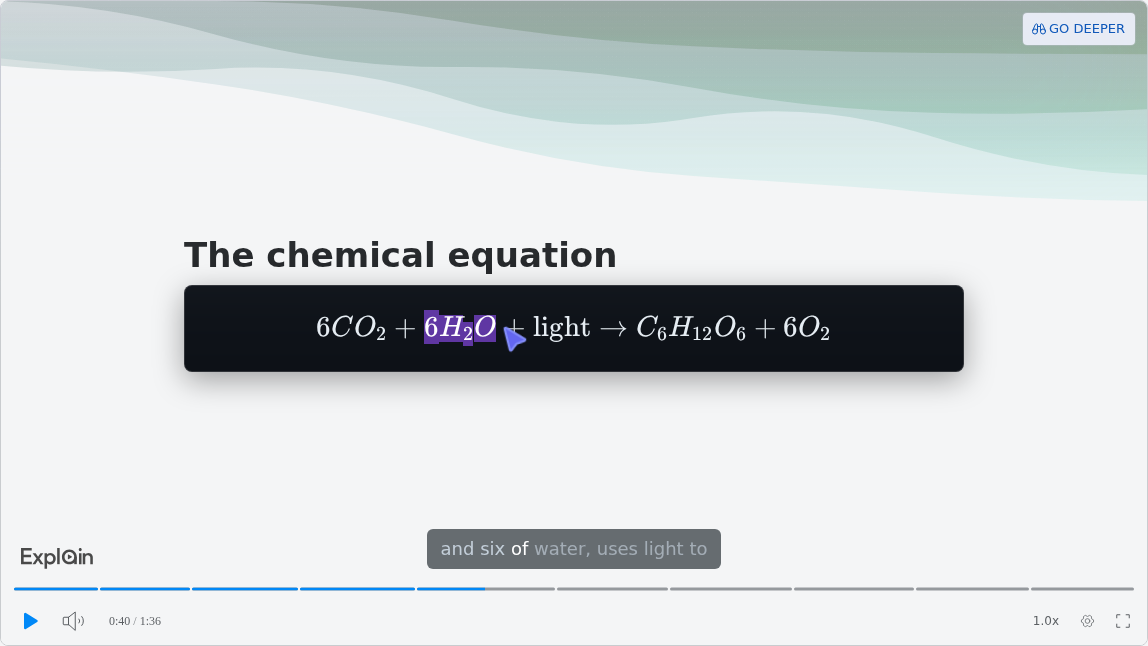
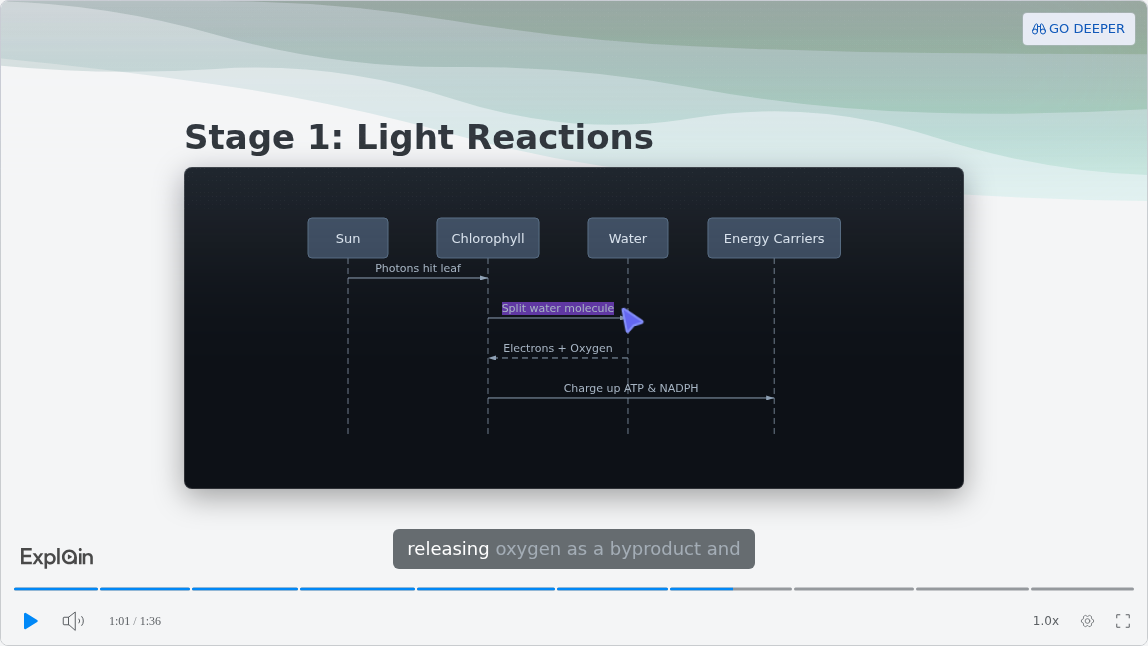
Diagrams, formulas and code. Scrimba's docs list flowcharts, sequence, state, class and entity-relationship diagrams, and "Formulas render as real mathematical notation, not as plain text like x^2" (math). Code slides hold about 15 lines, with a pointer that follows the narration. "How Photosynthesis Works", a published example on Scrimba's use-case page, shows the first two:
Fix one slide, keep the rest. Under the player, the box Change anything about this explainer… rewrites a slide, adds or deletes slides, reorders them or translates the lesson (editing). A free account gets three edits per explainer; Gemini Notebook's help page describes no way to change a finished video.
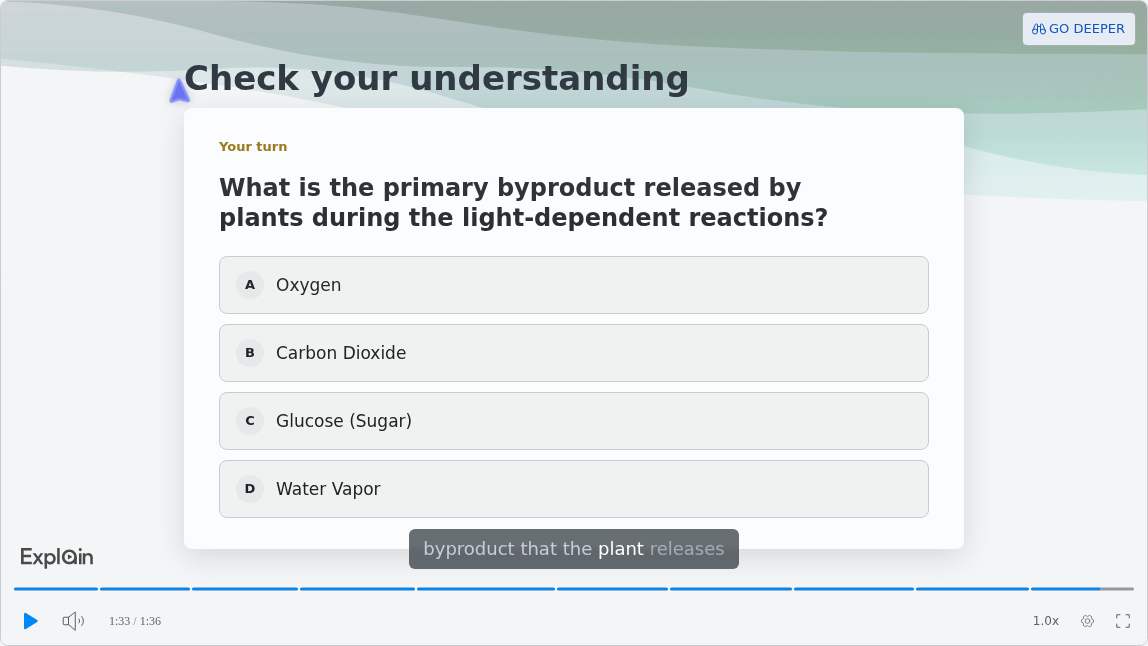
Teaching styles and a quiz on scrimba.com. Seven teaching styles change how the lesson is written; the default, Explain, promises "Simple words, small steps." Ask a lesson to "end with a quiz" and it can close on one multiple-choice check:
Inside ChatGPT, and next to your code. Explain runs in ChatGPT as the Explain Video Generator plugin, and Claude Code or Codex can build an explainer from a repository they read directly. Computer science students get a route Gemini Notebook does not document.
Exports, Watermarks and Sharing on Both Sides
Each tool lets you download a video and marks free output: Gemini Notebook with a visible watermark, Scrimba Explain with its logo on the slides.
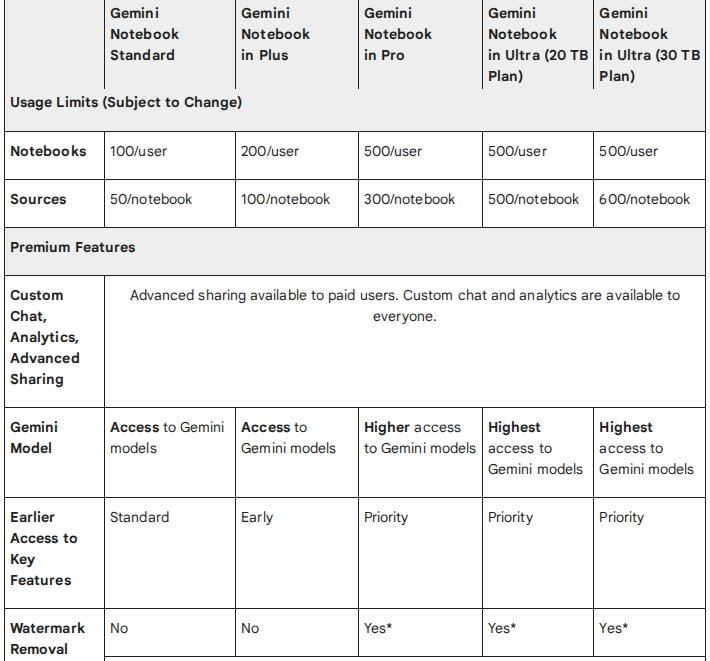
Gemini Notebook. The help page offers a Download button and link sharing, but "Public notebook sharing is only enabled for consumer accounts. It's currently disabled for Workspace Enterprise or Education accounts," so a school account downloads the file to share it. The plans page says "a visible watermark is added to generated images and videos"; Pro and Ultra subscribers can switch it off, except in India, South Korea and Vietnam, where it is applied automatically.
Scrimba Explain. Click Download on an explainer you own; "By default the video is 1080p at 60 fps," with 720p and 1440p as options and a .vtt subtitles file (exporting). The explainer must be public or unlisted, and a free account can export one explainer. Owners get Show watermark, "on by default, which puts the Explain logo in the corner of the slides," and switching it off needs Pro (player controls). Whether the logo is burned into the MP4 is not stated.
Explain also shares without a download: any explainer you can link to can be embedded, and "Visitors don't need a Scrimba account to watch an embedded explainer."
What Does Each Cost a Student?
Both tools are free to start: Gemini Notebook limits how much compute you use, while Scrimba Explain limits how many explainers you keep.
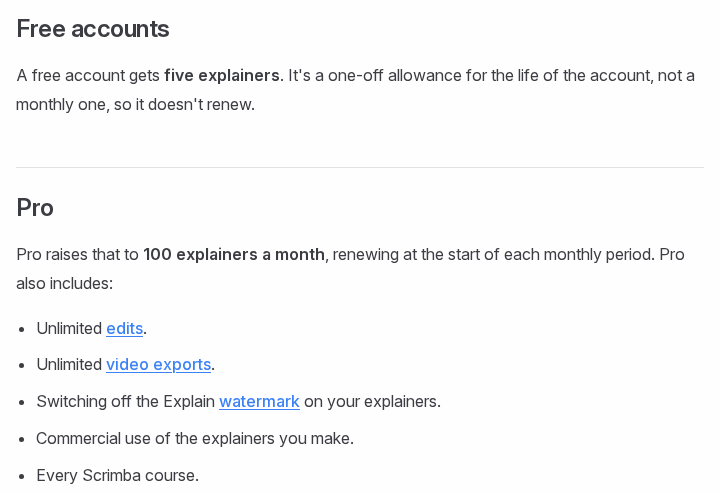
Scrimba Explain is free to start: 1 explainer without an account, 5 for the life of a free account, and 100 a month on Pro (plans and pricing). Follow-ups and Go deeper count as new explainers. Explainers made in ChatGPT count against nobody until claimed, but once you connect your Scrimba account, each one is saved and counts right away. The upgrade dialog on scrimba.com/explain shows the current price.
Gemini Notebook is free with a Google account under the standard limits. Eligible U.S. college students can claim a year of Google AI Pro, with 500 notebooks of up to 300 sources each (plans), until December 31, 2026; after that it charges $19.99 a month unless cancelled (Google).
How to Make the Same Lesson in Each Tool
In Gemini Notebook you add sources and choose Video Overview in the Studio panel; in Scrimba Explain you attach the source and ask for the lesson.
Keep each video to one topic in either tool. A study of 6.9 million video sessions across four edX courses found that "shorter videos are much more engaging" (Guo, Kim and Rubin, 2014).
In Gemini Notebook:
- Open a notebook and add your sources.
- In the Studio panel, select Video Overview, then pick Explainer or Short, a language and, optionally, a focus topic.
- Select Generate now or Generate later, and come back when it is ready.
In Scrimba Explain on scrimba.com:
- Sign in and set visibility first. Signed in, a new explainer "starts on Public, so the finished explainer is listed in the community for anyone to find" (Scrimba). Pick Unlisted or Private before you attach notes.
- Attach one chapter as a PDF and say what to explain, for example: Explain the light reactions from my notes as a sequence diagram, then end with a quiz.
- Check it against your notes. Every explainer page prints the narration under Transcript, so you can read it line by line.
In ChatGPT: install the plugin in a signed-in session, type @, pick Explain Video Generator and paste or attach your notes. It replies with an explainer card; Watch explainer opens the lesson, unlisted, and plugin explainers are square unless you ask for another frame (ChatGPT docs). The listing warns: "When connected to Explain Video Generator, ChatGPT may share relevant chats and memories with this app to help provide context for your requests." More in Scrimba's guide to turning study notes into a video in ChatGPT.
When Neither Tool Is the Right Pick
Neither tool replaces practice tests, a recorded lecture, or a teacher on camera, and neither should be trusted unchecked.
- Drilling for an exam. Use the practice tests built for that exam and a flashcard deck for recall. Video is for understanding one idea.
- The lecture itself. A recording of the class stays the source of record; lecture recap videos are a separate job.
- A presenter on screen. Neither tool shows a person. Avatar tools put a presenter in front of a script; Scrimba's comparison of AI explainer video makers lists them.
Both makers warn about accuracy. Google's help page says Video Overviews "may contain inaccuracies or audio glitches," and Scrimba's transcript docs show the line printed on every explainer page:
"Explain is AI and can make mistakes. Please do your own diligence."
For subject guides, see Scrimba's AI video tools for law students and the best AI study tools. Guides for nursing and medical students, which link back here, follow later this week.
Frequently Asked Questions
Can NotebookLM make videos?
Yes. Gemini Notebook, the new name for NotebookLM since July 16, 2026, makes Video Overviews from the sources in a notebook. Google lists three formats: Explainer, Short (about 60 seconds) and Cinematic (18+, English only). A video can take more than 30 minutes to generate.
Is NotebookLM the same product as Gemini Notebook?
Yes. Google renamed NotebookLM to Gemini Notebook on July 16, 2026 and calls it the same standalone product, with notebooks now also available in the Gemini app. Older Google posts and many third-party guides still use the NotebookLM name.
What is a good NotebookLM alternative for turning notes into a video?
Scrimba Explain, listed in ChatGPT as Explain Video Generator. It builds a narrated lesson from attached notes or a PDF, shows the first slide within seconds, draws diagrams and formulas, and lets you edit single slides. Gemini Notebook stays stronger for many sources, audio and flashcards.
Are Gemini Notebook Video Overviews free, and do they have a watermark?
They are free with a Google account under compute-based limits that refresh every five hours up to a weekly cap. Generated videos carry a visible watermark; Google AI Pro and Ultra subscribers can switch it off, except in India, South Korea and Vietnam.
Can I download a Video Overview or a Scrimba Explain explainer?
Yes, both. Gemini Notebook has a Download button for each Video Overview. Explain exports an MP4 at 1080p by default, up to 1440p, with a subtitles file, for explainers you own that are public or unlisted. A free Explain account can export one explainer.
Does NotebookLM or Scrimba Explain work inside ChatGPT?
Scrimba Explain does, as the Explain Video Generator plugin: install it while signed in to ChatGPT, mention it with @, and it replies with an explainer card. Google's pages checked for this article do not state any ChatGPT integration for Gemini Notebook, which works in its own app and the Gemini app.
Which tool narrates in more languages?
Gemini Notebook. Google lists 80 narration languages for Explainer Video Overviews and 73 for Short ones, while Cinematic videos are English only. Scrimba Explain narrates in 33 languages with a native voice for each.
Which is better for exam prep?
Use both for different jobs. Gemini Notebook suits reviewing a whole course with quizzes and flashcards in one place. Scrimba Explain suits the one concept you keep missing, drawn as a diagram or worked formula. Neither replaces the practice tests for your exam.
Key Takeaways
- Gemini Notebook is NotebookLM renamed (July 16, 2026); its Video Overviews come as Explainer, Short (about 60 seconds) and Cinematic.
- Gemini Notebook wins on many sources, Word, PowerPoint and Google Drive input, Audio Overviews, flashcards and narration languages.
- Scrimba Explain wins on speed (first slide within seconds), diagrams and formulas, slide-level edits, and working inside ChatGPT.
- Both mark free videos: Google with a visible watermark, Explain with its logo, removable on paid plans.
- Scrimba Explain is free to start: 1 explainer without an account, 5 on a free account, 100 a month on Pro.
Sources
- Google, NotebookLM is now Gemini Notebook, July 16, 2026
- Google Help, Video Overviews, plans, usage limits, sources and Audio Overviews
- Google, three study tips (October 16, 2026), new study tools (September 15, 2026), co-creation (October 19, 2026) and student offer (August 19, 2026)
- Guo, Kim and Rubin, How Video Production Affects Student Engagement, ACM Learning at Scale, 2014
- Scrimba, Explain documentation, use cases and the Explain Video Generator listing
All pages accessed October 23, 2026.