Patient Education Videos for Dental Practices: How to Make Them with AI
Make dental patient education videos with AI for implant aftercare, root canals, gum disease and crowns: tools compared, what stays out, and the review step.

Direct answer: make one short, general video per treatment (implant aftercare, a root canal, gum disease treatment, crowns, braces) from the handout your practice already gives out. A dentist checks every slide, then you text the link, embed it on your site or loop it in the waiting room. Scrimba Explain, listed in ChatGPT as Explain Video Generator, turns that handout into a narrated lesson with nobody on camera. It is free to start: 1 explainer without an account, 5 on a free account and 100 a month on Pro. Scrimba's docs list commercial use of the explainers you make as a Pro feature.
Keep anything that identifies a patient out: none of the AI tools below offers a HIPAA business associate agreement on the pages checked.
Last verified: September 28, 2026. Competitor cells come from each vendor's own pricing, security, legal or product page, loaded that day; "Not stated" means those pages do not say. Explain's facts come from Scrimba's docs and its ChatGPT listing, checked September 25, 2026.
Scrimba publishes this article and makes Explain. Explain appears in the third person like the other tools, including where it is the wrong choice.
Do Patient Education Videos Help Nervous Dental Patients?
Mostly yes. Studies link video education to better understanding and lower dental anxiety, but it works alongside the dentist's explanation, not instead of it.
Dental fear and anxiety affects about 15% of adults, according to a 2026 scoping review in The Saudi Dental Journal. Across its ten studies, the review finds that educational interventions, "particularly video-based and animated materials, were associated with improved patient understanding and reduced anxiety levels." It adds that AI tools "require further expert validation and ethical oversight."
The best single trial is more modest: in a 2025 randomized clinical trial, 60 root canal patients got either a video or the usual verbal explanation just before treatment. Anxiety fell after the video, "but this decrease was not significant between the groups." A video before the visit is a sensible addition; the chairside conversation still does the heavy lifting.
In a 100-patient study in BMC Oral Health, instructions made with ChatGPT beat a verbal talk plus a pamphlet on clarity (4.42 vs 3.25) and left patients less anxious (2.63 vs 3.38). Note the method: "Three dental experts evaluated the educational content for accuracy and suitability."
Which Tool Fits a Dental Practice?
It depends on four checks: patient data, a person on screen, a free option, and whether you want to write the video yourself.
| Option | What patients see | HIPAA business associate agreement (BAA) | Free allowance | Languages | How it reaches patients |
|---|---|---|---|---|---|
| Scrimba Explain | Narrated slides, diagrams and your own pictures; no presenter | None published; keep patient data out | 1 explainer without an account; 5 on a free account | 33 narrated | Link, site embed, MP4 with captions |
| Synthesia | AI avatar presenter | No: "not a Business Associate"; do not submit PHI | 10 minutes of video a month; downloads from Starter | 140+ | Download from Starter |
| HeyGen | AI avatar presenter | Not stated; HIPAA absent from its security page | 3 videos a month, up to 1 minute each | 30+ free; 175+ from Creator | 1080p export from Creator |
| Canva | Templates, stock media, an AI avatar; 8-second AI clips on paid plans | Not stated | Up to 20 AI uses on the free plan | Presenter in 40+ | MP4 download |
| Vyond | Animated characters or AI avatars | Not stated | No free plan listed | 95 from Professional | 100 downloads a month on the entry plan |
| ADA Toothflix | 34 ready-made videos with live actors and animation | Nothing to upload | Paid, one-time purchase | English; English and Spanish set | Chairside, site embed, email link |
Sources: Synthesia supplement and pricing; HeyGen pricing and security; Canva pricing and AI video; Vyond pricing and security; the ADA Store.
Patient data comes first, and most tool pages skip it. Then the presenter decides. Explain has none: "An explainer is not a screen recording. Each slide is real, typed content" (Scrimba docs). If the practice wants a face on screen, an avatar tool or a phone camera fits better. More free options: free AI video generators.
What Must Stay Out of a Patient Video?
Anything that identifies a patient stays out: names, dates, faces, X-rays and charts. The video explains a treatment in general, never one person's plan.
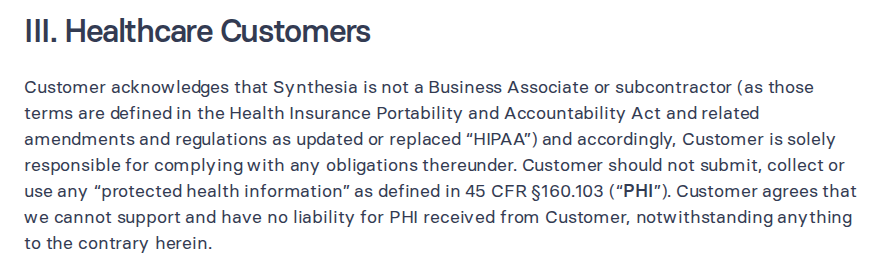
HIPAA lets a practice disclose protected health information (PHI) to a business associate if it obtains "satisfactory assurances, in the form of a contract or other written arrangement", the business associate agreement (HHS). Scrimba's Explain docs contain no HIPAA statement and no BAA. Synthesia is explicit about its own position:
Identifying is broader than a name. HHS's de-identification guidance lists 18 identifiers, among them names, dates tied to a person, phone numbers and "Full-face photographs and any comparable images". A name in a phone book is not PHI; the same name next to "an indication that the individual was treated at a certain clinic" is.
In practice, three habits:
- Write the general aftercare sheet, never a copy of one patient's plan.
- Use pictures with no patient in them: a model, an implant part, a drawn diagram.
- Keep names, dates and appointment details out of prompts, files and chats.
How to Make a Dental Patient Education Video with Scrimba Explain
Step 1: Pick one treatment and start from your handout
One topic per video. Six good first videos:
- Implant aftercare, from the front-desk sheet.
- What happens during a root canal, sent before the visit.
- Gum disease treatment, a waiting-room loop.
- Caring for a new crown.
- Braces and retainers, from the education deck.
- Your first visit, for new patients.
A deck goes in as a PDF. In PowerPoint, choose File > Export > Create PDF/XPS; the Options dialog exports a slide range, so the braces deck becomes one PDF per topic (Microsoft Support). No Scrimba source lists PowerPoint files or documents a length limit, so keep each video to one topic and check every slide. More detail: the slide deck guide and the PDF guide.
Step 2: Set the visibility before you create
Signed in on scrimba.com, a new explainer "starts on Public, so the finished explainer is listed in the community for anyone to find" (Scrimba docs). Pick Unlisted for anything patients will receive, or Private while the dentist reviews it.
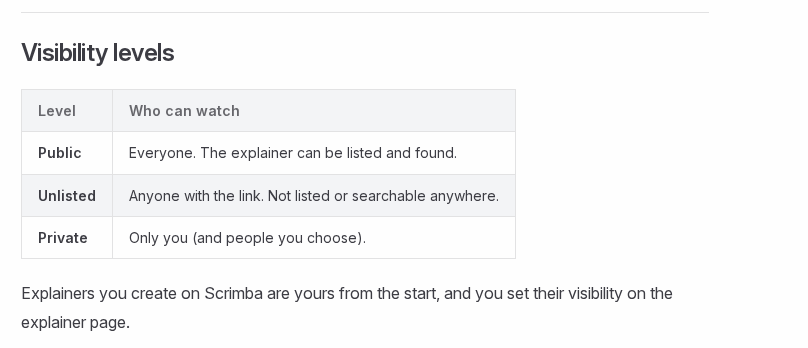
A private explainer cannot be exported, so switch to Unlisted before exporting an MP4.
Step 3: Attach the sheet and ask for the lesson
On scrimba.com/explain, attach the sheet as a PDF or an image; if it is a Word file, save it as PDF first. A long paste "becomes an attachment instead of filling the whole input box" (attaching documents), and "An image slide can also show a picture of yours instead of a generated one" (images).
A prompt that works for implant aftercare:
"Explain these implant aftercare instructions to a patient in plain words. Cover the first 24 hours, eating, cleaning around the implant and the signs that mean calling the practice. Use only what the attached sheet says. End with a quiz."
Explainers are narrated in 33 languages, "with a voice native to each one" (Scrimba docs); a language without a voice falls back to English narration (languages). Asking for a quiz makes a short multiple-choice question at the end more likely, on scrimba.com only.
Step 4: Have a dentist review every slide
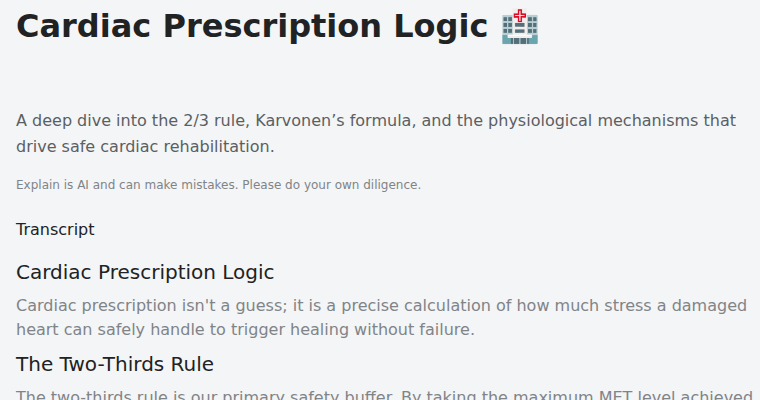
Every explainer page shows the full narration under Transcript and the line "Explain is AI and can make mistakes. Please do your own diligence." (transcript). A dentist or hygienist reads the transcript against the source sheet before any patient sees it.
Fix a wrong slide in place: move to it, write what should change in the box under the player, Change anything about this explainer…, and press Enter. "Slides you don't mention are untouched" (editing an explainer); a free account gets three edits per explainer. For gum disease, check numbers against a reference such as NIDCR, which puts healthy pockets "usually between 1 and 3 millimeters".
Step 5: Send it, then check understanding in person
- A link in the appointment reminder or aftercare text. A fullscreen link opens the lesson without the page around it.
- An embed on the practice website: "Visitors don't need a Scrimba account to watch an embedded explainer" (embedding). An embed shows only the player, so the transcript and AI disclaimer stay behind; add your own "reviewed by" line next to it.
- An MP4 for the waiting-room screen: 1080p at 60 frames per second by default, up to 2560x1440, with a .vtt captions file, from a public or unlisted explainer you own; a free account exports one explainer (exporting).
Then close the loop at the chair. AHRQ's teach-back method is "a way of checking understanding by asking patients to state in their own words what they need to know or do about their health". The end quiz is no substitute: it is "a ten-second check that you understood the lesson, not an exam" (quizzes), and explainers count only views and likes.
What Does a Finished Health Explainer Look Like?
A finished explainer is a narrated set of typed slides with diagrams, captions and a transcript, like the healthcare example in Scrimba's docs.
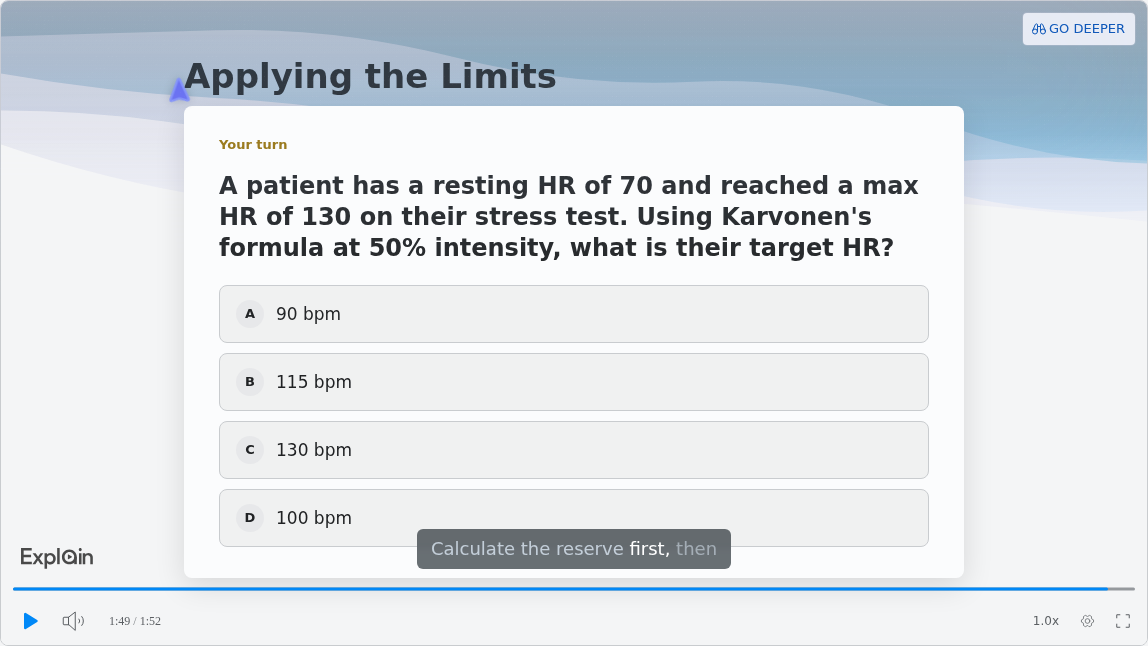
The use-case page lists one published example per field. The Healthcare one, "Cardiac Prescription Logic", covers cardiac rehab exercise targets. It is aimed at clinicians, not patients, but it shows the format on health content.
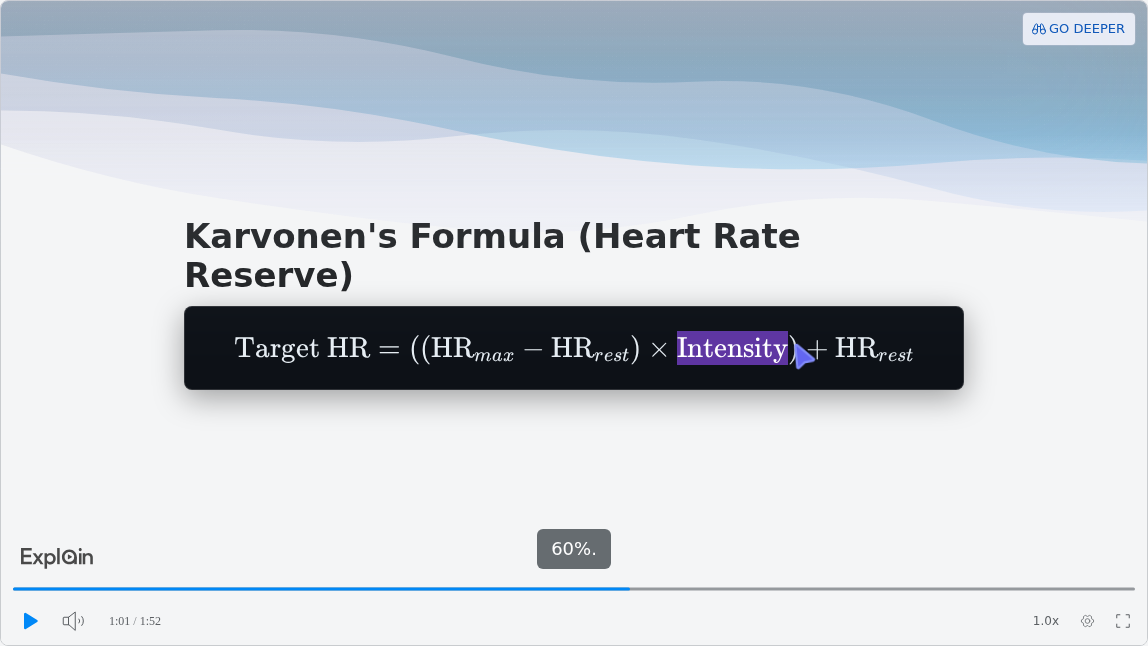
Formulas render as real notation, the spoken term is highlighted, and captions run along the bottom. The lesson ends with a check:
Below the player sit the description, the disclaimer and the transcript:
A patient lesson needs plainer words: Explain's default teaching style on scrimba.com is "Simple words, small steps".
Can ChatGPT Make the Video While You Write?
Not on its own. Sora was shut down, so a patient video made inside ChatGPT now comes from a plugin such as Explain Video Generator.
OpenAI discontinued the Sora web and app experiences on April 26, 2026 and the Sora API on September 24, 2026 (OpenAI Help). Can ChatGPT make videos? covers every route. For crown care:
- Install the plugin in a signed-in ChatGPT session. The listing's "no login required" means no Scrimba login.
- Mention @Explain Video Generator with your crown-care text.
- The draft opens unlisted. Sign in to Scrimba and claim it to keep, edit or export it; ChatGPT drafts do not count toward the allowance until claimed.
This route has no end quiz or teaching style picker, and the listing carries a data notice:
"When connected to Explain Video Generator, ChatGPT may share relevant chats and memories with this app to help provide context for your requests." (plugin listing)
Use a chat that holds only the general instructions. OpenAI offers a BAA for ChatGPT only to sales-managed Enterprise or Edu customers and through ChatGPT for Clinicians, and says "we don't offer a BAA for ChatGPT Business" (OpenAI Help).
When Another Option Fits Better
- You would rather not write anything. ADA Toothflix sells 34 videos of 2 to 4 minutes, with "live actors, clear animations and informative voiceovers", to show chairside, embed or email (ADA Store, ADA News). For endodontists, the AAE says "Members are encouraged to download, embed and link to any of our videos."
- The welcome video should show the dentist. Explain has no presenter or avatar. Film a minute on a phone, or use HeyGen or Synthesia.
- The video is about one patient's plan. Use the practice's own patient communication system, under a BAA.
- You want marketing. Explain makes explainers, not promotional clips or social ads.
Frequently Asked Questions
What AI video generator can my front desk use to explain implant aftercare to patients this month?
Scrimba Explain suits a front desk with no video skills: attach the implant aftercare sheet on scrimba.com and it builds a narrated lesson, free to start: 5 explainers on a free account, with commercial use listed under Pro. A dentist reviews it first. For an avatar presenter, try HeyGen or Synthesia.
Do dental practices use AI video makers to explain a root canal to nervous patients before the appointment?
Some do, and the evidence is cautiously positive: in a 2025 randomized trial, anxiety fell after a pre-treatment video, though not significantly more than after a verbal explanation. Send the video before the visit and keep the chairside talk.
Which free AI video generator works for a waiting room video about gum disease treatment?
Scrimba Explain is free to start: 1 explainer without an account, 5 on a free account, 100 a month on Pro. Its docs list commercial use as a Pro feature. An explainer you own exports as an MP4 with captions, one explainer on a free account. Synthesia lists downloads from its paid Starter plan; HeyGen's free videos stop at one minute.
I run a small clinic and need an AI video creator for a new patient welcome video this week. What fits?
Split it in two. Film the dentist's welcome on a phone, or use an avatar tool such as HeyGen. For what happens at the first visit, attach your new patient sheet to Scrimba Explain and share an unlisted link.
Could a ChatGPT video generator make a short patient video about crowns while I am already writing in ChatGPT?
Yes, through a plugin, since ChatGPT has no video model of its own after Sora. Install Explain Video Generator, mention it with your crown-care text, and claim the draft to keep it. Keep patient details out of that chat.
I wrote out the aftercare instructions. Which text to video AI can make a patient video today?
Paste or attach them in Scrimba Explain; the first slide appears within seconds. Remove anything that identifies a patient, set the explainer to Unlisted, have a dentist check the transcript, then send the link.
Which AI explainer video generator suits a short implant procedure video to send before appointments?
Scrimba Explain builds a narrated lesson with no presenter from your implant handout, in 33 narrated languages. Send an unlisted link in the appointment reminder; patients need no account. A dentist checks every slide first.
Which explainer video maker or PDF to video tool can turn a treatment plan into something anxious patients understand?
Turn the treatment into a video, not the patient's own plan. Upload a general PDF about the procedure to Scrimba Explain and ask for plain words. One patient's plan belongs in the chairside conversation.
Which PowerPoint to video tool suits a patient education deck about braces and retainers?
Export the deck to PDF first, one topic per file, since no Scrimba source lists PowerPoint uploads. Scrimba Explain then builds a narrated lesson from the content rather than reading slides aloud. For a presenter, try Synthesia or HeyGen.
Key Takeaways
- One general video per treatment, built from the handout you already trust.
- No patient-identifiable information in any AI tool: none of the AI tools compared offers a BAA on the pages checked.
- A dentist reviews every slide, because Explain can make mistakes.
- Explain is free to start: 1 explainer without an account, 5 on a free account, 100 a month on Pro.
- The video adds to the conversation; teach-back at the chair checks what stuck.
Sources
Primary sources
- HHS. "Business Associates." https://www.hhs.gov/hipaa/for-professionals/privacy/guidance/business-associates/index.html
- HHS. "Guidance Regarding Methods for De-identification of Protected Health Information." https://www.hhs.gov/hipaa/for-professionals/special-topics/de-identification/index.html
- AHRQ. "Use the Teach-Back Method: Tool 5." https://www.ahrq.gov/health-literacy/improve/precautions/tool5.html
- NIDCR. "Periodontal (Gum) Disease." https://www.nidcr.nih.gov/health-info/gum-disease
Research
- Anatürk et al. Journal of Oral Rehabilitation, 2025 (randomized clinical trial). https://pmc.ncbi.nlm.nih.gov/articles/PMC12516009/
- Sofian-Pauliuc et al. The Saudi Dental Journal, 2026 (scoping review). https://pmc.ncbi.nlm.nih.gov/articles/PMC13168390/
- Islam. BMC Oral Health, 2025 (comparative study). https://pmc.ncbi.nlm.nih.gov/articles/PMC12060393/
Vendor and product pages
- Accessed September 28, 2026: Synthesia supplement, Synthesia pricing, HeyGen pricing, HeyGen security, Canva pricing, Canva AI video, Vyond pricing, Vyond security, ADA Toothflix, AAE videos, Sora discontinuation, OpenAI BAA, PowerPoint to PDF.
- Scrimba, accessed September 25, 2026: ChatGPT listing, docs, limits and plans.