How to Deploy Your First Website [2026]
How to deploy a website in 2026: what deployment means, a Netlify walkthrough, free hosts compared, custom domains, HTTPS, and why builds fail.

![How to Deploy Your First Website [2026]](/articles/content/images/size/w1200/2026/07/118-hero-1.jpg)
Deploying a website means putting your built files on a server that stays on, so anyone with the address can open them. For a static site in 2026, the fastest route is to push your code to GitHub and connect the repository to a free host such as Netlify, Vercel, Cloudflare Pages, or GitHub Pages, which then rebuilds and republishes automatically on every push.
That is the short version. Deployment is also where a lot of self-taught developers quietly stall. You have an index.html that looks right when you double-click it, a folder full of CSS, and no idea how any of that becomes something you can text to a friend.
What follows: Git, a Netlify walkthrough, the free alternatives, custom domains, HTTPS, secrets, and the classic failure where a build works locally and dies on the host.
What Does It Actually Mean to Deploy a Website?
Deployment is copying your finished site files onto a machine that is always running and reachable at a public address, so other people can load them.
Look at your address bar. If it starts with file:///, you are not looking at a website. You are looking at a file on your own hard drive, and nobody else can reach it.
A host gives you three things your laptop cannot:
- An always-on machine. Your computer sleeps, changes networks, and gets closed. A server does not.
- A public address. DNS turns a name people type into an IP address a browser can reach.
- A certificate. Without one, browsers show a "Not secure" warning next to your domain.
One distinction matters before you pick a host. A static site is prebuilt files a server hands over unchanged, which is why it can be cached worldwide. A dynamic site runs code on every request, needing a live process and usually a database.
Your project is not published until it has a URL that someone else can open on a phone you have never touched.
Everything below assumes a static site, which covers portfolios, landing pages, docs, and every single-page app built with React, Vue, or Svelte. It is also where free hosting is genuinely free.
What Do You Need Before You Deploy?
You need four things: a finished project folder, Git installed, a GitHub account, and a build that completes without errors on your own machine.
A host account comes last and takes two minutes. The real prerequisite is version control, because every modern deploy flow reads your code from a repository rather than asking for a manual upload.
Create an empty repository on GitHub, then run this from your project folder:
git init
git add .
git commit -m "First commit"
git branch -M main
git remote add origin https://github.com/your-username/your-repo.git
git push -u origin main
If the terminal is the intimidating part, Scrimba's free Command Line Basics course (101 minutes, Ajo Borgvold) covers the commands you will use daily. For Git itself, the Pro course Learn Git and Github (103 minutes, Gregor Thomson) walks through staging, branching, pull requests, and merge conflicts, with a written version in Scrimba's guide to learning Git and GitHub.
No project to deploy yet? Scrimba's article on building a web developer portfolio covers what belongs in one.
How Do You Deploy a Static Site to Netlify?
Netlify deploys a static site two ways: drag the folder into the browser for an instant URL, or connect a Git repository so every push rebuilds the site automatically.
Option A: Drag and drop
Sign in, open the deploy area, and drag your project folder onto it. Within seconds you get a live URL on a random *.netlify.app subdomain.
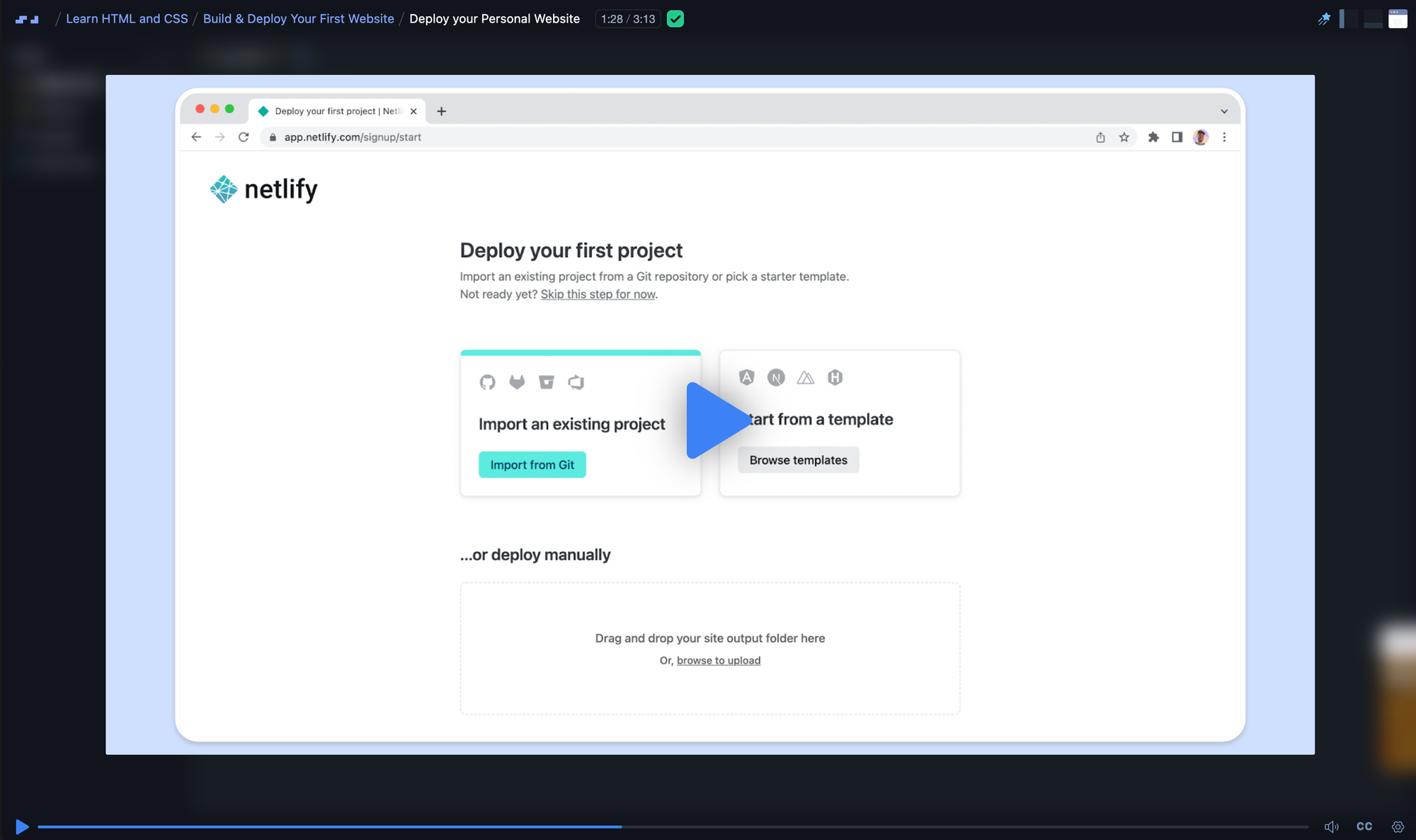
The limitation is that nothing is connected. Change one line of CSS and you drag again. Great for seeing your work live, bad for a site you keep editing.
Option B: Connect a Git repository
Choose "Import an existing project", authorize GitHub, pick your repository, then confirm two settings:
- Build command. What Netlify runs to produce your files. Plain HTML needs nothing; a Vite project needs
npm run build. - Publish directory. Where the finished files land. Vite writes to
dist, Create React App tobuild, and a plain HTML site is the project root.
Better to commit those settings than click them, so they live in version control:
[build]
  command = "npm run build"
  publish = "dist"
Save that as netlify.toml in your repository root. Netlify's configuration docs cover the rest, including base for a monorepo. There is a command-line route too:
npm install -g netlify-cli
netlify deploy --prod --dir=dist
The --prod flag publishes straight to your live URL; leave it off and you get a draft URL (Netlify CLI reference).
What the free plan really gives you. Netlify moved to a credit model: $0 with a hard cap of 300 credits a month that cannot be exceeded or generate a bill (Netlify pricing). A production deploy costs 15 credits and bandwidth 20 per GB, from one pool, while deploy previews are free (credit docs). Read that as roughly twenty production deploys a month: fine for a portfolio, tight for daily pushing. When the pool empties, every site on the account pauses.
Scrimba's free course Deploying with Netlify (23 minutes, Treasure Porth) covers this ground in eight lessons: drag-and-drop deploys for plain JavaScript and framework projects, deploying a React app straight from a Scrim, continuous deployment, and deploy previews.
Where Else Can You Host a Website for Free?
Netlify, Vercel, GitHub Pages, Cloudflare Pages, and Render all host static sites free. They differ in bandwidth, build quotas, and whether they can also run a backend.
Free tiers move constantly; these figures were checked on 21 July 2026 against each vendor's pricing page.
| Host | Best for | Free tier | Custom domain | Build support |
|---|---|---|---|---|
| Netlify | First deploys | 300 credits/mo, hard cap | Yes, free SSL | Yes, plus previews |
| Vercel | Next.js and React | 100 GB transfer, 1M requests/mo | Yes | Yes, auto-detected |
| GitHub Pages | Docs and portfolios | 1 GB site, 100 GB/mo bandwidth | Yes | Jekyll or Actions |
| Cloudflare Pages | High-traffic static | 500 builds/mo, unlimited bandwidth | Yes, 100 per project | Yes |
| Render | Static plus a backend | 5 GB bandwidth on Hobby | Yes | Yes, for both |
Vercel is the default for anything Next.js, since Vercel builds Next.js. Hobby is free but explicitly personal and non-commercial (Vercel pricing).
GitHub Pages has the least friction when your code already lives there, with builds soft-limited to ten an hour (Pages limits). One catch beginners hit: on the free plan, Pages publishes only from public repositories (GitHub's plans).
Cloudflare Pages has the most generous ceiling of the five. Worth knowing for 2026: Cloudflare now steers full-stack projects toward Workers with static assets and publishes a migration guide. Pages remains supported and is still the simplest choice for a plain static site.
Render is the odd one out, and that is why it is here. It hosts static sites free and can run a real backend beside them, which none of the others do free. The catch: a free web service spins down after 15 minutes without traffic and takes about a minute to wake (Render docs). Fine for a demo, painful for anything a recruiter clicks.
If deployment turns out to be the part you enjoy, Scrimba's roundup of DevOps courses for beginners is a reasonable next stop.
How Do You Connect a Custom Domain and Add HTTPS?
You buy a domain from a registrar, point two DNS records at your host, and the host issues a free TLS certificate once those records resolve.
Your host is not your registrar. Two record types cover almost every case: an A record (or ALIAS, depending on the registrar) for the bare domain, and a CNAME record for the www subdomain pointing at your host. Your host's dashboard gives the exact values. Do not guess them.
Then wait. DNS propagates in minutes on some networks and hours on others, and nothing is broken during that window. The common mistake is editing the records again, restarting the clock.
HTTPS is the easy part. Netlify provisions and renews a Let's Encrypt certificate automatically once DNS points at it (HTTPS docs). GitHub does the same after its DNS check passes, though the "Enforce HTTPS" checkbox can take up to 24 hours to appear (Pages HTTPS docs). Vercel, Cloudflare, and Render also issue and renew certificates free.
How Do You Handle Environment Variables and Secrets?
Secrets belong in your host's environment variable settings, never in your repository. Add .env to .gitignore before your first commit, not after you notice the problem.
The rule has one brutal corollary: once a key has been pushed, it is compromised. Deleting it in the next commit does not help, because the old commit is still in the history. Rotate the key at the provider instead.
Your .gitignore should start here:
node_modules
.env
.env.local
dist
Add the real values in your host's dashboard, under project settings. They are injected at build or run time, so your code reads them exactly as it does locally.
One trap catches nearly everyone once. In frontend tooling, variables prefixed VITE_ or NEXT_PUBLIC_ are deliberately bundled into the JavaScript the browser downloads. They are not secret. They exist so you can expose a publishable key on purpose. Put a private key behind one and you have shipped it to every visitor. Anything genuinely secret belongs behind a server function.
Why Does the Build Fail on the Host When It Worked Locally?
Because the host builds your project in a clean Linux container with no memory of your machine, so anything your laptop supplied invisibly is missing.
Four causes, in the order to check them.
- Wrong build command or publish directory. The host looked in
buildand your bundler wrote todist. The deploy "succeeds" and the URL shows a 404. Check what your build produces, then match the setting. - A missing dependency. A package that works locally because it sits in
node_moduleswas never saved topackage.json. Netlify installsdevDependenciesby default, but settingNODE_ENV=productionstops it, which breaks any build tool listed there (dependency docs). Deletenode_modulesand reinstall to see what the host sees. - A Node version mismatch. Your laptop runs Node 22 and the host defaults to something older, so modern syntax throws a parse error. Pin it with a
.node-versionor.nvmrcfile, or aNODE_VERSIONvariable. - Case-sensitive filenames. This one is genuinely maddening. macOS and Windows filesystems are case-insensitive, so
import Button from './components/button'resolves happily even though the file isButton.jsx. Linux refuses. Netlify keeps a support guide on it, and the fix takes two steps because Git will not otherwise record the rename:
git mv src/components/button.jsx src/components/temp.jsx
git mv src/components/temp.jsx src/components/Button.jsx
git commit -m "Fix filename casing"
Then there is the failure that is not a build failure at all: 404s on client-side routes. Your React app works at / and dies on /about after a refresh, because the server looked for a file at that path, found nothing, and returned a 404 before the router could run.
The fix is a rewrite that hands every path to index.html with a 200 status. On Netlify, one line in a _redirects file in your publish directory:
/* /index.html 200
On Vercel, the equivalent lives in vercel.json:
{
  "rewrites": [{ "source": "/(.*)", "destination": "/index.html" }]
}
Whatever the symptom, read the deploy log from the top. The first error is the real one.
What Is Continuous Deployment and Why Does It Matter?
Continuous deployment means your host rebuilds and republishes the site automatically whenever you push to your main branch, with no manual upload step.
This is the payoff for connecting Git rather than dragging a folder. You edit, commit, push, and a minute later the change is live. Two habits make it useful:
- Deploy previews. Open a pull request and the host builds that branch at its own temporary URL, so you see the change before visitors do. On Netlify they cost zero credits.
- One-click rollback. Every previous deploy is still stored, so republishing the last good one beats debugging under pressure.
Worth keeping straight: continuous deployment is your host reacting to a push, while continuous integration is the test and lint pipeline that runs first. The first is free; the second you build yourself.
Where Should You Learn This Properly?
Beyond the Netlify course above, Scrimba's free Build and Deploy Your Portfolio runs 2.4 hours with Kevin Powell: build a portfolio site in HTML and CSS, then deploy it to a DigitalOcean Droplet over FTP. Deliberately a different model from the Git-connected flow, and seeing both is useful.
Short of something to deploy? The free Learn HTML and CSS course (5.7 hours, built with Mozilla MDN) has you build and deploy five small projects, and Scrimba's roundup of free HTML and CSS courses compares the alternatives. Every free course carries a completion certificate; Pro is $24.50 a month on the annual plan ($294 billed yearly), with regional pricing and student discounts on top.
Frequently Asked Questions
Can you deploy a website for free?
Yes, permanently. Netlify, Vercel, GitHub Pages, Cloudflare Pages, and Render all host static sites at no cost, with a free TLS certificate and support for your own domain. The free tiers differ in bandwidth and build quotas, not in whether your site is really live.
Do you need to know Git to deploy a website?
Not for a one-off drag-and-drop deploy, but yes for anything you keep working on. Every modern host reads your code from a Git repository and rebuilds on each push. Learning the basic commands takes a couple of hours and removes manual uploading permanently.
How long does it take to deploy a website?
A drag-and-drop deploy of a plain HTML site takes under a minute. Connecting a Git repository the first time takes five to ten minutes including account setup. A custom domain adds minutes to hours, because DNS propagation is out of your control.
What is the difference between hosting and a domain name?
Hosting is the server that stores and serves your files. A domain name is the address people type to reach it. You rent them from different companies and connect the two with DNS records. Free hosting includes a subdomain; a custom domain is a yearly purchase.
Why does my site show a 404 after I refresh the page?
Your app uses client-side routing and the server has no file at that path. Add a rewrite that serves index.html for every route with a 200 status. On Netlify that is one line in a _redirects file; on Vercel it is a catch-all rewrite in vercel.json.
Key Takeaways
- Deployment puts your built files on an always-on server with a public address and a TLS certificate, none of which your laptop provides.
- Getting your code into Git is the real prerequisite, because every modern host deploys from a repository.
- Netlify's drag-and-drop deploy proves the concept in a minute; connecting a repository is what you should actually use.
- Free tiers differ mainly in bandwidth and build quotas. Cloudflare Pages is the most generous, Vercel is best for Next.js, GitHub Pages needs a public repo, and Render can also run a backend.
- HTTPS is free and automatic on all five hosts once DNS resolves, but custom domains are a separate purchase.
- Never commit a
.envfile, and remember thatVITE_andNEXT_PUBLIC_variables ship to the browser on purpose. - Builds that fail only on the host usually mean a wrong publish directory, a missing dependency, a Node mismatch, or filename casing.
Sources
All pricing and documentation below verified 21 July 2026.
- Netlify: pricing, credits, file-based configuration, dependencies, HTTPS, case-sensitivity guide, CLI deploy.
- Vercel: pricing, vercel.json reference.
- GitHub: Pages limits, plans, Pages HTTPS.
- Cloudflare: Pages, migrating Pages to Workers.
- Render: pricing, free tier.
- Scrimba: pricing, self-reported pricing and course data.