How to Use Scrimba Explain: A Developer's Guide [2026]
What Scrimba Explain does, how to install it on Claude Code, Codex, or ChatGPT, where it is listed as Explain Video Generator, and where it falls short.

![How to Use Scrimba Explain: A Developer's Guide [2026]](/articles/content/images/size/w1200/2026/08/129-hero-1.jpg)
Scrimba Explain is an MCP plugin for coding agents. You ask your agent a question, the agent researches it against the files and context it already has, and Explain turns that answer into a narrated video walkthrough. It works with Claude Code, Codex / ChatGPT, and any agent that supports the Model Context Protocol, and it is free during open beta. In ChatGPT's plugin directory the same product is listed under a different name, Explain Video Generator, with the tagline Create free explainer videos.
Understanding code you did not write has always been the slow part of the job. In 2026 it is also the common part, because a growing share of the code in front of you was produced by an agent that has already moved on to the next task. Scrimba's framing of the problem on the Explain product page is blunt: understanding AI-written code is painful, and long text answers are hard to follow.
This guide covers what Explain does, how to install it, what separates a question that produces a useful walkthrough from one that produces filler, how the grounding works, what happens to the video afterwards, and where the tool falls short. It assumes you have never heard of Explain.
What is Scrimba Explain?
Scrimba Explain is an MCP plugin that converts a question into a narrated video walkthrough, built from the research your coding agent performs.
The pipeline has three parts, and the middle one is the part most descriptions skip:
- You ask a question. Not a script, not a scene description. A question, addressed to the plugin inside your agent session.
- Your coding agent researches it. It reads the relevant files, uses the conversation it already has, and works out the answer the way it would for any other request.
- Explain turns that answer into a video. The output is a narrated walkthrough rather than a wall of text (Scrimba).
Scrimba's own reasoning for the video format is that video combines diagrams, animations, and the relevant code to build intuition, with narration that talks you through it the way a tutor would. Whether that beats reading is a matter of taste and of how tired you are. The mechanical claim underneath it is easier to check: the walkthrough is assembled around code that exists in your project, not around a generic illustration of the concept.
One disambiguation belongs here rather than buried at the bottom, because a lot of people arrive at Explain from searches about AI video. Explain is not a text-to-video model and not an avatar tool. There are no avatars, no stock footage, and no brand templates. It does not turn an arbitrary prompt into invented footage. It explains a question against real context, which is a different product category with a different failure mode.
Explain is in open beta and free during open beta. If the plugin distribution model is new to you, Scrimba's roundup of MCP tutorials and courses covers the protocol itself before you install anything.
How do you install Scrimba Explain?
Installation is two steps: create a free Scrimba account, then install the plugin in your coding agent.
That is the whole procedure as Scrimba documents it, and it does not get longer on closer inspection:
- Create a free Scrimba account. This is what later lets you claim the videos you generate.
- Install the plugin. The product page carries install links for Claude Code and for Codex / ChatGPT (Scrimba).
For anything else, the route is the MCP endpoint. Scrimba's FAQ is direct about it: any coding agent that supports MCP can use Explain, via the link https://scrimba.com/explain/mcp.
| Agent | How Explain is added | What you need first |
|---|---|---|
| Claude Code | Install link on the Explain product page | A working Claude Code setup |
| Codex / ChatGPT | Install link on the Explain product page | A working Codex setup |
| Any other MCP agent | The MCP endpoint at scrimba.com/explain/mcp |
An agent with MCP support |
In ChatGPT the same tool is the plugin directory's Explain Video Generator, and an explainer made there plays inline in the chat.
If either agent itself is unfamiliar, Scrimba has separate walkthroughs for Claude Code and for OpenAI Codex.
What MCP is, in one paragraph
The Model Context Protocol is an open-source standard for connecting AI applications to external systems, described by its maintainers as something like a USB-C port for AI applications (Model Context Protocol). Both Claude Code and Codex support MCP servers generally, so Explain is not a special case in either. It is one more connected tool your agent can reach for, which is also why the third-party path exists at all.
How do you ask a good question?
A good Explain question names something real in your project and asks about a flow rather than a file, so the agent has something concrete to trace.
The mechanic is simple. You address the plugin in your agent session, following the pattern Scrimba's own demo shows: @Explain how the Stripe integration works. What separates a useful result from a vague one is not phrasing skill, it is whether the question points at something the agent can actually go and read.
| Vague question | Sharper version | Why the second one lands better |
|---|---|---|
| How does this app work? | How does a request get from the API route to the database? | Names a path the agent can trace end to end |
| Explain the auth code | How does the app decide whether a session is still valid? | Asks about a decision, so the answer has a shape |
| What does this file do? | Why does the webhook handler retry, and what happens if it never succeeds? | Covers behavior and failure, not just structure |
| Tell me about the tests | What does the checkout test suite assert? | Bounded scope, verifiable answer |
| Summarize the codebase | How does the billing subsystem fit with the user model? | Two named things and the relationship between them |
A few heuristics that follow from how the plugin gets its facts:
- Name the subsystem. "The billing flow" gives the agent a starting point. "The backend" does not.
- Ask about a flow, not a file. Walkthroughs are strongest when there is a sequence to narrate.
- Ask the question you would ask a colleague. If you would not phrase it that way to a human who knows the code, it is probably too abstract.
- Ask when the context is warm. A question asked after the agent has already been working in the relevant area has more to draw on than one asked cold.
Scrimba's own one-line description of the loop is the thing to keep in mind while phrasing anything:
"Ask @Explain a question. It researches the relevant context and creates a narrated video walkthrough."
The quality of the explainer is bounded by the quality of that research. Explain narrates what the agent found. If the agent found little, the video will say little, at length.
How does Explain ground its answers?
Explain grounds answers in context the coding agent already holds: the relevant files, the conversation history, and whatever else is in the session.
This is the most misunderstood part of the product, so here is Scrimba's FAQ verbatim. The agent "uses the relevant files, conversation history, and other context it already has. When it needs outside knowledge, it can search the web and cite its sources. The agent decides when external research is useful, so not every explainer includes citations."
Three consequences follow, and each one changes how you use the tool:
- Session context is an asset. Asking at the end of a debugging session gets you more than opening a fresh terminal and asking the same thing cold.
- Citations are conditional. Their absence is not a defect. The agent decides whether outside knowledge is needed, so an explainer about your own payment flow may reasonably carry none, while one touching an unfamiliar library may.
- Nothing here describes indexing. No published claim covers embedding, indexing, or training on a repository. The mechanism, as described, is context the agent already holds.
This is also the cleanest way to see why Explain sits in a different category from generative video. A text-to-video model starts from a prompt and invents pixels that have never existed. Explain starts from a question and narrates what the agent actually found. That difference is why it can explain your system and a prompt-driven model structurally cannot: the substance lives outside the prompt box.
What happens to the video?
The explainer arrives as an unlisted video at a secret URL. Opening that URL while signed in to a Scrimba account claims it and makes it private, adding it to the account.
The flow, as Scrimba's FAQ describes it, runs in four steps:
- Ask your agent the question.
- Receive a link back in the session.
- Open the link while signed in to Scrimba.
- The explainer is claimed, private, and attached to your account.
One practical note follows from how unlisted links work anywhere: before the video is claimed, anyone holding the URL can open it. If the subject is proprietary, treat the link the way you would treat any other unlisted link to something sensitive. That is a general caution about secret URLs, not a statement about Explain's security model, which Scrimba has not published.
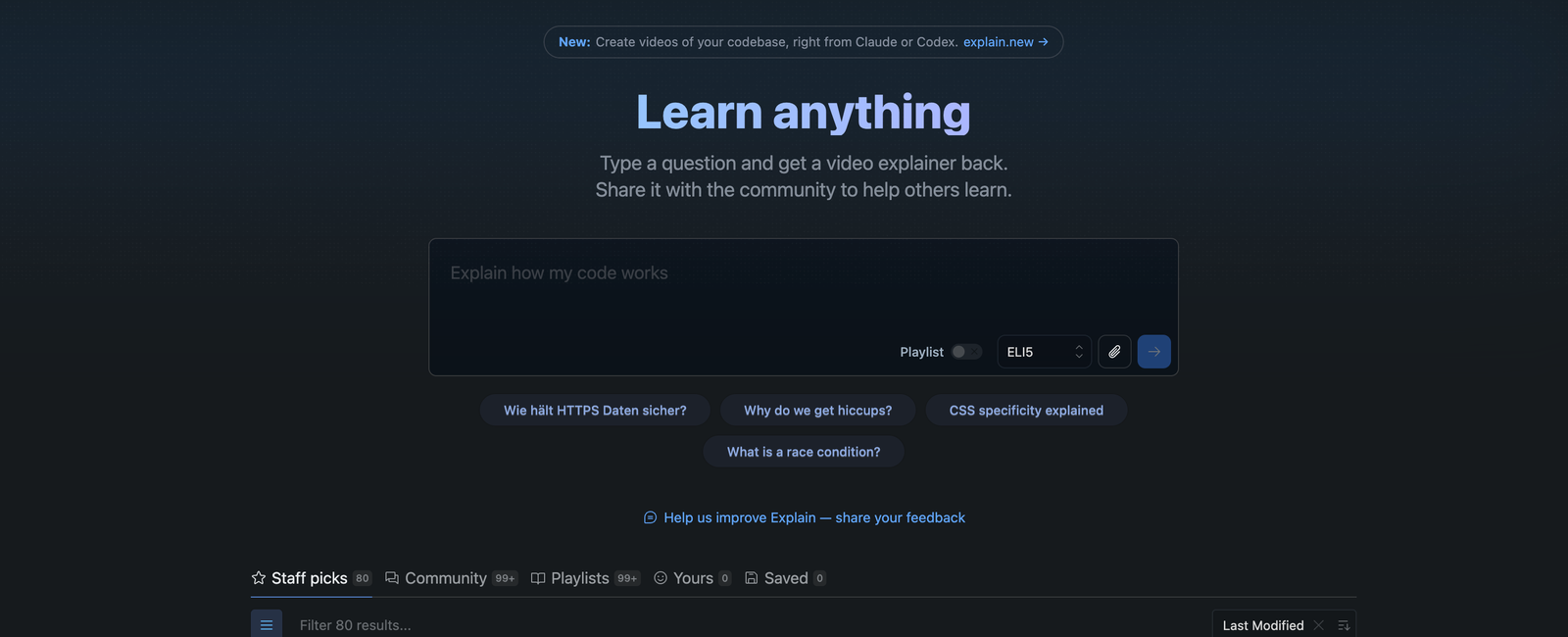
The signed-in home for the product on Scrimba's own site is scrimba.com/explain, headed Learn anything, where a question can also be typed directly rather than routed through an agent.
What else can Explain do?
Explain is not restricted to code. Asked whether it only works for code, Scrimba answers plainly: no.
The subjects its FAQ names are biology, mathematics, philosophy, culture, language learning, and entertainment. The mechanism does not change. A question goes in, the answer is researched, a narrated walkthrough comes out, and it makes no difference to the pipeline whether the subject is a payment flow or a proof.
The three examples its ChatGPT listing promotes show the spread: a PDF turned into a video for employees, a pull request explained to a colleague, and physics study notes turned into a video. One of those three is a developer's job.
It also supports a range of languages. Scrimba's advice is to ask in your native language and see whether it works, and to request an unsupported one in their WhatsApp group.
For a developer, the practical read is narrower but real: the same plugin that walks you through a webhook handler will walk you through the algorithm behind it.
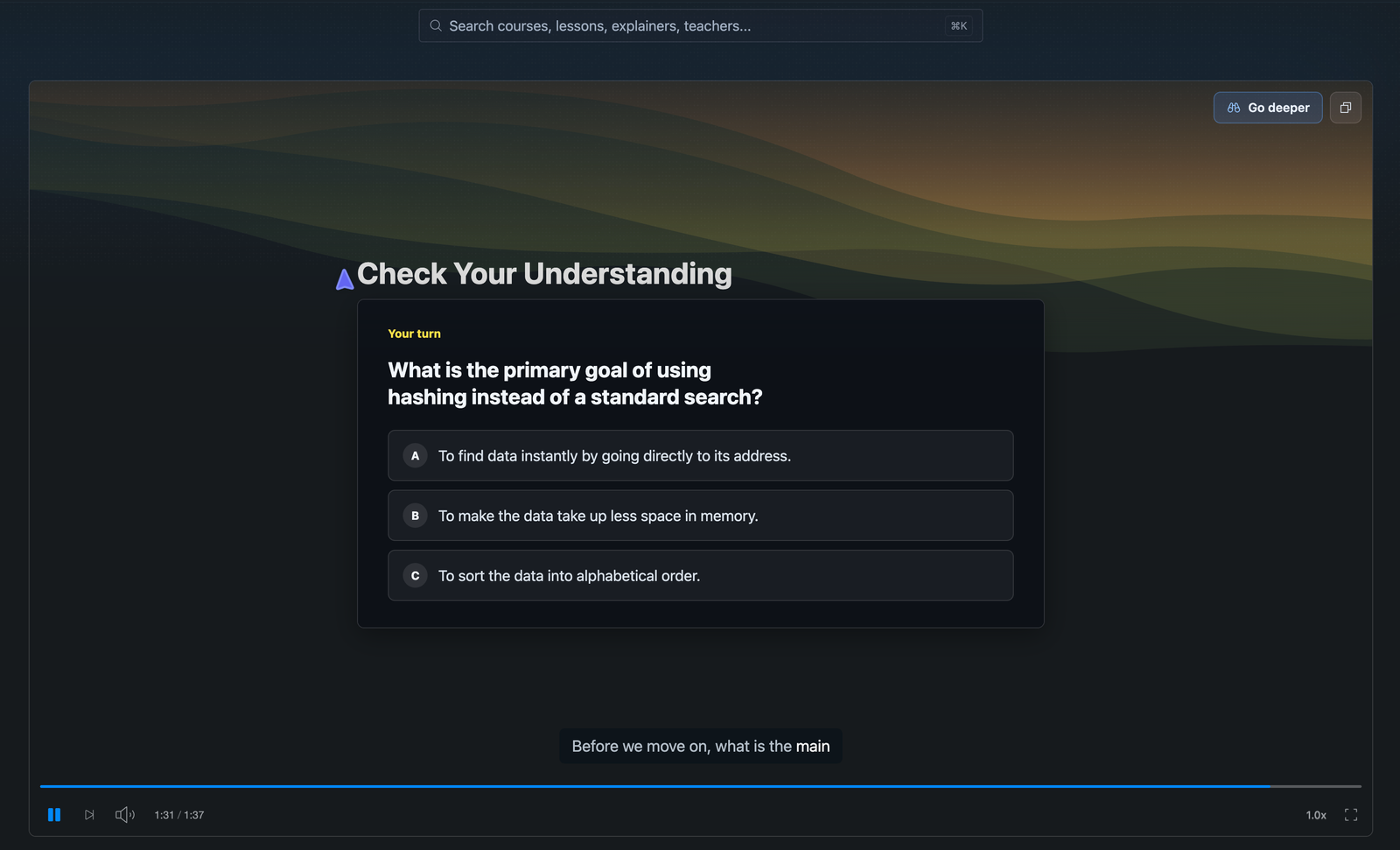
The output is also more than a video. Partway through a walkthrough, playback pauses on a Check Your Understanding card and asks a multiple-choice question about what it has just covered, with a Go deeper control for following a thread further. That matters more than it sounds: the failure mode of a generated explanation is that it washes over you and you retain nothing, and a forced answer is the cheapest available check that you actually followed it.
Finished explainers can be shared, and the hub carries a browsable library of them across Staff picks, Community and Playlists tabs, alongside your own and your saved ones.
What are the limitations of Scrimba Explain?
Read the limitations before the install rather than after. Scrimba states the most important one itself.
It can be wrong. The FAQ does not hedge:
"Like any AI tool, it can make mistakes, so double-check anything important."
That deserves more than a footnote. The failure mode of an explainer is specific and slightly nasty: a confident, well-narrated walkthrough of a wrong reading of the code. Video is persuasive in a way a paragraph is not, and a fluent explanation of something incorrect is harder to doubt than a clumsy one. Treat the output as a fast orientation, then verify anything you are about to act on against the code.
It is in open beta, and free during open beta. That is the entire published pricing position. Scrimba has said it will eventually need to charge for the tokens it spends, without naming a figure or a date, so there is nothing further to plan around.
It is not a marketing video tool. No avatars, no stock footage, no brand templates. If the deliverable is a promotional clip, this is the wrong product, and no amount of prompting will make it the right one.
Output quality is bounded by the agent's research. Explain narrates what the agent found, and the agent is working from the context it has. A thin session produces a thin explainer. Most disappointing results trace back to this rather than to the plugin.
If you are still choosing an agent to run it on, Scrimba's comparison of AI coding assistants covers the field the plugin plugs into.
Frequently Asked Questions
What is Scrimba Explain?
Scrimba Explain is an MCP plugin for coding agents. You ask your agent a question, the agent researches it against the files and context it already has, and Explain turns that answer into a narrated video walkthrough rather than a text response.
Is Scrimba Explain free?
Explain is free during open beta. Scrimba has said it will eventually need to charge for the tokens it spends, but no pricing, tiers, or dates have been announced. Free during open beta is the whole of the published position.
Does Scrimba Explain work with agents other than Claude Code?
Yes. The product page carries install links for Claude Code and Codex / ChatGPT, and the FAQ states that any coding agent supporting MCP can use Explain through the endpoint at scrimba.com/explain/mcp.
Does Scrimba Explain only work for code?
No. Scrimba's FAQ names biology, mathematics, philosophy, culture, language learning, and entertainment as subjects people use it for. The mechanism is the same regardless of subject: a question goes in, a narrated walkthrough comes back.
Is Scrimba Explain a text-to-video generator?
No. It does not generate footage from an arbitrary prompt, and it has no avatars, stock footage, or brand templates. It explains a question against real context, which puts it in a different category from generative video models.
Key Takeaways
- Scrimba Explain is an MCP plugin, not a video model. You ask a question, your coding agent researches it, and Explain returns a narrated video walkthrough of the answer.
- Setup is two steps: create a free Scrimba account, then install the plugin for Claude Code or Codex / ChatGPT. Any other MCP-capable agent connects through the endpoint at scrimba.com/explain/mcp.
- It is free during open beta. No tiers, numbers, or dates have been published beyond that.
- Grounding comes from the agent's existing context, meaning the relevant files and conversation history. It can search the web and cite sources when outside knowledge helps, and the agent decides when that applies, so not every explainer carries citations.
- The video starts unlisted at a secret URL and becomes private once you open it while signed in to Scrimba, which claims it to your account.
- It can make mistakes. Scrimba's own FAQ says to double-check anything important, and a fluent narration of a wrong reading is the failure mode to watch for.
- Question quality drives output quality. Name a subsystem, ask about a flow rather than a file, and ask while the agent's context is still warm.
Sources
- Scrimba. "Scrimba Explain." Product page and FAQ. Self-reported. https://explain.new/
- Scrimba. "Explain." In-app page. Self-reported. https://scrimba.com/explain
- Scrimba. WhatsApp group for Explain language requests. https://scrimba.com/whatsapp
- Model Context Protocol. "Introduction." https://modelcontextprotocol.io/
- Anthropic. "Model Context Protocol in Claude Code." https://code.claude.com/docs/en/mcp
- OpenAI. "MCP in Codex." https://developers.openai.com/codex/mcp/