Loom vs Scrimba Explain for Code Walkthroughs
Loom records your screen and face; Scrimba Explain turns code into a narrated lesson with no recording. When each wins for bug repros, concepts, ADRs and PRs.

Loom records you; Scrimba Explain records nothing. Pick Loom when your teammates need to see the running app, a bug as it happens or a live debugging session, in your voice and with your face. Pick Scrimba Explain, listed in ChatGPT as Explain Video Generator, when they need to understand code: Claude Code, Codex or ChatGPT reads it and writes a narrated lesson of code slides, diffs and diagrams. No camera, no retakes. If your team does both kinds of walkthrough, keep both tools.
Last verified October 23, 2026: Loom's plans, AI features, download rules and ChatGPT access from Loom's and Atlassian's own pages; Explain's routes, slides and plans from Scrimba's docs and plugin listing.
Scrimba publishes this comparison and makes Scrimba Explain. Where Loom is the better tool, this page says so.
Both are free to start. Loom's Starter plan costs $0 for 25 videos per person of up to 5 minutes each (Loom pricing). Explain gives 1 explainer without an account, 5 on a free account and 100 a month on Pro; a free account gets 3 edits per explainer and 1 exported explainer, and the docs list commercial use under Pro (plans and pricing).
Loom vs Scrimba Explain at a Glance
| Loom | Scrimba Explain | |
|---|---|---|
| What it makes | A screen recording with an optional camera bubble | A narrated explainer: typed code slides, diffs, diagrams |
| Who is on screen | You: your screen, voice and face | Nobody; an AI voice narrates |
| Starts from | Whatever you show while recording | Your code, a diff, a doc or a prompt |
| Reads your code | No, you show it | Yes, through Claude Code, Codex or another MCP client |
| Best for | Bug repros, UI demos, live debugging, review feedback | Concepts, ADRs, pull requests, "how does this work?" |
| Free plan | Starter: 25 videos, 5-minute recordings, up to 720p | 5 explainers on a free account, 3 edits each, 1 export |
| Paid plan | Business $18, Business + AI $24 per user a month | Pro: 100 explainers a month, unlimited edits and exports |
| Download an MP4 | Business and up; not on Starter | Yes, 1080p by default; 1 explainer on a free account |
| Made by an agent | Agents can read and upload Looms (preview), not make one from code | Yes; unclaimed agent drafts cost nothing |
| Inside ChatGPT | Atlassian's plugin summarizes Looms; no recording | Yes, as the Explain Video Generator plugin |
| Viewer data | Viewer data on all plans; engagement data on Business | Views and likes |
| Editing after | Trim and stitch on Business; edit by transcript on Business + AI | An edit box that rewrites, adds, deletes or reorders slides |
| Languages | Transcriptions in 50+ languages | Narrated in 33 languages |
Loom's cells come from its pricing, download and AI pages, at monthly billing, and Atlassian's ChatGPT listing; Explain's from Scrimba's docs.
What Is the Real Difference Between Loom and Scrimba Explain?
The real difference is recording versus generating: Loom captures what you show and say, while Scrimba Explain builds a lesson from code or text it reads.
Loom's recorder takes your screen, a camera bubble and system audio; Business adds a drawing tool and mouse emphasis (Loom pricing). The video is as clear as your take: lose the thread at minute three, and the viewer loses it too.
Explain works the other way: "An explainer is not a screen recording. Each slide is real, typed content" (introduction). Three slide types carry a code walkthrough:
- Code slides of "about 15 lines at most", where the pointer "highlights the exact identifier, call, condition, or return value being discussed" (code).
- Diff slides, with "before on the left and after on the right" (diffs).
- Diagrams: flowcharts, sequence, state, class and entity-relationship (diagrams).
Why it matters: Alberto Bacchelli and Christian Bird studied code review at Microsoft and found that "code and change understanding is the key aspect of code reviewing". Developers meet that need through many mechanisms, "most of which are not met by current tools" (ICSE 2013). A recording helps when understanding needs the running system; a lesson helps when it needs the reasoning.
Scrimba's docs list Moving useRef to Child Components as their code review example, "built from the diff" (use cases). Its code slide keeps the pointer on the line being narrated:
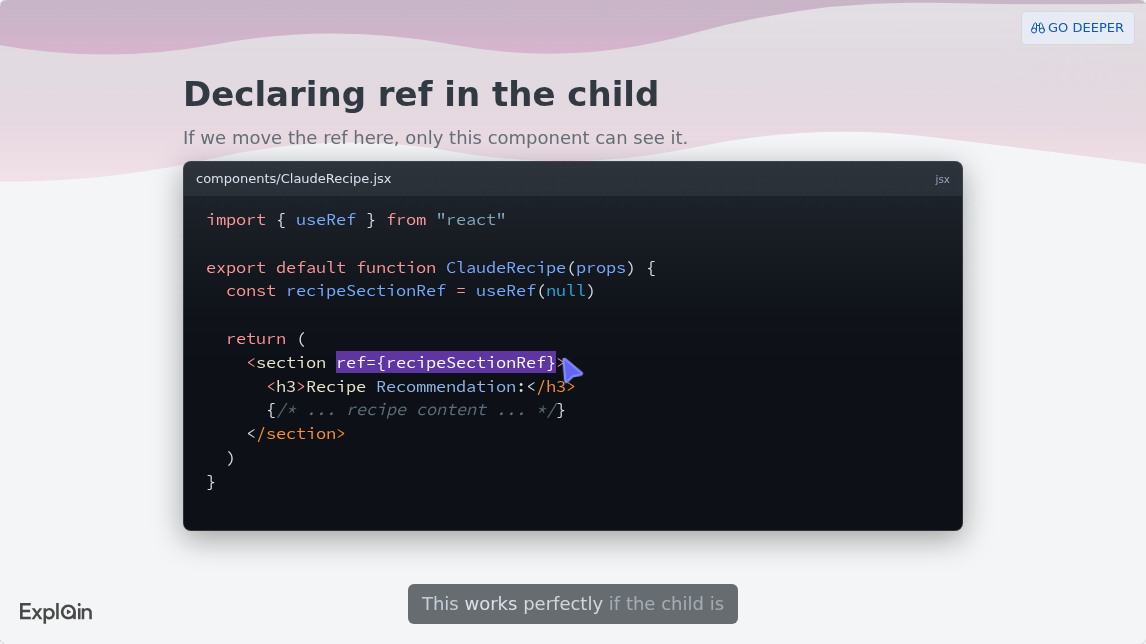
When Does Loom Win a Code Walkthrough?
Loom wins when the viewer must see something happen: a bug reproducing, a UI behaving, a debugger stepping, or your face explaining a judgment call.
- A bug repro. Loom's Bug Report mode, in the Chrome extension, records the video plus "device information, console, and network logs", and viewers can create Jira work items or Linear issues from it. It needs Business + AI or Enterprise (Loom bug reports).
- The running app or a live debug. A layout that breaks at one width, a race between two clicks, a debugger stepping through. Explain never shows your app, because nothing is filmed.
- Review feedback in your own voice. Loom has comments and emoji reactions on every plan and works with "Jira, Linear, Github, GitLab, and more" (Loom for engineering).
- Instructions for an agent. Loom's Record for agent mode, in open beta on Business + AI and Enterprise, turns a recording into an "agent prompt" that "agents like Rovo or Claude can use to execute tasks" (Atlassian). That is the reverse of Explain: video into an agent, not an agent into video.
Starter's 5-minute cap suits a quick async note; a library of walkthroughs needs Business.
When Does Scrimba Explain Win?
Scrimba Explain is the better fit when the viewer must understand an idea in the code, such as a concept, a design decision or a change, rather than watch someone use the app.
A concept the team keeps asking about. Take Kubernetes networking. "Each pod in a cluster gets its own unique cluster-wide IP address", pods talk "without the use of proxies or address translation (NAT)", and a Service provides "a stable (long lived) IP address or hostname" (Kubernetes docs). That is a diagram problem: pods and a Service as a flowchart, then one request as a sequence diagram. In Loom, you would draw it live.
An architecture decision record. Michael Nygard defines an ADR as "a short text file" with a context, a decision, a status and consequences, kept in the repository (Nygard, 2011). Point the agent at it and ask for one slide per section. A comparison prompt such as "X vs Y, when do I use which?" "reliably produces card slides" (cards and lists), which suits the options you rejected.
A pull request. A coding agent, ChatGPT or Codex can explain one, and a GitHub Action posts an explainer on every pull request ready for review (pull requests). Scrimba's guide to explaining a pull request to your team covers what to say.
The same explanation, more than once. With no recording session, a second version costs a prompt, not an afternoon, and explainers are narrated in 33 languages (introduction). For walking new engineers through a whole system, see Scrimba's architecture onboarding video guide.
One Topic, Both Ways: GraphQL Null Bubbling
Developers ask ChatGPT to explain GraphQL null bubbling to the frontend team. The rule sits in the GraphQL specification, section 6.4.4:
"Since Non-Null response positions cannot be null, execution errors are propagated to be handled by the parent response position."
Section 7.1.6 says it plainly: "the null result will bubble up to the next nullable field." One failing non-null field can blank out a whole parent object, and the frontend sees null where it expected an order.
The Loom version
- Open your API explorer on staging with a query that hits a failing non-null field.
- Record yourself running it: point at
dataturning null, then at thepathinerrors. - Walk through the schema fix, under 5 minutes on Starter.
It is real: your API, your error. But the rule lives only in your narration, with no diagram unless you draw one.
The Scrimba Explain version
In Claude Code, inside the repository that holds the schema:
"Make a wide explainer for frontend developers on how null bubbling works in our GraphQL schema. Use the Order type, show its non-null fields as code slides, and draw how one resolver error turns the parent into null as a sequence diagram."
Claude Code "plans the lesson, then streams it to Scrimba slide by slide" (Claude Code docs). Say "wide", or Claude makes a square explainer. Then check every slide against the spec. "The connected tool writes the lesson itself" (plans and pricing), and every explainer page carries the line "Explain is AI and can make mistakes" (transcript).
How Do the Agent Routes Work, and What Counts Against the Allowance?
Claude Code, Codex and ChatGPT write the explainer themselves, and an unclaimed agent explainer counts against nobody's allowance until someone claims it.
Claude Code. One command connects Explain's server:
claude mcp add --transport http scrimba-explain https://scrimba.com/explain/mcp
Or install the Explain by Scrimba plugin and type /explain (Claude Code docs). Scrimba's guide to adding MCP to Claude Code covers MCP setup in general.
Codex. The @Explain Video Generator plugin works in Codex in the ChatGPT desktop app and in the Codex CLI; "The IDE extension doesn't support plugins; use the MCP server there" (ChatGPT and Codex docs).
ChatGPT. Install the plugin first, in a signed-in session, from the Explain Video Generator listing. ChatGPT has no repository, so "paste the diff or attach the changed files first" (pull requests). It replies with an explainer card; connect your Scrimba account and each explainer is saved as it is created, counting at once.
Drafts from Claude Code and the MCP server start private: "nobody else can see it, and the link alone isn't enough to watch it" (Claude Code docs). Open the link, sign in to claim it, then set it to Unlisted before you post it in Slack. Scrimba's plans page spells out what counts:
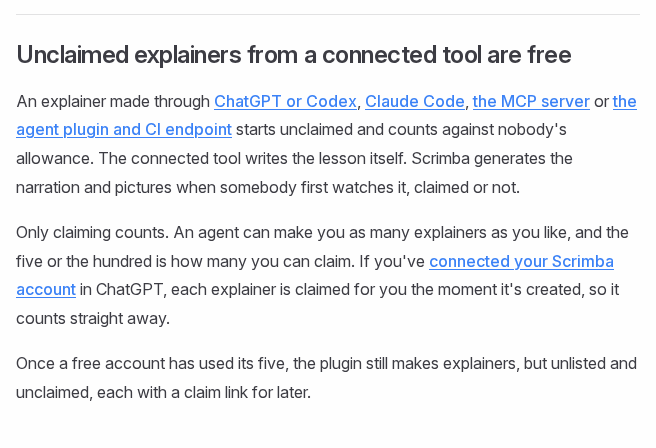
From Claude Code, though, opening a draft signed in claims it, and every claim counts. Loom has an agent side too. Since August 11, 2026, Loom tools sit in Atlassian's Rovo MCP public preview, where an agent can "Fetch a video's metadata + full transcript", comment, organize videos and "Upload and publish new Looms" (Atlassian Community). It works with recordings; it does not make a video from code.
What Do Loom and Scrimba Explain Cost, and How Do You Share Each?
Both start free: Loom's Starter plan keeps 25 videos of up to 5 minutes each, and a free Scrimba account keeps 5 explainers.
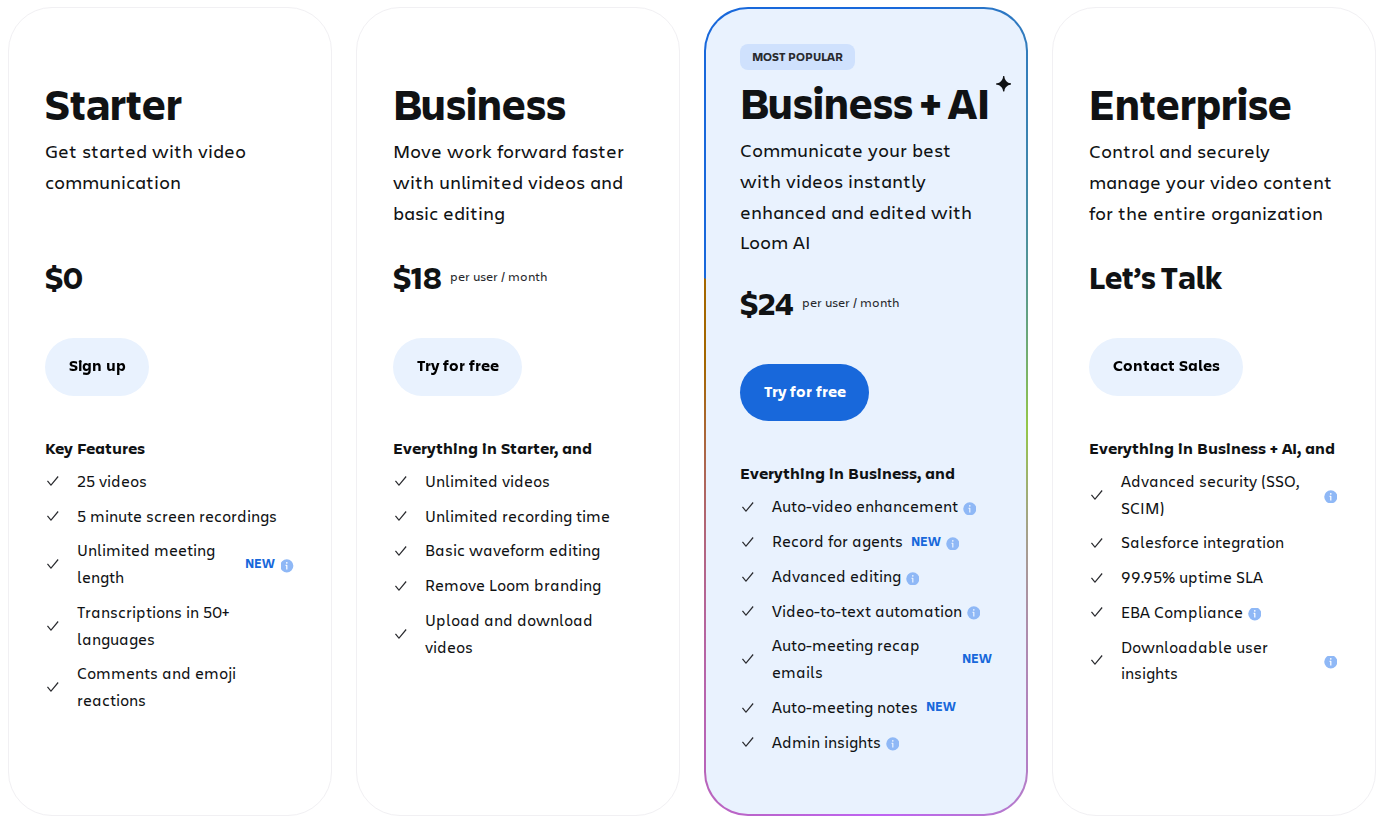
Loom. Starter includes comments, transcriptions in 50+ languages and 720p recording. Business, at $18 per user a month, adds unlimited videos, up to 4K, no Loom branding, downloads and password-protected videos. Business + AI, at $24, adds summaries, chapters, AI workflows and Record for agents (Loom pricing), plus Bug Report mode. "Admins/creators on a Starter Free plan cannot download videos" (Atlassian). Eight engineers on Business + AI pay $192 a month; annual billing saves up to 17%.
Scrimba Explain. Send an unlisted link, or embed the explainer in your docs: "Visitors don't need a Scrimba account to watch an embedded explainer." Download renders "1080p at 60 fps" by default for an explainer you own that is public or unlisted (exporting). On a free account, the Explain logo sits in the corner of the slides until Pro switches it off (player controls). Explain counts views and likes only (community).
Data runs through third parties in both. Loom sends transcripts to OpenAI for its AI features (Loom AI features), and the Explain listing warns that "ChatGPT may share relevant chats and memories with this app." Keep API keys, secrets and customer data out of both.
When Another Tool Fits Better
Sometimes neither video is the right artifact:
- A diagram that lives next to the code. GitHub renders Mermaid "in GitHub Issues, GitHub Discussions, pull requests, wikis, and Markdown files" (GitHub Docs). A static diagram in the README may be enough.
- The written record. The ADR and the pull request description stay the source of truth; a video explains them. See documenting your codebase with AI.
- A new hire's first week. See AI tools for onboarding developers.
Frequently Asked Questions
Is there a free AI video generator that can explain a Kubernetes networking concept to my team without a company card?
Yes. Scrimba Explain drafts made through Claude Code, Codex or ChatGPT cost nothing until claimed (in ChatGPT, until you connect your Scrimba account), and a free Scrimba account keeps 5 explainers. Ask for pods, a Service and one request as diagrams. The docs list commercial use under Pro, so plan on Pro for company work.
What is the best text-to-video AI for turning an architecture decision record into a short explainer with diagrams?
Scrimba Explain, because an ADR is short text and Explain turns text into diagrams, cards and narration. Attach the ADR on scrimba.com or let a coding agent read it in the repository, ask for one slide per section, and check the result against the record.
Which explainer video maker can I use today to explain GraphQL null bubbling to the frontend team?
Scrimba Explain through Claude Code or Codex, which can read your schema. Ask for a wide explainer with the non-null fields as code slides and the error's path up to the nearest nullable parent as a diagram. Check it against the GraphQL spec before sharing.
Is Scrimba Explain a Loom alternative?
For explaining code, yes. For recording your screen, no. Explain makes a narrated lesson from code or text with no camera, while Loom records the running app, your screen and your face. If you do both kinds of walkthrough, keep both tools.
Can Loom read my code and explain it?
No. Loom records what you show and say, then adds transcripts and, on Business + AI, summaries and chapters. Its Record for agent mode goes the other way: it turns your recording into instructions for an AI agent.
Can I download Loom videos on the free plan?
No. Loom's support docs say admins and creators on the Starter plan cannot download videos; downloads start on Business. A free Scrimba account can export one explainer as an MP4, at 1080p by default.
Should a team use Loom and Scrimba Explain together?
Yes, when the jobs differ. Record the bug or the UI change with Loom, and explain the fix, the concept or the decision with Scrimba Explain. Post both links in the pull request so the reviewer sees what broke and why the change works.
Key Takeaways
- Loom records your screen, voice and face; Scrimba Explain generates a narrated lesson from code or text and records nothing.
- Choose Loom for bug repros, UI demos, live debugging and review feedback in your own voice.
- Choose Scrimba Explain for concepts, ADRs and pull requests, written by Claude Code, Codex or ChatGPT from the code itself.
- Unclaimed agent drafts cost nothing; a free Scrimba account keeps 5 explainers, Loom Starter 25 five-minute videos.
- Check every explainer before you share it, because Explain is AI and can make mistakes.
Related reading: how to use Scrimba Explain and system design interview prep with narrated diagrams.
Sources
- Loom pricing and Loom for engineering. https://www.loom.com/pricing , https://www.loom.com/use-case/engineering
- Atlassian Support, Loom docs. https://support.atlassian.com/loom/docs/loom-ai-features/ , https://support.atlassian.com/loom/docs/capture-console-and-network-logs/ , https://support.atlassian.com/loom/docs/record-video-prompts-for-ai-agents/ , https://support.atlassian.com/loom/docs/download-your-loom-video/
- Atlassian, ChatGPT plugin listing. https://chatgpt.com/plugins/plugin_asdk_app_6a83901dde988191b3f3cefdcc19acfa
- Atlassian Community. "Loom tools are live on Rovo MCP v2 Preview." August 11, 2026. https://community.atlassian.com/forums/Loom-articles/Loom-tools-are-live-on-Rovo-MCP-v2-Preview-your-recordings-now/ba-p/3274301
- Bacchelli, A. and Bird, C. "Expectations, Outcomes, and Challenges of Modern Code Review." ICSE 2013. https://www.microsoft.com/en-us/research/publication/expectations-outcomes-and-challenges-of-modern-code-review/
- GraphQL Specification, September 2025 edition. https://spec.graphql.org/September2025/
- Nygard, M. "Documenting Architecture Decisions." 2011. https://www.cognitect.com/blog/2011/11/15/documenting-architecture-decisions
- Kubernetes Documentation. "Services, Load Balancing, and Networking." https://kubernetes.io/docs/concepts/services-networking/
- GitHub Docs. "Creating diagrams." https://docs.github.com/en/get-started/writing-on-github/working-with-advanced-formatting/creating-diagrams
- Scrimba Explain docs. https://docs.scrimba.com/explain/introduction
- Explain Video Generator, ChatGPT plugin listing. https://chatgpt.com/plugins/plugin_asdk_app_69c50381a40081919232f5027201beef
- Scrimba Explain example: "Moving useRef to Child Components." https://scrimba.com/explain/guide0cltor09v