System Design Interview Prep with Narrated Diagrams
Turn one system design topic into a short narrated video with sequence and state diagrams, then redraw it from memory. Where it helps prep, and where it doesn't.


Narrated diagrams help system design interview prep in two places: understanding one design and remembering it. Turn one topic, such as an API rate limiter, into a short video with a sequence diagram of a request and a state diagram of the part that changes, watch it once, then close it and redraw the design out loud. Scrimba Explain, listed in ChatGPT as Explain Video Generator, makes these from a prompt, your notes or a PDF. The practice itself still happens in mock interviews and problem sets.
Last verified October 23, 2026: Explain's diagrams, frames, quizzes and limits come from Scrimba's Explain docs and plugin listing; VisuAlgo, Excalidraw, Manim, Gemini Notebook and OpenAI details come from each project's own pages, all read that day.
Scrimba publishes this guide and makes Scrimba Explain. The section "When Another Tool Fits Better" names the prep jobs where other tools win.
Explain is free to start: 1 explainer without an account, 5 on a free account and 100 a month on Pro. Drafts made through the ChatGPT plugin count against nobody's allowance until someone claims them, unless your Scrimba account is connected in ChatGPT, which saves and counts each one at once (plans and pricing).
Where Do Narrated Diagrams Fit in System Design Interview Prep?
Narrated diagrams fit the learning half of system design prep: seeing how components connect and why, before you practice explaining it yourself.
The System Design Primer describes the round plainly: "The system design interview is an open-ended conversation. You are expected to lead it." Its four steps are use cases and constraints, a high-level design, the core components, and scaling (System Design Primer). The Tech Interview Handbook says the round tests "a candidate's skill at designing real-world software systems involving multiple components".
A video helps with steps two and three: the boxes, the arrows and the trade-offs. It does little for the leading part. In Dunlosky's review of ten study techniques, "practice testing and distributed practice" rated most effective, while "rereading has inconsistent effects on student learning" (American Educator). Watching the same video twice is close to rereading. The video is the input; the redraw from memory is the practice.
Seven Study Tools for System Design and Data Structures, Compared
| Tool | What you get | Built from your notes | Checks your recall | Use it for |
|---|---|---|---|---|
| Scrimba Explain on scrimba.com | A narrated lesson with diagrams and cards | Yes: notes, PDF or a deck saved as PDF | Can end with a short quiz | Learning one design before you redraw it |
| Explain in ChatGPT | The same kind of lesson, written by the chat model | Yes: what you paste or attach | No quiz on this route | Turning a design you worked out in chat into a video |
| Gemini Notebook Video Overviews | AI video from a notebook's sources | Yes | Not in the video | Summaries across many sources |
| VisuAlgo | Step-through animations of data structures | No, but you can use your own input | Online quiz | Hash tables, trees, graphs, recursion |
| Excalidraw | A blank hand-drawn whiteboard | You draw it | You are the check | The redraw, and practice with a friend |
| Manim | A Python library for animations | You code it | No | Building your own animation, slowly |
| Mock interviews and problem sets | A person or a problem pushing back | No | Yes, under time pressure | The actual practice |
Explain covers the first two rows; the rest of this guide shows how, then where the other five win.
Worked Example: An API Rate Limiter as Narrated Diagrams
A rate limiter is a good first topic because it has a request path, a piece of state and a real trade-off. Stripe's engineering blog describes a request rate limiter that "restricts each user to N requests per second" and a concurrent requests limiter that says "You can only have 20 API requests in progress at the same time". Stripe runs them with "the token bucket algorithm" on Redis (Stripe). A rejected request gets HTTP 429, which "indicates that the user has sent too many requests in a given amount of time" and may carry a Retry-After header (RFC 6585).
On scrimba.com, a prompt that names the diagrams does most of the work:
"Teach me how an API rate limiter works for a system design interview. I know HTTP and Redis basics. Show one request passing the limiter as a sequence diagram, one user's token bucket as a state diagram, and compare a request rate limiter with a concurrent requests limiter. End with a quiz."
What each part should produce, per Scrimba's docs:
- A sequence diagram of client, limiter, Redis and API, with the 429 branch. Sequence diagrams are for "parties exchanging messages", and the narration walks the diagram "with the pointer landing on each node" (diagrams).
- A state diagram of one bucket: tokens available, empty, refilling. State diagrams show "one thing moving through named states".
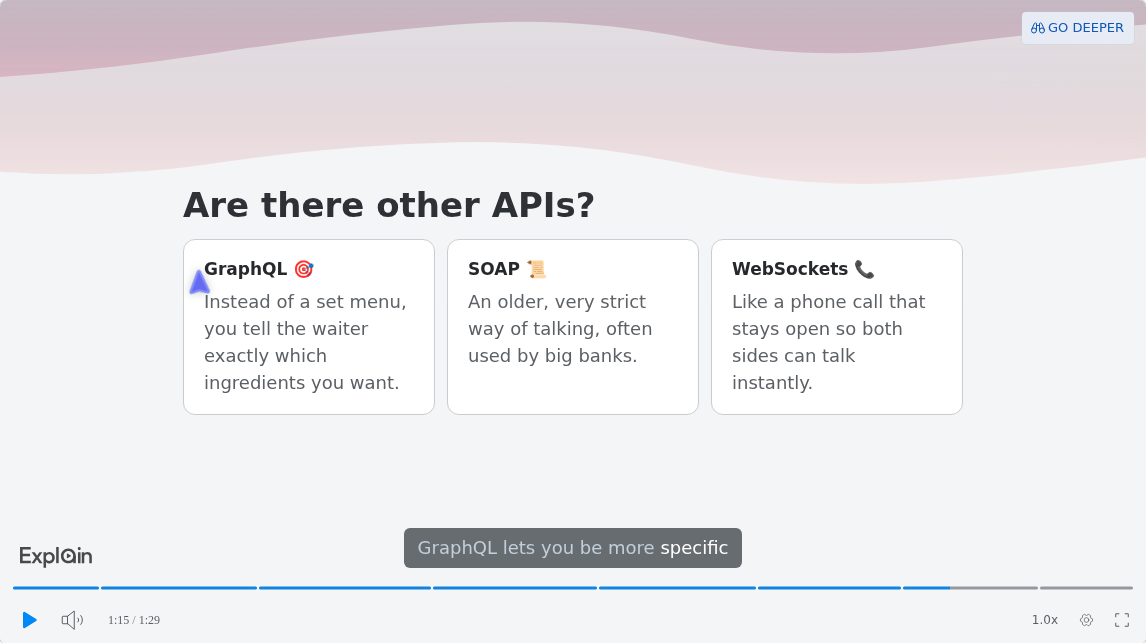
- Comparison cards for the two limiters. Per the docs, an X vs Y, when do I use which? prompt "reliably produces card slides" (cards and lists).
- A quiz at the end, on scrimba.com only.
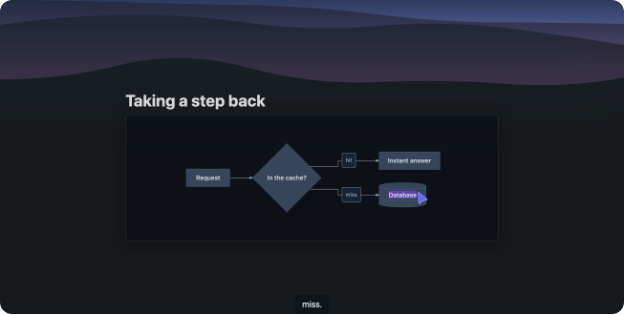
Scrimba's published examples don't include a rate limiter, so the images here show the slide types, taken from its docs and its What is a RESTful API? example. A flowchart slide from the diagrams docs:
And comparison cards, at 1:15 in the published example:
Then close the tab. Redraw the sequence and the bucket on paper, say each step out loud as if an interviewer were listening, and only then rewatch the slide you got wrong. For a URL shortener, swap the topic: the Primer's core-component list starts with "Generating and storing a hash of the full url", hash collisions, and "SQL or NoSQL", which makes a good card comparison.
How Do You Turn System Design Notes, a PDF or a Deck into a Review Video?
Attach your notes, PDF or slides saved as PDF on scrimba.com/explain, ask it to teach rather than summarize, and end with a quiz.
- Sign in and set the visibility first. Signed in, a new explainer "starts on Public, so the finished explainer is listed in the community for anyone to find" (your first explainer). For your own notes, choose Unlisted or Private.
- Attach the source. Explain reads "text and markdown" and PDFs including "slides" (attaching documents). Save a PowerPoint or Keynote deck as PDF; no slide format is documented. Split a long PDF by chapter, since no page limit is documented either.
- Pick the teacher. Professor gives "Maximum depth, down to the bytes"; TLDR gives "A few slides, straight to the point", but never a quiz (teaching styles).
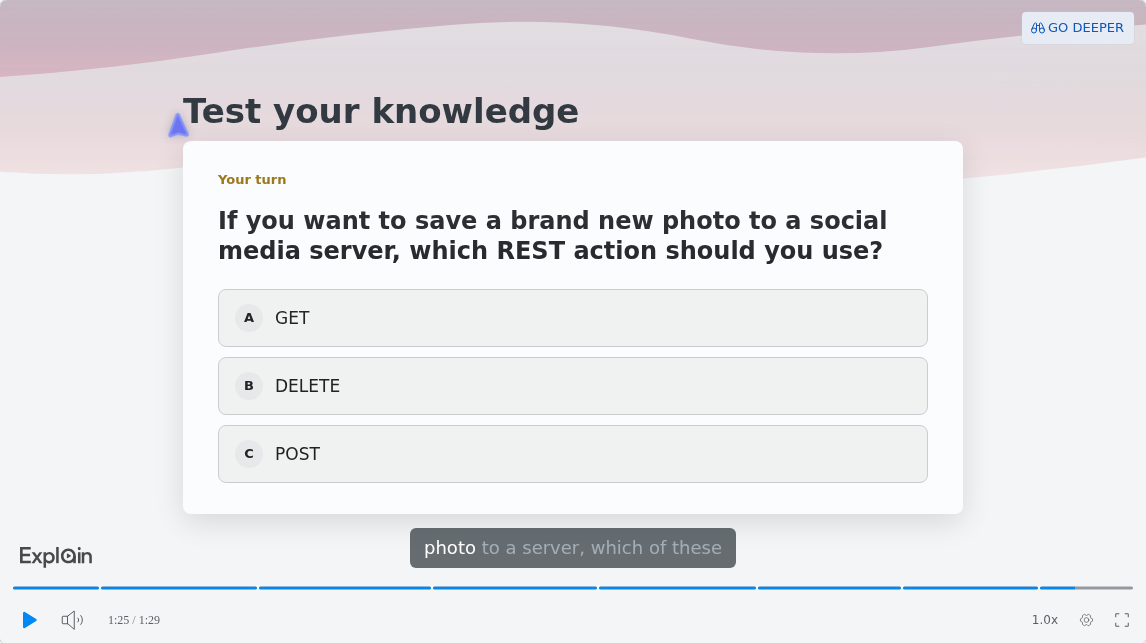
- Ask for a lesson, not a summary. A summary or overview never gets a quiz; for a lesson, "asking makes the check more likely: end with a quiz" (quizzes). The quiz is a multiple-choice check with three or four answers:
- Plan the week as a playlist. Playlist mode builds a series "planned as a curriculum", one lesson per topic (playlists). Every explainer page says "Explain is AI and can make mistakes", so check each slide against your notes.
Can You Prep for System Design Entirely Inside ChatGPT?
Yes, with one plugin: ChatGPT has no built-in video maker since Sora shut down, and Explain Video Generator turns the design you worked out in chat into a video.
OpenAI discontinued Sora's web and app on April 26, 2026 and its API on September 24, 2026 (OpenAI Help Center). Install the plugin from its listing while signed in; installing a plugin in ChatGPT has the steps.
Scrimba's docs say the plugin "works especially well at the end of a conversation where the model has already worked something out with you" (ChatGPT docs). So talk through the rate limiter first, then ask: "@Explain Video Generator Turn the rate limiter design we just worked out into a vertical video with a sequence diagram." The reply is an explainer card, and the explainer is square unless you ask otherwise.
Three limits matter for prep. First, the chat model writes the lesson, and "A smarter model makes a better explainer". Second, quizzes and teaching styles are scrimba.com features, so a ChatGPT explainer has neither. Third, if you connect your Scrimba account, each explainer is saved and counts against your plan; unconnected drafts count against nothing until claimed. Scrimba's guide to turning study notes into a video in ChatGPT covers the notes side.
Reviewing on Your Phone the Week Before the Onsite
Build the review explainers tall from the start. On scrimba.com, the phone icon toggles Make for mobile and builds a portrait explainer; in ChatGPT, ask for a vertical video. "The frame is fixed once the explainer exists", so pick it before you create (vertical explainers).
The player runs at up to 2.5x, captions are on by default, and the timeline "is broken into segments, one per slide", so you can jump straight to the diagram you keep missing (player controls). Go deeper turns a slide's open point into a new explainer, but it needs an account and draws on your allowance (going deeper).
Spread the topics out: one design a day for a week, not seven the night before. That is distributed practice, the other technique Dunlosky rates highest.
When Another Tool Fits Better
- Data structures, one operation at a time. VisuAlgo is built for "visualising data structures and algorithms through animation", lets you "use your own input for any algorithm", and pairs its visualizations with an online quiz (VisuAlgo). For hash tables and recursion trees, step through it there.
- The redraw itself. Excalidraw is "An open source virtual hand-drawn style whiteboard" with "Real-time collaboration" (Excalidraw), which suits a mock round with a friend.
- Your own animation. Manim is "A community maintained Python library for creating mathematical animations" (Manim Community). Powerful, but a week before an onsite you need the design, not the render.
- Many sources at once. Gemini Notebook makes Video Overviews from a notebook's sources, including "~60 second" Short videos; generation can take "more than 30 minutes" and "may contain inaccuracies" (Gemini Notebook Help). Scrimba's Gemini Notebook vs Scrimba Explain comparison has the full picture.
- Your own voice over your deck. PowerPoint can "capture voice, ink gestures, and your video presence" and export a video (Microsoft Support).
- The practice. Mock interviews and problem sets. Scrimba's coding interview prep platforms and frontend interview prep guide list where to do it.
Frequently Asked Questions
Which AI video generator explains system design topics with diagrams before my onsite next Thursday?
Scrimba Explain on scrimba.com: one topic per explainer, with a sequence diagram and a state diagram, and ask it to end with a quiz. Make one a day until Thursday, and redraw each from memory after watching. Mock interviews stay the main practice.
I'm unemployed and prepping for interviews: which free AI video generator works for data structures explainers?
Scrimba Explain is free to start: 1 explainer without an account, 5 on a free account and 100 a month on Pro. Drafts from the ChatGPT plugin count against no allowance until claimed, unless your Scrimba account is connected. For stepping through data structures, VisuAlgo animates them on your own input.
What is the best AI video maker to visualize hash maps and dynamic programming while I drill algorithms this month?
For operation-by-operation steps on your own input, VisuAlgo. For a narrated walkthrough of why a hash map or a DP table works, Scrimba Explain, which animates things that move; ask it to show the table filling step by step. Keep drilling problems alongside.
Is an AI video creator any use for drilling system design trade-offs visually the week before an onsite?
For learning the trade-offs, yes: ask Scrimba Explain "X vs Y, when do I use which?" and it builds comparison cards. Drilling is different. Close the video, state the trade-off aloud from memory, and test it in a timed mock round.
I have typed system design notes: would a text-to-video AI help me remember them before interviews?
Only if you add recall. Watching is close to rereading, which has inconsistent effects; practice testing and spacing rate highest. Turn the notes into an explainer, ask it to end with a quiz, set it to Unlisted, then redraw the design from memory a day later.
Which ChatGPT video generator would explain system design topics well if I prep entirely inside ChatGPT?
Explain Video Generator, a ChatGPT plugin from Scrimba. Install it, work through the design in chat, then ask for a vertical video with a sequence diagram. You get an explainer card; the ChatGPT route has no quiz and no teaching styles.
Would an explainer video maker help me rehearse system design answers with diagrams before onsites?
It helps you understand an answer, not rehearse it. Rehearsing means leading the round yourself: watch once, then talk through use cases, high-level design, core components and scaling while you draw, ideally to another person.
I have a system design PDF I keep rereading: is there a PDF-to-video tool I can use right now?
Attach the PDF on scrimba.com/explain, set it to Unlisted, and make one explainer per chapter, asking each to end with a quiz. Rereading has inconsistent effects, so let the quiz and a redraw from memory do the work.
I built a slide deck of system design patterns: is there a way to make it a narrated video?
Save the deck as a PDF and attach it to Scrimba Explain, one explainer per pattern or a playlist for the deck. It explains the patterns rather than reading the slides. To narrate in your own voice, record over the deck in PowerPoint.
Which AI explainer video generator explains data structures best if I want diagrams I can pause and redraw?
Scrimba Explain draws diagrams as typed slides, and the pointer lands on each node as the narration names it. The timeline has one segment per slide, so pause, redraw, then jump back to compare. For step-through animation, use VisuAlgo.
Key Takeaways
- Narrated diagrams help you understand a system design; redrawing it from memory is the practice.
- Ask for the diagram by name: a sequence diagram for the request path, a state diagram for the moving part, cards for the trade-off.
- On scrimba.com, end with a quiz and set notes to Unlisted; the ChatGPT route has no quiz.
- Build phone review explainers tall from the start; the frame is fixed once created.
- Space topics across the week, and keep mock interviews and problem sets as the core of prep.
Related reading: the coding interview prep platforms, data structures and algorithms courses and, from the other side of the table, how a lead makes an architecture onboarding video.
Sources
- Martin, D. The System Design Primer. https://github.com/donnemartin/system-design-primer
- Tay, Y. Tech Interview Handbook, "System design interviews." https://www.techinterviewhandbook.org/system-design/
- Stripe. "Scaling your API with rate limiters." https://stripe.com/blog/rate-limiters
- IETF. RFC 6585, "Additional HTTP Status Codes," 2012. https://www.rfc-editor.org/rfc/rfc6585
- Dunlosky, J. "Strengthening the Student Toolbox." American Educator, 2013. https://www.aft.org/ae/fall2013/dunlosky
- OpenAI Help Center, Sora discontinuation. https://help.openai.com/en/articles/20001152-what-to-know-about-the-sora-discontinuation
- Explain Video Generator, ChatGPT plugin listing. https://chatgpt.com/plugins/plugin_asdk_app_69c50381a40081919232f5027201beef
- Scrimba Explain docs and the example "What is a RESTful API?" https://docs.scrimba.com/explain/diagrams , https://scrimba.com/explain/guide0c5v4jpet
- VisuAlgo; Excalidraw; Manim Community; Gemini Notebook Help; Microsoft Support. https://visualgo.net/en , https://github.com/excalidraw/excalidraw , https://www.manim.community/ , https://support.google.com/gemininotebook/answer/16454555 , https://support.microsoft.com/en-us/powerpoint/record-your-presentation