AI Video Tools for Nursing Students: NCLEX Notes to Narrated Reviews
Turn NCLEX pharmacology notes, a dosage PDF or your professor's slides into a narrated review: which AI video tool fits, what is free, and what to check.

Three AI tools build a narrated review from your own nursing notes: Scrimba Explain (on scrimba.com, or as Explain Video Generator inside ChatGPT), Google's Gemini Notebook and Scholarly. Use one to understand a drug class or a dosage formula you keep getting wrong, at a speed you can follow, then drill with NCLEX-style practice items. None of them is aligned with the NCLEX, and every dose on screen needs checking against your course material.
Last verified October 23, 2026. Checked that day: NCSBN's 2026 NCLEX-RN test plan, Scrimba's Explain docs and plugin listing, Google's Gemini Notebook help pages, Scholarly's pricing and notes-to-video pages, and the sources linked below. "Not stated" means the pages checked do not say.
Scrimba publishes this article and makes Scrimba Explain, one of the tools compared. It is named where it fits, and the tools that fit other jobs better are named too.
Which AI Video Tool Fits Which Nursing Study Job?
The right tool depends on the job: a drug class from your notes, dosage math shown step by step, your professor's slides, or a whole course in one place.
| Tool | Builds from | Dosage math on screen | Your professor's PPT | Free to start | On a phone | Self-check |
|---|---|---|---|---|---|---|
| Scrimba Explain on scrimba.com | Typed notes, PDFs, images, pasted text | Formula slides in real notation, walked term by term when you name the formula | Save it as a PDF first | 1 explainer without an account, 5 on a free account, 100 a month on Pro | Portrait frame with Make for mobile | Can end with a one-item quiz |
| Explain Video Generator in ChatGPT | Notes pasted or attached in the chat | Same slide types, written by the chat model | Attach the PDF | Unclaimed explainers count against nothing | Square by default; ask for vertical | None |
| Gemini Notebook Video Overviews | Up to 50 sources per notebook | Short overviews animate formulas, per Google | Accepts PowerPoint files | Free under compute-based limits | Mobile app, with some video limits | Quizzes and flashcards |
| Scholarly | Notes, photos of handwriting, PDFs, Word, slides | Equations build with the voice, per Scholarly | Accepts slide decks | 1 video of about 2 minutes, 720p, with its logo | In a phone browser; no app | 5 quiz items and 1 practice exam, lifetime |
Explain's allowance comes from Scrimba's plans page; a free account also gets 3 edits per explainer and 1 exported explainer. Google's rows rest on its Video Overviews and sources help pages.
What Can a Narrated Review Do for NCLEX Pharmacology?
A narrated review helps you understand one drug class, one calculation or one mechanism you keep missing; it cannot replace answering NCLEX-style practice items.
NCSBN's NCLEX-RN test plan, effective April 2026, gives Pharmacological and Parenteral Therapies 13 to 19% of items. Its activity statements include "Perform calculations needed for medication administration" and "Monitor intravenous infusion and maintain site." Candidates answer between 85 and 150 items in a five-hour period.
That volume is why practice beats watching. A review by Dunlosky and colleagues rated practice tests and distributed practice as high utility and rereading as low, and rewatching a video is closer to rereading. So make the video for the concept that keeps costing you points, then go back to practice items.
How to Turn Pharmacology Notes into a Narrated Review
On scrimba.com, set the explainer to Private or Unlisted, attach one drug class from your notes, and ask for the comparison you keep confusing.
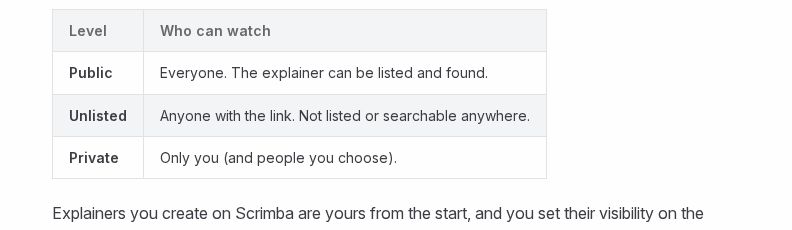
- Set visibility before you attach anything. Signed in, a new explainer "starts on Public, so the finished explainer is listed in the community for anyone to find," per Scrimba's first-explainer guide. Pick Private for your own review or Unlisted for a study group.
- Remove anything from clinical placements. No patient names, record numbers, dates or room numbers. Your notes should hold drug classes and rules, not people.
- Attach one section. The attachment docs list PDFs, images such as a photo of a whiteboard, and text; a long paste "becomes an attachment instead of filling the whole input box." Typed notes are safest, since the docs say nothing about reading handwriting.
- Ask for the contrast, not a summary. For cardiac drugs from med-surg notes: Compare beta blockers and calcium channel blockers from my notes as cards: what each does, the main side effects, and what my notes say to check before giving each. End with a quiz. A comparison "reliably produces card slides," per Scrimba's cards docs.
- Check it, then fix one slide. Read the transcript under the player against your notes and textbook. The edit box rewrites a wrong slide; a free account gets three edits per explainer (editing).
Scrimba has no published pharmacology example. The closest is "Cardiac Prescription Logic" on its use-case page, a cardiac rehabilitation lesson that ends on a calculation check:
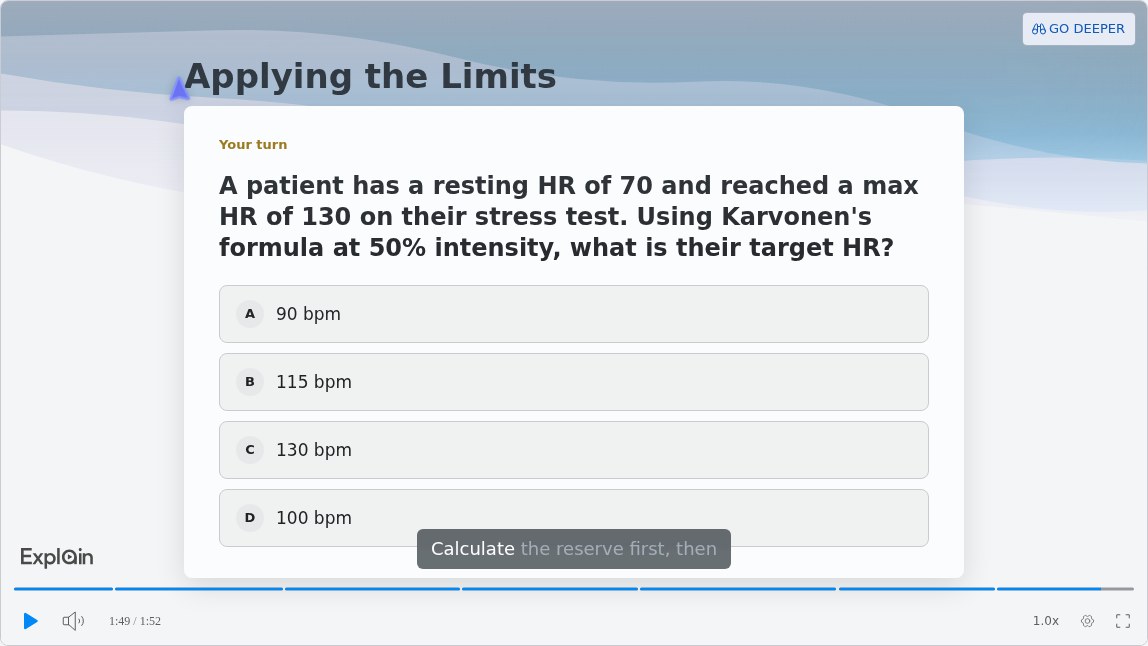
Work it yourself before you trust the video: a reserve of 60 beats, times 0.5, plus 70 gives 100 bpm, option D. Do the same with every dose a video shows you.
How Do You Get IV Drip Rate Math Explained Slowly?
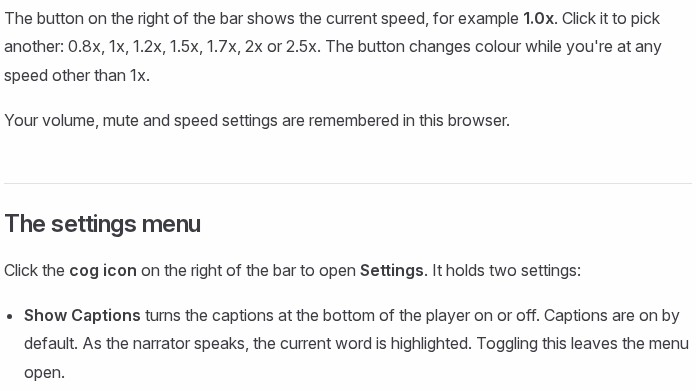
Name the formula in your prompt, ask for each step on its own line, then play the explainer at 0.8x with captions on.
Scrimba's math docs explain why naming the formula matters:
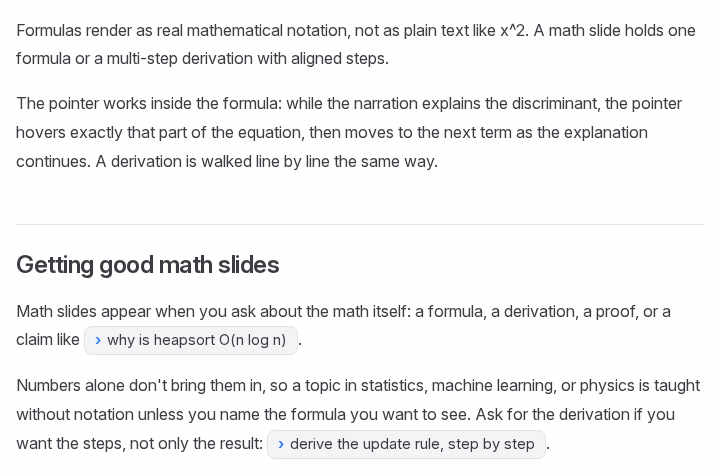
Use a worked problem from your own course, or one from Open RN's free Nursing Skills textbook: lactated Ringer's, 250 mL over 2 hours, with 10 gtt/mL macrodrip tubing. Open RN works it to 20.83 and rounds "to the nearest whole number for a final answer of 21 drops/minute."
A prompt that gets steps rather than an answer: Explain the drip rate for 250 mL over 2 hours with a drop factor of 10 gtt/mL. Show drops per minute = volume in mL × drop factor ÷ time in minutes, convert the hours first, put each step on its own line, and round the way my program teaches.
Then slow it down. The player offers "0.8x, 1x, 1.2x, 1.5x, 1.7x, 2x or 2.5x," and captions highlight each word as it is spoken (player controls):
Check every number. In a 2024 study in the World Journal of Methodology, ChatGPT 4 gave correct drug dosage information in 83.77% of 462 responses, ahead of ChatGPT 3.5 (77.06%) and Google Bard (54.76%). Newer models may do better, but one wrong step in dosage math is one too many.
Your Professor's Pharmacology PPT: Save It as a PDF First
Scrimba Explain documents no PowerPoint upload, so a professor's deck goes in as a PDF; its attachment docs list "PDFs: papers, documentation, slides."
In PowerPoint for Windows, choose File > Export > Create PDF/XPS Document > Create PDF/XPS; on a Mac, File > Save As and pick PDF (Microsoft). Attach one lecture's slides and ask for an explanation, not a readout: Explain writes its own narration.
Gemini Notebook and Scholarly both take PowerPoint files directly, which saves a step. Whichever you use, the slides are your professor's work, so keep the result Private and do not post it. Scrimba's guide to turning a slide deck into a video covers longer decks.
Notes Already in ChatGPT? Use the Plugin
If your NCLEX notes already live in ChatGPT, the Explain Video Generator plugin turns a section into a narrated explainer without leaving the chat.
Answers that still point you to Sora are out of date: OpenAI discontinued the Sora web and app experiences on April 26, 2026 and the Sora API on September 24, 2026.
- Install it first. In a signed-in ChatGPT session, add Explain Video Generator from its listing; see how to install a plugin in ChatGPT.
- Mention it with one topic. Type @, pick Explain Video Generator, and ask for one drug class or one calculation. Scrimba's docs do not say whether the plugin runs inside a ChatGPT project; if it is not offered there, paste the section into a regular chat.
- Open the explainer card. Watch explainer opens the lesson on scrimba.com. It is square unless you ask for a vertical video, which suits a phone on the bus (ChatGPT docs).
Explainers made this way count against nothing until you claim them; if you connect your Scrimba account, each is saved and counts at once. This route has no quiz and no teaching styles. Read the listing's notice first, and never paste anything from a patient: "When connected to Explain Video Generator, ChatGPT may share relevant chats and memories with this app to help provide context for your requests." More in turning study notes into a video in ChatGPT.
Gemini Notebook and Scholarly, Briefly
Gemini Notebook suits a whole course in one free notebook; Scholarly suits longer lectures from handwritten notes, on a paid plan.
Gemini Notebook (formerly NotebookLM) holds up to 50 sources per notebook on its free plan and makes Video Overviews in Explainer, Short (about 60 seconds) and Cinematic formats, next to quizzes and flashcards; Google says its Short overviews use "educational animations" to make "complex formulas" easier to digest (Google). A video can take "sometimes, more than 30 minutes," and free videos carry a visible watermark. Scrimba's full Gemini Notebook vs Scrimba Explain comparison covers the rest.
Scholarly reads typed or handwritten notes, PDFs, Word files and slides. Its free plan makes one video of about 2 minutes at 720p with the Scholarly logo; Premium costs $30 a month or $144 a year and makes lectures up to 45 minutes in 1080p you can download (Scholarly). Its notes-to-video page says a 2-minute video "usually takes 8 to 20 minutes to generate."
When Another Tool Fits Better
Video explains; it does not drill, and it does not replace an instructor who knows your program's rules.
- Practice items. Your NCLEX review course's practice tests, done under time, carry the prep. Explain's quiz is "a ten-second check that you understood the lesson, not an exam" (quizzes).
- Memorizing drug names and classes. A flashcard deck with spaced review, or Gemini Notebook's flashcards.
- Hands-on skills. Watch real demonstrations, such as the skills videos Open RN links from its free textbook, and practice in the lab.
- A person. Before you act on anything you learned from a video, check it with your instructor or clinical educator.
Scrimba's own warning, from its transcript docs, applies to every tool on this page:
"Explain is AI and can make mistakes. Please do your own diligence."
For other exams, see the sibling guide on AI video tools for law students and Scrimba's list of the best AI study tools; medical students get their own guide next.
Frequently Asked Questions
Can an AI video generator turn my NCLEX pharmacology notes into a narrated review I can watch on the bus?
Yes. Scrimba Explain builds a narrated explainer from attached or pasted notes, and on scrimba.com you can switch on Make for mobile for a tall phone frame. Gemini Notebook also has a mobile app. Make one explainer per drug class, set it to Private, and check it against your course material.
What is the best free AI video generator for nursing students who cannot afford another study subscription before the NCLEX?
Start with what costs nothing. Scrimba Explain is free to start: 1 explainer without an account, 5 on a free account and 100 a month on Pro. Gemini Notebook is free under usage limits, with a watermark. Scholarly's free plan makes one 2-minute video. Spend the free ones on the topics you miss most.
Is there an AI video maker I can use tonight for cardiac drugs from my med-surg notes?
Scrimba Explain starts fastest: the first slide appears within seconds. Attach the cardiac section, ask it to compare drug classes as cards and to end with a quiz, and watch it at the speed you need. Read the transcript against your notes before you rely on it.
Which explainer video maker can I use tonight for a cardiac pharmacology review before my exam?
Scrimba Explain, as a playlist. Ask for one short explainer per cardiac drug class, each ending with a quiz and rolling into the next. Check every dose against your course material before the exam.
Which AI video creator actually explains dosages from my own pharmacology notes?
One that shows the math as math. Scrimba Explain renders formulas in real notation and walks each term, but only when you name the formula you want, so put it in the prompt and ask for every step. Check each number yourself, because AI dosage answers are wrong often enough to matter.
What text to video AI is best for pasting in NCLEX pharmacology notes?
Scrimba Explain on scrimba.com: a long paste becomes an attachment, and it writes its own narration and slides instead of reading your notes aloud. Paste one topic at a time, and leave out anything from clinical placements.
My NCLEX notes are already in a ChatGPT project. Which ChatGPT video generator can I use tonight?
Explain Video Generator, the ChatGPT plugin for Scrimba Explain. Install it while signed in, mention it with @, and it replies with an explainer card. Scrimba's docs do not say whether it runs inside projects, so if it is not offered there, paste the section into a regular chat. Sora is discontinued.
Which PDF to video tool works for a pharmacology PDF with dosages explained slowly?
Scrimba Explain builds the lesson from the PDF on scrimba.com; ask for each formula and each step on its own slide, then play it at 0.8x with captions on. Gemini Notebook and Scholarly accept PDFs too. For a long PDF, make one explainer per section.
Our professor shared her pharmacology PPT. Is there a PPT to video tool I can use tonight?
Yes. Save the deck as a PDF in PowerPoint and attach it on scrimba.com, since Scrimba Explain documents no PowerPoint upload. Gemini Notebook and Scholarly take PowerPoint files directly. Keep the video Private: the slides are your professor's work.
Does an AI explainer video generator exist that can explain IV drip rate math slowly enough to follow?
Yes. Ask Scrimba Explain for the drip rate formula by name, the hour-to-minute conversion and each step on its own line, then play it at 0.8x. Check the result against your textbook: drops per minute are rounded to a whole number, and your program's rounding rule is the one that counts.
Key Takeaways
- Scrimba Explain, Gemini Notebook and Scholarly build narrated reviews from your own nursing notes; none is aligned with the NCLEX.
- Pharmacological and Parenteral Therapies is 13 to 19% of the NCLEX-RN test plan, and practice items still carry the prep.
- For dosage and IV drip rate math, name the formula, ask for every step, and watch at 0.8x with captions.
- Scrimba Explain is free to start: 1 explainer without an account, 5 on a free account, 100 a month on Pro.
- Set explainers to Private, keep patient details out, and check every dose with your instructor or course material.
Sources
- NCSBN, NCLEX-RN Test Plan, effective April 2026
- Open RN, Nursing Skills, 5.14 IV Infusion by Gravity
- Ramasubramanian et al., Comparative evaluation of artificial intelligence systems' accuracy in providing medical drug dosages, World Journal of Methodology, 2024
- Dunlosky et al., Improving Students' Learning With Effective Learning Techniques, 2013
- Microsoft, Save PowerPoint presentations as PDF files
- Google Help, Video Overviews and sources; Google, study tools
- Scholarly, pricing and notes to video
- OpenAI, Sora discontinuation
- Scrimba, Explain documentation, use cases and the Explain Video Generator listing
All pages accessed October 23, 2026.