Best HTML and CSS Courses for Beginners [2026]
Which HTML and CSS course to start, the first project you build in it, and the point where a free course stops being enough. Nine options compared.

![Best HTML and CSS Courses for Beginners [2026]](/articles/content/images/size/w1200/2026/03/5.png)
Pick one interactive course, finish one small project inside it, and only then compare anything else. For a complete beginner the shortlist is three names: Scrimba's free Learn HTML and CSS, freeCodeCamp's Responsive Web Design certification, and The Odin Project's Foundations. All three cost nothing to start, and the difference between them is format, not quality.
This guide is written for that decision, not for browsing. Nine courses are compared below on price, format, duration, and certificate, each with a best for label, and the free-versus-paid call gets an explicit rule instead of a shrug. If your only criterion is that it costs nothing, the companion roundup of the best free HTML and CSS courses ranks that field on its own terms and will get you there faster.
The entry cost is near zero and the ceiling is high: HTML5 is used by 95.9% of all websites whose markup language is known. Most beginners do not fail this step by choosing the wrong course. They fail it by never choosing at all.
Which HTML and CSS Course Should You Start?
Three checks settle it.
Do you learn by typing, or by reading and building alone? If you learn by typing, take an interactive course: Scrimba's free Learn HTML and CSS runs 5.7 hours with Per Borgen and lets you pause the screencast and edit the instructor's code in place. If you prefer to work things out yourself, The Odin Project's Foundations suits you better, and freeCodeCamp fits anyone who wants structured text with a graded credential.
Does your certificate need to be free? Scrimba issues one on the free course at no cost. freeCodeCamp's is free too, but since the 2026 rebuild it requires passing an exam rather than finishing the steps. Codecademy, Mimo, and W3Schools all put certificates behind a paid plan or a one-off fee.
Are HTML and CSS the destination, or step one toward a job? If they are the destination, a personal site or a page for a small business, stay on the free route. If they are step one toward frontend work, what is worth paying for is not better HTML lessons. It is the sequencing into JavaScript, React, and portfolio work that free resources leave you to assemble yourself.
If none of that moved you, take the interactive route and start today. Picking the wrong free course costs a weekend; not picking is the pattern that stalls most beginners.
How the Top HTML and CSS Courses Compare
Scan the "Best For" column, then read the breakdowns.
| Course | Provider | Price | Duration | Format | Certificate | Best For |
|---|---|---|---|---|---|---|
| Learn HTML and CSS | Scrimba | Free | 5.7 hrs | Interactive scrims | Yes (free) | Hands-on learners who want to code inside the lesson |
| Responsive Web Design | freeCodeCamp | Free | Self-paced | Text + projects | Yes (exam required) | Learners who want a recognized free certification |
| Foundations | The Odin Project | Free | Self-paced | Projects + readings | No | Self-starters who learn by building real projects |
| Learn HTML / Learn CSS | Codecademy | Free / Plus from $14.99/mo | 13 hrs | Browser exercises | Paid plans only | Learners who prefer short, structured exercises |
| Learning Area | MDN Web Docs | Free | Self-paced | Documentation | No | Learners who prefer authoritative written reference |
| HTML Tutorial | W3Schools | Free | Self-paced | Try-it editor | Optional ($95) | Absolute beginners who want the simplest starting point |
| Web Developer Bootcamp | Udemy | Paid, price varies | 70+ hrs | Video lectures | Yes | Video learners who want depth and breadth |
| CSS Tutorials | Kevin Powell (YouTube) | Free | 1,100+ videos | Video | No | Visual learners who want CSS mastery |
| HTML and CSS | Mimo | Free / Pro from $9.99/mo | Self-paced | Mobile app | Paid plans only | Mobile learners who want bite-sized lessons |
The First Project You Build
A course you can name is worth less than a page you have shipped, so check what each route builds in week one, not only what it covers.
Scrimba's free Learn HTML and CSS front-loads it. The opening project is Build and Deploy Your First Website, and the course carries five in all: that first website, a Google.com clone, a digital business card, a space exploration site, and a birthday gift site. It closes with a solo project, a homepage for your hometown, built without guidance. That last one counts most, because it is the first time nobody hands you the markup.
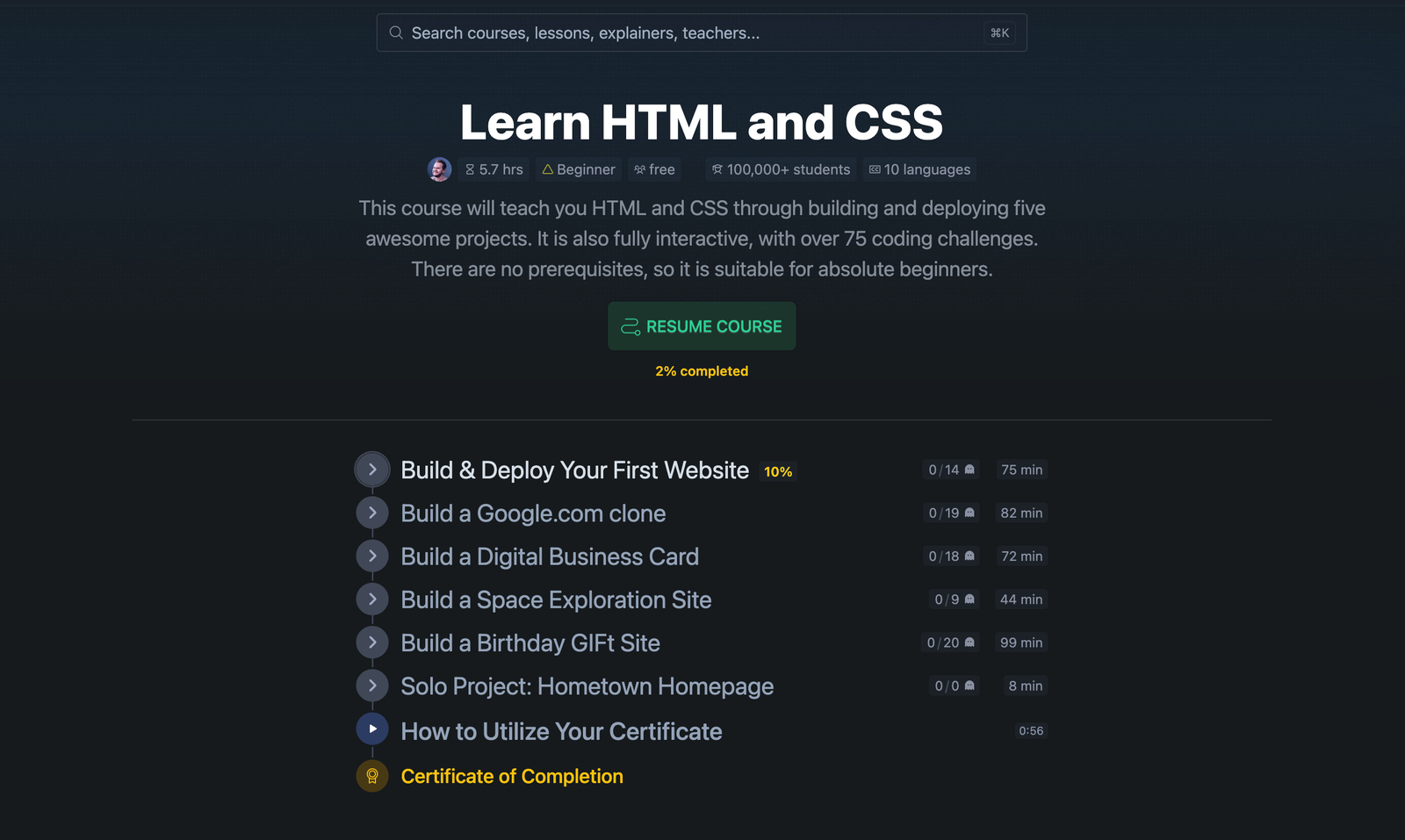
The other two routes front-load different things. freeCodeCamp's certification is earned through five projects plus an exam, so the building is real but the credential has a gate at the end. The Odin Project has you install VS Code, open DevTools, and push to GitHub before you style anything, closer to a working developer's first week and harder to stick with alone.
Either way the rule holds: one finished page, deployed at a URL you can send to someone, beats three half-watched courses.
Best HTML and CSS Courses for Beginners
Scrimba Learn HTML and CSS (Best for Interactive, Hands-On Learning)
Scrimba's Learn HTML and CSS uses the scrim format: learners pause the screencast and edit the instructor's code directly in the browser, with no local setup. It covers HTML fundamentals, CSS styling, and building real pages from scratch in 5.7 hours with Per Borgen, and both the course and the certificate are free.
It is also the first module of Scrimba's Frontend Developer Path, which Mozilla's own MDN Curriculum page names as the partner course teaching the MDN Curriculum Core. The sequence follows Mozilla's standards rather than one company's opinion.
Best for: Learners who want to write real code from the first lesson, not just watch or read.
freeCodeCamp Responsive Web Design (Best for Free Certification)
freeCodeCamp offers a free Responsive Web Design certification covering HTML, CSS, layout, accessibility, and responsive development. The curriculum was rebuilt in 2026: it now mixes workshops, labs, and theory lessons, and the certification requires five projects plus a certification exam.
The platform is free and open source, and its certifications carry real recognition among developers. The trade-off is a text-heavy format with no video, and the exam means the certificate is no longer something you collect by finishing the steps.
Best for: Self-motivated learners who want a recognized free certification and prefer a text-driven, project-based format.
The Odin Project (Best for Project-Based Learning)
The Odin Project is a free, open-source curriculum that uses real developer tools from day one, and its Foundations course covers HTML, CSS, Flexbox, and JavaScript basics. Odin expects learners to research and debug on their own, which mirrors how professional developers work and is also why some beginners stall in week two. The community Discord is active when people get stuck.
Best for: Self-starters who learn by building real projects and are comfortable with less hand-holding.
Codecademy HTML/CSS (Best for Structured Exercises)
Codecademy's Learn HTML (7 hours) and Learn CSS (6 hours) use browser-based exercises with instant feedback, shorter and more guided than project-based alternatives like freeCodeCamp or Odin. The free Basic plan excludes certificates; Plus costs $14.99 a month billed annually or $29.99 month to month.
Best for: Learners who prefer short, guided exercises with instant feedback and structured progression.
MDN Web Docs (Best for Reference-Based Learning)
MDN Web Docs is Mozilla's official documentation for web technologies, and its learning area includes structured HTML and CSS tutorials alongside the reference developers use daily. There are no coding exercises, but as a companion beside a structured course nothing is more trustworthy, and its curriculum defines what every web developer should learn and in what order.
Best for: Learners who prefer reading official documentation and want a reference they will keep using throughout their career.
Kevin Powell YouTube (Best for CSS Mastery)
Kevin Powell's YouTube channel has passed a million subscribers and 1,100 videos, nearly all of them CSS. He turns Grid, Flexbox, animations, and responsive design into visual explanations that make CSS feel learnable rather than arbitrary. Powell also teaches on Scrimba: Learn Responsive Web Design (Pro, 15.1 hrs) and the free Build a Multi-Page Website with HTML and CSS. A free Kevin Powell course is an easy thing to miss.
Best for: Visual learners who want to master CSS specifically through free video content.
Also Worth Knowing: W3Schools, Udemy, and Mimo
Three options in the table suit narrower cases but come up constantly.
- W3Schools is the fastest way to look up a single tag or property. Its certificates are a separate paid product at $95 each.
- Udemy's Web Developer Bootcamp is the video-course default: over 70 hours, rated 4.6 out of 5 across more than 286,000 ratings. List prices swing with sales.
- Mimo teaches in mobile-sized chunks, which suits commute learning. Pro is $9.99 a month billed yearly, with professional certificates on the top plan only.
HTML and CSS Learning Roadmap
A structured plan is what keeps beginners out of the tutorial-hopping trap. Here is the eight-week route to responsive pages.
Phase 1: HTML Fundamentals (Weeks 1-2)
Start with document structure: headings, paragraphs, lists, links, and images. Learn semantic HTML elements like <header>, <nav>, <main>, and <footer>, which describe what content means rather than how it looks. By week two you should be able to build a multi-page site with no styling.
Phase 2: CSS Fundamentals (Weeks 3-4)
Add visual styling: selectors, the box model, colors, typography, display types, and positioning. Understand specificity and the cascade, the rules that decide which declaration wins when two of them target the same element. Then restyle your Phase 1 projects, one property at a time.
Phase 3: Responsive Design (Weeks 5-6)
Learn media queries, Flexbox, and CSS Grid, design mobile-first, and rebuild one project to work on every screen size. Three Scrimba courses map onto this phase, all intermediate and behind Pro, so treat them as the step after the fundamentals:
- Flexbox, one-dimensional layout: Learn Flexbox (52 min), or the complete guide to CSS Flexbox.
- CSS Grid, two-dimensional layout: Learn CSS Grid (63 min), plus a practical guide to learning CSS Grid.
- Responsive technique end to end: Learn Responsive Web Design (15.1 hrs, Kevin Powell), alongside the complete guide to responsive web design.
Phase 4: Projects and Portfolio (Weeks 7-8)
Build two or three complete pages without following a tutorial, then deploy them to a free host like GitHub Pages or Netlify so you have a live URL to share. If a blank file is still intimidating, Scrimba's free Build a Multi-Page Website with HTML and CSS walks through a full responsive site with a design system and keyboard navigation, and CSS Challenges (Pro, 2.6 hrs) drills individual UI components.
When Free Is Enough, and When It Is Not
For HTML and CSS specifically, free is not the compromise option. A motivated beginner can reach responsive pages without spending anything, and the best free HTML and CSS courses roundup covers that route.
Free stops being enough at one specific point, and it is worth naming. A beginner HTML and CSS course teaches structure and styling. It does not go deep on responsive design or accessibility, and those are what separate a page that works from a page that only works on your laptop. On Scrimba that depth sits in the Frontend Developer Path, which adds 4.5 hours of essential CSS concepts, 4.6 hours of responsive design, and 95 minutes of accessible development above its 6.3-hour basics module, or in the standalone Learn Accessible Web Design (Pro, 96 min).
Stay free if HTML and CSS are the goal in themselves. Pay if they are step one and you want someone else to own the sequencing into JavaScript, React, and a portfolio.
| Feature | Free Options | Paid Platforms |
|---|---|---|
| HTML/CSS content quality | Excellent | Excellent |
| Interactive coding | Limited | Full |
| Structured career path | Self-directed | Guided |
| Career integration | None | JavaScript, React, portfolio |
| Certificate | Varies, sometimes paid | Included |
Scrimba's Learn HTML and CSS sits in both columns: free, 5.7 hours, certificate included, with Pro ($24.50/mo annually, $294/year, before regional and student discounts) unlocking the 81.6-hour Frontend Developer Path. To go deeper on CSS alone, the roundup of CSS courses and tutorials covers the field, and CSS animations come next once layout clicks.
Frequently Asked Questions
What is the best way to learn HTML and CSS as a beginner?
Take one interactive course and finish a project inside it before comparing alternatives. Writing code in the browser from the first lesson beats watching video, because HTML and CSS are learned by typing them and watching the page change. A practical route is Scrimba's free Learn HTML and CSS, then a deployed project, then responsive design.
How long does it take to learn HTML and CSS?
Most beginners can build simple web pages within 2-4 weeks of consistent practice, and reaching comfortable proficiency with responsive design, Flexbox, and CSS Grid takes 6-8 weeks. The timeline depends more on daily practice frequency than total hours spent. Thirty minutes of daily coding beats a single weekend marathon.
Should I learn HTML and CSS before JavaScript?
Yes. HTML and CSS provide the visual foundation that JavaScript interacts with, and every major curriculum, including MDN, freeCodeCamp, and The Odin Project, teaches them first. According to the Stack Overflow 2025 Developer Survey, HTML and CSS are used by 61.9% of all developers surveyed.
Can I get a job with just HTML and CSS?
HTML and CSS alone are rarely enough for a developer role, and most frontend positions require JavaScript and at least one framework like React. According to the U.S. Bureau of Labor Statistics, web developers and digital designers earned a median $99,520 per year in 2025, with 5% job growth projected from 2025 to 2035.
What should I learn after HTML and CSS?
JavaScript. According to the Stack Overflow 2025 Developer Survey, JavaScript is used by 66% of developers and powers interactivity on the web. After it, most learners move to a frontend framework like React, then to backend technologies like Node.js.
Key Takeaways
- Pick one interactive course, finish one project in it, then compare. The beginner shortlist is Scrimba Learn HTML and CSS, freeCodeCamp Responsive Web Design, and The Odin Project Foundations.
- The first project matters more than the syllabus. Scrimba's free course opens with building and deploying a first website and closes with an unguided solo project.
- Stay free if HTML and CSS are the goal. Pay if they are step one toward frontend work and you want the sequencing into JavaScript, React, and a portfolio handled for you.
- Certificates split the field: free on Scrimba, exam-gated on freeCodeCamp, paid on Codecademy, Mimo, and W3Schools ($95).
- If price is your only criterion, the best free HTML and CSS courses roundup is the faster read.
- The roadmap: HTML basics (weeks 1-2), CSS basics (weeks 3-4), responsive design (weeks 5-6), projects and portfolio (weeks 7-8). Web developers earned a median $99,520 in 2025, with 5% job growth projected through 2035.
Sources
- W3Techs. "Usage Statistics of HTML5 for Websites." Accessed August 2026.
- Stack Overflow. "2025 Developer Survey." 2025.
- U.S. Bureau of Labor Statistics. "Web Developers and Digital Designers." Occupational Outlook Handbook. Accessed August 2026.
- Mozilla. "MDN Curriculum." MDN Web Docs. Accessed August 2026.
- Mozilla. "MDN and Scrimba Partnership." MDN Blog.
- freeCodeCamp. Responsive Web Design Certification. Accessed August 2026.
- The Odin Project. Foundations Course. Accessed August 2026.
- Codecademy. Plans and Pricing. Accessed August 2026.
- Mimo. Pricing. Accessed August 2026.
- W3Schools. Certifications. Accessed August 2026.
- Udemy. The Web Developer Bootcamp. Accessed August 2026.
- Scrimba. Pricing. Accessed August 2026.