CSS Variables: A Complete Guide [2026]
CSS variables explained in full: scoping, inheritance, var() fallbacks, JavaScript, theming, @property, and the gotchas that break them.

![CSS Variables: A Complete Guide [2026]](/articles/content/images/size/w1200/2026/08/136-hero.jpg)
A CSS variable is a custom property: a real CSS property whose name starts with two dashes, declared like any other property and read back with the var() function. That formal name is not pedantry. Because custom properties are ordinary properties, they inherit down the tree and they obey the cascade, which is the one fact that separates them from Sass variables and the one most guides skip.
This guide covers the full surface: syntax, scoping, inheritance, fallbacks, JavaScript, theming, responsive values, @property, and the failures that produce the "my variable does nothing" bug.
What Are CSS Variables and How Do You Declare One?
A CSS variable is a custom property, defined as any property whose name starts with two dashes, and referenced anywhere a value is allowed using var().
:root {
  --brand: #2563eb;
  --space: 1rem;
}

.button {
  background: var(--brand);
  padding: var(--space) calc(var(--space) * 2);
}
Two details catch people early. Custom property names are case-sensitive, so --Brand and --brand are two different properties. And the value is stored as a raw token stream: --space: 1rem is not a length to the browser until something consumes it.
The CSS Custom Properties for Cascading Variables Module Level 1 spec, a W3C Candidate Recommendation Snapshot dated 16 June 2022, puts the important part plainly: custom properties "are ordinary properties, so they can be declared on any element, are resolved with the normal inheritance and cascade rules." Everything below follows from that sentence.
Support is not a consideration anymore. var() has been Baseline Widely available since April 2017.
Declaring on :root vs Scoping to a Selector
:root is a convention, not a requirement. It matches the <html> element, so anything declared there inherits everywhere, which is why it became the default home for global values.
The more useful move is scoping: redeclaring the same custom property on a narrower selector so every descendant of that element sees the new value. No new class names on the children, no new selectors, no duplication.
.card {
  --card-pad: 1.5rem;
  --card-bg: white;
  padding: var(--card-pad);
  background: var(--card-bg);
}

.card--compact { --card-pad: 0.75rem; }
.card--inverted { --card-bg: #111; color: white; }
.card--compact changes one declaration and the padding updates, along with anything else inside the card that reads --card-pad. Three patterns cover most of it:
- Component defaults. Declare the component's knobs on the component root, then read them in its child rules. The component now has a documented API.
- Variant classes that only touch variables. A modifier class sets values rather than restating properties, so variants stay one line each.
- State on a wrapper.
[data-state="error"] { --accent: crimson; }recolors a whole subtree from one attribute.
Scoping is also cheaper at runtime, for reasons covered below.
How Inheritance and the Cascade Apply to Custom Properties
Custom properties inherit by default and are subject to specificity, source order, and !important exactly like color or font-size. There is no separate resolution mechanism for them.
The consequence is bigger than it sounds: a custom property's value is resolved per element, not once per stylesheet. The same var(--gap) written in one rule can produce a different number on every element that rule matches, because each element resolves the variable against its own inherited value.
This is why the mental model borrowed from preprocessors fails. A Sass variable has one value at the point it is used; a custom property has as many values as there are elements.
Cycles are the one hard error. If --one: calc(var(--two) + 20px) and --two: calc(var(--one) - 20px), both are invalid at computed-value time and compute to the guaranteed-invalid value rather than lengths.
Invalid at computed-value time is the mechanism behind the biggest gotcha in the topic, and the spec explains why it has to exist:
"The invalid at computed-value time concept exists because variables can't 'fail early' like other syntax errors can, so by the time the user agent realizes a property value is invalid, it's already thrown away the other cascaded values."
Using var() With Fallbacks and Nested Fallbacks
The var() function takes a custom property name and an optional second argument, the fallback, used when the named property has no usable value.
.a { color: var(--accent, #333); }
.b { color: var(--accent, var(--brand, #333)); }
.c { font-family: var(--stack, Georgia, "Times New Roman", serif); }
Two rules trip people up. Everything after the first comma is the fallback, commas included, so var(--stack, Georgia, "Times New Roman", serif) has a three-item fallback rather than a syntax error. And fallbacks nest as deeply as you like, chaining from most specific to most generic.
The fallback fires in exactly three cases, per MDN: the property was never declared on a matching rule, it was explicitly set to initial, or its own declared value is invalid at computed-value time and it is either unregistered or registered with the universal * syntax.
Note what is missing from that list. The fallback is not an error handler. It catches a missing variable, never a present-but-wrong one, and the gap between those two cases is where most CSS variable bugs live.
Reading and Writing CSS Variables From JavaScript
Custom properties are readable and writable from script, a capability preprocessor variables can never have.
const el = document.querySelector('.card');

// Read the resolved value, including anything inherited
const pad = getComputedStyle(el).getPropertyValue('--card-pad');

// Read only what is set inline on the element
const inline = el.style.getPropertyValue('--card-pad');

// Write and remove
el.style.setProperty('--card-pad', '2rem');
el.style.removeProperty('--card-pad');
Three behaviors to expect:
getComputedStylereturns a string, not a number. Run it throughparseFloatbefore arithmetic, and do not assume leading whitespace has been trimmed.- For an unregistered custom property you get the raw token stream back, not a computed value.
--space: 1remreturns"1rem", never"16px". el.style.getPropertyValueonly sees inline declarations. For the cascaded result,getComputedStyleis the only option.
The pattern worth stealing is writing one variable per frame and letting CSS do the rest:
document.addEventListener('pointermove', (e) => {
  document.body.style.setProperty('--x', `${e.clientX}px`);
  document.body.style.setProperty('--y', `${e.clientY}px`);
});
.spotlight {
  background: radial-gradient(circle at var(--x) var(--y), #fff3, transparent 40%);
}
There is a scripting equivalent of @property too. CSS.registerProperty() takes name and inherits as required members and throws InvalidModificationError if you register the same name twice.
Theming and Dark Mode With CSS Variables
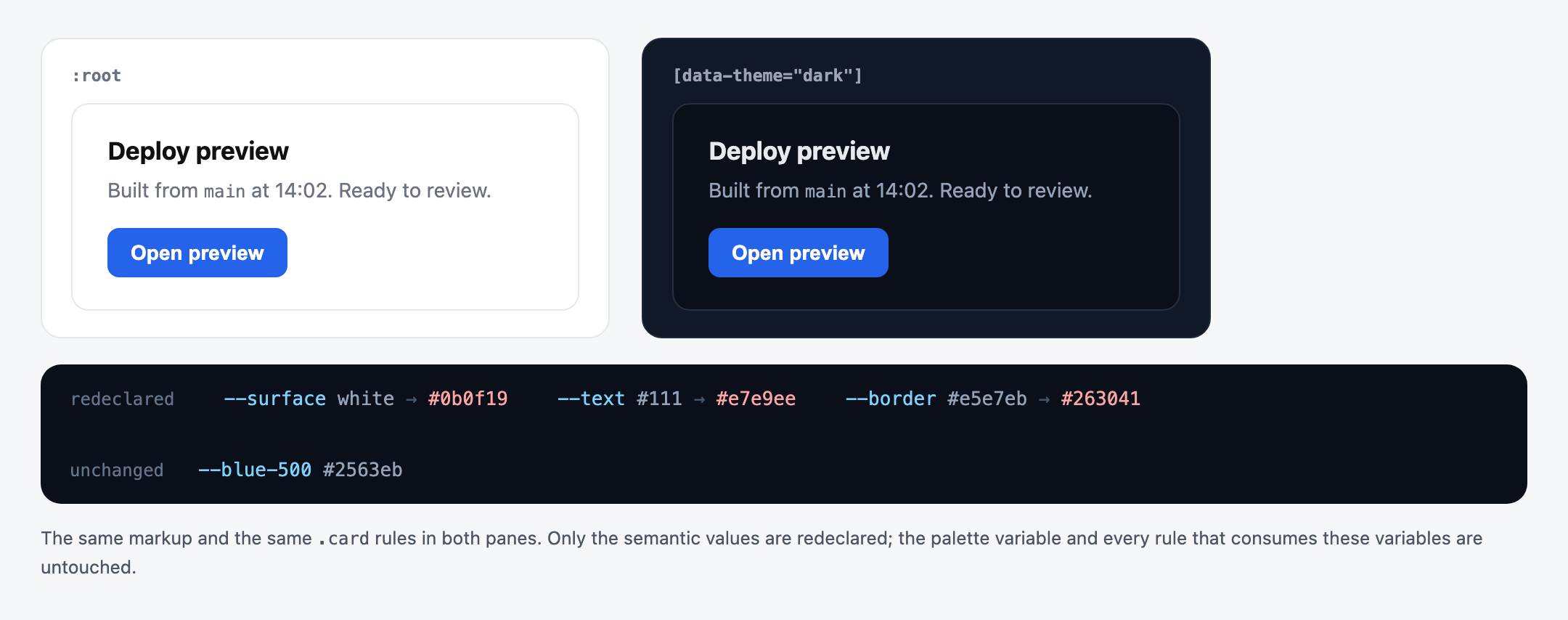
Theming is the most common real use, and it works in three steps:
- Declare semantic variables at the root:
--surface,--text,--border, not--blue-500. - Redeclare only those semantic names under a theme selector or a media query.
- Never write a raw color anywhere else in the stylesheet.
:root {
  --blue-500: #2563eb;      /* palette layer, never changes */
  --surface: white;          /* semantic layer, swapped per theme */
  --text: #111;
}

[data-theme="dark"] {
  --surface: #0b0f19;
  --text: #e7e9ee;
}

@media (prefers-color-scheme: dark) {
  :root:not([data-theme="light"]) { --surface: #0b0f19; --text: #e7e9ee; }
}
The two-layer split is what makes a theme survive a rebrand. Palette variables name the color, semantic variables name the job, and only the second layer gets redeclared. Adding a third theme means adding one block rather than auditing every rule.
There is a shorter route for colors alone. light-dark() takes two colors and picks by scheme, and it reached Baseline Newly available in May 2024. It does nothing unless color-scheme is set:
:root { color-scheme: light dark; }
body {
  background: light-dark(white, #0b0f19);
  color: light-dark(#111, #e7e9ee);
}
Responsive Values With Media Queries and Container Queries
Redeclaring a variable inside a media query updates every consumer at once. One block replaces a dozen property overrides.
:root { --gutter: 1rem; --step: 1.125; }

@media (min-width: 48rem) {
  :root { --gutter: 2rem; --step: 1.2; }
}
What does not work is the reverse direction. You cannot use a custom property in a media query condition. MDN is blunt about it: "Variables do not work inside media queries and container queries." @media (min-width: var(--bp)) is not valid CSS, and var() is equally unusable for property names and selectors.
The 2026 update is that container style queries close half of that gap. They query the computed value of a custom property on the container, which media queries still cannot do:
.panel { --density: compact; }

@container style(--density: compact) {
  .row { padding-block: 0.25rem; }
}
Container style queries reached Baseline Newly available on 19 May 2026, when Firefox 151 shipped them behind Chrome 111, Edge 111, and Safari 18. A boolean form, style(--density), tests whether the property differs from its initial value. One catch: blue will not match #0000ff unless the property is registered as a <color>, because unregistered properties are compared as raw tokens. Breakpoint methodology is a bigger topic, covered in Scrimba's complete guide to responsive web design.
What Is @property and Why Does It Unlock Animation?
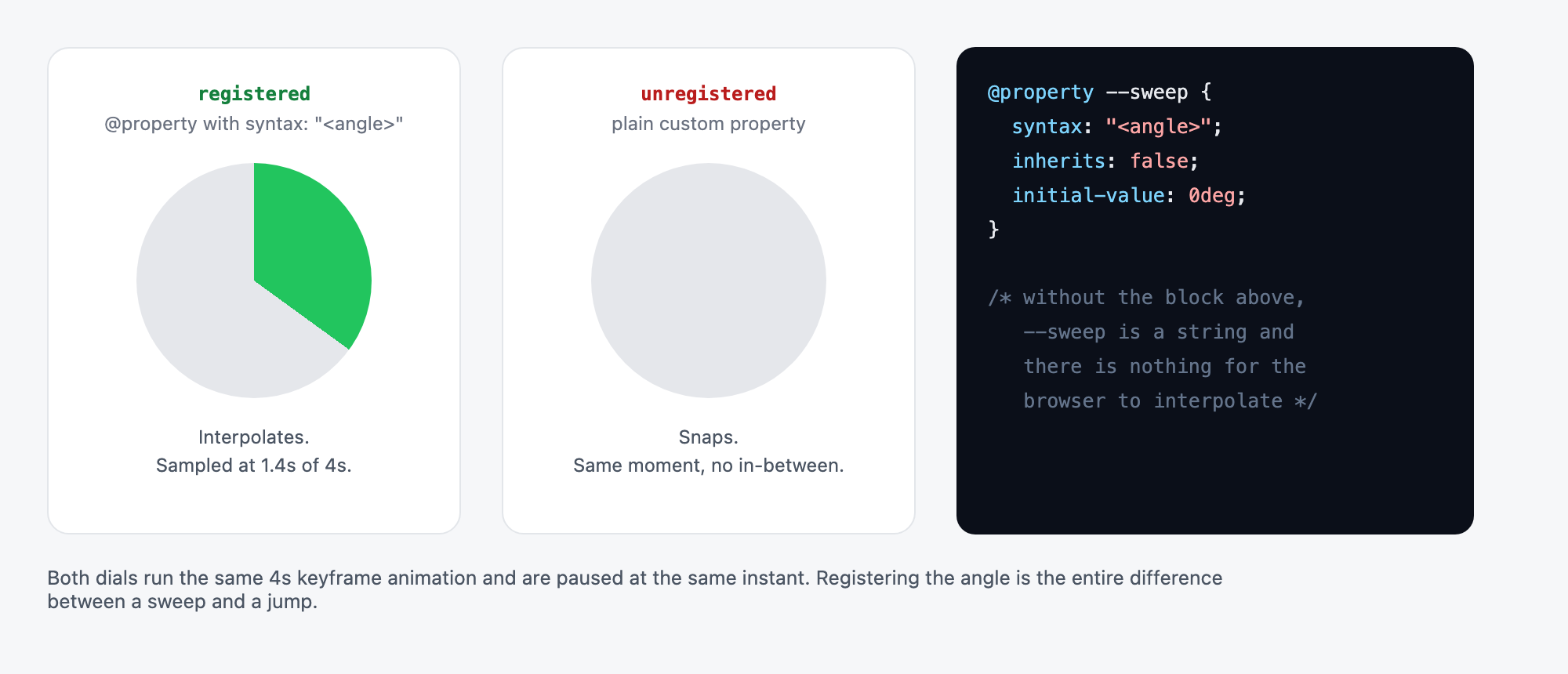
@property registers a custom property with a type, an inheritance behavior, and a real initial value, which lets the browser treat it as a typed value instead of a token stream.
@property --progress {
  syntax: "<percentage>";
  inherits: false;
  initial-value: 0%;
}

.bar {
  background: linear-gradient(to right, #22c55e var(--progress), #e5e7eb var(--progress));
  transition: --progress 400ms ease;
}
.bar.is-full { --progress: 100%; }
| Descriptor | Required | Notes |
|---|---|---|
syntax |
Yes | "<color>", "<length>", "<number>", "<percentage>", "<angle>", a union with |, or "*" for universal |
inherits |
Yes | Omitting either required descriptor invalidates the whole rule |
initial-value |
Unless syntax is "*" |
Must be computationally independent: 10px and 2in qualify, 3em does not |
An unregistered custom property is a string as far as the browser is concerned, so there is nothing to interpolate between. Register it as <percentage> or <color> and it becomes animatable, which is how gradient stops and conic-gradient angles become animatable at all. For the keyframe and transition mechanics themselves, Scrimba's guide on how to learn CSS animations goes deeper.
The second payoff is error handling: a registered property's initial-value becomes the real fallback for an invalid value, which is the only clean fix for the problem in the next section.
@property reached Baseline Newly available on 9 July 2024, when Firefox 128 completed the set behind Chrome and Edge 85 (August 2020) and Safari 16.4 (March 2023). Baseline Widely available is projected for 9 January 2027.
Four CSS Variable Gotchas Worth Knowing
- Invalid values fall back to
unset, not to your fallback. Given--not-a-color: 20px, a rule withbackground-color: redfollowed bybackground-color: var(--not-a-color)produces a transparent background, not a red one. The declaration is invalid at computed-value time, so it computes as ifunsethad been specified, taking the inherited or initial value. Writingbackground-color: 20pxdirectly would be an ordinary syntax error, the declaration would be discarded, andredwould win. The fix is@propertywith aninitial-value. - They are values only. No custom properties in media query conditions, no
var()in a property name or a selector. Container style queries are the one exception, and only for containers. :rootvariables have a real cost. Because they inherit, changing one invalidates style for everything beneath it. In web.dev's benchmark over a 1,000 element tree, an inheriting custom property managed roughly 256 style recalculations per second while a non-inheriting registered one reached about 214,000. Registration itself is nearly free, at 98% of unregistered speed. The guidance is direct: "If you can register your custom property withinherits: false, you definitely should." Where you cannot, scope the variable to the smallest subtree that needs it.- Expansion is capped. Browsers limit how far a
var()may expand, because doubling a value through a chain of custom properties reaches a billion tokens in about 30 lines. Past the limit, the property is invalid at computed-value time.
CSS Variables vs Sass and Less Variables
CSS custom properties are resolved by the browser at runtime; preprocessor variables are resolved by the compiler and never reach the browser at all.
| CSS custom properties | Sass / Less variables | |
|---|---|---|
| Resolved | At runtime, per element | At compile time, once |
| Present in shipped CSS | Yes | No, compiled away |
| Inherits and cascades | Yes | No |
| Readable and writable from JavaScript | Yes | No |
| Usable in a media query condition | No | Yes |
| Usable in loops, maps, and functions | No | Yes |
| Different values on different elements | Yes | One value at a time |
The Sass documentation states the split cleanly: "Sass variables are all compiled away by Sass. CSS variables are included in the CSS output." It also frames the behavioral difference well, calling Sass variables imperative (change the value and earlier uses keep the old one) and CSS variables declarative (change the value and every use updates).
This is not a migration story. Preprocessor variables remain the right tool for compile-time values that must not ship: breakpoint numbers used inside @media conditions, map keys, loop counters, and anything feeding a mixin or function. Custom properties win for anything that changes at runtime, per element, or per theme. Most production codebases run both, and the boundary is whether the browser needs to know.
How to Actually Learn CSS Variables
The model is small; the intuition is not. What makes it click is watching a scoped override change one subtree and leave its sibling alone, which is a practice problem rather than a reading problem.
Scrimba's Learn CSS Variables is a 29-minute Pro course from Per Borgen covering declaring and overriding custom properties, local versus global variables and inheritance, theming, changing variables with JavaScript, and responsiveness. Because scrims let you pause the screencast and edit the instructor's CSS in place, changing a value and watching the subtree react is the default interaction. It stays on the core technique and does not cover preprocessors, Flexbox, or Grid.
If the prerequisites are the gap, the free Learn HTML and CSS course runs 5.7 hours, and free courses on Scrimba include completion certificates. Pro is $24.50/mo on the annual plan ($294/year), with student, location-based, and promotional discounts available. Scrimba's roundup of CSS courses and tutorials compares the alternatives, and variables pair naturally with the layout properties in the complete guide to CSS flexbox and the practical guide to CSS Grid.
Frequently Asked Questions
What is the difference between CSS variables and Sass variables?
Sass variables are compiled away and never reach the browser, so they hold one value at a time. CSS variables ship in the stylesheet, inherit and cascade, resolve to different values on different elements, and can be read and written from JavaScript at runtime.
Can you use CSS variables in media queries?
You can redeclare a variable inside a media query, and every rule that reads it updates. You cannot use one in the condition itself, so @media (min-width: var(--bp)) is invalid. Container style queries can query a custom property, but media queries still cannot.
Why is my CSS variable not working?
The most common cause is an invalid value. If the substituted value is wrong for the receiving property, the declaration becomes invalid at computed-value time and computes as if unset were specified, which means the var() fallback is ignored. Check spelling, scope, and whether the value type matches.
Do CSS variables slow down a page?
Reading them is cheap. Changing an inheriting variable on the root is not, because it invalidates style for the entire subtree beneath it. Registering with inherits: false where possible, and scoping variables to the smallest element that needs them, removes most of the cost.
What is @property and do I need it?
@property registers a custom property with a type, an inheritance setting, and an initial value. You need it for two things: animating or transitioning a custom property, and getting a real fallback when a value is invalid. For static values, plain custom properties are enough.
Key Takeaways
- CSS variables are custom properties: ordinary CSS properties that inherit and obey the cascade, resolved per element rather than once per stylesheet.
:rootis a convention, not a rule. Scoping a variable to a component or a state selector is what makes it more than a color constant.- The
var()fallback catches a missing variable, never a present-but-wrong one. A bad value makes the declaration invalid at computed-value time, and it computes asunset. @propertygives a custom property a type, which is what makes it animatable and turns itsinitial-valueinto a real fallback. Baseline Newly available since July 2024.- Custom properties cannot appear in media query conditions, but container style queries can query them. Baseline Newly available since May 2026.
- Changing an inheriting variable on
:rootinvalidates style for the whole subtree, so preferinherits: falseand narrow scopes. - Preprocessor variables are compile-time and disappear; custom properties are live, inheritable, and scriptable. Both still have a place.
Sources
- W3C. "CSS Custom Properties for Cascading Variables Module Level 1." Candidate Recommendation Snapshot, 16 June 2022. https://www.w3.org/TR/css-variables-1/
- MDN Web Docs. "Using CSS custom properties (variables)." https://developer.mozilla.org/en-US/docs/Web/CSS/CSS_cascading_variables/Using_CSS_custom_properties
- MDN Web Docs. "var()." https://developer.mozilla.org/en-US/docs/Web/CSS/var
- MDN Web Docs. "@property." https://developer.mozilla.org/en-US/docs/Web/CSS/@property
- MDN Web Docs. "CSS.registerProperty()." https://developer.mozilla.org/en-US/docs/Web/API/CSS/registerProperty_static
- MDN Web Docs. "light-dark()." https://developer.mozilla.org/en-US/docs/Web/CSS/color_value/light-dark
- Web Platform Features Explorer. "Registered custom properties." Baseline low date 9 July 2024. https://web-platform-dx.github.io/web-features-explorer/features/registered-custom-properties/
- Web Platform Features Explorer. "Container style queries." Baseline low date 19 May 2026. https://web-platform-dx.github.io/web-features-explorer/features/container-style-queries/
- Bramus. "Benchmarking the performance of CSS @property." web.dev, 2 October 2024. https://web.dev/blog/at-property-performance
- Sass. "Variables." https://sass-lang.com/documentation/variables/