First-Time Buyer Explainer Videos for Real Estate Agents
Turn your buyer guide or a disclosure PDF into short narrated explainers on escrow, closing costs and inspections, in English and Spanish, without filming.

Make one short explainer per buyer topic, such as escrow, closing costs or a new disclosure, from your own buyer guide or the public form, then a second explainer in Spanish, and have your broker check both before a client sees them. Scrimba Explain, listed in ChatGPT as Explain Video Generator, builds each one from a PDF as typed slides, diagrams and narration, so nobody films anything and no avatar stands in for you. For client use, plan on Explain's Pro plan, where Scrimba's docs list commercial use.
Last verified October 23, 2026. Checked that day: Scrimba's Explain docs and plugin listing; the CFPB's Closing Disclosure and escrow pages; NAR's 2025 buyer profile and its written buyer agreement guide; HUD's home inspection notice; and the HeyGen, Synthesia, Canva and Pictory pages linked below.
Scrimba publishes this guide and makes Scrimba Explain, one of the tools discussed here. Other tools are described from their own pages, checked the same day.
First-time buyers are rarer and older than they used to be. In NAR's 2025 Profile of Home Buyers and Sellers, their share of purchases fell to a record low of 21%, and their median age rose to 40. The same survey found that 88% of buyers used an agent or broker. Each needs the process explained, usually more than once.
Which Tool Fits Which Buyer Conversation?
Match the tool to the conversation: explainers for concepts and forms, a camera or an avatar for you, an editor for listings, and a call for one buyer's numbers.
| Buyer conversation | Start from | Tool that fits | Before a client sees it |
|---|---|---|---|
| What escrow is and why the payment changes | Your buyer guide, or the CFPB's escrow page | Scrimba Explain: one narrated explainer with a diagram | Ask your lender how their escrow works |
| Closing costs and the Closing Disclosure | The CFPB's blank sample Closing Disclosure | Scrimba Explain for the form; a call for the buyer's own numbers | Never upload a client's filled-in form |
| A new rule or disclosure (a written buyer agreement, HUD's inspection notice) | The rule's or form's own PDF | Scrimba Explain, English and Spanish as two explainers | Broker review; an attorney where your state requires one |
| Inspection and contingency deadlines | Your buyer guide and your state's purchase contract | Scrimba Explain, the steps as a flowchart | Check every deadline against the contract |
| Sellers: pricing and the listing process | Your seller guide as a PDF | Scrimba Explain for the process | Broker review |
| You on camera, introducing yourself | A script | HeyGen, or your own phone | Avatar plans and limits below |
| A listing tour or social clip | Your own footage | Canva's video editor | Marketing, outside this guide |
HeyGen's pricing page lists a free plan with 3 watermarked videos a month, up to 1 minute each, one custom video avatar and 500+ ready-made presenters; Creator, $29 a month, adds 1080p export and a custom avatar with your own voice and likeness. Canva's video editor is free and promises "No watermarks" for editing your own clips on a timeline.
What Does a Real Estate Explainer Look Like?
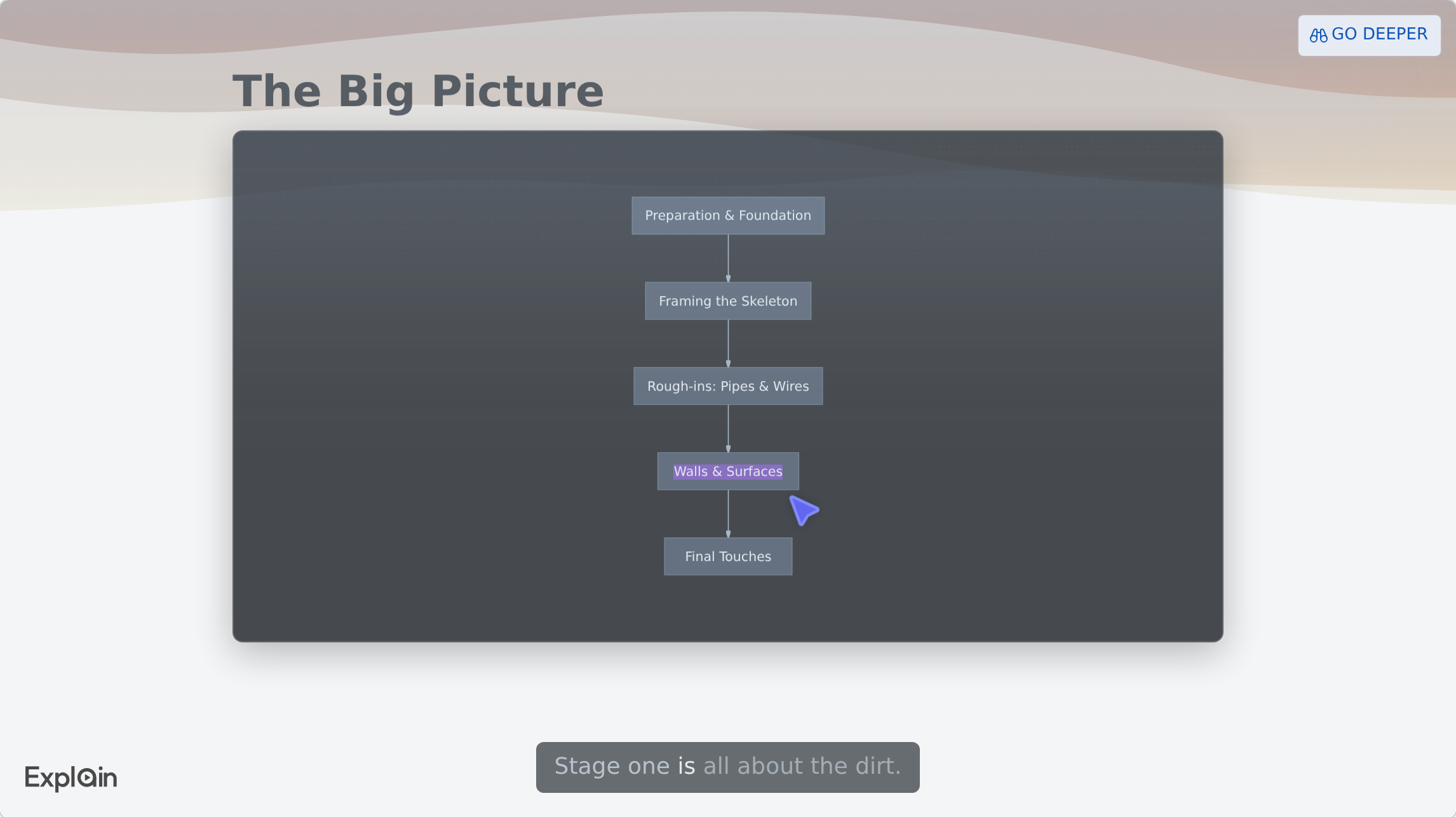
A real estate explainer is a short run of narrated slides that walks one process in order, then checks the viewer understood it. Scrimba's use-case gallery lists "The New Home Build Process" as its Real estate example, a published explainer of under two minutes.
It opens with a flowchart of five stages, from "Preparation & Foundation" to "Final Touches", the pointer moving down the boxes:
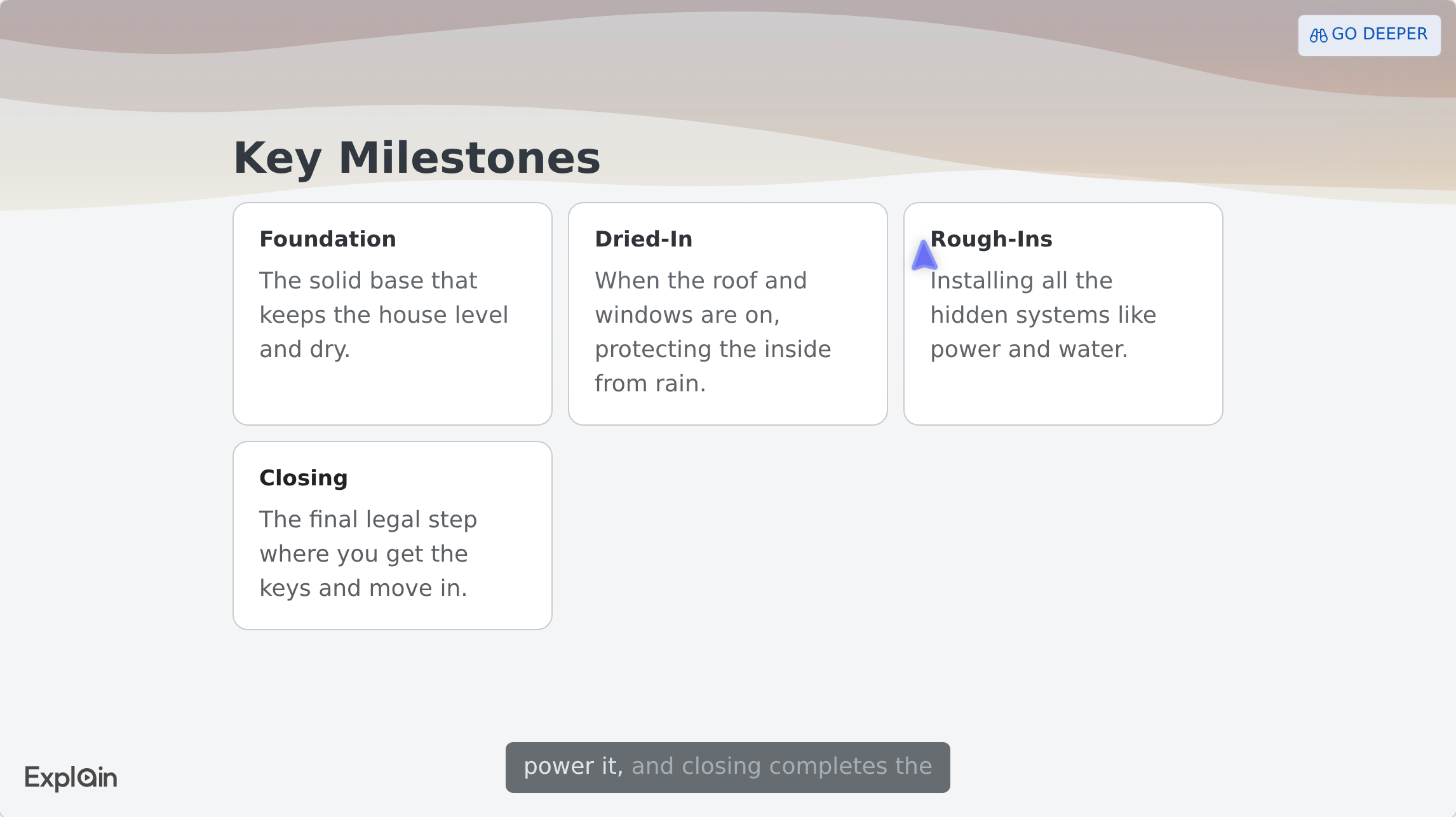
Eight stage slides follow, each with a generated picture tagged Generated image. Near the end, the milestones come back as cards, including the one buyers care about most:
It ends with a quiz, "Why do electrical wires and plumbing pipes go in before the drywall?". Per Scrimba's quiz docs, quizzes appear on explainers made on scrimba.com, and asking for one makes it more likely. Your own pictures can replace the generated ones: attached photos carry no tag, per the docs on your own pictures.
How to Turn a Disclosure PDF into a Buyer Explainer
Attach one form to Explain, ask for a plain-language explanation with a timeline, check it against the form, and have your broker approve it before sending. Here is the route with a real HUD form written for FHA buyers.
HUD's notice For Your Protection: Get a Home Inspection is short, and its key lines are worth a video:
"A home inspection will only occur if you arrange for one; FHA does not perform home inspections."
The same notice says that if buyers request an inspection early, "you may be able to make your purchase contract contingent on its results," and it warns that an appraisal, which estimates the home's value for the lender, "does not replace a home inspection."
- Pick one form or one section of your buyer guide. One explainer per topic keeps each video short and easy to fix.
- Set visibility first. Signed in on scrimba.com, a new explainer "starts on Public," per Scrimba's first-explainer guide, and public explainers are listed in the community. Choose Unlisted.
- Attach the PDF. Explain's attachment docs list PDFs and images; save a Word guide as PDF first. Use blank forms and your own guide only: never a client's contract, Loan Estimate or Closing Disclosure.
- Ask for the explanation you would give in person. For example: Explain this HUD notice to a first-time buyer in plain words: why the inspection is their choice, how an appraisal differs, and when to ask for an inspection contingency. Draw the steps from accepted offer to closing as a flowchart and end with a quiz. For buyers who will watch on a phone, switch on Make for mobile in the composer, which builds a tall, portrait explainer (vertical explainers).
- Check every claim. The narration is printed under the player as a Transcript, with Scrimba's own warning (transcript docs): "Explain is AI and can make mistakes. Please do your own diligence."
- Get a licensed review. Rules differ by state. NAR's consumer guide to written buyer agreements, a requirement for many agents since August 17, 2024, says it plainly: "Practices may vary based on state and local law." Your broker should approve any explainer about contracts, disclosures or deadlines, and an attorney where your state requires one.
- Fix what the review finds with an edit. Type the change into the box under the player; per the editing docs, "Slides you don't mention are untouched." A free account gets three edits per explainer.
How Do You Explain Escrow and Closing Costs Without Getting Numbers Wrong?
Explain the concepts and the form in the video, and leave each buyer's actual numbers to the lender and a conversation. A figure right for one buyer is wrong for the next.
Start from the CFPB's definitions. An escrow account "is set up by your mortgage lender to pay certain property-related expenses," paid from a portion of the monthly payment, and because taxes and insurance change, the escrow payment and the total monthly payment change with them. That last point deserves its own slide.
The Closing Disclosure is "a five-page form," and the lender must give it at least three business days before closing so the buyer can compare it with the Loan Estimate. The CFPB's Closing Disclosure explainer puts it bluntly: "now is the time to resolve problems."
So the explainer walks the blank sample form: where cash to close sits, what estimated escrow means, and which numbers to compare with the Loan Estimate. The buyer then brings their own form to you and the lender. Scrimba's guide to turning a PDF into a video covers longer documents, which belong in a short series rather than one long explainer.
How Do You Make the Same Explainer in Spanish?
Make a second explainer from the same PDF and ask for it in Spanish; don't translate the English one, because a translation replaces it. Explain narrates in 33 languages, and Spanish has voices for three regions.
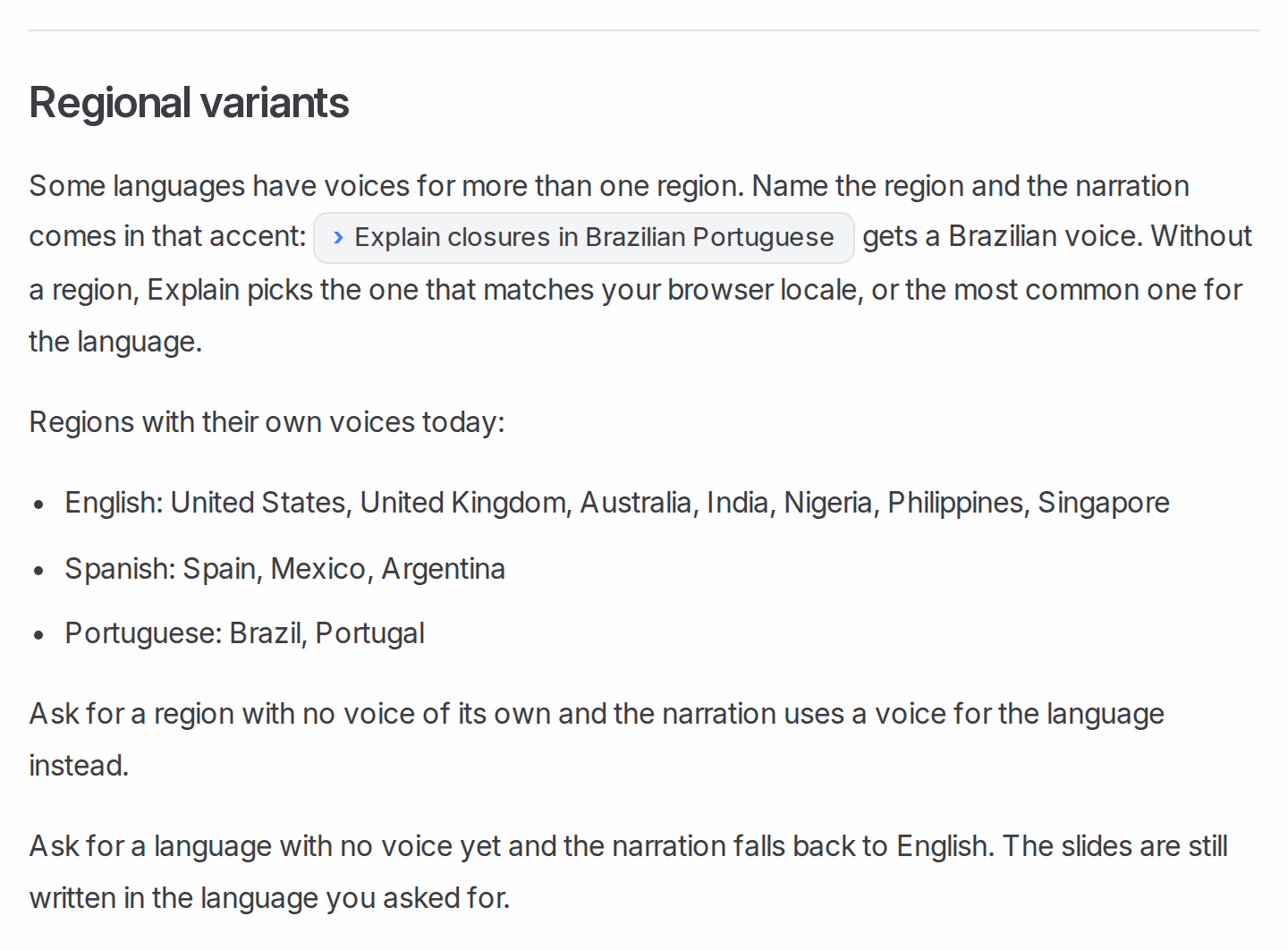
Per Scrimba's languages docs, naming the region sets the accent, so ask for the explainer "in Mexican Spanish" if that is what your buyers speak. Scrimba's own ChatGPT listing advertises this two-language job with the card "Create an English and a Spanish video of these property photos."
Why two explainers? An edit can translate, but per the editing docs, "Narration rewritten in another language moves the explainer to that language," and per the export docs, editing "retires every saved version" of the video file. Each language version counts as its own explainer against your plan. Have a fluent Spanish speaker review the Spanish one as carefully as your broker reviews the English. Scrimba's coming guide on making one training video in many languages goes deeper on running several language versions.
Can You Make a Buyer Explainer in ChatGPT?
Yes: install the Explain Video Generator plugin, attach your buyer guide in the chat, and ask for an explainer; ChatGPT replies with an explainer card.
Install it first, from its listing, in a signed-in ChatGPT session (how to install a plugin in ChatGPT). Per Scrimba's ChatGPT docs, a plugin explainer is square unless you ask for a vertical one, and Watch explainer opens it on scrimba.com. If you connect your Scrimba account, each explainer is saved as it is made and counts toward your plan. Plugin explainers have no quiz.
Keep client details out of the chat. The listing's data notice reads:
"When connected to Explain Video Generator, ChatGPT may share relevant chats and memories with this app to help provide context for your requests."
Sending It to Buyers: Pro, Unlisted Links and Your Website
For explainers you send to clients, use Explain's Pro plan. Scrimba's plans page lists "Commercial use of the explainers you make" under Pro, along with 100 explainers a month, unlimited edits and exports, and switching off the Explain logo on the slides.
You can try it first: 1 explainer without an account, or 5 on a free account with 3 edits each and 1 exported explainer, with the logo on.
Three ways to get it to a buyer:
- A link by text or email. Per the sharing docs, an Unlisted explainer plays for "Anyone with the link." The player's cog menu also has Copy fullscreen link, which opens the lesson alone, without the page around it (copying links).
- On your website. Paste the embed code into any page that takes HTML; per the embedding docs, "Visitors don't need a Scrimba account to watch an embedded explainer." The embed shows only the player, not the AI warning, so add a line under it, such as Reviewed by our broker. General information, not legal advice.
- As a video file. The export docs give 1080p MP4 by default; a portrait explainer exports at 1080×1920.
Explain counts views and likes only, so it won't tell you which buyer watched.
When Another Tool Fits Better
Explain explains processes and forms. For the rest:
- Your face and voice. Buyers hire you, so a phone video of you still matters. For an avatar of yourself, HeyGen's free plan includes one custom video avatar; Synthesia's pricing starts downloads at $19 a month on Starter, with stock avatars.
- Listing tours and social clips. That is marketing, outside this guide; Canva's free editor or HeyGen's real estate tools fit it.
- Stock footage over a script or URL. Pictory's pricing page lists video "from script or URL" and a free trial of 3 video projects.
- One buyer's numbers or a legal issue. A call with the lender, your broker or an attorney.
Frequently Asked Questions
Which AI video generator is best for walking first-time buyers through escrow and closing costs?
For explaining the concepts, a tool that builds narrated diagrams from your own material: Scrimba Explain turns your buyer guide or the CFPB's sample Closing Disclosure into a short explainer. Avatar tools like HeyGen fit when you want a presenter. Leave each buyer's actual numbers to the lender.
I am a solo agent. Is there a free AI video generator for a first-time buyer explainer this weekend?
You can test Scrimba Explain free, with 5 explainers on a free account and its logo on the slides, but its docs list commercial use under Pro, so plan on Pro for client videos. HeyGen's free plan makes 3 watermarked avatar videos a month; Canva's editor is free for your own footage.
Which AI video maker explains the home buying process to clients without any filming?
Scrimba Explain: nothing is filmed, and no avatar appears. It builds typed slides, flowcharts and narration from a PDF or your notes. Its own Real estate example, "The New Home Build Process," walks the build stage by stage in under two minutes and ends with a quiz.
Can an AI video creator explain a new disclosure rule to my buyers without me getting on camera?
Yes. Attach the rule's PDF to Scrimba Explain, such as NAR's guide to written buyer agreements, and ask for a plain-language explainer. Set it to Unlisted, check the transcript, and have your broker approve it, since practices vary by state.
My buyer guide is a written document. Does a text to video AI exist that makes it watchable?
Yes. Save the guide as a PDF, attach one section at a time to Scrimba Explain, and ask for a short explainer per section. Each becomes narrated slides with diagrams. Check every page against your guide before you send the link.
Is an explainer video maker worth it for walking sellers through pricing and the listing process?
For the process, yes: one explainer on how pricing works and what happens between listing and closing saves repeating it at every appointment. Make it from your seller guide, keep it general, and leave each home's price to the conversation.
Which PDF to video tool works now for the buyer disclosure PDF my clients never open?
Scrimba Explain reads the PDF and explains it in plain words, with a flowchart of when it matters. Use the blank form, never a client's signed copy, set the explainer to Unlisted, and send it with the disclosure.
Which AI explainer video generator explains escrow and inspection timelines to first-time buyers?
Scrimba Explain draws timelines as flowcharts, so the order from accepted offer to closing is clear. Take every deadline from your state's purchase contract, not from the AI, and have your broker check it. Make a second explainer for Spanish-speaking buyers.
Key Takeaways
- Make one explainer per buyer topic, from your own guide or a blank public form, never a client's documents.
- Scrimba Explain builds narrated slides and flowcharts from a PDF, with no filming and no avatar.
- For Spanish-speaking buyers, make a second explainer and name the region, such as Mexican Spanish; a translation edit replaces the original.
- Have your broker, and an attorney where required, review every explainer about rules, disclosures or deadlines.
- For client use, Scrimba's docs list commercial use under Pro.
Sources
- National Association of REALTORS®, First-Time Home Buyer Share Falls to Historic Low of 21%, Median Age Rises to 40, 2025, and Consumer Guide to Written Buyer Agreements
- Consumer Financial Protection Bureau, What is a Closing Disclosure?, What is an escrow or impound account? and the Closing Disclosure explainer
- U.S. Department of Housing and Urban Development, For Your Protection: Get a Home Inspection, form HUD-92564-CN
- HeyGen pricing, Synthesia pricing, Canva video editor, Pictory pricing
- Scrimba, Explain documentation and the Explain Video Generator listing
All pages accessed October 23, 2026.