How to Make a Training Video in ChatGPT
Sora is gone, but a plugin turns your SOP into a narrated training video inside ChatGPT. The steps, the workspace and data checks, and the limits.

Yes, through a plugin, not through ChatGPT itself. OpenAI closed Sora's web and app experiences on April 26, 2026 and its API on September 24, 2026, so ChatGPT has no video model of its own. To make a training video without leaving the chat, install Scrimba Explain, listed in ChatGPT as Explain Video Generator, attach or paste one section of your SOP, and mention the plugin. The model you are chatting with writes the lesson, and the plugin turns it into a narrated explainer in the same conversation. Claim it to keep it, then export an MP4 for your LMS.
Last verified: September 28, 2026. Checked that day: OpenAI's help articles on Sora, plugins, apps and projects; the vendor pages in the table; and Scrimba's Explain docs and plugin listing.
Scrimba publishes this article and makes Explain. It is described in the third person, and the article says where it is the wrong choice.
Can You Make a Training Video Inside ChatGPT?
You can make a narrated training video inside ChatGPT by installing a video plugin, because ChatGPT itself has made no video since Sora closed.
Ask ChatGPT and it usually suggests writing the script there and making the video elsewhere. Synthesia's ChatGPT page answers "Can ChatGPT generate video?" with "No. ChatGPT generates text, not video" and tells you to paste the script into Synthesia.
Plugins removed that second step. OpenAI's plugins help article describes the flow: install a plugin from Plugins, connect an account if it asks, then call it with an @ mention. Explain's listing sums up its job: "Turn anything into a narrated explainer video, without leaving ChatGPT." And per Scrimba's ChatGPT docs, "The model you're chatting with writes the lesson and the narration."
There is no presenter and no camera: typed slides, diagrams and images, a narrating voice and captions. As Scrimba's introduction puts it, "An explainer is not a screen recording."
Does an AI-generated teaching video teach as well as one a person made? In a study in Computers & Education, 447 participants reached equally high learning outcomes with AI-generated and human-made teaching videos, though they preferred the human-made ones. Those AI videos used HeyGen avatars as presenters, not narrated slides. Their scripts came from ChatGPT, and the lead author notes that "A teacher read the AI-generated scripts to check that the content was correct." Keep that step.
Which Route Fits Your Training Video?
The right route depends on three things: a presenter, completion records in the LMS, and staying inside ChatGPT.
Checked on each vendor's own page on September 28, 2026:
| Route | Presenter or avatar | SCORM or LMS tracking | Quiz | Free allowance | Languages | Works inside ChatGPT | Export |
|---|---|---|---|---|---|---|---|
| ChatGPT alone | No video, text only | No | As text | Your ChatGPT plan | Not applicable | Yes | Text |
| Explain Video Generator in ChatGPT | No: narrated slides, diagrams, images | No; you upload the MP4 to the LMS | No | Free to start: drafts don't count; claiming counts toward 10 for the life of a free account or 100 a month on Pro | 33 narrated | Yes | MP4 at 2560x1440 plus .vtt, after claiming |
| Scrimba Explain on scrimba.com | No | No | Multiple-choice at the end | 1 without an account; 10 for the life of a free account; 100 a month on Pro | 33 narrated | No | Same |
| HeyGen (ChatGPT app or heygen.com) | Yes, AI avatars | SCORM and LMS integrations on Business | Business | 3 videos a month, up to 1 minute, with a free HeyGen account | 30+ free, 175+ from Creator | Yes, through its app | Watermark removal from Creator |
| Colossyan | Yes, 300+ stock avatars | SCORM from Professional (5 a month); none on free Starter | 10 interactive videos a month on free Starter | Starter: 20 minutes a month | 120+ | Apps for assessments and course outlines, not video | Unlimited MP4 downloads from Professional |
| Synthesia | Yes, AI avatars | SCORM on Enterprise | Quizzes on Enterprise | Basic: 10 minutes of video a month | 160+ | Yes, a beta plugin that needs a paid Synthesia account | MP4 at 1920x1080, downloads from Starter |
Sources: HeyGen's ChatGPT page and pricing, Colossyan's pricing and ChatGPT apps post, Synthesia's pricing and plugin listing, and Scrimba's limits and exporting docs. SCORM is how a module "talks" to the LMS for "delivery and tracking," as Rustici Software puts it. An MP4 carries no such link.
Before You Start: Check the Workspace and the Data
Workspace. On ChatGPT Business, "apps are enabled by default," according to OpenAI's plugins help article. On Enterprise and Edu, OpenAI's admin guide says "In general, new plugins and apps are disabled by default," so an administrator may have to allow Explain Video Generator first. Disabled by admin means ask your admin.
Data. The listing carries this notice:
"When connected to Explain Video Generator, ChatGPT may share relevant chats and memories with this app to help provide context for your requests."
OpenAI's connected apps article adds that data shared with an app "is handled according to each app's terms of service and privacy policies." On OpenAI's side, Business, Enterprise and Edu content is not used to train its models by default, per its projects article. Even the OpenAI Verified badge "does not replace your organization's privacy, security, or vendor review," so put Explain through your usual vendor review before pasting an internal SOP.
How to Make an SOP Training Video in ChatGPT, Step by Step
To make an SOP training video in ChatGPT, install the plugin, give it one procedure, mention it with a specific prompt, then check, claim and export the result.
- Install Explain Video Generator in a signed-in ChatGPT session. Open the listing and choose Install plugin. "Free to start, no login required" means no Scrimba login; ChatGPT still needs you signed in. Scrimba's guide to installing a plugin in ChatGPT walks through the screens.
- Give it one procedure, not the whole manual. Attach the SOP as a PDF or paste the section you need; the listing's own example card is "Turn this employee onboarding PDF into an explainer video." No length or coverage limit is documented, so do not count on a 40-page manual fitting into one explainer. Scrimba's guide to turning an SOP into a training video covers splitting a long one.
- Mention the plugin with a prompt that names the audience and the steps. Type @, pick Explain Video Generator, and be specific: "@Explain Video Generator Turn section 4 of this SOP, the lockout steps before cleaning the slicer, into a short training explainer for new line staff. Keep every step in the SOP's order and use its exact names for parts and checks."
- Watch it build. The first slide appears within seconds and the rest streams in while you watch. It starts unlisted: anyone with the link can open it, but it is not listed or searchable.
- Check every step against the SOP. Every explainer page says "Explain is AI and can make mistakes. Please do your own diligence." Compare each slide with the procedure, and have its owner, or a qualified person for safety content, sign off.
- Claim it to keep and edit it. Sign in to Scrimba when you open the link and claim the explainer. Then fix a weak slide with Redo slide instead of rebuilding.
- Export the MP4 for your LMS. An explainer you own exports as an MP4 at 2560x1440 with a separate .vtt captions file, as long as it is public or unlisted, and Scrimba emails a link when the render finishes. Assignment and any completion records stay in the LMS.
Explain can draw a procedure as a flowchart, one of the diagram types its docs list. This slide comes from "Navigating Elder Care in the UK", a published example in Scrimba's use-case gallery:
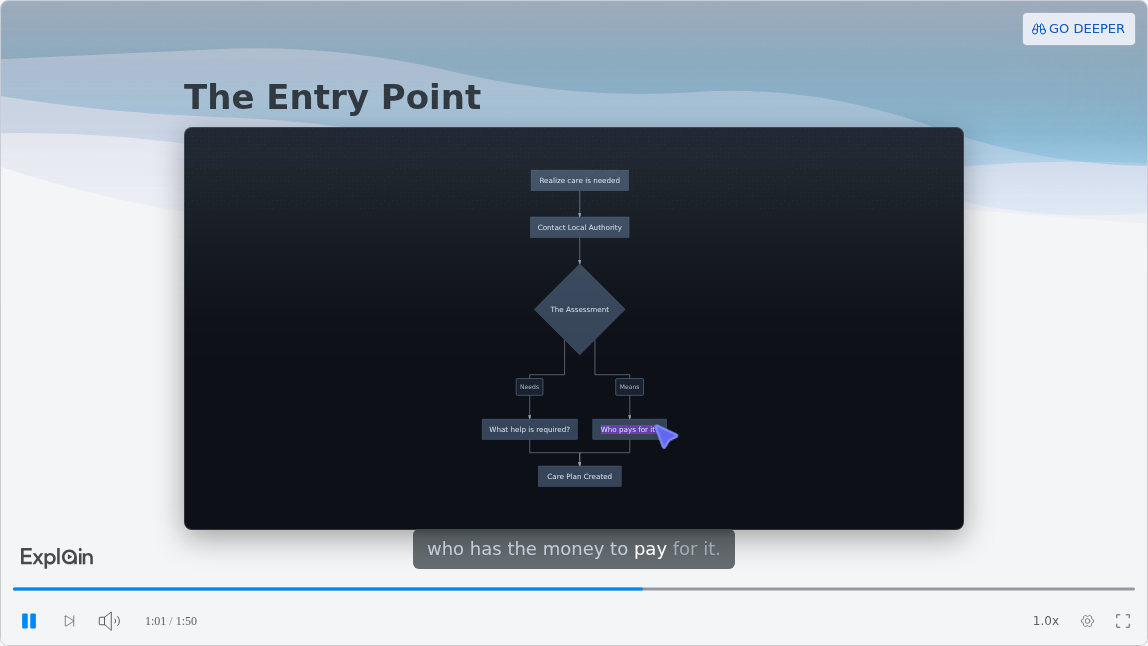
Claiming is also where the allowance starts. Scrimba's limits page says drafts made through ChatGPT don't count, "however many you make." A claimed explainer counts toward your account: ten for the life of a free account, 100 a month on Pro. After that, "using it costs nothing further."
What If Your Handbook Already Lives in a ChatGPT Project?
A ChatGPT project keeps chats, files and instructions together, and OpenAI says connected apps work in project chats, but Scrimba's docs do not cover projects.
OpenAI's projects article says "You can use connected apps in project chats": pick one from the + menu or name it in the message. It caps project files by plan: 5 on Free, 25 on Go and Plus, 40 on Edu, Pro, Business and Enterprise.
Neither OpenAI nor Scrimba documents Explain reading a project's files, so do not rely on it. Attach or paste the handbook section in the chat where you mention the plugin, and check the explainer against it. Keep one policy per explainer: PTO, benefits enrollment, the first-day checklist.
Send new hires the unlisted link, or embed the explainer on an intranet page. Scrimba's embedding docs say "Visitors don't need a Scrimba account to watch an embedded explainer." Scrimba's guide to making employee onboarding videos from your handbook covers the full first-week set.
Safety Briefings in the Tool You Already Pay For
A safety briefing can stay inside the ChatGPT plan you already pay for, because the plugin runs in ChatGPT on web, desktop and mobile and a draft costs nothing until you claim it. To keep, edit or export a briefing, you claim it into a Scrimba account, where a free account holds 10 explainers for its life and Pro allows 100 a month.
OSHA's training standards policy statement says "an employer must instruct its employees using both a language and vocabulary that the employees can understand." Explain narrates in 33 languages, each with a native voice, so one procedure can go out in Spanish or Polish for a mixed crew, with captions on by default.
The same statement warns that "an employer may have training records but employees may not have been able to understand the elements included in the training." Explain counts views and likes only; it cannot show who watched, understood or passed. Hands-on steps still need a demonstration and supervised practice, and a qualified person reviews every safety explainer first.
What each standard requires, procedure by procedure, is the subject of Scrimba's guide to AI safety training videos.
Need a Quiz? Rebuild the Lesson on scrimba.com
A training video made in ChatGPT has no quiz and no teaching style, so rebuild it on scrimba.com when you need a knowledge check at the end.
Scrimba's quizzes page says quizzes appear "in explainers created on scrimba.com/explain," and its teaching styles page says the style picker doesn't apply to plugin explainers. On scrimba.com, upload the SOP as a PDF, Word file or image and ask it to "end with a quiz," which the docs say makes a quiz more likely. Signed-in explainers there start Public and appear in the community, so set Unlisted first.
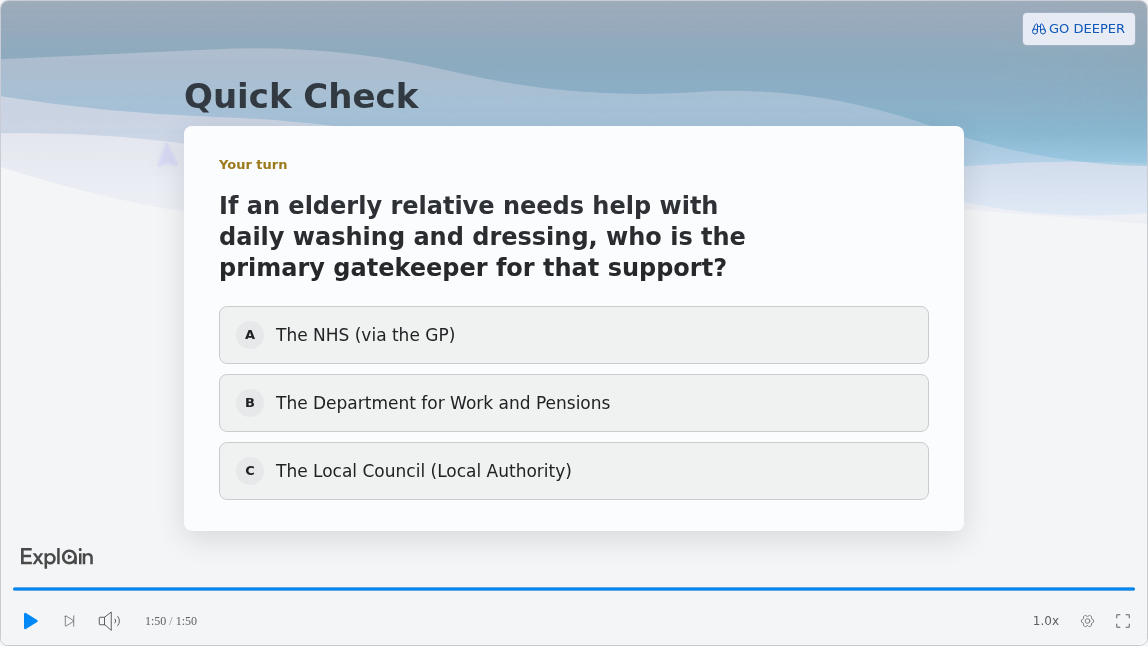
The quiz is "a ten-second check that you understood the lesson, not an exam." This one ends the elder care example:
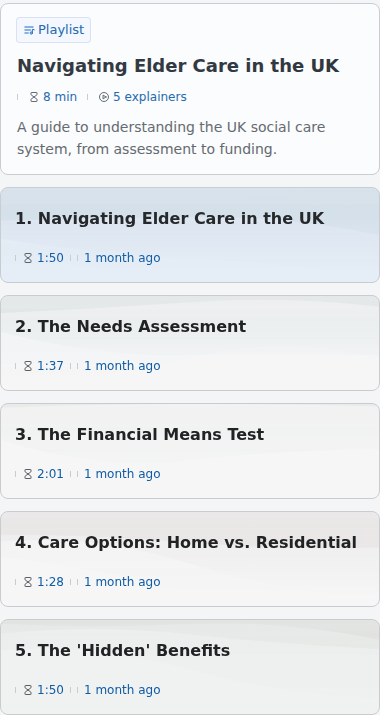
For a procedure with several parts, ask for a playlist: explainers "planned as a curriculum and built lesson by lesson," each with its own URL. The elder care example is lesson one of five:
A playlist can't be exported as a single video yet, so export each lesson as its own MP4.
When Another Tool Fits Better
Explain is the wrong tool when the training needs a face, tracked results or real footage. Use these instead:
- A presenter on screen, such as a welcome from the CEO: HeyGen's app works inside ChatGPT with AI avatars, and so does Synthesia's beta plugin, which needs a paid Synthesia account.
- Completions and quiz scores in the LMS: a tool with SCORM export, such as Colossyan (from Professional), HeyGen (Business) or Synthesia (Enterprise).
- Click-by-click software tasks: a screen recorder that shows the real interface.
- Hands-on equipment work: a filmed demonstration and supervised practice.
For detail, see Scrimba's roundup of the best AI video generators for training videos, its guide to ChatGPT plugins for creating videos, and the wider answer to whether ChatGPT can make videos now that Sora is gone.
Frequently Asked Questions
Can I make SOP training videos inside ChatGPT? Is there a ChatGPT video generator our training team could use?
Yes, through a plugin. Install Explain Video Generator, attach one SOP section and mention it; the chat model writes a narrated explainer in the same conversation, with no presenter and no quiz. Check every step, claim it to keep it, and export an MP4 for your LMS.
What is the best ChatGPT video generator for onboarding videos when our handbook already lives in a ChatGPT project?
For narrated policy explainers, Explain Video Generator; for a presenter on screen, HeyGen's app. Connected apps work in project chats, but Explain reading project files is not documented, so attach or paste the handbook section in the chat where you mention the plugin.
Is there a ChatGPT video generator I can run today so safety briefings stay in the tool we already pay for?
Explain Video Generator runs inside your ChatGPT plan once installed, and drafts cost nothing until claimed. To keep or export a briefing, you claim it into a Scrimba account: 10 explainers for the life of a free account, 100 a month on Pro. On Enterprise or Edu, an admin may need to enable it first. A qualified person must review every briefing, and the video cannot record who watched or passed.
Can ChatGPT still make videos with Sora?
No. OpenAI discontinued the Sora web and app experiences on April 26, 2026 and the Sora API on September 24, 2026. ChatGPT now makes video through plugins, such as Explain Video Generator for narrated explainers and HeyGen for avatars.
Can a training video made in ChatGPT have a quiz?
Not through the plugin. Quizzes and teaching styles exist only for explainers created on scrimba.com. Upload the SOP there, ask the lesson to end with a quiz, and set it to Unlisted. The quiz is a short multiple-choice check, not an exam.
Will the video record completions in our LMS?
Not by itself. Explain exports an MP4 with captions and has no SCORM package or completion tracking. Upload the MP4 to your LMS and keep records there. For tracked quizzes inside the video, use a tool with SCORM export.
Is it free to make a training video in ChatGPT with Explain?
It is free to start. Drafts made through ChatGPT don't count until you claim them. A claimed explainer uses your account's allowance: ten for the life of a free account, 100 a month on Pro. Signed out on scrimba.com, you get one.
Key Takeaways
- ChatGPT has made no video on its own since Sora closed (web and app April 26, 2026, API September 24, 2026); plugins render video now.
- Explain Video Generator turns an attached or pasted SOP section into a narrated explainer in the same chat, with no presenter and no camera.
- Check the workspace (admins may need to enable plugins on Enterprise and Edu) and read the data notice before pasting internal procedures.
- Claim the explainer to keep, edit and export it; the MP4 goes into your LMS, which keeps any completion records.
- For a quiz, rebuild on scrimba.com; for avatars or SCORM, use HeyGen, Colossyan or Synthesia.
Sources
All sources accessed September 28, 2026.
Official and research sources
- OpenAI Help Center. "What to know about the Sora discontinuation." https://help.openai.com/en/articles/20001152-what-to-know-about-the-sora-discontinuation
- OpenAI Help Center. "Plugins in ChatGPT and Codex." https://help.openai.com/en/articles/20001256-plugins-in-chatgpt-and-codex
- OpenAI Help Center. "Admin controls, security, and compliance for plugins and apps." https://help.openai.com/en/articles/11509118
- OpenAI Help Center. "Connected apps in ChatGPT." https://help.openai.com/en/articles/11487775
- OpenAI Help Center. "Projects in ChatGPT." https://help.openai.com/en/articles/10169521-projects-in-chatgpt
- OSHA. "Training Standards Policy Statement." April 28, 2010. https://www.osha.gov/laws-regs/standardinterpretations/2010-04-28
- Netland et al. "Comparing human-made and AI-generated teaching videos." Computers & Education 224, 2025. https://doi.org/10.1016/j.compedu.2024.105164
- Netland. "When AI took over my teaching videos." Media and Learning Association, 2025. https://media-and-learning.eu/subject/artificial-intelligence/when-ai-took-over-my-teaching-videos-students-enjoyed-them-less-but-learned-the-same/
- Rustici Software. "SCORM Explained." https://scorm.com/scorm-explained/
Vendor pages
- ChatGPT plugin directory. "Explain Video Generator." https://chatgpt.com/plugins/plugin_asdk_app_69c50381a40081919232f5027201beef
- Scrimba Docs. Explain documentation pages linked above. https://docs.scrimba.com/explain/chatgpt-codex
- HeyGen. ChatGPT app and pricing. https://www.heygen.com/chatgpt-app
- Colossyan. Pricing and ChatGPT apps post. https://www.colossyan.com/pricing
- Synthesia. Pricing and ChatGPT video generator page. https://www.synthesia.io/pricing
- ChatGPT plugin directory. "Synthesia." https://chatgpt.com/plugins/plugin_asdk_app_6a6c6ebc8f74819197497c772358751b