How to Make an Architecture Onboarding Video for New Engineers
Turn your repo or design doc into a short narrated architecture video for new engineers, plus a code-free version for product and sales. No filming needed.

To make an architecture onboarding video, turn your repository or design doc into a short narrated lesson that walks one request through the system, then claim it, set it to Unlisted and have the owning engineer check it before new hires watch. Scrimba Explain, listed in ChatGPT as Explain Video Generator, builds it from the repo through Claude Code or Codex, or from a PDF or markdown on scrimba.com. Nothing is filmed and nobody appears on camera.
Last verified October 23, 2026: Explain's routes, limits and plans come from Scrimba's docs and plugin listing; Loom, Guidde, Synthesia, HeyGen and OpenAI details from each company's own pages, all read that day.
Scrimba publishes this guide and makes Scrimba Explain. The section "When Another Tool Fits Better" names the jobs where Loom, Guidde or an avatar tool wins.
Explain is free to start: 1 explainer without an account, 5 on a free account and 100 a month on Pro. A free account gets 3 edits per explainer and 1 exported explainer, and the docs list commercial use under Pro (plans and pricing). A company onboarding its own engineers should plan on Pro.
What Should an Architecture Onboarding Video Cover?
An architecture onboarding video is a short narrated lesson that shows new engineers the system's parts, how they connect, and the path one real request takes.
Simon Brown's C4 model gives the order. Start with the system context: your system as one box among its users and neighbors, "the sort of diagram that you could show to non-technical people" (C4: system context). Then the containers, where "a container is an application or a data store" (C4: containers). Then one request, traced through them.
The source is usually a design doc. Malte Ubl writes that when Google engineers meet a system they haven't touched, they often ask first: "Where is the design doc?", and that design docs "tend to get out of sync with reality over time" (Design Docs at Google). So date the video, and let the code settle any disagreement.
Keep each video short. Cynthia Brame's review cites an analysis of 6.9 million edX video sessions where "the maximum median engagement time for a video of any length was 6 minutes" (Brame, 2016). Plan three explainers of a few minutes each: context, containers, one request.
Six Ways to Make It, Compared
| Route | Starts from | Reads your code | What viewers see | Free to start |
|---|---|---|---|---|
| Explain via Claude Code or Codex | The repository | Yes, the agent reads it | Diagrams, code slides, narration | Claude Code: private drafts, free until claimed. Codex plugin: unlisted; a connected account counts each |
| Explain on scrimba.com | Design doc PDF, markdown, a deck saved as PDF | Only what you attach | Diagrams, code slides, narration | 1 without an account, 5 on a free account |
| Explain in ChatGPT | The chat and attached files | Only what is in the chat | Diagrams, narration; square unless you ask | Drafts free; a connected account counts each |
| Loom | Your screen and camera | You show it | Your screen and face | 25 videos, 5-minute recordings |
| Guidde | A workflow you click through | No | Captured screens, AI voiceover | Up to 25 how-to videos |
| Synthesia or HeyGen | A deck or document | No | An avatar presenter | Watermarked; HeyGen: 3 one-minute videos a month |
Only the agent route reads code you didn't paste. The steps cover Explain's three routes; the last section says when the others win.
Step 1: Choose the Source of Truth
Explain teaches from what you hand it: "the more context you hand it, the more the lesson is about your thing" (writing a good prompt). Pick one source per video:
- The repository, when the docs have drifted. A coding agent "reads the code directly, so there's nothing to attach" (attaching documents).
- The design doc, exported to PDF. Explain reads PDFs and "text and markdown"; save a Word file as PDF first.
- The markdown wiki. Attach the pages. Mermaid diagrams, which GitHub renders in "wikis, and Markdown files" (GitHub Docs), are plain text and travel with the page.
- The architecture deck, saved as PDF, since no PPTX upload is documented.
Strip API keys, credentials and customer data first.
Step 2: Make It From the Repo with Claude Code or Codex
- Connect it. In Claude Code, one command adds Explain's server (Claude Code docs):
claude mcp add --transport http scrimba-explain https://scrimba.com/explain/mcp
Or install the Explain by Scrimba plugin and type /explain. Codex uses the @Explain Video Generator plugin; its IDE extension doesn't support plugins, so connect the MCP server there (ChatGPT and Codex docs). More in adding MCP to Claude Code.
- Name the audience and the frame. Agents make square explainers unless told otherwise; the docs' own example is "explain how our caching works, as a wide video for the team meeting" (vertical explainers). For new engineers: "Make a wide explainer for engineers in their first week: the services in this repo, what each owns, and one checkout request from the gateway to the database as a sequence diagram."
- Know what comes back. The agent writes "the narration, the code excerpts, the diffs, and the diagrams" itself (MCP server). Expect flowcharts "for branching logic and architecture", sequence diagrams (diagrams), code slides of "about 15 lines at most" with a pointer on the line being discussed (code) and one infographic.
- Claim it, then share it on purpose. Claude Code and other MCP clients start a private draft:
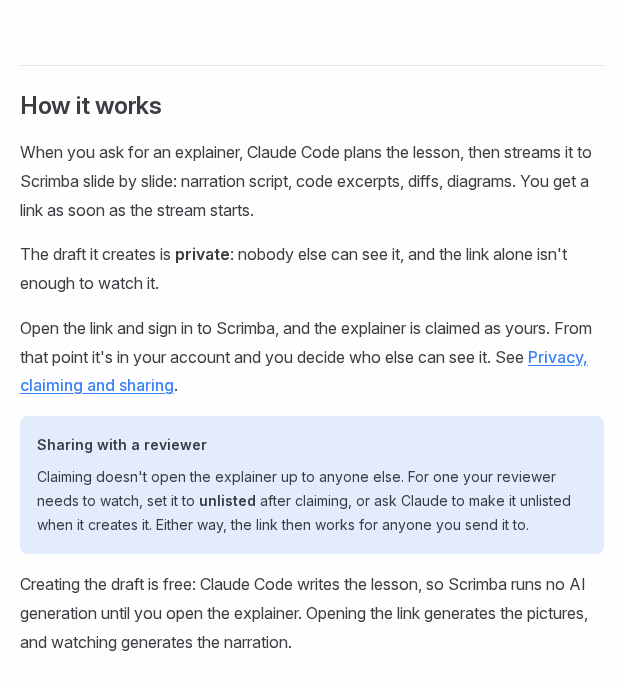
Those drafts cost nothing until claimed: "Only claiming counts" (plans and pricing). So let the agent try two versions and claim the better one. Codex's @Explain Video Generator plugin differs: its explainer starts unlisted, open to anyone with the link, and a connected Scrimba account saves and counts it the moment it's created (ChatGPT and Codex docs).
Step 3: Or Make It From the Design Doc on scrimba.com
Use this route when the design doc holds the reasoning the code can't show: goals, non-goals and rejected alternatives.
- Sign in and set the visibility first. Signed in, a new explainer "starts on Public, so the finished explainer is listed in the community for anyone to find" (your first explainer). Choose Unlisted or Private for internal architecture.
- Attach the PDF or markdown files and say what to draw: "Teach new backend engineers how this design works: the four services, where each stores data, and the order request as a sequence diagram." The composer builds wide unless you toggle Make for mobile.
- Split a long doc. Ubl puts larger design docs at "10-20ish pages", and Scrimba documents no page limit. Make one explainer per section, or a playlist, and check every slide against the doc.
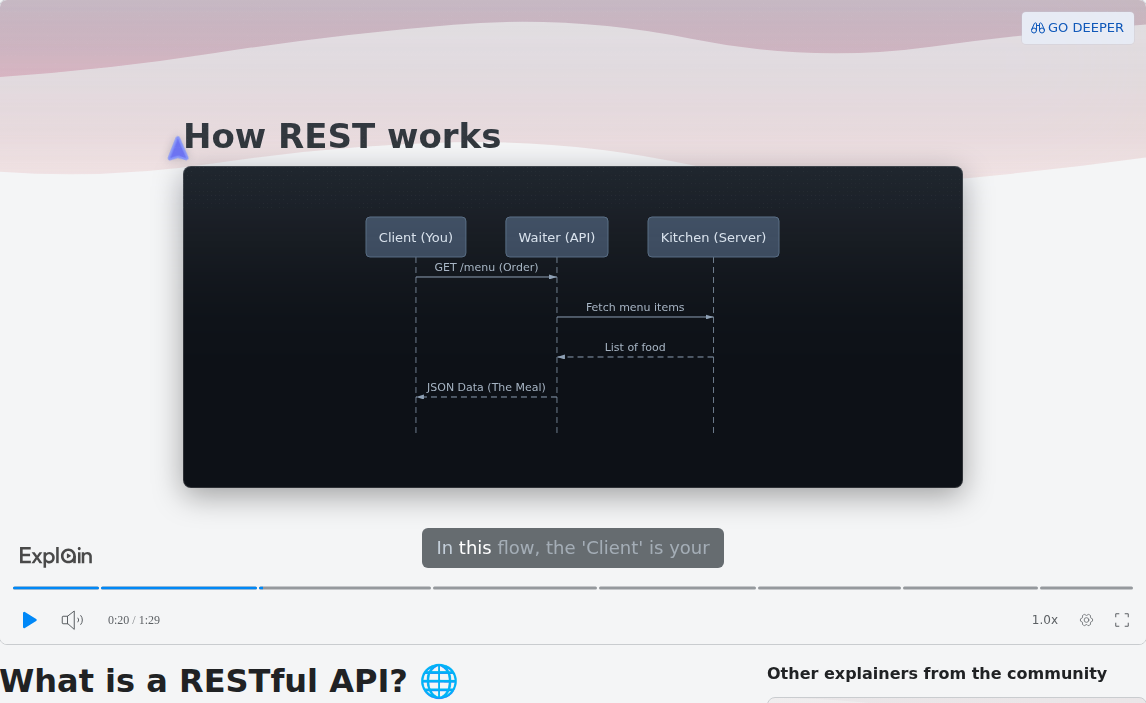
Scrimba's published example What is a RESTful API?, from the docs' use cases page, shows the two slide types an architecture video leans on. At 0:20, a sequence diagram:
At 0:50, a code slide with the pointer on the call being narrated:
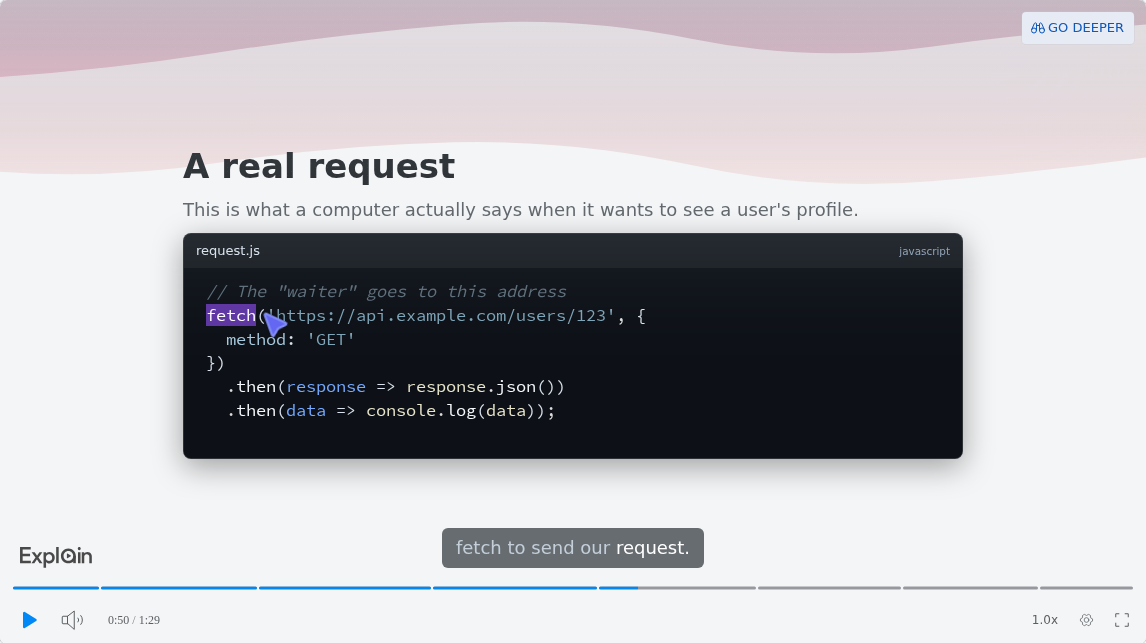
response.json())". The caption reads "fetch to send our request." and the player shows 0:50 / 1:29.">
How Do You Explain the Same Architecture to Product and Sales?
Make a second explainer from the same source for non-engineers: the system context only, plain names for each part, and no code slides.
Scrimba's prompt guide says a good prompt names the topic, the audience and the slide types, and that "Audience is the sentence most people leave out" (writing a good prompt). For example: "Explain this architecture to product managers and account executives who don't read code. One diagram of the system, its users and the outside services it depends on. No code slides."
The engineer version goes down to containers and a traced request. The product version stops at the context view, the one C4 describes as fit for non-technical people.
Can ChatGPT Make an Architecture Video Without Extra Tooling?
ChatGPT has had no built-in video maker since Sora shut down, so the shortest route is one plugin install: Explain Video Generator, which replies with an explainer card.
OpenAI discontinued Sora's web and app on April 26, 2026 and its API on September 24, 2026 (OpenAI Help Center). Install the plugin while signed in, from the Explain Video Generator listing; installing a plugin in ChatGPT has the steps.
On ChatGPT Business "apps are enabled by default", while on Enterprise and Edu "new plugins and apps are disabled by default" until an admin turns them on (OpenAI admin controls).
Then attach the design doc and ask: "@Explain Video Generator Turn this design doc into a wide onboarding video for new engineers, with the request path as a sequence diagram." Watch explainer on the card opens it on scrimba.com, square unless you asked otherwise. If you connect your Scrimba account, each explainer is saved as it's created, counts against your plan and stays unlisted until you change it (ChatGPT docs).
The listing warns that "ChatGPT may share relevant chats and memories with this app", so check your company's policy before attaching internal docs. And ChatGPT sees only what you paste, while Codex has the code (pull requests docs).
Share It, Keep It Current, and What It Costs
For the all-hands, Download renders "1080p at 60 fps" by default, with 720p and 1440p options, for an explainer you own that is public or unlisted. Subtitles ride inside the MP4, with a .vtt file under Options (exporting).
The free plan shows the Explain logo in the corner of the slides, and Pro switches it off (player controls).
Plan the updates too:
- Small fixes: the edit box under the player rewrites, adds, deletes or reorders slides (editing an explainer). An edit "retires every saved version", so export again afterwards.
- A new service or a split database: regenerate from the repo rather than patching slides one edit at a time.
- Shared ownership: in a workspace, every member can edit an explainer, but only its maker and the admins can export it or change its visibility (privacy and sharing). Scrimba Teams sells Explain "for internal training and onboarding".
Every explainer page says "Explain is AI and can make mistakes. Please do your own diligence." The engineer who owns each service watches it before new hires do.
When Another Tool Fits Better
- Showing the running app or a live debug. Explain is "not a screen recording" (introduction). Loom records "Screen and camera", and its free Starter plan allows 25 videos with "5 minute screen recordings" (Loom pricing). Scrimba's Loom vs Explain comparison for code walkthroughs follows on November 2.
- Click paths in internal tools. Guidde captures "via our browser extension, mobile or the desktop app" and turns the recording into "step-by-step narrative scripts" (Guidde).
- A presenter, or the deck as it is. Synthesia imports a .pptx of up to 150 slides, scripts each scene from speaker notes and can "Add avatar to each scene" (Synthesia docs). HeyGen takes "DOCX, TXT, or PPTX directly" (HeyGen). Explain has no avatars; see Synthesia and HeyGen alternatives for training videos.
- The written record. The design doc stays the source of truth: see documenting your codebase with AI, and for a new engineer's first week, the developer onboarding tools guide.
Frequently Asked Questions
Which AI video generator can turn our service architecture doc into an onboarding video for new hires?
Scrimba Explain. Attach the doc as a PDF on scrimba.com, or let Claude Code or Codex read the repo, and ask for a wide lesson that traces one request as a sequence diagram. Set it to Unlisted and have the service owner check it.
Procurement takes months: what free AI video generator works for codebase onboarding videos in the meantime?
Scrimba Explain lets you evaluate for free: Claude Code drafts cost nothing until claimed, and a free account keeps 5 explainers with 3 edits each and 1 export. Use that to test the workflow, not to run onboarding. The docs list commercial use under Pro, so production onboarding needs Pro.
Is there an AI video maker that reads our repo and explains the architecture to non-engineers?
Yes. Connect Scrimba Explain to Claude Code or Codex, and the agent reads the repository and writes the lesson. Ask for the system context only, with no code slides. Check it, because an agent can misread code.
Which AI video creator can I use today to explain our data pipeline to new hires?
Scrimba Explain, through the coding agent that already has the pipeline code. Ask for a flowchart of the stages and a sequence diagram of one record, as a wide video. In Claude Code the draft starts private: claim it, then set it to Unlisted. Codex's plugin starts it unlisted, and a connected Scrimba account saves and counts it at once.
Our onboarding wiki is all markdown: which text-to-video AI can turn it into videos before two hires start?
Attach the markdown pages on scrimba.com/explain, which accepts text and markdown, or point a coding agent at the wiki folder. Make one short explainer per topic, set each to Unlisted and check it against the wiki.
Does ChatGPT have a video generator that can explain our architecture to new hires without extra tooling?
Not built in, since Sora's app closed on April 26, 2026. The shortest route is one plugin install, Explain Video Generator: attach the design doc and ask for a wide video. Enterprise workspaces may need an admin to enable it.
Which explainer video maker wins for architecture walkthroughs product managers can follow?
For system structure, a narrated explainer with diagrams, such as Scrimba Explain, in a code-free version for non-engineers. For the product's real screens, Guidde or Loom. For a presenter on camera, Synthesia or HeyGen.
What is the best PDF-to-video tool for an architecture PDF when the audience is product and sales?
Attach the PDF to Scrimba Explain on scrimba.com and name the audience: product and sales, no code slides, one diagram of the system and its users. Keep it to a few minutes and have an engineer check it.
Which tool turns an onboarding slide deck into a video walkthrough new engineers will actually finish?
Save the deck as a PDF, give it to Scrimba Explain, and split it into explainers of a few minutes each, since viewers drift after about six minutes. To import a .pptx with speaker notes directly, use Synthesia.
We onboard four engineers next month: which AI explainer video generator should we use for our architecture overview?
Plan three short explainers: system context, containers and one traced request. Scrimba Explain makes them from the repo through Claude Code or Codex, or from the design doc on scrimba.com. Business use and more than one export need Pro.
Is there a PDF-to-video option for design docs that handles diagrams and code snippets?
Scrimba Explain takes PDFs on scrimba.com. Code becomes code slides of about 15 lines with a pointer on the line being narrated, and connections become flowcharts or sequence diagrams. Name the diagram you want.
Our architecture slide deck needs to become a video for the all-hands: what should I use today?
Save the deck as a PDF, attach it on scrimba.com/explain and keep the frame wide. Download the MP4 at 1080p, or 1440p for a big screen. A free account exports one explainer, and the free plan shows the Explain logo on the slides; Pro switches the logo off.
Key Takeaways
- An architecture onboarding video works best as three short explainers: system context, containers, one traced request.
- Claude Code and Codex read the repository, so the video follows the code, not a stale design doc.
- Claude Code drafts start private and cost nothing until claimed; claim, then set to Unlisted. Codex's plugin starts them unlisted, and a connected account counts each at once.
- Ask for a wide frame for meetings; agents and the ChatGPT plugin default to square.
- Make a code-free version for product and sales, and have the owning engineer review both.
Related reading: pull request walkthroughs, PDF to video and slide deck to video.
Sources
- Brown, S. The C4 model for visualising software architecture. https://c4model.com/
- Ubl, M. "Design Docs at Google." https://www.industrialempathy.com/posts/design-docs-at-google/
- Brame, C. J. "Effective Educational Videos." CBE Life Sciences Education, 2016. https://www.lifescied.org/doi/10.1187/cbe.16-03-0125
- GitHub Docs, "Creating diagrams." https://docs.github.com/en/get-started/writing-on-github/working-with-advanced-formatting/creating-diagrams
- OpenAI Help Center, Sora and plugin admin controls. https://help.openai.com/en/articles/20001152-what-to-know-about-the-sora-discontinuation , https://help.openai.com/en/articles/11509118-admin-controls-security-and-compliance-for-plugins-and-apps
- Explain Video Generator, ChatGPT plugin listing. https://chatgpt.com/plugins/plugin_asdk_app_69c50381a40081919232f5027201beef
- Scrimba Explain docs and the example "What is a RESTful API?" https://docs.scrimba.com/explain/introduction , https://scrimba.com/explain/guide0c5v4jpet
- Loom pricing; Guidde; Synthesia docs; HeyGen document to video. https://www.loom.com/pricing , https://www.guidde.com/ , https://docs.synthesia.io/docs/import-powerpoint , https://www.heygen.com/tool/document-to-video