What You Can Build After Scrimba's Free JavaScript Course [2026]
One project you can finish with only the skills the free Learn JavaScript course covers, with acceptance criteria, a built example, and three next projects.

![What You Can Build After Scrimba's Free JavaScript Course [2026]](/articles/content/images/size/w1200/2026/09/153-hero.jpg)
You can build a complete, useful, single page application with variables, functions, arrays, objects and the DOM. No framework, no build step, no server, no network request. This article specifies one such project precisely enough that you can tell when it is finished, then shows it running.
The reason most people stall here is not a missing skill. It is a missing finish line. An idea has no finish line. A specification does: a defined output, a fixed set of functions, and a list of checks that either pass or do not.
What follows is that specification, a map from every requirement in it back to a skill the free course verifiably covers, one honest gap where the course covers nothing, three projects to build after it, and the free-or-paid decision at the end.
If you have not started the course yet, the complete beginner's guide covers the route in. If you want twenty options rather than one, the project ideas list is the companion to this page. That page gives you breadth. This one gives you a finish line.
What the Free Course Actually Leaves You With
The free Learn JavaScript course runs 9.4 hours across four builds: a passenger counter, a Blackjack game, a Chrome extension and a mobile app. Its module list is public.
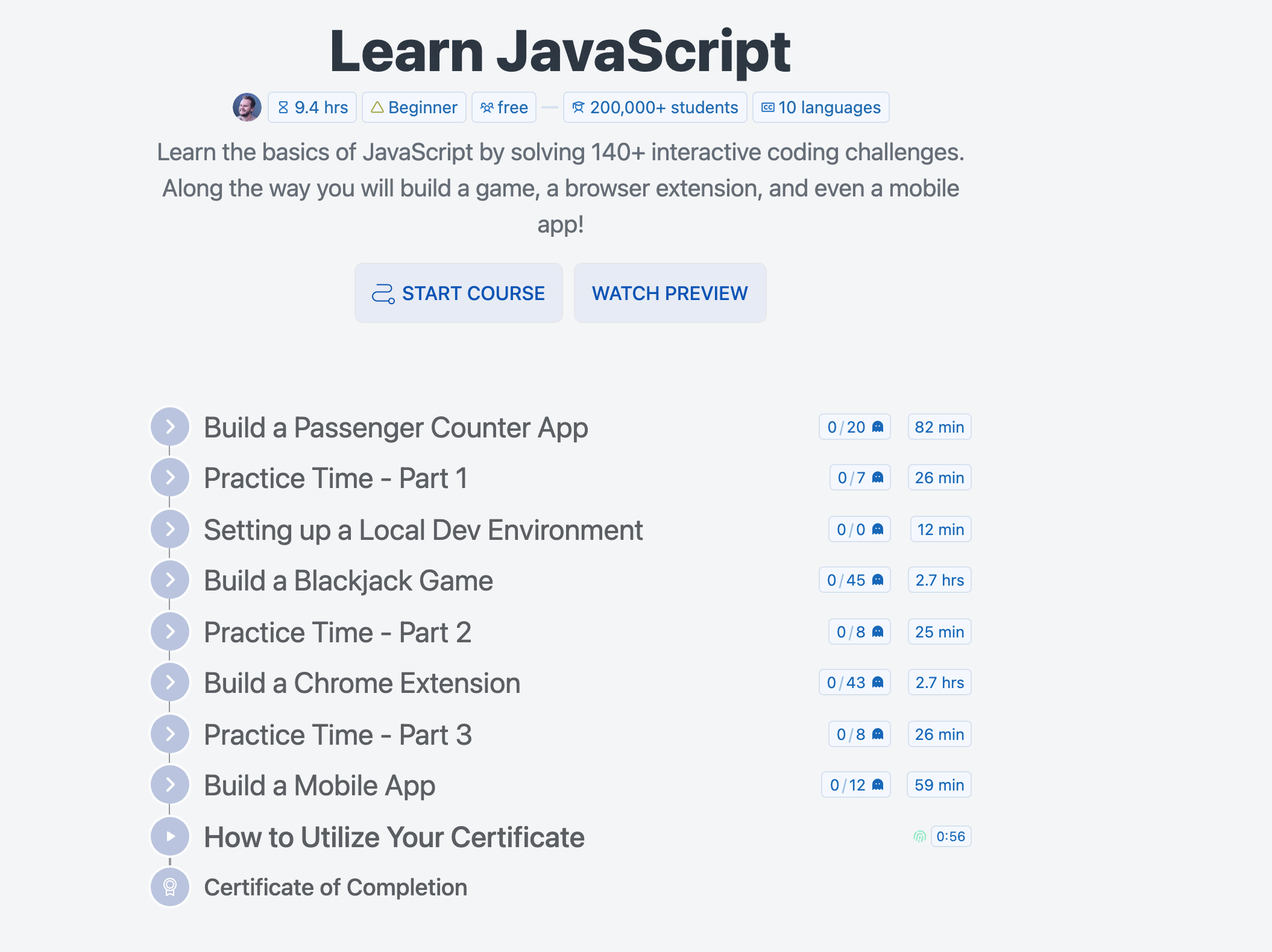
The Learn JavaScript module list, captured signed out on 8 September 2026.
Stripped of the project names, the course leaves you with seven things:
| What the course covers | What that lets you do in a project |
|---|---|
Variables with let and const |
Hold the state of the page in a few named values |
| Functions | Split the work into named steps that take parameters and return results |
| Arrays | Keep a growing list of anything and walk it |
| Objects | Give each item in that list named fields instead of loose parallel arrays |
| DOM manipulation | Read what someone typed and write results back onto the page |
| ES6 and later syntax | Template literals and the modern shorthands you will see in every codebase |
| Local dev environment setup | Run your own folder of files on your own machine |
Then there is the half that decides what you can build. The course does not cover:
- Asynchronous JavaScript,
fetch, or working with APIs - React, Vue or any other framework
- TypeScript
- Node.js or anything on a server
- Testing
- Advanced patterns such as closures and prototypes in depth
The second list is the more useful one. Every project proposed below was checked against it, and nothing here needs anything on it.
The Project: Settle Up
Settle Up is a single page where you enter who was on a trip and who paid for what, and it tells you who pays whom to square everyone up.
Three files in one folder, which is exactly what the course's local dev environment module sets up:
settle-up/
    index.html
    styles.css
    index.js
Why this and not a to-do list. A to-do list is a rendering exercise: whatever appears on the page is correct by definition, so there is nothing to be wrong about. A splitter has an answer you can work out on paper and compare against. That is what turns an idea into a specification.
The data
Two shapes, both flat, both built from things the course covers directly:
const people = ["Ana", "Ben", "Cleo"]

const expenses = [
    { payer: "Ana", amount: 84.00, label: "Groceries" }
]
An array of strings, and an array of objects. Nothing else is stored.
The functions
Five, and no more. If you find yourself writing a sixth, you have probably started a different project.
| Function | What it does |
|---|---|
addPerson(name) |
Rejects an empty or duplicate name, otherwise adds it to people and re-renders |
addExpense(payer, amount, label) |
Rejects an unknown payer or a non-positive amount, otherwise adds an object to expenses and re-renders |
getBalances() |
Returns an object keyed by name: what that person paid, minus their equal share |
getPayments(balances) |
Walks the people who owe against the people who are owed, and returns a list of payments |
render() |
Writes the people, the expenses, the payments and any rounding residue onto the page |
Only one of them is non-obvious, and it is short:
function getBalances() {
    const balances = {}
    let total = 0

    for (let i = 0; i < people.length; i++) {
        balances[people[i]] = 0
    }
    for (let i = 0; i < expenses.length; i++) {
        balances[expenses[i].payer] += expenses[i].amount
        total += expenses[i].amount
    }

    const share = total / people.length
    for (let i = 0; i < people.length; i++) {
        balances[people[i]] = round2(balances[people[i]] - share)
    }
    return balances
}
An object, two loops and a division. A positive balance means the person is owed money. A negative one means they owe it.
The acceptance criteria
This is the part that makes it a specification. Five checks, each of which you can run by hand:
- Three people and one expense of 90.00 produces exactly two payments of 30.00, both to the person who paid.
- Everyone paying the same amount produces no payments and the words
Everyone is square. - Nobody appears as both a payer and a receiver in the same result.
- Adding an expense updates the page with no reload and no edit to
index.html. - Reloading the page clears everything. That is expected behavior, not a defect. More on that below.
Built to that specification, in 138 lines of JavaScript, it looks like this:
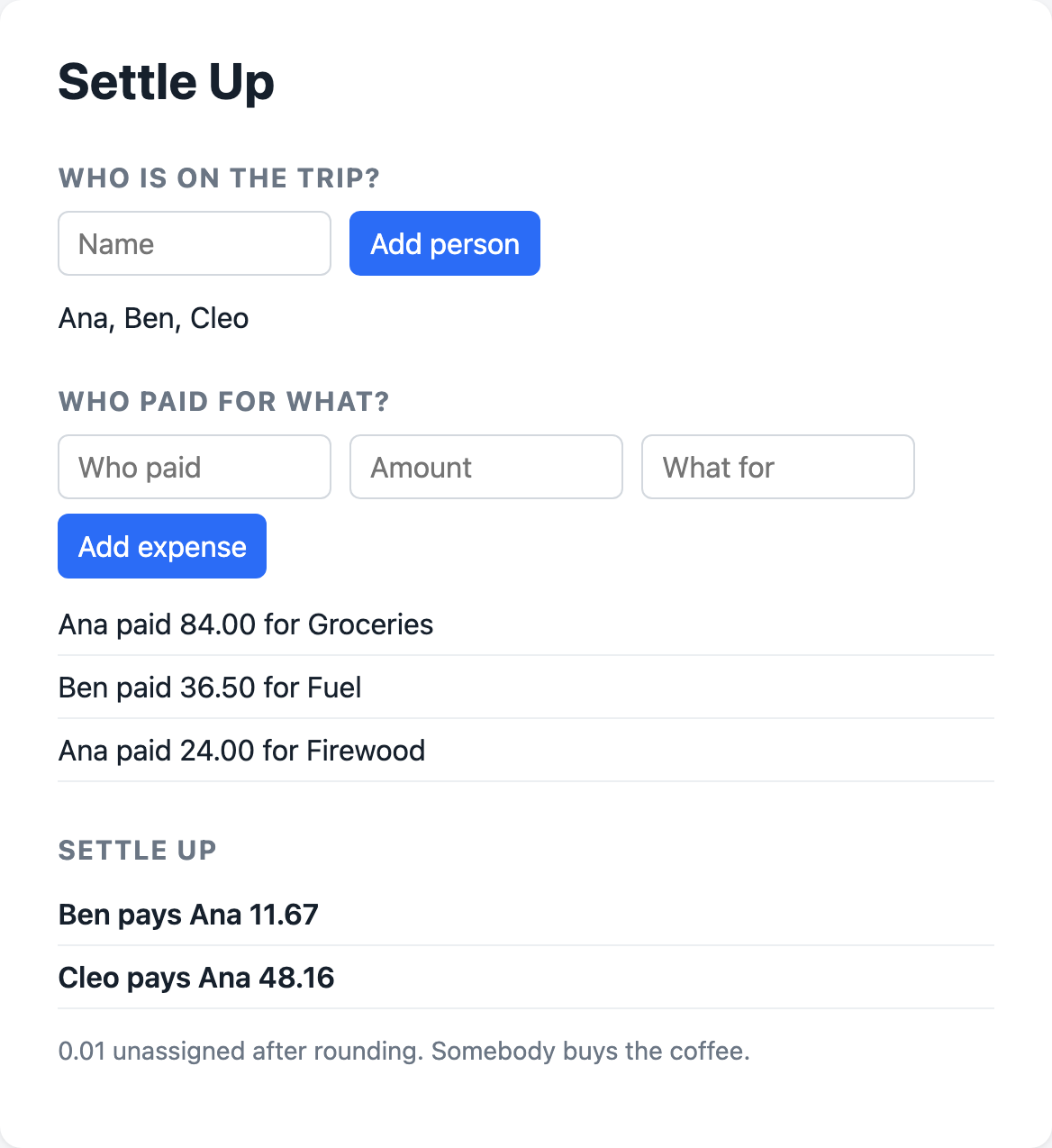
Settle Up built for this article and run in a browser on 8 September 2026.
Once it works, keep the folder in version control and put it online. Git and GitHub and deploying your first website each take an evening, and together they turn a folder on your laptop into something you can send someone.
Where Each Requirement Lands
Every line of Settle Up traces back to something the free course covers. That is not a coincidence. It is the constraint the project was designed under.
| What the project needs | The skill it rests on |
|---|---|
people and expenses as page state |
Variables with let and const |
| Five named functions taking parameters | Functions |
| Adding to lists and walking them | Arrays |
Each expense as { payer, amount, label } |
Objects |
| Balances keyed by name | Objects |
| Reading the three inputs, writing four regions of the page | DOM manipulation |
| The payment lines assembled as text | Template literals, from ES6 and later |
| Running three files from your own folder | Local dev environment setup |
The run in the screenshot above exposes something the mapping alone would not. Three people spent 144.50 between them. Ana is owed 59.83, Ben owes 11.67, Cleo owes 48.17. Add the two debts and you get 59.84, one cent more than Ana is owed, because each balance was rounded to the cent on its own.
So the app pays Ben's 11.67 and then 48.16, and prints 0.01 unassigned after rounding underneath. It does not quietly drop the cent, and it does not pretend the numbers balance.
A project you can check is a project you can finish. Nobody discovers a rounding residue by reading a list of project ideas. You discover it the first time you write down what the output is supposed to be and then compare.
The One Thing Settle Up Cannot Do
Reload the page and the trip is gone. Nothing is saved anywhere.
That is deliberate. Saving data in the browser means the Web Storage API, and the free Learn JavaScript course does not cover it. Rather than send you three lessons deep into something the course never taught, the specification does not require it, and criterion five states the consequence out loud.
You have two options, and both are fine:
- Accept it. A settle-up conversation happens in one sitting, at the end of a trip, with everyone in the room. A page that forgets afterwards is not obviously wrong.
- Go and learn the one thing. MDN's Web Storage documentation is a page of reading, not a course. Read it on purpose, add it, and you have a version that survives a refresh.
The rule generalizes. When a project needs something your course did not teach, either change the project or go and learn that one thing deliberately. What does not work is guessing at it mid-build, which is how a first solo project turns into an abandoned folder.
Three Projects to Build Next
Each of these changes exactly one thing about Settle Up. Build them in this order.
One: the same shape, different data. A practice log, a reading list, a shared shopping list. An array of objects, a couple of functions, a rendered list. No new skill at all, which is the point: the second project is what proves the first one was not memorized.
Two: data from somewhere else. Convert the trip total into a second currency, or load the expense list from a file instead of typing it in. The new skill is asynchronous JavaScript and fetch, which the free JavaScript course explicitly does not cover. It is covered in the Frontend Developer Path, which has a dedicated "Working with APIs" module at 7.6 hours, and in Advanced JavaScript, 9.8 hours with Tom Chant. Both sit on the Pro tier.
Three: the same app, as components. Rebuild Settle Up so the people list, the expense list and the settlement each own their state. Nothing about the problem changes. Everything about how the code is organized does. That is a large enough shift to want a course rather than documentation, and Learn React is free, 15.1 hours with Bob Ziroll, and ends in two capstone projects. Unsure whether you are ready for it? How much JavaScript you need before React answers that directly.
One more item belongs on the list, though it is not a project. Prove getPayments with automated tests rather than by hand. Testing is absent from the free JavaScript course too, and Introduction to Unit Testing covers the fundamentals in 86 minutes on Pro.
Free Courses or the Path
At this point there is a real fork, and it is a scope decision rather than a price one.
The free standalone route is substantial. Learn React at 15.1 hours, Learn TypeScript at 4.2 hours and Learn Node.js at 3.5 hours are all free, all carry a completion certificate, and you can assemble a route from them yourself.
What a standalone course cannot do is sequence itself. It does not know what you finished last or what you should reach for next, and it does not contain the material that sits between the language and a job.
The Frontend Developer Path is the sequenced version: 81.6 hours in a fixed order, built in partnership with Mozilla MDN, carrying modules no standalone course has. Working with APIs at 7.6 hours, accessible development, responsive design, user interface design, and a getting hired module at 5.1 hours. It sits on Pro, at $24.50 a month on the annual plan or $49 monthly, with regional and student discounts available.
The rule: pick free standalone courses if you already know what you are missing, and pick the path if you do not. After Settle Up you will know one thing you are missing, because the specification named it for you.
Frequently Asked Questions
What should you build after finishing a beginner JavaScript course?
One project with a defined output you can check by hand, rather than three you abandon. A shared-expense splitter works well because the answer is arithmetic you can verify on paper: enter three people and one expense, and you already know what the result should say. Write the checks down before you write the code.
Can you build a real project with only JavaScript basics?
Yes, as long as the project needs no network calls and no persistence. Variables, functions, arrays, objects and DOM manipulation are enough for any single page app whose data lives in memory for one sitting. Calculators, splitters, trackers, quizzes and games all fit. Anything that must load or save data does not.
Does the free Scrimba JavaScript course teach APIs?
No. The free Learn JavaScript course covers variables, functions, arrays, objects, the DOM and modern syntax, and it does not cover asynchronous JavaScript, fetch or working with APIs. Those are covered by Advanced JavaScript and by the Working with APIs module inside the Frontend Developer Path, both on the Pro tier.
How long should a first solo JavaScript project take?
Long enough that you get stuck at least twice, short enough that you finish. Settle Up is 138 lines of JavaScript across five functions, which is a reasonable target for a first build without a tutorial to follow. If a first solo project runs past a couple of weekends, it is usually too big rather than too hard.
Should you learn React or TypeScript next?
React, if the thing stopping you is organizing a growing page. TypeScript, if the thing stopping you is not knowing what shape your data is when it reaches a function. Both are free standalone courses on Scrimba, so the order costs nothing but time, and React is the more common next step straight after the fundamentals.
Key Takeaways
- A specification beats an idea because it has a finish line. One project with five acceptance criteria will get built. Twenty ideas will not.
- Check every requirement against what the course covers. Settle Up rests on variables, functions, arrays, objects, DOM manipulation, modern syntax and a local folder, and nothing else.
- Name the gap instead of hiding it. Settle Up loses everything on refresh because browser storage is not part of the free JavaScript course, and the specification says so.
- Each follow-on project should change one thing: the data, the source of the data, or the way the code is organized.
- Free standalone courses versus the path is a sequencing decision. Pick standalone courses when you know what you are missing, and the path when you do not.
Sources
- Learn JavaScript, Scrimba, module list captured 8 September 2026
- Learn React, Learn TypeScript and Learn Node.js, Scrimba
- Advanced JavaScript and Introduction to Unit Testing, Scrimba
- The Frontend Developer Path, Scrimba
- Scrimba price plans, checked 8 September 2026
- MDN, Web Storage API
Accessed September 2026.