Best ChatGPT Plugins for Creating Videos [2026]
Sora is gone, so video in ChatGPT now comes from plugins. The main video plugins in the directory, verified October 2026, sorted by job, with vendor pricing.

![Best ChatGPT Plugins for Creating Videos [2026]](/articles/content/images/size/w1200/2026/08/142-hero.jpg)
Short answer: the best ChatGPT plugin for video is the one built for your job: Runway, Pika or PixVerse for footage from a prompt, Visla or invideo for a produced video from a brief, HeyGen or Synthesia for an avatar presenter, Scrimba Explain (Explain Video Generator in ChatGPT) or VideoZero for a narrated explainer, and Descript for editing a recording. Each one renders on the vendor's side, because ChatGPT has made no video of its own since OpenAI closed Sora; the dates are in Can ChatGPT Make Videos Now That Sora Is Gone?
Last verified October 23, 2026: every plugin below comes from a search of ChatGPT's plugin directory, with its developer and description read from the listing and its price from the vendor's own pricing page that day. "Not listed" means neither shows it. New since the September check: Pika and Prezi.
Scrimba publishes this article and makes one of the plugins in it: Scrimba Explain, listed in ChatGPT as Explain Video Generator. It appears under the job it does, and the plugins that beat it at the other jobs are named with their prices.
How to Install and Use a Video Plugin in ChatGPT
A plugin connects ChatGPT to an outside service, which makes the video under your account with the vendor. The steps follow OpenAI's plugin help article.
- Sign in to ChatGPT. Signed out, the Install plugin button sends you to the login page.
- Open Plugins in the sidebar, or go to
chatgpt.com/plugins, and search for the plugin by name. - Select it and click Install plugin. If it asks you to Connect, sign in to the vendor's account.
- In a chat, type
@and the plugin's name, then describe the video. ChatGPT can also pick an installed plugin on its own when it fits.
OpenAI's plugins page says select plugins are available in all plans, some only on paid ones, and its help center notes that Desktop only plugins cannot run on the web. Scrimba's guide to installing a plugin in ChatGPT walks through each screen.
The Main Video Plugins in ChatGPT's Directory
| Plugin, as listed | Made by | The job it does | Presenter or avatar | Free tier | Cheapest paid | Export |
|---|---|---|---|---|---|---|
| Runway | Runway AI, Inc. | Footage from a prompt | Not listed | 125 one-time credits | $12 a month, billed yearly | Runway workspace; no watermark from Standard |
| Pika | Pika | Footage from a prompt | Lip-sync, per the listing | No monthly credits, only packs; no watermark | $8 a month, billed yearly, commercial license included | Saved to your Pika library |
| PixVerse | PixVerse | Footage from a prompt | Talking-head workflows | 60 starting credits, 30 a day | $8 a month, billed yearly | Up to 540p free; 720p, watermark-free on Standard |
| AI Video Maker | InfoseekAI | Footage from a prompt | Not listed | Not listed | Usage based, no rate card | Download or share link |
| VEED Video Generator | VEED | Presenter video | Stock characters | 720p exports with a watermark | $12 per user a month, billed yearly | Free watermark baked into the file; none on Creator |
| Visla Video Maker | Visla Inc. | Brief to narrated video | Text-plus-avatar projects | Visla watermark, monthly base credits | $15 a month, billed annually | 1080p, from Visla's app |
| invideo | Invideo Inc | Brief to narrated video | Not listed | Not listed | $10 per seat a month, billed annually ($20 monthly) | 4K export from Starter |
| Genra Video Editor | RAMA ALPACA N4 LIMITED | Brief to edited video | Not listed | Free credits at sign-up | $10 for 240 credits | Not listed |
| HeyGen | HeyGen Technology Inc. | Avatar presenter | Stock and custom avatars | 3 watermarked videos a month, up to 1 minute | $29 a month, brand kit included | 1080p, watermark-free from $29 |
| Synthesia | Synthesia | Avatar presenter | AI avatars | 10 minutes a month on the site, no downloads; plugin needs a paid plan | $14 a month, billed yearly | 1080p MP4 downloads from Starter |
| Prezi | Prezi Inc | Slide deck to narrated video | Optional: you, on camera | Basic plan; new decks are public | $7 a month, billed annually; voice-over and PDF export from $19 | Narrated video, podcast, PDF, PowerPoint or SCORM |
| VideoZero | VIDEOZERO TECHNOLOGIES LTD | Animated explainer | None; 2D animation | Always free, with an overlay | $5 a month for 20 credits | Share link or embed; no overlay on Starter |
| Explain Video Generator | Scrimba AS | Narrated explainer from your material | None; no camera | 1 signed out, 5 per free account; 3 edits each, 1 export, logo on slides | Pro, 100 a month | MP4, 1080p by default, .vtt subtitles |
| Descript | Descript | Edit a recording | Your own recording | Free plan | $16 a month, billed yearly | 720p free; 1080p, watermark-free on Hobbyist |
| Yaps Video Captions | Yaps AI | Captions on a video file | Your own video | Mobile app only | $12 a month, billed annually | Captioned MP4 from the Yaps desktop app |
The same search lists dozens more, such as ChatCut, Kling AI and Pollo AI. Canva's plugin creates designs such as presentations, posters and social posts; its listing names no video creation, so it is not in the table.
Which Plugin for Which Job
- "My NCLEX notes are already in a ChatGPT project." Explain Video Generator turns them into a narrated review; the notes-to-video walkthrough shows how.
- "I prep for system design interviews entirely inside ChatGPT." Explain draws system design diagrams; VideoZero animates algorithms.
- "NFPA 13 worked problems without leaving the chat." Explain renders worked problems with real notation; check each step against the standard, and have a licensed fire protection engineer or instructor review it.
- "I draft client memos in ChatGPT." A client explainer from the memo, on Pro (where Scrimba lists commercial use), reviewed by a qualified professional first.
- "Turn help docs into onboarding videos." Explain with your screenshots, embedded as help center videos; a capture tool for click-by-click steps.
- "Turn a consulting methodology into modules." A playlist on scrimba.com/explain plans the methodology training as a curriculum; set it to Unlisted or Private before you create it, because signed-in explainers start Public. HeyGen if the client wants a presenter.
- Trainers, HR and safety teams: Scrimba's guide How to Make a Training Video in ChatGPT covers SOPs, handbooks and briefings.
Job 1: Generate Footage From a Prompt
This was Sora's job: you describe a shot that was never filmed, and a model invents it. Scrimba's guide to how text to video works covers the mechanics, and its AI video generator roundup covers tools outside ChatGPT.
- Install Runway ("Generate with every AI model"), Pika ("Make video, images and sound") or PixVerse ("Create and edit videos") and connect your account.
- Describe the subject, the motion, the camera and the length.
- Review the clip, then regenerate or ask for a targeted edit.
Runway's listing says results are stored privately in the user's connected Runway workspace and purchases happen on runway.com, never in the chat. PixVerse's listing adds ready-made routes for product ads, talking heads and captions. InfoseekAI's AI Video Maker runs on Seedance models with no subscription: you credit the account first.
Pika, new on October 16, is a plugin extension, the app-like format OpenAI announced at DevDay: Pika's announcement says it opens a studio in a side panel on ChatGPT desktop and web and saves your work to your Pika library. Its listing covers product ads, short films, photo animation and lip-sync.
Limits: output is measured in seconds, and every discarded generation still costs credits.
Job 2: Turn a Brief Into a Produced Video
You know what the video should say and need it produced.
- Work out the script with ChatGPT first.
- Hand it to the plugin:
@Visla Video Maker,@invideoor@Genra Video Editor. - Open the project in the vendor's app to edit, export and download.
Visla Video Maker takes text, documents, PDFs or URLs and returns a narrated video with stock footage and music; its listing says a Visla account is required. invideo handles script, visuals, voiceover and music from a text prompt. Genra sells credits as one-time modules. VEED Video Generator (pick your character, pick your voice), HeyGen and Synthesia put a presenter on screen; Synthesia's plugin, in beta, needs a paid Synthesia account and now builds finished videos with Synthesia Syren.
Limits: free plans watermark the output (Visla, VEED), and VEED's export help says the watermark is hardcoded into the video, so upgrading later means exporting again.
Job 3: Explain Something as a Narrated Walkthrough
Here the tool's work is the explanation, and the video is only how it arrives: onboarding, documentation, studying.
VideoZero, listed as "Visualize • Animate • Explain", turns a prompt into a narrated 2D animation, such as the listing's Dijkstra's algorithm example; its free plan allows commercial use with an overlay.
Prezi, announced for educators on September 25, starts from slides made in ChatGPT or a PowerPoint or PDF you upload. Its listing turns them into an interactive deck you can share and export "as a narrated video or a podcast". It needs a Prezi sign-in, and decks on free plans are public.
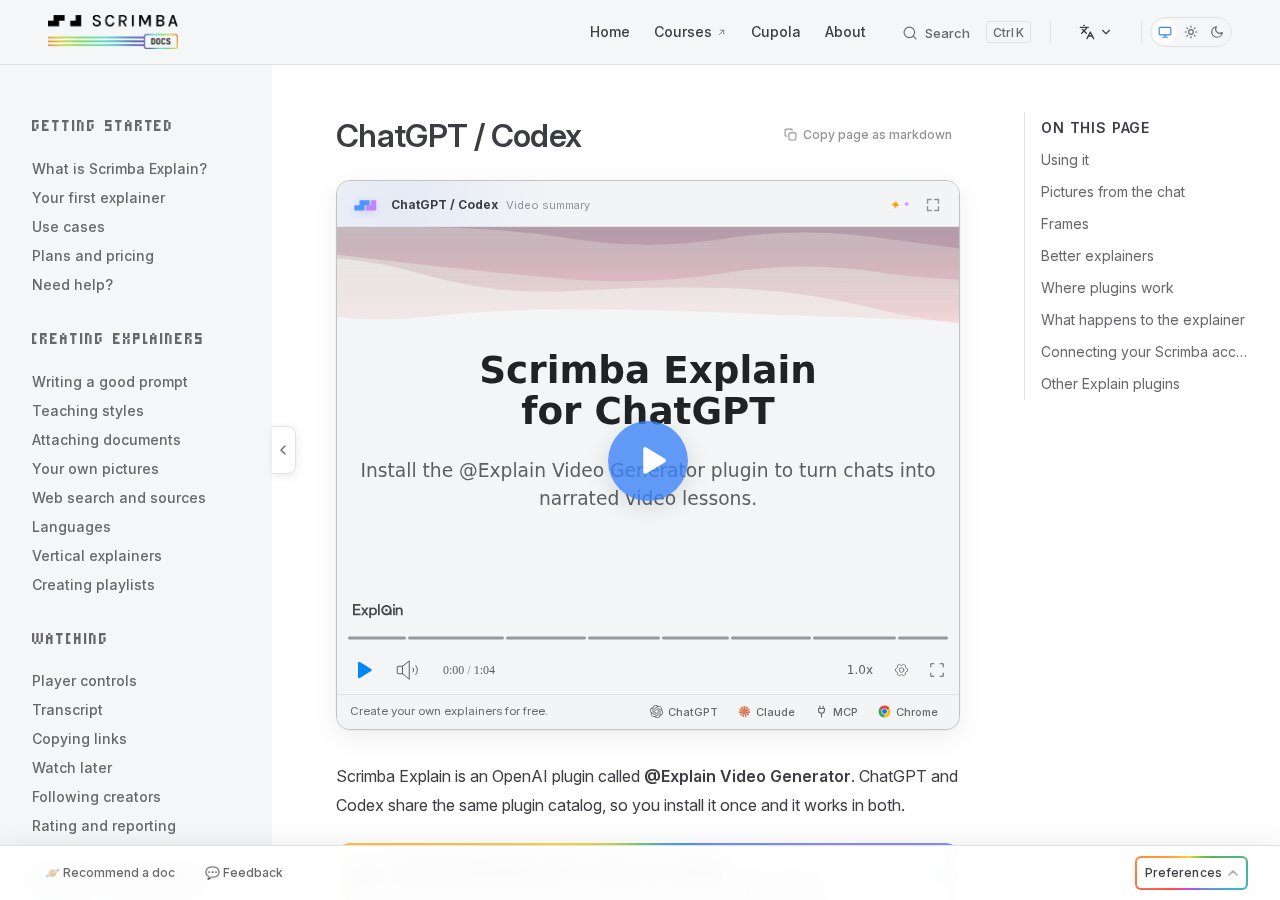
Scrimba Explain, listed as Explain Video Generator ("Free AI explainer video maker"), is Scrimba's plugin. It turns a topic, a document, a webpage, a codebase or a product brief into a narrated video with diagrams, animations and images. Nothing is filmed: each slide is typed content, so there is no presenter and no camera.
- Install it first, in a signed-in ChatGPT session.
- Paste or attach your material, then write
@Explain Video Generatorand what to teach. The model you chat with writes the lesson, so a smarter model makes a better explainer. - Open the explainer card. Watch explainer on ChatGPT's reply opens the lesson on scrimba.com, unlisted: anyone with the link can watch, nobody can find it. It is square unless you ask for a vertical video.
- Keep it. Connect Scrimba, when ChatGPT offers it, saves every explainer to your account as it is made; without it, click Save to profile. A saved explainer downloads as an MP4, 1080p by default, with .vtt subtitles, and embeds without a viewer account.
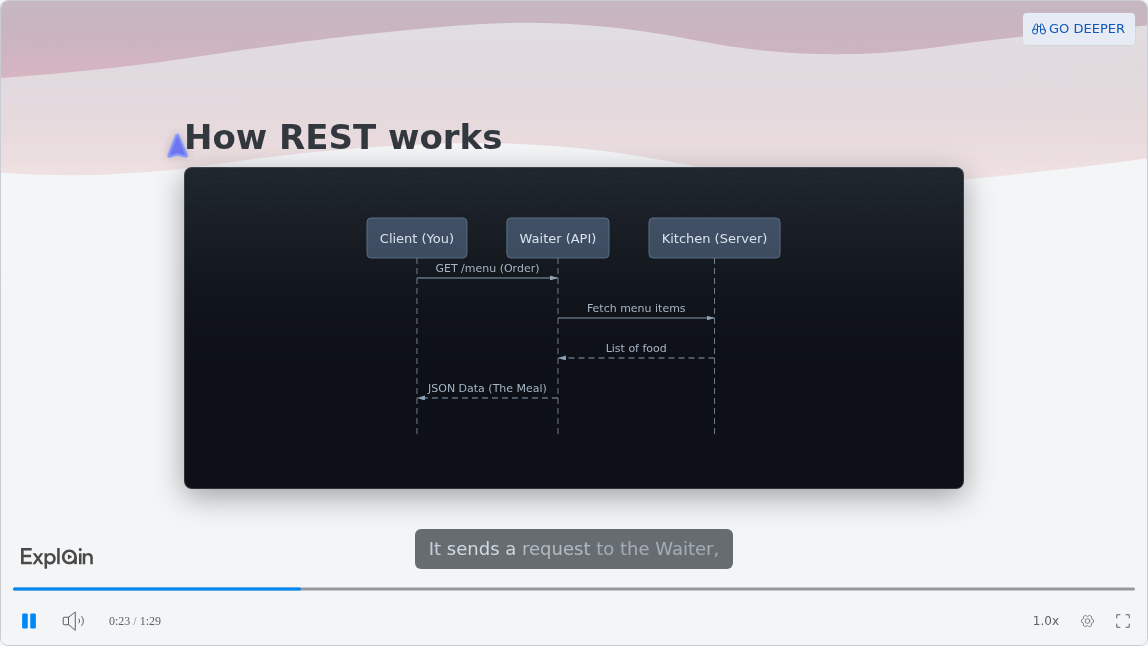
The slide is from What is a RESTful API?, a published example on Scrimba's use-cases page.
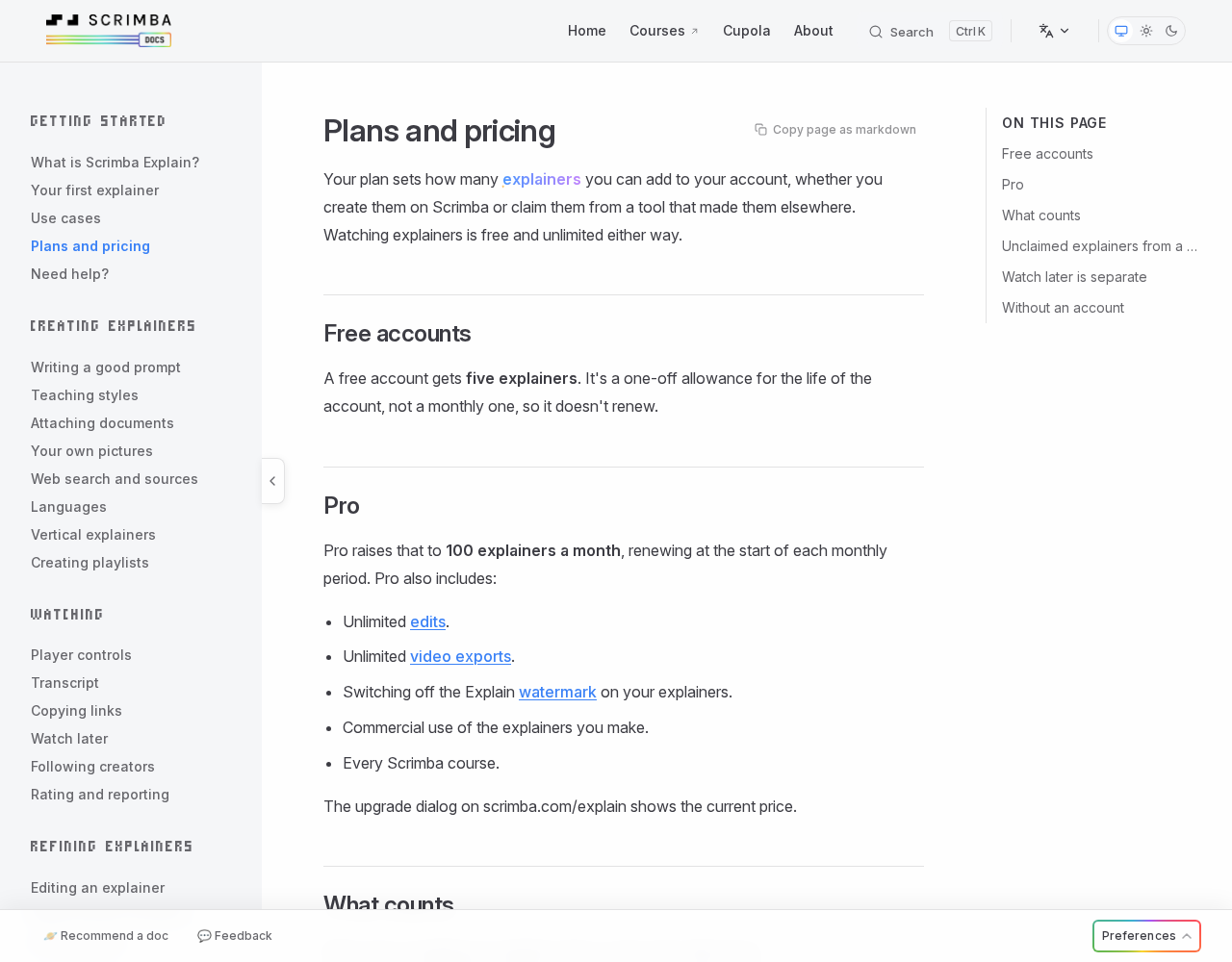
Limits: Explain is free to start: the plans page allows 1 explainer without an account, 5 on a free account and 100 a month on Pro, and each saved explainer counts. A free account gets 3 edits per explainer and 1 export, its slides show the Explain logo until Pro switches it off, and commercial use is listed under Pro.
Narration covers 33 languages. Quizzes and teaching styles exist only on scrimba.com, and there are no avatars, brand kits, SCORM packages or completion tracking. Every explainer page warns: "Explain is AI and can make mistakes. Please do your own diligence." Scrimba's guide to using Explain covers what to ask it.
Before pasting client memos, help docs or company methods into a chat, read the listing's data notice:
"When connected to Explain Video Generator, ChatGPT may share relevant chats and memories with this app to help provide context for your requests."
Job 4: Work on Video You Already Have
The video exists and needs cutting, captioning or stripping down. Descript, listed as "Edit video by chatting", edits a recording through conversation: transcription, filler word removal, Studio Sound, captions and clips. Yaps ships single-purpose plugins instead, among them Video Captions, Video Clipping, Subtitle Generator and Video to Audio. Either way, you point the plugin at the recording, say what to cut, caption or translate, and export from the vendor's app.
The catch with Yaps: every plugin connects to the Yaps app on your computer. The captions listing says it needs a local-capable ChatGPT Desktop Work or Codex session; ChatGPT web and cloud sessions cannot reach it.
When Another Tool Fits Better
- The same presenter in every video, or a brand kit: HeyGen, whose brand kit starts on the $29 Creator plan, or Synthesia, whose Assistant builds a video from a prompt plus PDFs, PowerPoint or Word files on paid plans (with a brand kit only on Enterprise).
- A click-by-click software walkthrough: a capture tool such as Guidde, whose free plan covers up to 25 how-to videos.
- Training that must record who watched or passed: an LMS or SCORM authoring tool, with the MP4 uploaded into it. HeyGen's pricing lists SCORM export from its Business plan, and Prezi's listing exports decks to SCORM.
- Drilling for NCLEX or a certification exam: the practice bank built for that exam. An explainer teaches one concept; it does not drill hundreds.
- Cinematic footage: Runway, Pika or PixVerse, not an explainer tool.
Scrimba's audit of free AI video generators shows what each free tier holds back.
Frequently Asked Questions
What is the best ChatGPT video generator?
It depends on the video: Runway, Pika or PixVerse for footage, HeyGen or Synthesia for a presenter, Visla or invideo for a produced video, Explain Video Generator or VideoZero for a narrated explainer. The vendor renders it, so the vendor's plan sets quality and watermarks.
Which ChatGPT plugin makes avatar videos, and what does it cost?
HeyGen and Synthesia build videos around an AI avatar, and VEED Video Generator lets you pick a stock character. HeyGen's free plan gives 3 watermarked videos a month, with paid plans from $29 a month. Synthesia's plugin needs a paid plan, from $14 a month billed yearly. VEED starts at $12 per user a month, billed yearly.
Do I need a separate account for each ChatGPT video plugin?
Mostly, yes. Runway works through your Runway account, Visla's listing says a Visla account is required, Prezi needs a Prezi sign-in, and Synthesia a paid Synthesia account. Explain Video Generator makes a first explainer without a Scrimba account. Every plugin still needs a signed-in ChatGPT session.
Do ChatGPT video plugins work on every ChatGPT plan and device?
Not all of them. OpenAI says select plugins are available in all plans and some require a paid plan, and a Desktop only label means the plugin needs the desktop app. Yaps needs a local-capable ChatGPT Desktop Work or Codex session, while Pika's plugin runs on ChatGPT desktop and web.
Is Canva's ChatGPT plugin a video generator?
Not according to its listing, which describes designs such as presentations, posters, flyers and social posts and names no video creation. If you want a deck as a narrated video, Prezi's plugin exports one.
Which ChatGPT video plugin has the most usable free tier?
VideoZero's free plan allows commercial use, with an overlay. PixVerse gives 30 credits a day at up to 540p. Pika's free plan has no watermark but also no monthly credits. Explain gives 5 explainers, 1 export and its logo on the slides. HeyGen gives 3 watermarked videos a month.
Key Takeaways
- Pick the job, then the plugin: footage, a produced video from a brief, a narrated explainer, or editing a recording.
- New since September: Pika for footage, Prezi for a deck as narrated video. Canva's plugin makes designs, not video.
- A ChatGPT subscription buys none of the rendering. Credits, watermarks and billing sit with the vendor.
- Read the export terms first. VEED bakes its free watermark into the file, Yaps needs the desktop app, and a free Explain account exports one explainer.
- Business use has its own terms: Pika's commercial license starts on Starter ($8 a month, billed yearly), and Scrimba lists commercial use under Pro.
Sources
Accessed October 23, 2026.
- OpenAI: What to know about the Sora discontinuation
- OpenAI: Plugins in ChatGPT
- OpenAI: ChatGPT plugins
- ChatGPT plugin directory, with the listings for Runway, Pika, PixVerse, Visla Video Maker, Synthesia, Prezi, Canva, VideoZero, Explain Video Generator, Descript and Yaps Video Captions
- Runway pricing
- Pika: Pika is now inside ChatGPT
- Pika pricing
- PixVerse plans
- InfoseekAI AI Video Maker
- VEED pricing
- VEED export help
- Visla pricing
- invideo pricing
- Genra pricing
- HeyGen pricing
- Synthesia pricing
- Synthesia: Create a video using Assistant
- Prezi: Prezi Added as a ChatGPT Plugin
- Prezi pricing
- VideoZero pricing
- Descript pricing
- Yaps pricing
- Yaps Codex plugins
- Guidde pricing
- Scrimba docs: ChatGPT / Codex
- Scrimba docs: Plans and pricing
- Scrimba docs: Exporting explainers
- Scrimba docs: Player controls
- Scrimba docs: Privacy, claiming and sharing