Best AI Video Generators [2026]
The best AI video generator depends on the job: avatar presenter, cinematic clip, template editor or explainer. Prices and free plans checked September 2026.

![Best AI Video Generators [2026]](/articles/content/images/size/w1200/2026/08/125-hero.jpg)
Short answer: the best AI video generator depends on the job, because the phrase covers four kinds of tool. For an avatar presenter reading your script, Synthesia or HeyGen. For a cinematic clip from a prompt, Runway or Google Flow. For a template editor that turns templates, stock or a recording into a cut, Canva or Descript. For an explainer from your own material, narrated with diagrams and nobody on camera, Gemini Notebook or Scrimba Explain (Explain Video Generator in ChatGPT). Sora is gone: OpenAI closed its web and app experiences on April 26, 2026 and its API on September 24, 2026.
Last verified September 28, 2026 (Scrimba Explain: October 23): every price, free plan and feature below was read on the vendor's own page that day, and "In ChatGPT" comes from searching ChatGPT's plugin directory. Scrimba publishes this article and makes Scrimba Explain.
What Does "AI Video Generator" Mean?
An AI video generator is any tool that produces video from a non-video input. In practice that covers four jobs with different inputs, costs and failure modes, and picking the wrong job costs far more than picking the wrong brand:
- Avatar presenter. You write a script, a synthetic presenter delivers it on camera. Built for corporate training and translating one video into dozens of languages.
- Cinematic clip. You write a prompt, and a model generates the footage, from everyday scenes to shots nobody could film.
- Template editor. You supply a template, stock footage, a recording or an article, and the tool assembles a watchable cut.
- Explainer from your own material. You bring notes, a PDF, a help article or a question, and get a narrated walkthrough with diagrams. Built for onboarding, client briefings and study.
If you cannot say which of the four you need, no amount of tool comparison will help you. The job is the decision. The brand is a detail.
The 2026 AI Video Generator Comparison Table
"Not stated" means the vendor page we checked says nothing either way, not that the feature is missing. "Not found" means a search of ChatGPT's plugin directory returned no plugin from that vendor on September 28, 2026. Plugins work only once installed in a signed-in ChatGPT session.
| Tool | Job | Avatar or presenter | SCORM or LMS | Quiz | Languages | Export | Free plan | Cheapest paid | In ChatGPT |
|---|---|---|---|---|---|---|---|---|---|
| Synthesia | Avatar | Yes | Enterprise | Enterprise | 140+ | MP4 1080p, from Starter | 10 min a month, no download | $14 a month, yearly | Yes, paid account |
| HeyGen | Avatar | Yes | Business, $149 | Business | 30+ free, 175 paid | 1080p, 4K from Pro | 3 videos a month, 1 min each | $29 a month | Yes |
| Runway | Clip | Not stated | Not stated | Not stated | Not stated | No watermark, 4K upscale, paid | 125 one-time credits | $12 a month, yearly | Yes |
| Google Flow | Clip | Own likeness; not in EEA, UK, Switzerland | Not stated | Not stated | Not stated | 1080p upscale, paid | 50 credits a day | $4.99 a month | Not found |
| Pika | Clip | Not stated | Not stated | Not stated | Not stated | No watermark | Credit packs only | $8 a month, yearly | Not found |
| Canva | Template | Yes | Not stated | Not stated | 40+ for presenters | MP4 | Templates, 20 AI uses | $144 a year | Yes |
| Descript | Template | Yes, 35+ stock | Not stated | Not stated | Dubbing in 30 | 720p free, 1080p, 4K | 60 media minutes, 720p | $16 a month, yearly | Yes |
| invideo | Template | Yes | Not stated | Not stated | 50+ for avatars | 4K from Starter | Not listed | $20 a seat a month, yearly | Yes |
| Pictory | Template | Yes | Enterprise | Enterprise | AI voices in 29 | 1080p, .srt and .vtt | 14-day trial | $25 a month, yearly | Not found |
| Gemini Notebook | Explainer | Not stated | Not stated | Separate quizzes | 80 | Download, watermark until AI Pro | 3 overviews a day, watermarked | $4.99 a month | Not found |
| Scrimba Explain | Explainer | No, nothing filmed | No | Can end with one, scrimba.com only | 33 narrated | MP4 1080p, up to 1440p, .vtt captions | Free to start: 1 signed out, 5 for the life of a free account | Pro, 100 a month, no price published | Yes |
Who Each Job Is For
Scrimba's guides by audience:
- Trainers and L&D teams: Best AI Video Generators for Training Videos
- Teachers: Best AI Video Generators for Teachers
- Course creators: Best AI Video Generators for Online Courses
- Law students: AI Video Tools for Law Students
- SaaS product teams: How-It-Works Videos for SaaS
- Dental practices: Patient Education Videos for Dental Practices
- Video inside ChatGPT: Can ChatGPT Make Videos? and Best ChatGPT Plugins for Creating Videos
Avatar Presenter: Synthesia and HeyGen
Avatar video is the most commercially mature job, because it is narrow: read this script convincingly, on camera, in any language.
Synthesia now prices in credits. Its plan page gives the free Basic plan up to 10 minutes of video a month, but downloading and removing the Synthesia logo start at Starter, $19 a month or $14 billed yearly. Creator is $89 a month, or $59 yearly, for up to 30 minutes, and SCORM export is an Enterprise feature.
HeyGen also sells credits, with a free tier of three videos a month, up to a minute each. Creator at $29 a month adds 600 credits and watermark removal, Pro at $49 adds 4K, and SCORM export, LMS integrations and quizzes start at Business, $149 a month.
Both share a quality ceiling: a synthetic presenter reads a script to camera, but cannot demonstrate a physical action or carry real emotional range. That still covers most corporate video, which is talking head video.
Cinematic Clip: Runway, Google Flow and Pika
Generative models produce footage that never existed, frame by frame, from a prompt or a reference image.
Sora shut down in two steps. According to OpenAI's help center, the web and app experiences were discontinued on April 26, 2026 and the API on September 24, 2026.
Runway publishes exact credit costs, which makes it the easiest tool here to reason about. Its pricing page puts Gen-4.5 at 60 credits per five seconds. Standard is $15 a month, or $12 billed yearly for 7,500 credits a year, and Max is $95, or $76 yearly for 114,000. The free tier is 125 one-time credits, and "No watermarks" starts at Standard.
Google Flow runs Veo 3.1 and comes with Google AI plans at $4.99, $19.99 or from $99.99 a month. Google's help page gives everyone 50 Flow credits a day, plus 1,000 a month on AI Pro. A Veo 3.1 clip costs 10 credits in Lite, 20 in Fast and 100 in Quality, so $19.99 a month buys ten eight-second Quality clips.
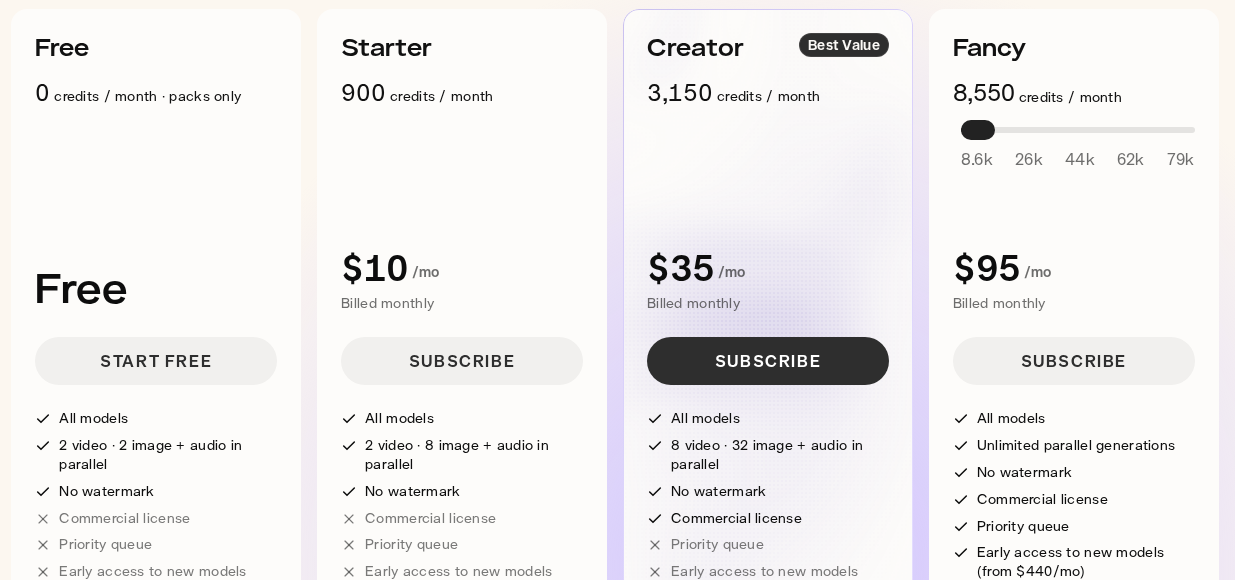
Pika changed its free plan. Its pricing page now shows 0 credits / month · packs only, and a commercial license starts at Creator, $35 a month.
Every model in this category shares the same limits:
- Output is measured in seconds, so long form means stitching generations together.
- Physics, hands and text inside the frame still fail regularly.
- Every discarded generation was paid for, which makes prompt engineering a practical skill here.
Template Editor: Canva, Descript, invideo and Pictory
Template editors do not invent a film. They assemble one from templates, stock, a recording or an article, and that changes the economics: cutting an hour of existing video costs a fraction of generating ten seconds of new video.
Canva's free plan includes 1.6 million templates and up to 20 AI uses; Pro costs $144 a year. Its AI video generator makes clips of up to eight seconds, only on Pro, Business, Enterprise and Nonprofit plans.
Descript treats video as a text document: edit the transcript, the video edits itself. The free tier has 60 media minutes a month at 720p. Hobbyist, $16 a month billed yearly, comes with 10 media hours and watermark-free 1080p.
invideo no longer lists a free plan, and its paid plans start at $20 per seat a month, billed annually.
Pictory turns long text into video, and its plans show the split between the two kinds of work. Its Starter plan, $25 a month billed annually, includes 2,400 minutes of media a year, but its AI credits cover up to 12.5 minutes of generated video. Generated minutes are about 190 times scarcer than media minutes.
Explainer From Your Own Material: Gemini Notebook and Scrimba Explain
Explainer video turns your material or a question into a narrated walkthrough, not a produced clip. Success means someone understood something: a client, a new hire, a student before an exam.
Gemini Notebook, which Google renamed from NotebookLM on July 16, 2026, turns a notebook's sources into a Video Overview, such as an Explainer or a Short of about 60 seconds. The free tier allows three a day with a visible watermark, and Google warns an overview can take more than 30 minutes and may contain inaccuracies.
Scrimba Explain, listed in ChatGPT as Explain Video Generator ("Free AI explainer video maker"), turns a topic, a document, a webpage, a codebase or a product brief into narrated slides with diagrams, animations and images. On scrimba.com/explain you upload a PDF or image, or paste a link; save a Word file as PDF first. In ChatGPT you install the plugin first, signed in, then mention it. Narration covers 33 languages, and a claimed explainer exports as a 1080p MP4 by default, up to 1440p, with a .vtt captions file, or embeds where viewers need no account.
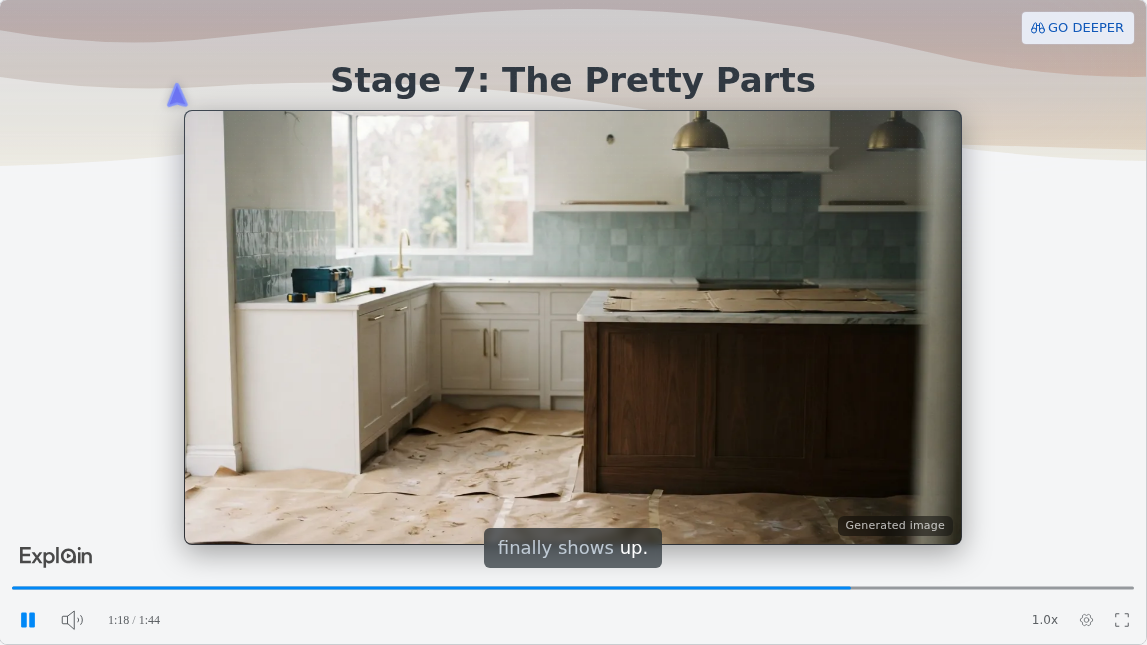
That slide comes from The New Home Build Process, one of the published examples on Scrimba's use-cases page:
Limits: Explain is free to start. Scrimba's docs allow 1 explainer without an account, 5 for the life of a free account and 100 a month on Pro. ChatGPT drafts start unlisted and count only once claimed, which keeping, editing or exporting requires. Free accounts get 3 edits per explainer and export 1 explainer; the docs list commercial use under Pro. There are no avatars, brand kits, SCORM packages or completion tracking, and every explainer page says "Explain is AI and can make mistakes. Please do your own diligence." Before pasting client or company documents into a chat, read the listing's data notice:
"When connected to Explain Video Generator, ChatGPT may share relevant chats and memories with this app to help provide context for your requests."
What a Finished Minute Actually Costs
Cost per finished minute is the number the marketing never shows, and it varies by more than an order of magnitude across the jobs.
| Job | Example plan | List price | What it buys | Cost per finished minute |
|---|---|---|---|---|
| Cinematic clip | Runway Standard, yearly | $144 a year | 125 clips of 5 seconds, about 10 minutes | About $14 |
| Cinematic clip | Runway Max, yearly | $912 a year | 1,900 clips of 5 seconds, about 158 minutes | About $6 |
| Avatar presenter | Synthesia Creator, yearly | $708 a year | Up to 30 minutes a month | About $2 |
| Template editor | Descript Creator, yearly | $288 a year | 30 media hours a month | About 1 cent per media minute |
Each figure is a floor: it assumes every generation is usable. For cinematic clips, double or triple them.
When Another Tool Fits Better
- The same presenter or brand kit in every video: Synthesia or HeyGen. Explain has neither.
- Proof that someone finished a module: an LMS, fed by SCORM export from HeyGen Business or Synthesia Enterprise. Explain counts views and likes only.
- A pitch video for investors: a template editor such as Canva, or an avatar tool. An explainer teaches how a product works; it does not sell it.
- Footage of something that cannot be filmed: Runway or Google Flow.
Commercial rights differ too: Pika withholds them below Creator, and Canva allows commercial use of AI output but warns you may not hold exclusive rights.
Frequently Asked Questions
What is the best AI video generator in 2026?
It depends on the job. Synthesia and HeyGen lead avatar presenters, Runway and Google Flow lead cinematic clips, Canva and Descript lead template editing, and Gemini Notebook and Scrimba Explain turn your own material into narrated explainers. Sora is gone: OpenAI closed its web and app experiences on April 26, 2026 and its API on September 24, 2026.
Which AI video generator explains USMLE biochem, system design or NFPA 13 rules step by step, with diagrams and not a talking head?
An explainer tool, not an avatar tool. Scrimba Explain draws flowcharts, sequence and state diagrams and renders formulas as real notation, so it can take a pathway, a design tradeoff or a PE exam worked problem step by step. Gemini Notebook builds visual overviews from your sources. Both can be wrong, so check each step against your course material, and have a qualified fire protection engineer check any NFPA 13 spacing rule or hydraulic calculation against the standard.
Can an AI video generator turn my NCLEX pharmacology notes into a narrated review I can watch on the bus?
Yes. Upload the notes as a PDF or photo on scrimba.com/explain and ask it to end with a quiz. For the bus, the player's vertical view switches to a tall, portrait layout. Signed-in explainers start Public, so pick Unlisted first, and check every dose against your drug reference. Scrimba has a separate guide for notes in ChatGPT.
Is an AI video generator a realistic way to make how-to videos from our help center articles?
For concepts, yes: paste the article's link into Scrimba Explain, which reads the page first, and embed the result in the article. The embed shows only the player, without the transcript or Explain's AI disclaimer, so review it against the article first and add your own note. For click-by-click steps, a capture tool such as Guidde, free for up to 25 how-to videos, shows the real interface. For identical branding across 200 accounts, use an avatar tool with a brand kit.
Can an AI video maker turn my one pager into something I can send customers instead of a demo call?
For showing how the product works, yes, without an agency or a camera. Upload the one-pager or product brief as a PDF on scrimba.com/explain, add your own screenshots, and Explain narrates it with no presenter. Pick Unlisted before you create it, because signed-in explainers start Public, then send the link; customers need no account. Check every slide, since Explain can make mistakes. It is not built for investor pitches or ads.
Which AI video maker explains the home buying process to clients without any filming?
An explainer tool. Scrimba's published real estate example walks through a home build stage by stage with narration and no presenter, and your own property photos can go on the slides. For escrow, closing costs or a disclosure rule, have your broker or attorney review it before buyers see it.
Can an accountant explain a new rule, like a new 1099 reporting rule, to every client with one video?
Yes. Upload your client memo on scrimba.com/explain and pick Unlisted before you create it, because signed-in explainers start Public. Explain narrates the memo, and you send one link that clients open without an account. A qualified tax professional reviews it first, because Explain can make mistakes. It cannot show who watched: it counts views and likes only.
Can an AI video generator turn our client methodology into short modules the client team will actually finish?
It can make the modules: one explainer per step, grouped into a playlist that plays in order. Choose Unlisted at creation, because signed-in explainers start Public. It cannot prove anyone finished them, since Explain has no SCORM export. If completion matters, load the MP4s into the client's LMS, or use HeyGen Business or Synthesia Enterprise.
Is there an AI video maker that reads our repo and explains the architecture to non-engineers?
Yes, through a coding agent. Claude Code, Codex or another MCP client connects to Scrimba Explain, reads the code directly and builds a narrated explainer with diagrams, as Scrimba's guide to using Explain shows. An engineer checks it, since the model writes the lesson.
Key Takeaways
- AI video generator covers four jobs: avatar presenter, cinematic clip, template editor and explainer from your own material.
- Runway footage costs about $6 to $14 per finished minute before discarded takes; Synthesia avatar video about $2.
- Free plans moved: Pika's has no monthly credits, invideo lists none, and Synthesia's still cannot download.
Sources
All pages accessed September 28, 2026; Scrimba's docs October 23.
- Synthesia. "Pricing." https://www.synthesia.io/pricing
- HeyGen. "Pricing." https://www.heygen.com/pricing
- Runway. "Pricing." https://runwayml.com/pricing
- Google. "Manage your Google Flow credits." https://support.google.com/flow/answer/16526234
- Google. "Create & use your avatar in Google Flow." https://support.google.com/flow/answer/17102997
- Google. "Google AI plans." https://one.google.com/about/google-ai-plans/
- Pika. "Pricing." https://pika.art/pricing
- OpenAI. "What to know about the Sora discontinuation." https://help.openai.com/en/articles/20001152-what-to-know-about-the-sora-discontinuation
- Canva. "Plans and pricing." https://www.canva.com/pricing/
- Canva. "AI Video Generator: Text to Video AI Tool." https://www.canva.com/features/ai-video-generator/
- Descript. "Pricing." https://www.descript.com/pricing
- invideo. "Pricing." https://invideo.io/pricing
- invideo. "AI Avatar Generator." https://invideo.io/make/ai-avatar-generator/
- Pictory. "Pricing." https://pictory.ai/pricing
- Google. "Upgrade Gemini Notebook." https://support.google.com/gemininotebook/answer/16213268?hl=en
- Google. "Generate Video Overviews in Gemini Notebook." https://support.google.com/gemininotebook/answer/16454555?hl=en
- Guidde. "Pricing." https://www.guidde.com/pricing
- Scrimba. "Plans and pricing." https://docs.scrimba.com/explain/limits-and-plans
- Scrimba. "Exporting." https://docs.scrimba.com/explain/exporting