Best ChatGPT Plugins for Students: Understand, Practice and Review
One biology question run through ChatGPT's plugin directory on September 8, 2026. Which study plugins earned their install, and the job that needed none.

Studying inside ChatGPT is three separate jobs, and they do not want the same tool. Getting a concept to land is one. Practicing until you can reproduce it is another. Reviewing it three weeks later, when the exam is real, is a third. The short answer: ELI5 or Explain Video Generator to understand, Quizlet or Recall to review, and no plugin at all to practice. The task behind that answer was one biology question put through ChatGPT's plugin directory on September 8, 2026, once with nothing installed and once with a plugin installed. Both outcomes are below, including the one where nothing happened.
Scrimba publishes this article and makes one of the plugins in it. Scrimba Explain, listed in the directory as Explain Video Generator, appears in the first of the three jobs beside a competitor described at the same length, and does not compete in the third job at all. For the video-plugin roundup rather than the student one, that comparison covers it.
Last verified October 23, 2026 against the five plugin listings, OpenAI's help center and Scrimba's docs. The runs date from September 8, 2026.
One dated note on ChatGPT itself: OpenAI's 2026 Back to School offer gave eligible US college and graduate students four free monthly billing periods of ChatGPT Plus, with claims accepted until October 31, 2026.
One Study Task, Four Runs
The task was the kind of thing a student actually types: explain how photosynthesis converts light into sugar, for a first-year biology student. Then a follow-up asking to be tested on it.
Photosynthesis was not chosen to flatter anyone; these listings use it to sell themselves. Quizlet's first example card in the plugin directory reads Create flashcards on photosynthesis, and Wayground offers create flashcards on photosynthesis for grade 5, both read signed out on September 8, 2026. Running them on their own showcase topic removes any excuse that the task was unfair.
The baseline came first: the question with no plugin involved at all.
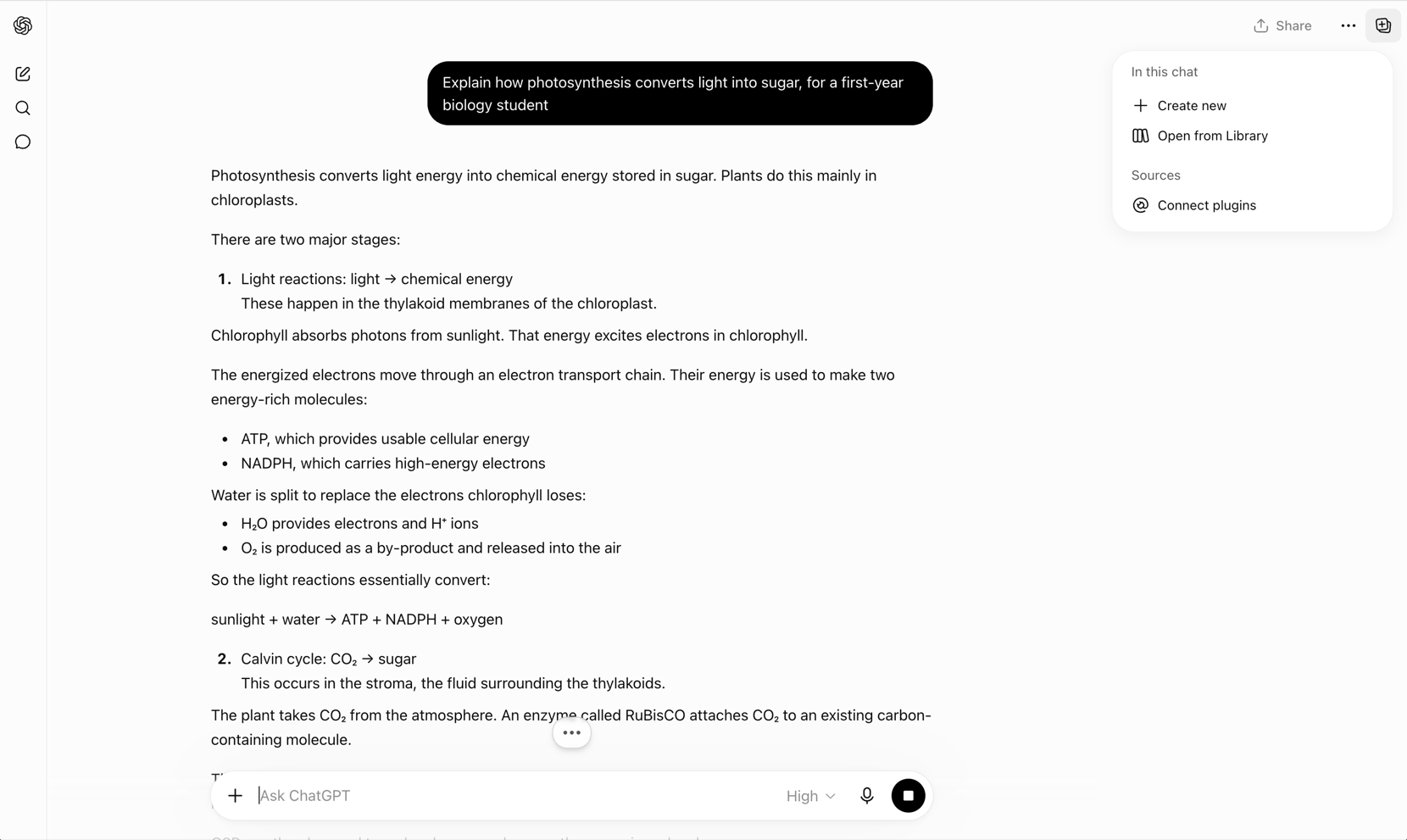
It answered, and answered well. Everything below is measured against that answer, and each condition ran once, so every number describes one output rather than a promised format.
Nothing Happens Until the Plugin Is Installed
Signed out, with nothing installed, the same question went in with an @ mention of the plugin in front of it. ChatGPT answered in ordinary prose, near enough identical to the baseline. The mention was read as the everyday word it happens to be.
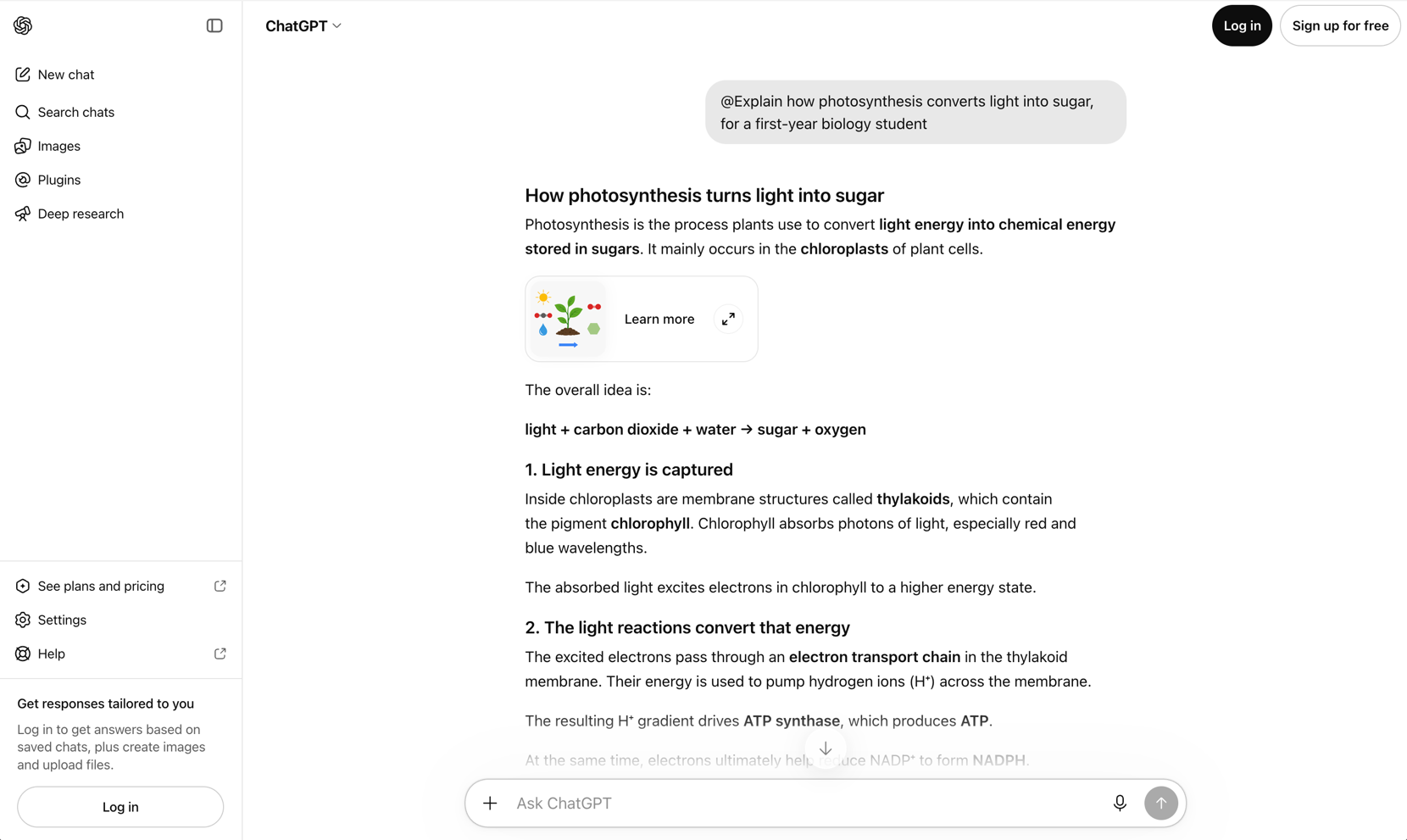
No error, no greyed-out control, nothing saying a plugin had been skipped. That silence is the problem. A student follows advice that says to type a plugin name, gets a good answer, and concludes the plugin is either fake or already working. Neither is true.
OpenAI's help center is direct about the conditions sitting between a reader and a working plugin:
The plugin directory is available across ChatGPT plans. Installing or using an individual plugin depends on your plan, workspace, role, region, and its included capabilities.
Those two runs prove less than they seem: one signed out with nothing installed, one signed in with the plugin installed. They show that installation changes the outcome, and nothing about which plan you need.
The route is short and OpenAI publishes it: go to Plugins, select the plugin and review its included apps, select Install plugin, then select Connect if an app asks for account authorization. After that you call it with an @ mention, by selecting + and entering its name, or by selecting Plugins in the composer. Scrimba's companion walkthrough, How to Install and Use a ChatGPT Plugin, records the route with screenshots.
One case catches students specifically. On a school account, administrators manage installation in Workspace settings > Plugins, and new Enterprise and Edu workspaces start with a selected set of apps enabled rather than everything. A plugin the school has restricted can stay visible in the directory marked Disabled by admin. A dead install control on a university login is usually policy, not a fault.
Understand: Getting the Concept to Land
ChatGPT already does this job unaided. The baseline answer laid out the light reactions and the Calvin cycle in readable order, and plain text beats every alternative here at skimming, pasting into notes, and finding a line again a week later. A plugin has to beat that, not merely differ from it.
ELI5 makes the visual argument. Its tagline is Picture-first HTML explainers, and its listing describes turning a difficult topic into a beginner-friendly explainer of large diagrams, plain language and progressive steps, saved as one portable file. For a mechanism with stages and arrows, that shape fits.
Its limits sit on the same page, to its credit. It is skills-only, with no MCP server, no hosted backend and no account system, so nothing is stored for you. Its directory category is Productivity rather than Education, the developer field names an individual rather than a company, and version 0.2.6 is early software.
Scrimba Explain, listed as Explain Video Generator, makes the other argument: watch it instead of reading it. Signed in with the plugin installed, naming the plugin ahead of the same question produced a status line and then a card rather than a paragraph.
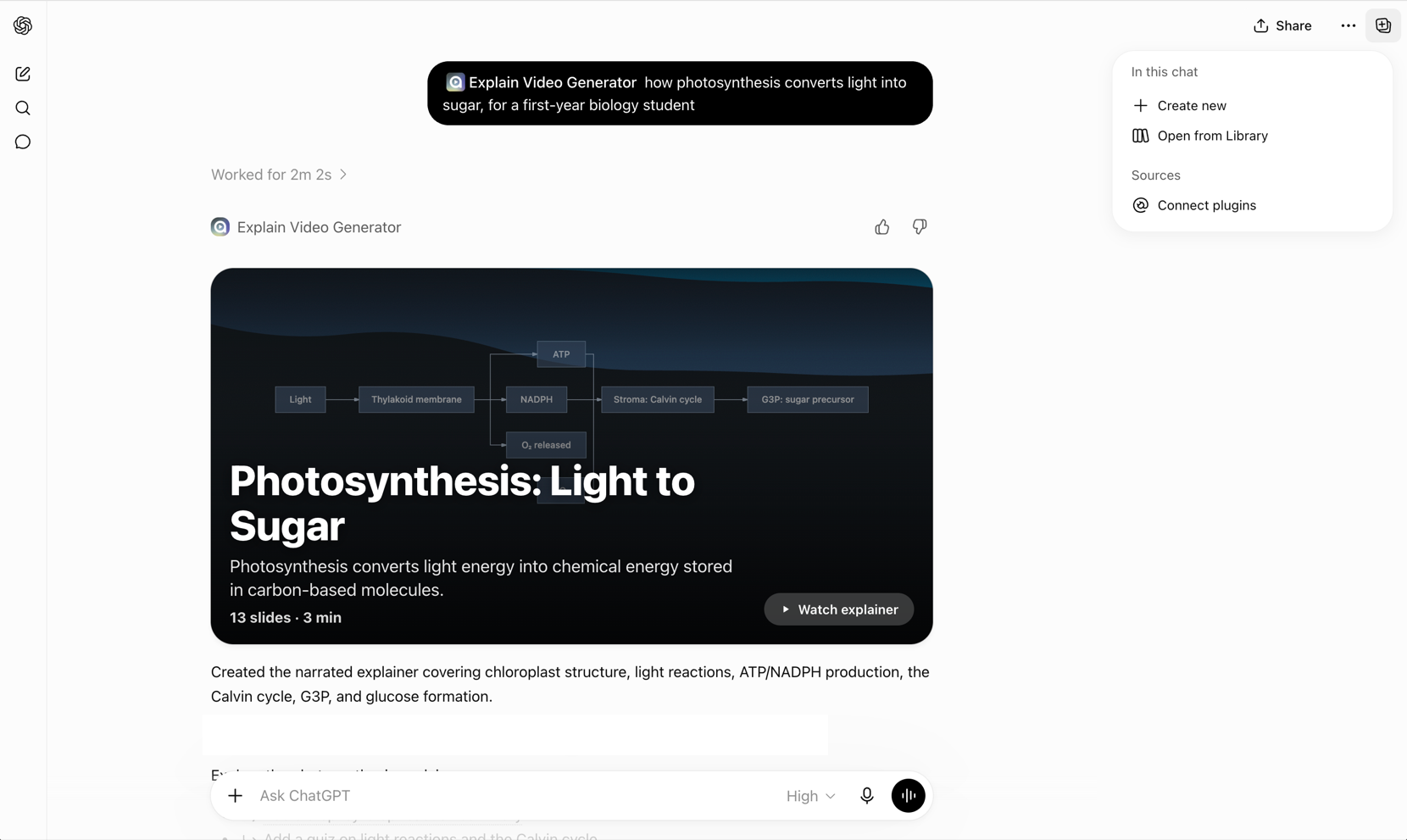
The status line read Worked for 2m 2s. What came back was titled "Photosynthesis: Light to Sugar", marked 13 slides and 3 min, with a diagram tracing light through the thylakoid to ATP and NADPH and on to the Calvin cycle, and a Watch explainer button. Per Scrimba's docs, Watch explainer opens the lesson on scrimba.com in a new tab, and ChatGPT can connect a Scrimba account that saves each explainer as it is made.
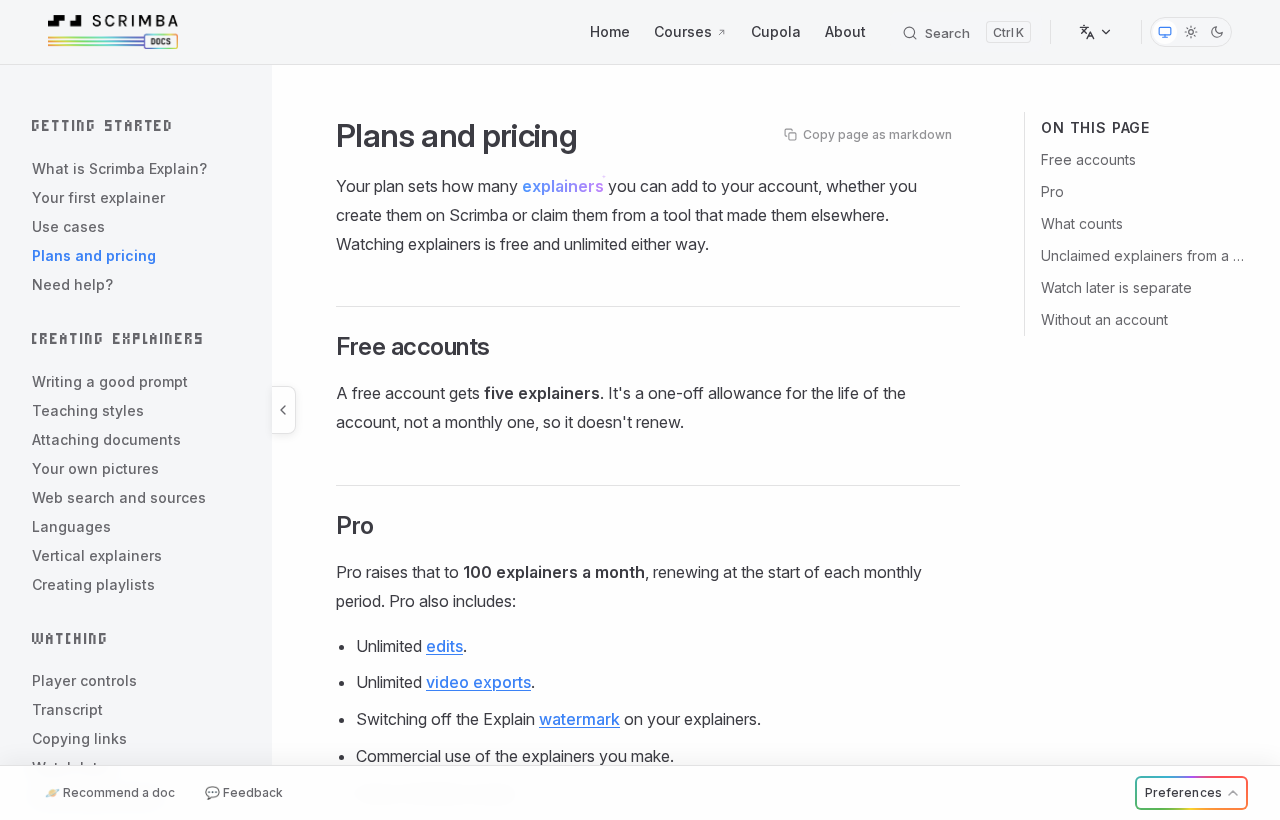
Each saved explainer counts against an allowance that is free to start: 1 explainer without an account, 5 for the life of a free account and 100 a month on Pro. A free account also gets 3 edits per explainer and 1 exported explainer, and its slides carry an Explain logo that only Pro switches off.
Its limits deserve the same space. It explains a question against real context rather than generating video from an arbitrary prompt, so it is not a text-to-video model. It does no avatars, stock footage or brand templates, so it is not a marketing video tool. Scrimba's docs print the warning under every explainer: Explain is AI and can make mistakes. Please do your own diligence. And it produces no flashcards and schedules no reviews, which matters below. The full product guide covers the other ways to reach it.
From your own notes. Compress the notes into one question, ask, then check the explainer against the notes; turning study notes into a video in ChatGPT walks through it. Exam material has its own pages for law outlines, NCLEX notes and USMLE lecture PDFs, with FE and PE worked problems to follow. An explainer made signed in on scrimba.com starts Public, so set notes-based lessons to Unlisted or Private first.
When to skip both: a three-minute video is slower to search than a paragraph. Half-understanding the material and needing one step clarified is a job for the plain answer.
Practice: The Job That Needs No Plugin
This is the section that should sell you something and does not.
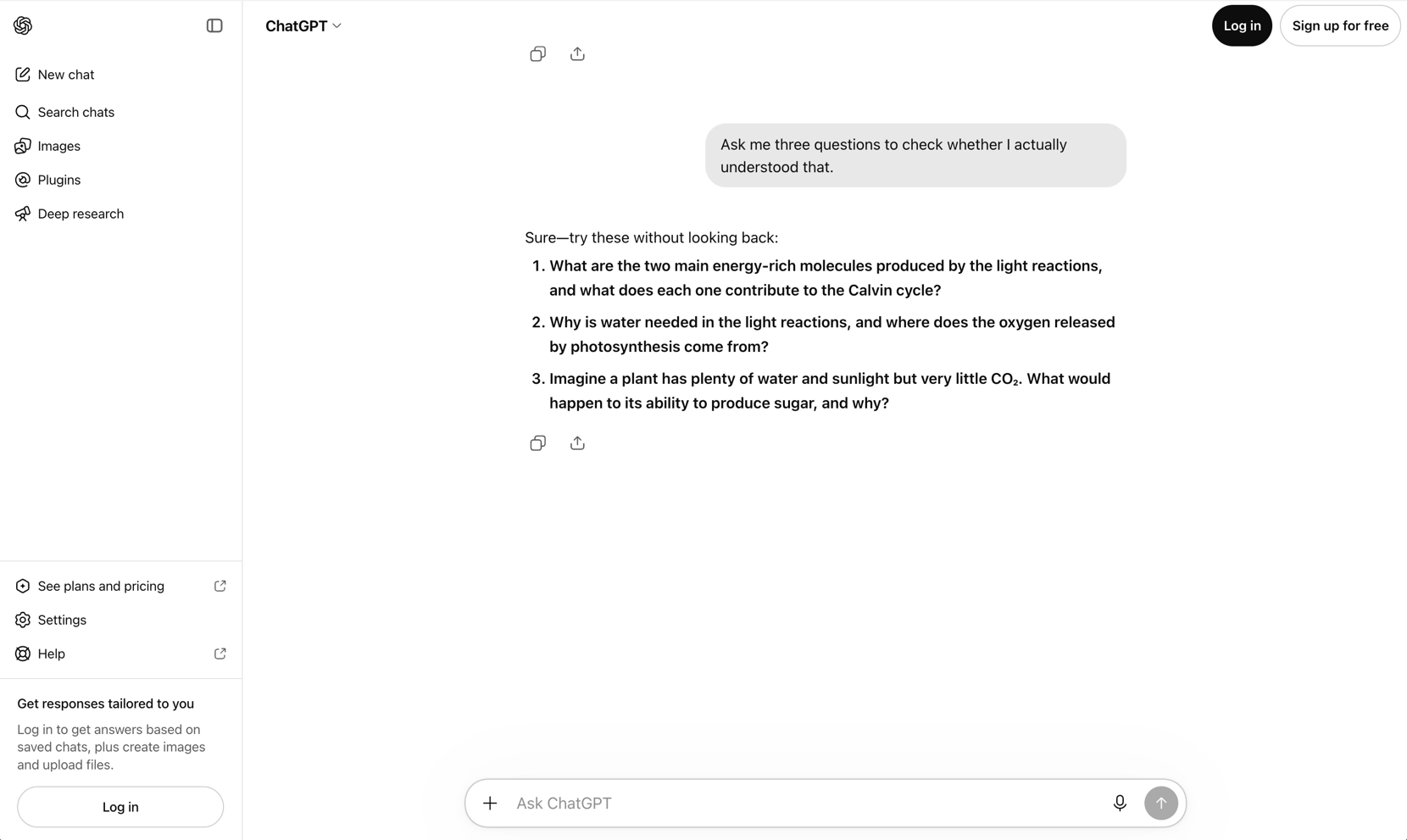
Asked to produce three questions checking whether the explanation had landed, plain ChatGPT produced three real ones, one of them asking the reader to transfer the idea rather than repeat it back.
The same follow-up typed inside the plugin thread also returned three questions, and on that particular run they were sharper: the two stages and where each happens, the roles of water, light, ATP, NADPH and oxygen, and why the Calvin cycle does not directly produce glucose.
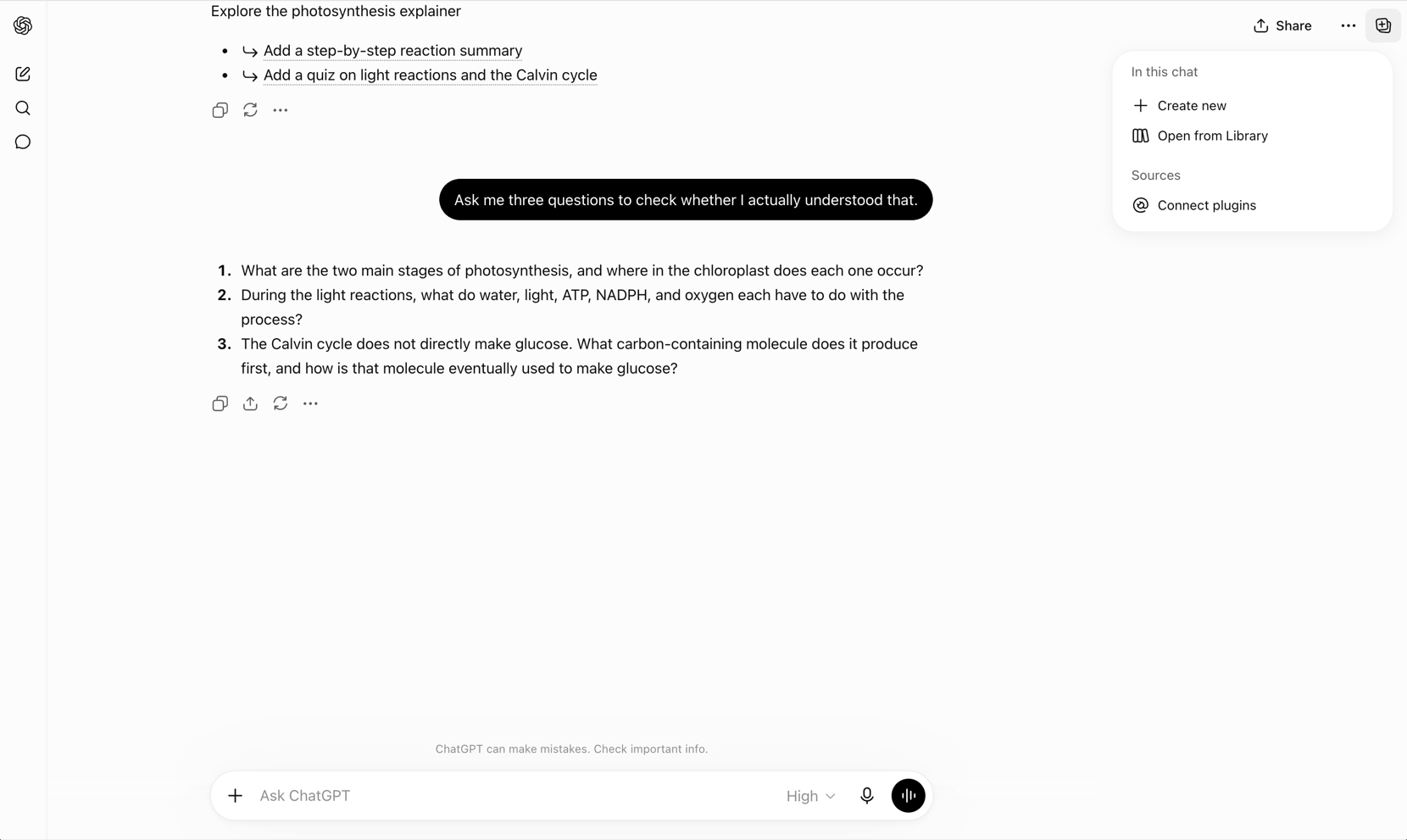
That difference is worth one sentence, because it is one run against one run. It is not a benchmark, and nobody should install anything on the strength of it.
| What was asked | Plugin involved | What came back |
|---|---|---|
| Explain how photosynthesis converts light into sugar | None | A long structured prose answer |
| The same question, with an @ mention, signed out | None fired | Near-identical prose. No error, no indication anything was skipped |
| The same question, plugin installed and signed in | Explain Video Generator | Worked for 2m 2s, then a card: 13 slides, 3 min, a diagram, a watch control |
| Ask me three questions to check I understood | None | Three comprehension questions, including one that transfers the idea |
ChatGPT also ships a study feature that needs no install. Announcing study mode on July 29, 2025, OpenAI described guiding questions rather than answers, scaffolded responses, and knowledge checks it defined as quizzes and open-ended questions with personalized feedback. That announcement stated availability for logged-in users on Free, Plus, Pro and Team, with ChatGPT Edu to follow.
One practice case does need a plugin. Wayground, published by Quizizz Inc., turns your own instructional material into ready-to-assign quizzes and study cards and reports on how learners engaged with them. For a teacher setting practice for thirty people, that reporting is real value. Its listing now mentions students self-checking too, but activities are delivered through Wayground, so the practice happens outside the chat, and the reporting is built for the teacher.
For a student testing themselves, the verdict is plain. To be quizzed on what you just read, a plugin is a detour.
Review: Where a Plugin Earns Its Place
Review is where the argument for installing something gets strong.
Understanding decays on a schedule. A chat thread does not come back on Thursday to ask whether you still know it, and neither does a video. A deck does. That is a scheduling problem rather than a content problem, and the one job here ChatGPT cannot do by itself.
Quizlet is the direct route. Its plugin creates flashcards from any prompt or file, handles the formatting, and builds a set from notes you paste in rather than making you retype them. Published by Quizlet under Education and Research, version 4.1.0. Its limit is structural: making cards is not reviewing them. Generation happens in the chat, studying happens in Quizlet.
Recall goes further into the mechanism. Its listing describes creating spaced repetition decks from ChatGPT, writing atomic cards that follow memory-retention principles, scheduling them so review starts immediately, and surfacing the cards you keep missing. One of its example prompts is Which words am I struggling with in Japanese?, the right question for this job. The caveat applies twice over: another account, another app, and a schedule that only helps if you open it.
Scrimba Explain does not compete here: it makes no flashcards and schedules no reviews.
One warning covers all of them. Cards generated from a conversation inherit that conversation's mistakes, and a wrong card on a spaced schedule is a wrong fact rehearsed to permanence. Check the cards against the course material once before the schedule starts. For study tools outside ChatGPT entirely, the wider roundup covers that ground.
The Three Jobs, Side by Side
| Job | What actually helps | Needs a plugin? | Options in the directory |
|---|---|---|---|
| Understand | A second explanation in a different shape: a diagram, or something to watch | No, but a plugin can genuinely change the format | ELI5, Explain Video Generator |
| Practice | Being asked questions you cannot answer by pattern-matching | No. ChatGPT does this unprompted, and study mode formalizes it | Wayground, for assigning practice to a group |
| Review | Cards that come back on a schedule weeks later | Yes. This is the job the chat cannot do | Quizlet, Recall |
Read down the middle column: the further a job sits from the conversation you are already having, the more a plugin is worth installing.
What a Study Plugin Cannot Do for You
Every connected plugin carries the same data notice: ChatGPT may share relevant chats and memories with the app to give it context, and the vendor's use of that data falls under the vendor's own terms and privacy policy. For coursework that is unremarkable. For anything under an academic confidentiality rule it is worth reading once rather than never.
None publishes an accuracy guarantee, so the check runs against your course material rather than against the tool that produced the answer. And the plugins to be careful with are the ones that hand over a finished artifact, since a set of cards you did not read is a set of cards you have not learned. For where these tools help and where they quietly hurt, AI tutors covers the argument. If your subject is programming, AI tools and courses for learning to code is the narrower guide.
Which One Should a Student Install First?
- Testing yourself on something you just read. Install nothing. Ask ChatGPT for three questions and answer them without scrolling up.
- You want to be walked through it rather than told. Study mode, also nothing to install.
- The material has not landed after two readings. An explainer plugin: ELI5 for a diagram page you keep, Explain Video Generator to watch it instead.
- An exam is weeks away. A card plugin: Quizlet if you already live there, Recall if you want the scheduling done for you.
- You are setting practice for a class. Wayground, for the assigning and the reporting.
Frequently Asked Questions
What are the best ChatGPT plugins for students?
It depends which of three jobs you have. For understanding a concept in a different format, ELI5 builds a diagram-first explainer page and Explain Video Generator returns a narrated video. For reviewing weeks later, Quizlet and Recall build flashcard decks, and Recall schedules them. For practicing right now, no plugin is needed.
Do you need a plugin to quiz yourself in ChatGPT?
No. Asked to produce three questions checking comprehension, plain ChatGPT produced three real ones, including a question that required transferring the idea rather than repeating it. ChatGPT also has a built-in study mode that runs knowledge checks. Installing a plugin to be quizzed on material already in the conversation is a detour.
Why did nothing happen when I typed a plugin name in ChatGPT?
Almost always because the plugin is not installed on the account you are using. Signed out with nothing installed, an at-mention of a plugin returned ordinary prose with no error and no warning. Install it from the plugin directory first. On a school account, an administrator may control installation in workspace settings.
Are ChatGPT plugins for students free?
The plugin directory does not display prices, and whatever a plugin costs is charged by the vendor rather than by OpenAI, so a ChatGPT subscription buys none of it. Check the vendor's own site before relying on one. Scrimba Explain is free to start: 1 explainer without an account, 5 on a free account and 100 a month on Pro.
Do students get ChatGPT Plus free in 2026?
Only through a time-limited offer. OpenAI's 2026 Back to School offer gave current college and graduate students at eligible US degree-granting institutions four free monthly billing periods of ChatGPT Plus after SheerID verification, with claims accepted until October 31, 2026. For later offers, check OpenAI's help center. Plus does not pay for any plugin.
Can Scrimba Explain make flashcards?
No. Scrimba Explain, listed as Explain Video Generator, turns a question, document, webpage or codebase into a narrated explainer video. It produces no flashcards and schedules no reviews. For flashcards from a ChatGPT conversation, Quizlet creates sets from a prompt or a file, and Recall builds spaced repetition decks and schedules them.
Key Takeaways
- The comprehension check needs no plugin. Plain ChatGPT produced three real questions on request, including one that tested transfer rather than recall.
- An uninstalled plugin fails silently. Signed out, an at-mention returned ordinary prose with no error, which is why installation comes before evaluation.
- Review is the job worth an install. Spaced repetition is scheduling, and Quizlet and Recall do it while the chat cannot.
- Explain's allowance is small on free. 1 explainer without an account, 5 on a free account, 100 a month on Pro, and each one saved from ChatGPT counts.
Sources
- OpenAI Help Center. "Plugins in ChatGPT." Accessed October 23, 2026. https://help.openai.com/en/articles/20001256-plugins-in-chatgpt
- OpenAI Help Center. "Connected apps in ChatGPT." Accessed October 23, 2026. https://help.openai.com/en/articles/11487775-connected-apps-in-chatgpt
- OpenAI Help Center. "ChatGPT Back to School offer for students." Updated October 22, 2026. https://help.openai.com/en/articles/20001493-chatgpt-back-to-school-offer-for-students
- OpenAI. "Introducing study mode." July 29, 2025. https://openai.com/index/chatgpt-study-mode/
- ChatGPT plugin directory. Listings for Explain Video Generator, Quizlet, Recall, Wayground and ELI5. Read signed out on September 8, 2026, re-read October 23, 2026. https://chatgpt.com/plugins
- ChatGPT plugin directory. "Explain Video Generator." Accessed October 23, 2026. https://chatgpt.com/plugins/plugin_asdk_app_69c50381a40081919232f5027201beef
- Scrimba Docs. "Plans and pricing", "ChatGPT / Codex" and "Transcript." Accessed October 23, 2026. https://docs.scrimba.com/explain/limits-and-plans, https://docs.scrimba.com/explain/chatgpt-codex, https://docs.scrimba.com/explain/transcript