Can ChatGPT Make Videos Now That Sora Is Gone?
Sora is closed, so ChatGPT makes no video on its own. What works now: plugins inside the chat, which plugin fits which video, and the steps to make one today.


Not on its own, and yes through a plugin. OpenAI closed Sora's web and app experiences on April 26, 2026 and the Sora API on September 24, 2026, so ChatGPT no longer has a video model of its own. What it has instead is a directory of plugins: you install one, mention it in a chat, and a vendor's service turns the conversation, a document or a prompt into a video.
Last verified: September 28, 2026. Checked for this article: OpenAI's Sora discontinuation and plugin help articles, the plugin listings on openai.com, the vendor pages named below, and Scrimba's Explain documentation.
Scrimba publishes this article and makes one of the plugins in it: Scrimba Explain, listed in ChatGPT as Explain Video Generator. It is named where it fits, and the tools that fit other jobs better are named too.
What Happened to Sora?
Sora was OpenAI's text-to-video model, and it is gone: first the apps, then the developer API, so no current ChatGPT plan includes an OpenAI video generator.
OpenAI's help center states the first date in one line:
"The Sora web and app experiences were discontinued on April 26, 2026."
The same article gave September 24, 2026 as the end date for the API, and that date has now passed. The old openai.com/sora address now lands on that help page. Anyone with Sora content was pointed to an export at sora.chatgpt.com/sunset, and purchased ChatGPT or Sora credits can still be used for Codex.
Why do so many answers still say "use Sora"? Because most pages about ChatGPT video were written while Sora existed. Ask ChatGPT itself and it may still lean on OpenAI's old Sora announcements, which describe a product you can no longer open.
How Does ChatGPT Make a Video Now?
A ChatGPT plugin is an installable package that connects ChatGPT to an outside service, and video plugins hand the actual rendering to that vendor. ChatGPT writes and steers; the vendor's model or renderer makes the file.
OpenAI's plugins help article describes the flow: open Plugins, select a plugin, choose Install plugin, and Connect a vendor account if the plugin asks for one. Then you call it in a chat with an @ mention. Availability is not universal, and OpenAI says so plainly:
"The directory is available across ChatGPT plans, although the label and available features can vary by rollout, surface, and account. Installing or using an individual plugin depends on your plan, workspace, role, region, and its included capabilities."
In practice, ChatGPT video now means somebody else's video, ordered from inside ChatGPT. Most plugins need an account with the vendor, and the credits are the vendor's. Runway's listing says its plugin works "using their Runway account" and that "purchases are completed on runway.com, never inside the chat." HeyGen's ChatGPT page says you need a free HeyGen account and that generation uses HeyGen credits.
Explain asks for less up front. Its listing says "Free to start, no login required", which means no Scrimba login for a first draft. You still need to be signed in to ChatGPT, because plugins install into a ChatGPT account. For a plugin-by-plugin comparison with prices, see Scrimba's guide to the best ChatGPT plugins for creating videos.
Which Tool Makes Which Kind of Video?
The right tool depends on the video you want: a generated clip, a presenter, produced footage or an explainer. Each uses different technology, and a plugin that is good at one is usually weak at the others.
Checked on each vendor's own page or plugin listing on September 28, 2026:
| The video you want | ChatGPT alone? | The route that works now | Someone on screen? | What you need |
|---|---|---|---|---|
| A script, storyboard or shot list | Yes | Ask ChatGPT directly | No video yet | Your ChatGPT plan |
| A cinematic clip from a prompt | No | Runway plugin in ChatGPT; outside ChatGPT, Gemini Omni in the Gemini app | Only if generated | A Runway account and credits; a Google AI subscription for Gemini Omni |
| A talking presenter or avatar | No | HeyGen, VEED Video Generator or Synthesia plugin | Yes, an AI avatar | A free HeyGen account, with video paid in HeyGen credits; a paid Synthesia account for Synthesia |
| A produced video with voiceover, footage and music from a script | No | Visla Video Maker or invideo plugin | Stock or generated footage | A Visla account, for Visla |
| A narrated explainer from your notes, a PDF, a web link or the chat | No | Explain Video Generator plugin (Scrimba Explain) | No, typed slides with narration | A signed-in ChatGPT session; free to start |
| An edit of a recording you already have | No | Descript plugin | Whatever you filmed | Install it and connect when asked |
The details behind the rows: Google says Gemini Omni will replace Veo in the Gemini app; it makes 10-second videos with native audio and requires a Google AI subscription. VEED's listing reads "Pick your character. Pick your voice. Generate your video." Synthesia's plugin, in beta, turns a prompt, a script, a document or a link into a video draft and requires a paid Synthesia account; Synthesia's free plan, with 10 minutes of video a month, is used on its own site. Visla's listing says it builds narrated videos "with stock footage and background music" and that "A Visla account is required." The invideo listing promises script, visuals, voiceovers and music from text prompts. Descript's listing sums it up as "Edit video by chatting."
What Does an Explainer Made in ChatGPT Look Like?
An explainer is a narrated lesson built from typed slides, diagrams and images, not a filmed or generated movie. It fits the moment when something needs explaining to someone else.
Scrimba Explain, listed in ChatGPT as Explain Video Generator with the tagline "Free AI explainer video maker", is one of four ways into the same product. The ChatGPT route is the first card below; uploading a PDF, Word file or image on scrimba.com is the fourth.
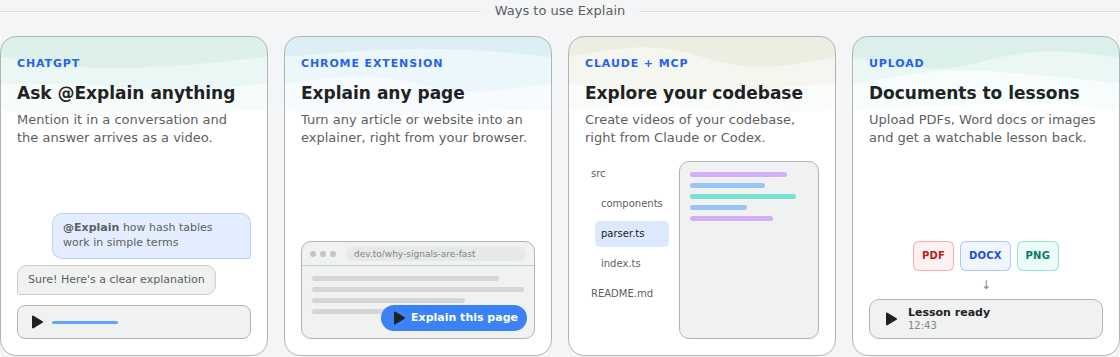
The listing says it takes "a topic, a document, a webpage, a codebase or a product brief" and turns it into a video "with voiceover, diagrams, animations and images." Scrimba's introduction is precise about the format: "An explainer is not a screen recording. Each slide is real, typed content." Explainers are narrated in 33 languages, and they stream, so the first slide appears within seconds and the rest builds while you watch.
Quality depends mostly on the model: according to the ChatGPT docs page, the model you are chatting with writes the lesson and the narration, so a better model, and asking it to think first, gives a better explainer. The plugin works in ChatGPT on web, desktop and mobile.
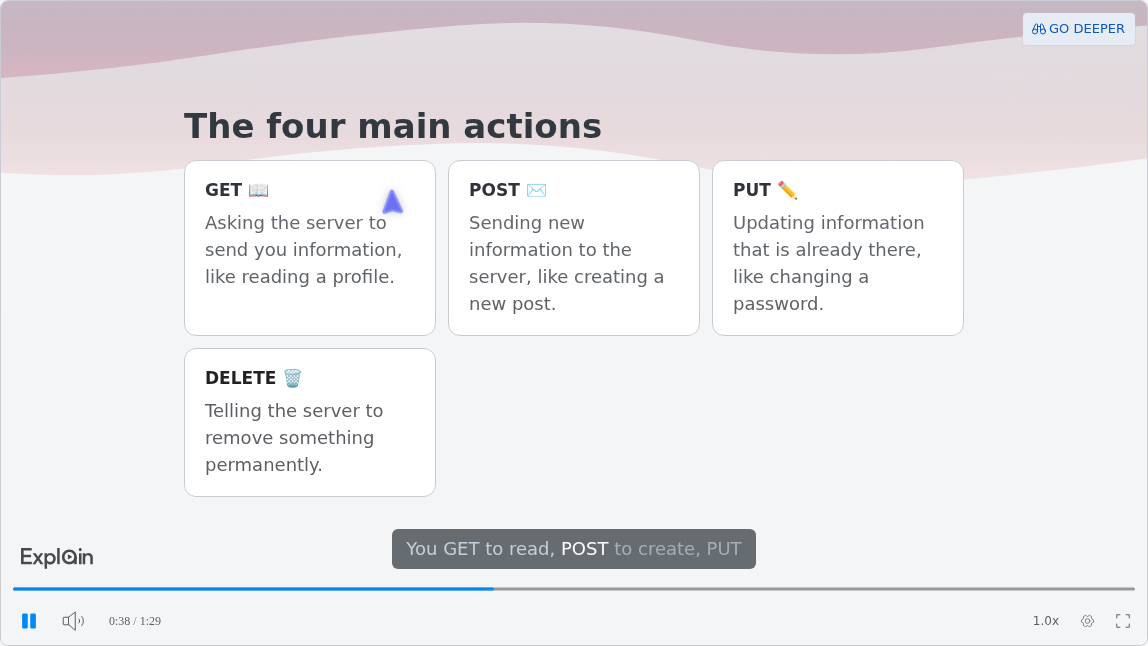
Here is a slide from a published example, "What is a RESTful API?", from the use-case gallery:
For a medical student, the Healthcare example "Cardiac Prescription Logic" shows how formulas come out: as real notation, not as plain text like x^2. Scrimba's guide to turning study notes into a video in ChatGPT covers that route in detail, and its guide to explaining a pull request to your team covers explainers built from code.
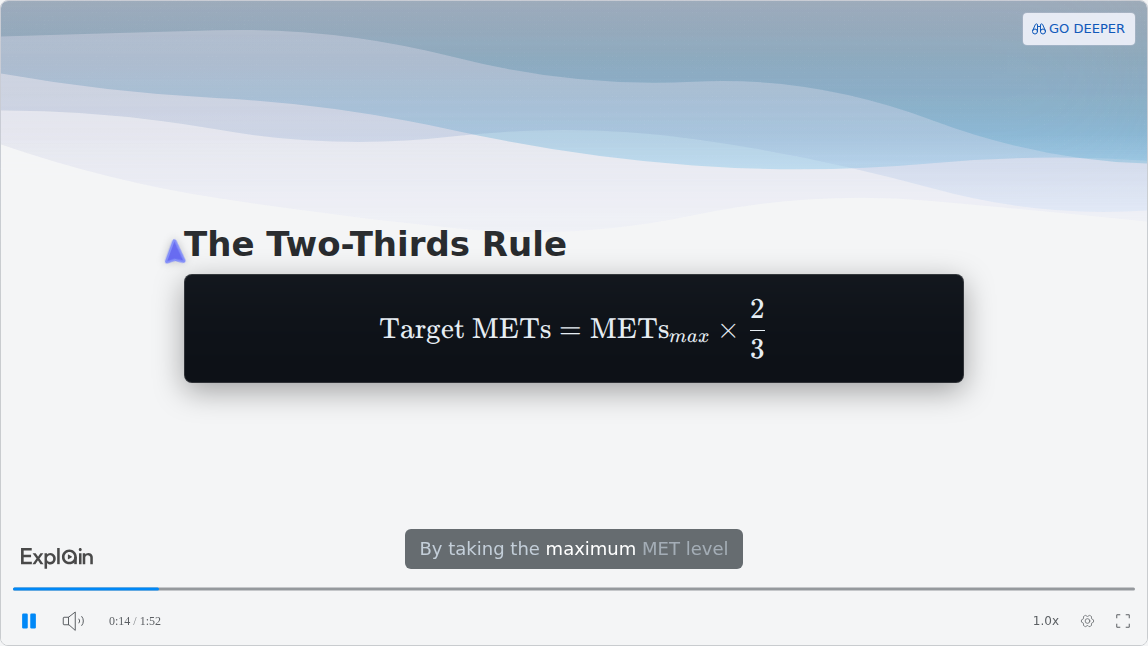
There is no presenter and no camera. Nobody is filmed, no avatar speaks, and captions run under the narration by default. If your video needs a face, the table above sends you elsewhere.
How to Make a Video in ChatGPT, Step by Step
To make a video in ChatGPT, install a video plugin, mention it with your material, then keep and check what it returns. The steps below use Explain Video Generator. Other plugins follow the same first three steps, plus a vendor sign-in where they ask for one.
- Install the plugin while signed in to ChatGPT. Open the listing and choose Install plugin. Until it is installed, typing its name does nothing useful. Scrimba's walkthrough on how to install a plugin in ChatGPT covers the details.
- Mention it with your material. Type @, pick Explain Video Generator, and say what to explain. Attach a document, paste a link, or ask it to turn the conversation you just had into a video.
- Watch it build. The explainer streams from the first slide. It starts unlisted: anyone with the link can watch it, but it is not listed or searchable.
- Claim it if you want to keep it. Keeping, editing or exporting a ChatGPT explainer means signing in to Scrimba and claiming it into your account.
- Export if you need a file. An explainer you own exports as an MP4 at 2560x1440 with a separate .vtt captions file, as long as it is public or unlisted.
- Check it before you share it. Every explainer page carries this line:
"Explain is AI and can make mistakes. Please do your own diligence."
On cost, Explain is free to start. Drafts made through ChatGPT do not count against anything until you claim them. Scrimba's limits page then sets the allowance: one explainer without an account, ten for the life of a free account, and 100 a month on Pro.
Before you paste company, client or personal material into a chat, read the data notice on the listing: "When connected to Explain Video Generator, ChatGPT may share relevant chats and memories with this app to help provide context for your requests."
What This Means for Trainers, Teachers and Lecturers
For trainers, teachers and lecturers, ChatGPT video in 2026 mostly means narrated explainers from material they already have. Each group starts from a different document and hits a different limit.
Trainers
The listing's own example card is "Turn this employee onboarding PDF into an explainer video", and its use-case list includes "Onboard new employees without filming a thing." What it does not do matters as much: no SCORM package, no completion tracking, no avatar. The usual route is an exported MP4 uploaded into your LMS, which then does the tracking. Read the data notice above before attaching an internal handbook in ChatGPT. Scrimba's guide How to Make a Training Video in ChatGPT walks through that route with a real SOP.
Teachers
The listing names a specific use: "Start your class with a 3-minute lesson opener built from the textbook chapter." The catch is on the ChatGPT route: end-of-lesson quizzes and the seven teaching styles exist only when you create on scrimba.com, so a plugin explainer has neither. Scrimba's guide How to Make a Lesson Opener Video from a Textbook Chapter covers the classroom version.
Lecturers
The card "Make an explainer video from my lecture notes" fits a weekly recap. Slides go in as a PDF, since no PowerPoint upload is documented; Scrimba's guide to turning a slide deck into a video covers the export. No length limit is documented either, so split a long deck into a playlist of shorter lessons and check each slide against the source. Scrimba's guide How to Make Lecture Recap Videos from Your Slides and Notes covers the weekly routine.
When Another Tool Fits Better
Explain is the wrong tool when the video needs cinematic footage, a face or tracking. Go here instead:
- A shot that never existed, such as a drone sweep over a city: Runway inside ChatGPT, or Gemini Omni outside it.
- The same presenter in every video: an avatar tool. HeyGen, VEED and Synthesia have ChatGPT plugins; Synthesia's needs a paid Synthesia account. Explain has no avatars.
- Completion records for compliance training: an LMS or a SCORM authoring tool. Explain counts views and likes only.
- Footage you already filmed: Descript, which edits recordings by chat.
- A 200-page manual covered in one video: Explain documents no length limit, so do not count on full coverage. Split the manual by section into a playlist and check each lesson.
Frequently Asked Questions
Can ChatGPT make videos?
Not by itself since Sora closed. OpenAI discontinued the Sora web and app experiences on April 26, 2026 and the Sora API on September 24, 2026. ChatGPT makes videos through plugins instead, such as Runway for generated clips, HeyGen for avatars and Explain Video Generator for narrated explainers.
Can ChatGPT generate a video from my pharmacology chat, or do I need a separate ChatGPT video generator?
You do not need a separate app, but you do need a plugin. With Explain Video Generator installed, ask it to turn the conversation into a video; the listing names "Turn a long ChatGPT conversation into a video you can rewatch or share" as a use case. Check every dose and mechanism against your textbook, and leave out any patient details.
Does ChatGPT have a video generator that can explain our architecture to new hires without extra tooling?
Not built in. One plugin install is the least tooling you can get away with: install Explain Video Generator, attach your architecture doc and ask for an explainer. Once it is connected, ChatGPT may share relevant chats and memories with it. To build from the actual code, connect a coding agent to Explain instead, because it reads the repository directly.
Is Sora still available in ChatGPT?
No. The Sora web and app experiences closed on April 26, 2026, and the Sora API followed on September 24, 2026. OpenAI's help center pointed users to an export at sora.chatgpt.com/sunset. No current ChatGPT plan includes an OpenAI video model.
Can you make videos in ChatGPT for free?
Partly. The plugin directory is available across ChatGPT plans, but each plugin has its own terms. Explain is free to start: one explainer without a Scrimba account, ten for the life of a free account, 100 a month on Pro. HeyGen gives new accounts free credits to start.
Can ChatGPT make a video with a person talking?
Only through an avatar plugin. HeyGen's plugin creates AI videos with avatars, VEED Video Generator lets you pick a character and a voice, and Synthesia's plugin needs a paid Synthesia account. Explain Video Generator has no presenter or avatar: it produces narrated slides, diagrams and images.
Can I download a video made in ChatGPT as an MP4?
With Explain, yes, once you claim it. Claiming puts the explainer in your Scrimba account, and an explainer you own exports as an MP4 at 2560x1440 with a .vtt captions file. The explainer must be public or unlisted, because a private one cannot be exported.
Does it work in the ChatGPT mobile app?
Yes. Scrimba's documentation says plugins work in ChatGPT on web, desktop and mobile, and in Codex in the ChatGPT desktop app. ChatGPT and Codex share one plugin catalog, so you install it once and it works in both.
Key Takeaways
- ChatGPT has no video model of its own since Sora closed: web and app on April 26, 2026, API on September 24, 2026.
- ChatGPT makes video through plugins, which you install, connect and @ mention, and the vendor renders the result.
- Pick by job: Runway for generated clips, HeyGen, VEED or Synthesia for avatars, Visla or invideo for produced videos with voiceover and footage, Explain Video Generator for narrated explainers.
- Explain is free to start. A ChatGPT draft costs nothing until you claim it; claims then use an allowance of 1 without an account, 10 on a free account or 100 a month on Pro.
- Check every AI video against its source before you share it, because every tool here can get facts wrong.
Sources
All sources accessed September 28, 2026.
- OpenAI Help Center. "What to know about the Sora discontinuation." https://help.openai.com/en/articles/20001152-what-to-know-about-the-sora-discontinuation
- OpenAI Help Center. "Plugins in ChatGPT and Codex." https://help.openai.com/en/articles/20001256-plugins-in-chatgpt-and-codex
- ChatGPT plugin directory. "Explain Video Generator." https://chatgpt.com/plugins/plugin_asdk_app_69c50381a40081919232f5027201beef
- OpenAI. Plugin pages for Runway, VEED Video Generator, Visla Video Maker, invideo and Descript. https://openai.com/business/plugins/runway
- HeyGen. "HeyGen x ChatGPT." https://www.heygen.com/chatgpt-app
- Synthesia. Homepage. https://www.synthesia.io/
- ChatGPT plugin directory. "Synthesia." https://chatgpt.com/plugins/plugin_asdk_app_6a6c6ebc8f74819197497c772358751b
- Google. "Gemini Omni" video generation. https://gemini.google/overview/video-generation/
- Scrimba Docs. "ChatGPT / Codex", "Limits and plans", "Exporting", "Use cases" and "Transcript." https://docs.scrimba.com/explain/chatgpt-codex
![What You Can Build After Scrimba's Free JavaScript Course [2026]](/articles/content/images/size/w600/2026/09/153-hero.jpg)