How to Turn Study Notes into a Video Explanation in ChatGPT
Compress a page of notes into one question, get a narrated explainer back in ChatGPT, then check it against the source. The step most guides skip.

You cannot feed a page of scribbled notes into ChatGPT and get a film out. What you can do is compress those notes into a single question, hand it to a plugin that answers in video, and watch a short narrated explainer instead of reading another wall of text. The tool used here is Scrimba Explain, listed in ChatGPT's plugin directory as Explain Video Generator and free to start: 1 explainer without an account, 5 on a free account, 100 a month on Pro. The route has four steps: install the plugin, turn your notes into one question, ask it, then test yourself against the notes it came from. That last step is the one almost every guide skips, and it is the only one that tells you whether the explanation was any good.
Disclosure: Scrimba publishes this article and makes the plugin used as the example. It is the example because the runs below were recorded first hand on 8 September 2026 rather than paraphrased from a help page. Anyone who wants a survey of what else is available will find it in the roundup of ChatGPT video plugins.
What Does "Turning Notes into a Video" Actually Mean?
Turning notes into a video means asking a question drawn from those notes and getting the answer back as narrated slides with diagrams, rather than as paragraphs.
Nothing from your notes is filmed. According to Scrimba's documentation, an explainer is not a screen recording: each slide is typed content, and the narration follows the language you ask in.
That distinction matters because two different products get described with the same phrase. A text to video model invents footage from a description and has no idea whether the footage is true. An explainer takes a question, produces an explanation, and draws it. If you arrived expecting the first thing, the guide to how text to video AI actually works covers that category instead.
The best way to calibrate what comes back is to look at what other people have already made. Scrimba's public gallery at scrimba.com/explain was filtered to 150 results on 8 September 2026, each entry showing a title, an author, a runtime and a view count. "The Human Respiratory System" runs 0:51 with 69 views. "How Sleep Affects the Brain" runs 1:40. "Why Ice Floats" runs 0:56, and the longest on the featured tab, on how a peregrine falcon controls a 300 kilometre per hour dive, runs 5:26.
Two things follow from that list. These are short, closer to a minute than a lecture. And they are mostly not about code: algebra, hiccups, Norwegian vocabulary, SEO. The subject range is real, and it is the reason this route is worth a student's time at all.
Step 1: Install the Plugin, Because the Name Alone Does Nothing
Until a plugin is installed on your account, its name in a prompt is just a word. ChatGPT reads it, ignores it, and answers in ordinary text with no error and no warning that anything was skipped.
That is not a theory. Signed out with nothing installed on 8 September 2026, the plugin's name typed in front of a question produced a normal prose answer. The plugin did not fire, and nothing on screen said so. A reader in that position concludes the product is broken and never comes back.
So install it first. Open the listing, select Install plugin, and complete the connect step if one appears. The direct listing page, checked on 8 September 2026 and viewable without an account, is:
https://chatgpt.com/plugins/plugin_asdk_app_69c50381a40081919232f5027201beef
A separate walkthrough on this blog, How to Install and Use a ChatGPT Plugin, covers the full sequence including what to do when the install control does nothing on a school or work account. OpenAI's own help center explains why that happens more often than people expect:
App availability depends on the app, your ChatGPT plan, region, workspace, role, model, and the ChatGPT interface you use.
Worth being precise about what the runs below establish. The comparison was signed out with nothing installed against signed in with the plugin installed, so it shows that installation is what changes the outcome. It says nothing about which ChatGPT plan you need, and neither does this article.
Step 2: Turn a Page of Notes into One Question
Notes are fragments. A fragment pasted into a chat gets you a summary of the fragment, which is the thing you already have and did not understand.
The work is compression, and it takes about thirty seconds. Read the page and pull out three things: the topic, the level you need it at, and the specific thing you cannot follow. Then write one sentence containing all three.
| What the notes say | The question to type | What the sentence supplies |
|---|---|---|
| "Calvin cycle: CO2 to sugar, in stroma. NOT glucose directly???" | Explain how photosynthesis converts light into sugar, for a first-year biology student | Topic and level, with the confusion left open for the answer to resolve |
| "elastic demand, price up but revenue down, why" | Explain why total revenue falls when price rises for a product with elastic demand, for a first-year economics student | The exact relationship that is not landing, rather than the whole chapter |
| "p value is NOT the probability the hypothesis is true (?)" | Explain what a p value measures and what it does not, for someone taking an introductory statistics course | A misconception named directly, so the answer has to address it |
Naming the level is the highest leverage word in the sentence. It decides what gets assumed and what gets explained, and it is the difference between an answer pitched at a textbook you have already failed to follow and one pitched at you.
Language deserves a line too. The listing's own use case list includes studying "a subject before an exam, in the language you think in", and the hub page cycles a Spanish example about the Monty Hall problem through its input field. Ask in the language you revise in.
Step 3: What Comes Back, and How It Differs From a Text Answer
Start with the baseline, which is genuinely good. Asked without the plugin, ChatGPT answered the biology question in structured prose: two stages, the light reactions in the thylakoid membranes, the Calvin cycle in the stroma, a summary equation.
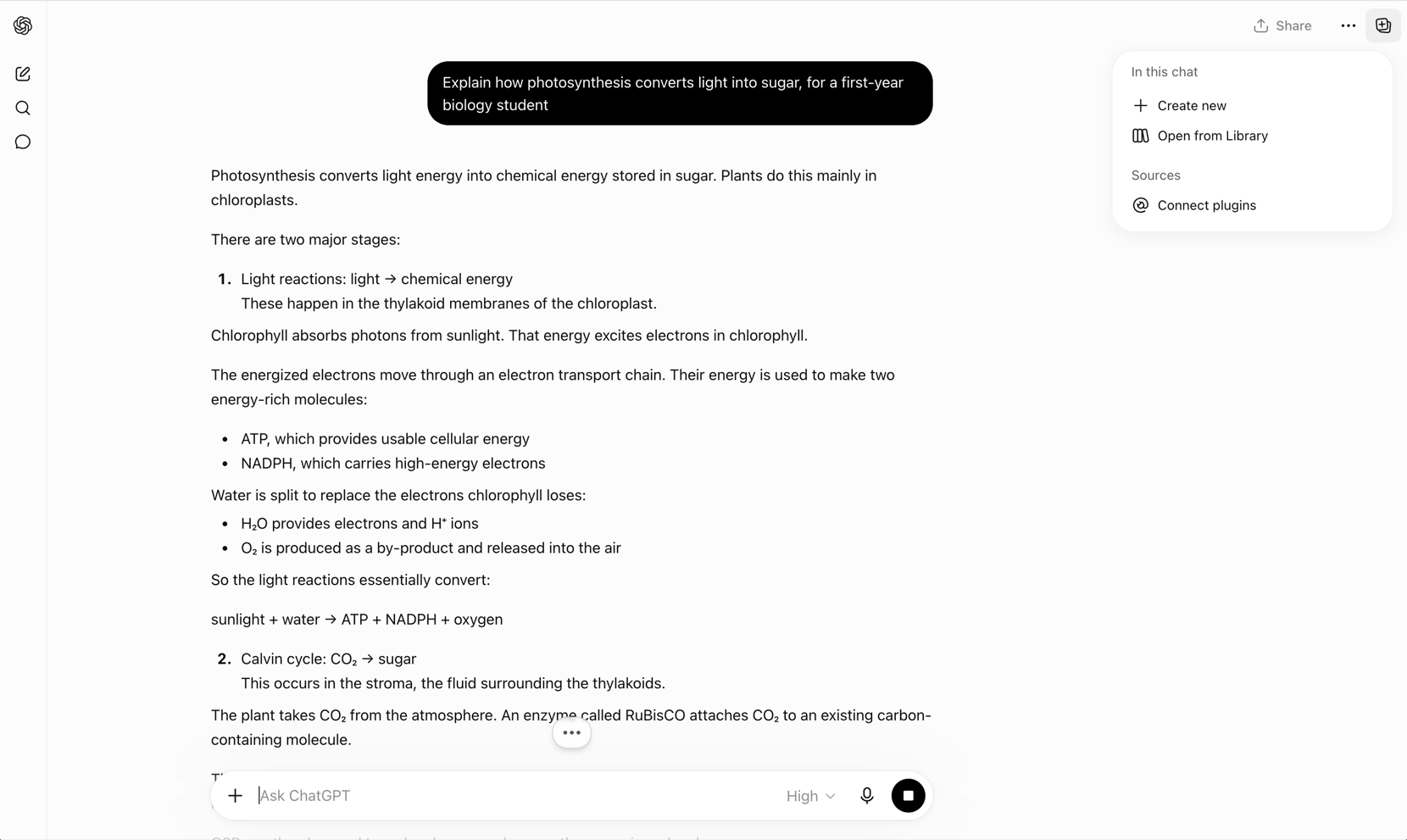
Now the same question with the plugin installed and mentioned at the front of it.
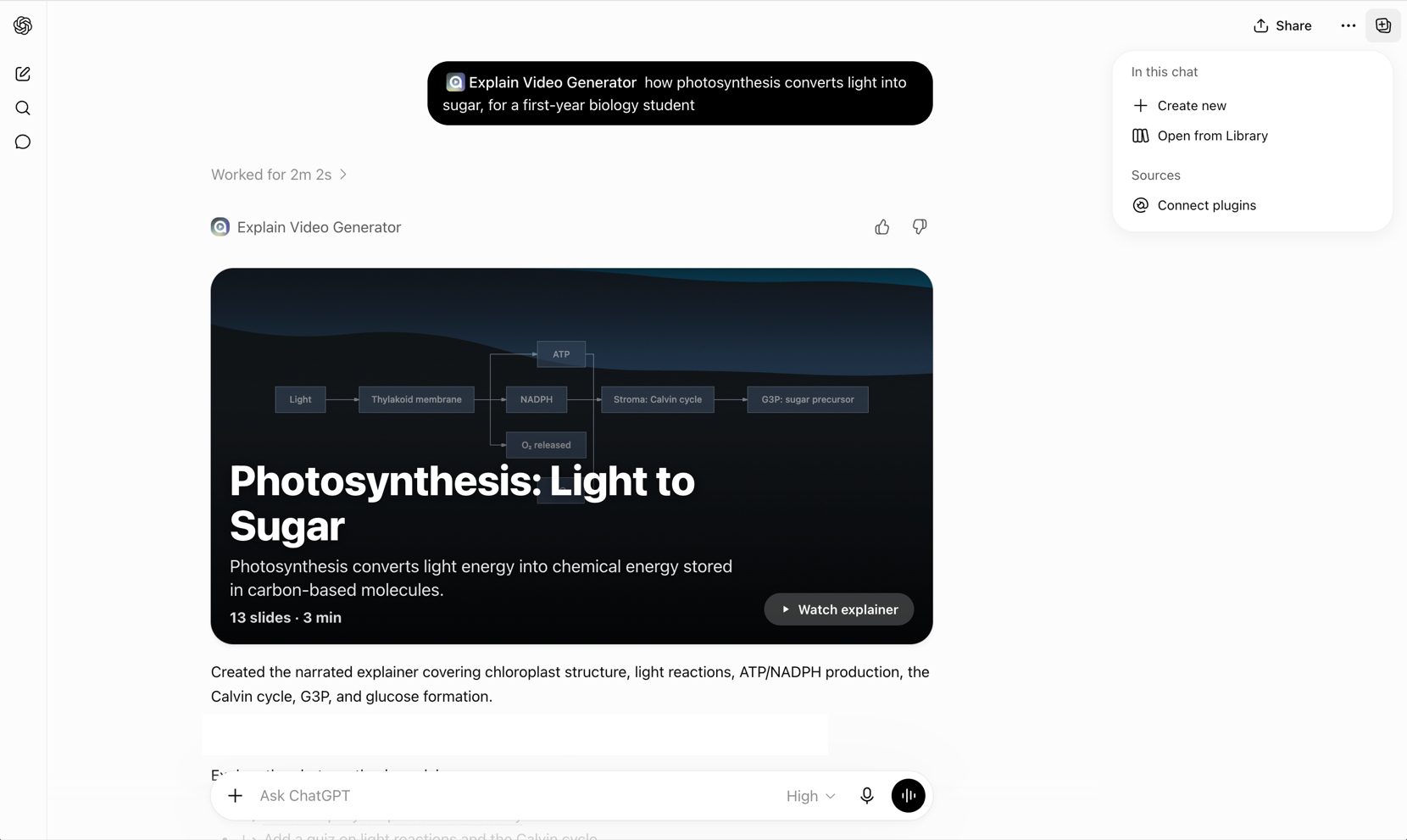
A status line read Worked for 2m 2s. What arrived was a card rather than a paragraph: a title, 13 slides, a three minute runtime, a diagram tracing light through the thylakoid membrane to ATP and NADPH and on into the Calvin cycle, and a control to watch it inline. This was one run, so treat the runtime and slide count as a description of that output and not a promised format.
| The same question, two ways | What came back | Where it helps |
|---|---|---|
| Asked with no plugin involved | A structured text answer with stages, locations and a summary equation | Scanning, copying into notes, coming back to a specific line later |
| Asked with the plugin installed | "Worked for 2m 2s", then a 13 slide, 3 minute narrated explainer with a process diagram | Following a sequence you cannot picture from a paragraph |
Neither one is the better artifact in general. The video is easier to sit through, and that property is exactly why the next step is not optional.
Step 4: Check the Explanation Against Your Notes
Fifty-four high school students watched a 21 minute recorded statistics lecture in a study by Szpunar, Jing and Schacter. The group that was never tested predicted they would score 78 percent and actually scored 48 percent. The group tested after each segment predicted 77 percent and scored 75 percent.
Watching does not tell you whether you understood. Being asked does. And an explanation generated from a question you wrote can also be plainly wrong, which no amount of watching will surface either.
The fix is one more message. Ask for questions that test whether the thing landed.
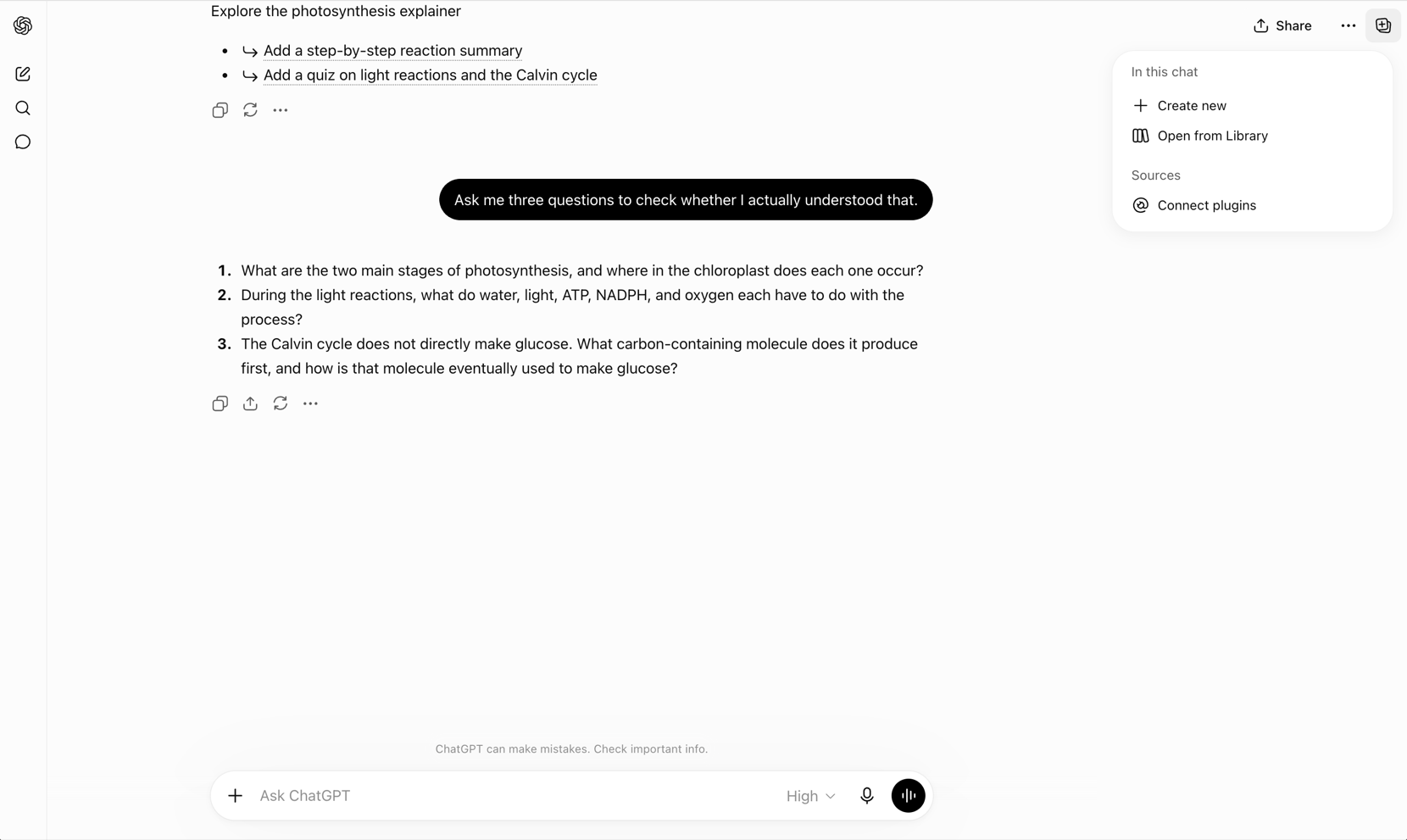
Three came back, and the third is the one worth having. It states that the Calvin cycle does not directly make glucose and asks which carbon-containing molecule it produces first. That is precisely the point a confident summary tends to smooth over, and it is the line the original notes had a question mark next to.
One rule separates a check from a second viewing. Answer from the source, not from the video. Use your notes, the textbook, the lecture slides. If the only way you can answer is by replaying the explainer, you have found a gap rather than closed one. If your notes and the explanation disagree, neither one wins automatically, and the tie is broken by the source both are supposed to describe.
This is not busywork. Testing yourself beats rereading on delayed tests even though rereading feels more productive at the time, a result Roediger and Karpicke demonstrated across two experiments. In a review of ten common study techniques, Dunlosky and colleagues rated practice testing high utility, and rated rereading, highlighting and summarization low.
Scrimba's own FAQ says the tool can make mistakes and that anything important should be double-checked. Read that as the vendor's position on its own product, and apply it to every AI explanation you meet.
When Your Notes Are a File Rather Than a Sentence
What was recorded above was a typed question inside ChatGPT. If your notes are a document rather than a sentence, the route changes.
Scrimba's list of what you can attach on scrimba.com/explain includes PDFs and images; save a Word file as PDF first. Images matter here, because photographed handwriting is the format most student notes are actually in. The format is accepted. How well any given page of handwriting is read was not tested for this article, so try it on one page before committing a term's worth.
Slide decks are named nowhere as an accepted upload, so export the deck to PDF rather than assuming. The guide to turning a PDF into a video covers what survives that conversion and what quietly does not.
What This Will Not Do for You
It will not read the textbook for you. An explainer built from a badly framed question is a clear explanation of the wrong thing, and it will feel just as convincing as a right one.
Scoping stays with you as well. The plugin has no idea what your syllabus covers, which exam board you sit, or which of the six things on the slide are actually examinable.
Two boundaries worth stating once. This is not an avatar or stock footage tool, so it is the wrong reach when you need a presentation video rather than an explanation. And no claim is made here about which ChatGPT plan is required, because that was not tested.
For the wider picture, what AI tutors do well and where they fail covers the tutoring model itself, and the survey of AI study tools covers the tools that sit outside ChatGPT entirely.
Frequently Asked Questions
Can ChatGPT turn my study notes into a video?
Not by uploading the notes into a chat and pressing a button. With a video plugin installed, you can turn the notes into one clear question and get a short narrated explainer back inside the conversation. The explanation is generated from your question, not filmed from your pages.
Do you have to install the plugin before it works?
Yes. Until the plugin is installed on your account, its name in a prompt is read as an ordinary word and ChatGPT answers in plain text, with no error and no sign that anything was skipped. Install it from the plugin directory first, then mention it in a chat.
Is Explain Video Generator free?
Explain Video Generator is the ChatGPT plugin directory listing for Scrimba Explain, and it is free to start: 1 explainer without an account, 5 on a free account, 100 a month on Pro. The limits count explainers saved to a Scrimba account; once a free account has used its five, the plugin still makes explainers, unlisted and unclaimed. Availability inside ChatGPT also depends on your plan, region, workspace, role, model and interface, which is OpenAI's own wording.
How do you check whether an AI explanation of your notes is correct?
Ask it to test you, then answer from the source rather than from the explanation. Three comprehension questions are enough. If you can only answer by replaying the video, you have found a gap. If your notes and the explanation disagree, check the textbook or lecture slides.
Can you upload handwritten notes?
On scrimba.com/explain you can attach PDFs and images, and a photograph of a handwritten page is an image; save a Word file as PDF first. How accurately any given handwriting is read was not tested for this article, so try a single page first before relying on it for a whole subject.
Key Takeaways
- The route has four steps: install the plugin, compress the notes into one question, ask it, then test yourself against the source.
- A plugin does nothing until it is installed. Signed out with nothing installed, the plugin name returned ordinary prose and no error at all.
- A fragment is not a question. Name the topic, the level and the exact thing you cannot follow, in one sentence.
- Video invites overconfidence. Untested students predicted 78 percent and scored 48 percent after a recorded lecture; tested students predicted 77 and scored 75.
- Answer from the source, not from the video. If replaying the explainer is the only way you can answer, you have found a gap rather than closed one.
Sources
- ChatGPT plugin directory. "Explain Video Generator." Accessed 8 September 2026. https://chatgpt.com/plugins/plugin_asdk_app_69c50381a40081919232f5027201beef
- Scrimba. "Explain." Accessed 8 September 2026. https://scrimba.com/explain
- Scrimba Docs. "What is Scrimba Explain?" Accessed 8 September 2026. https://docs.scrimba.com/explain/introduction
- Scrimba Docs. "Attaching documents." Accessed 23 October 2026. https://docs.scrimba.com/explain/attaching-documents
- Scrimba Docs. "Plans and pricing." Accessed 23 October 2026. https://docs.scrimba.com/explain/limits-and-plans
- OpenAI Help Center. "Apps in ChatGPT." Accessed 8 September 2026. https://help.openai.com/en/articles/11487775-connectors-in-chatgpt
- Szpunar, K. K., Jing, H. G., and Schacter, D. L. "Overcoming overconfidence in learning from video-recorded lectures." Journal of Applied Research in Memory and Cognition 3, no. 3 (2014): 161-164. https://doi.org/10.1016/j.jarmac.2014.02.001
- Roediger, H. L., and Karpicke, J. D. "Test-Enhanced Learning: Taking Memory Tests Improves Long-Term Retention." Psychological Science 17, no. 3 (2006): 249-255. https://doi.org/10.1111/j.1467-9280.2006.01693.x
- Dunlosky, J., Rawson, K. A., Marsh, E. J., Nathan, M. J., and Willingham, D. T. "Improving Students' Learning With Effective Learning Techniques." Psychological Science in the Public Interest 14, no. 1 (2013): 4-58. https://doi.org/10.1177/1529100612453266