Synthesia and HeyGen Alternatives for Internal Training Videos
Leaving Synthesia or HeyGen? Match the reason to the move: SCORM below Enterprise, a cheaper presenter, or no presenter at all. Plans checked October 23, 2026.

Direct answer: switch only when the new tool fixes your reason for leaving. If the blocker is the plan that unlocks tracking, Colossyan is the closer move: it keeps avatars, has quizzes on its free plan and puts SCORM export on a lower plan than Synthesia or HeyGen. If the blocker is the presenter itself, because the training is a procedure, policy or system explained from a document, a narrated explainer such as Scrimba Explain (listed in ChatGPT as Explain Video Generator) replaces the avatar, free to start, without SCORM. Stay with Synthesia or HeyGen when a face carries the message or your LMS already runs on their SCORM packages.
Last verified: October 23, 2026. Every plan and price below comes from the vendor's own pricing or product page, loaded that day, with monthly billing unless marked. "Not stated" means the vendor's public page does not say. Explain's facts come from Scrimba's docs, checked the same day.
Scrimba publishes this article and makes Explain. It is described in the third person like the other tools, and it has no avatar, no SCORM export and no completion tracking.
What Are You Actually Replacing When You Leave Synthesia or HeyGen?
A switch away from Synthesia or HeyGen replaces one of three things: the plan that unlocks tracking, the on-screen presenter, or the avatar format itself.
Name yours before any trial. The table maps each reason to its fix, the plan where the fix sits, and what the switch costs.
| Your reason for looking | Best move | Where it sits (checked October 23, 2026) | What you give up |
|---|---|---|---|
| SCORM or in-video quizzes without an Enterprise contract | Colossyan | Quizzes and branching on the free Starter plan (10 interactive videos a month); SCORM from Professional (5 exports a month) | HeyGen's larger stock avatar library; Starter keeps Colossyan's overlay |
| A presenter at a lower entry price | Move between HeyGen and Synthesia | HeyGen Creator, $29 a month, removes HeyGen branding; Synthesia Starter, $19 a month ($14 billed yearly), adds downloads | Nothing in format; tracking still needs Business or Enterprise |
| Animated characters instead of a face | Vyond | Starter, $58 a month billed annually or $99 monthly; SCORM only on Enterprise and Agency | A free plan (none is listed) |
| No presenter at all: a procedure or policy explained from the document | Scrimba Explain | Free to start: 1 explainer without an account, 5 on a free account, 100 a month on Pro | Avatars, SCORM, completion tracking, brand kits |
| Making the video without leaving ChatGPT | Explain Video Generator, HeyGen's plugin or Synthesia's beta plugin | Explain is free to start; HeyGen needs a HeyGen account and credits; Synthesia needs a paid account | Depends on the tool |
| One video in many languages with the same presenter | Stay | Synthesia lists 140+ languages and voices on every plan; HeyGen lists 175+ from Creator | Nothing; this is their strength |
Settle the SCORM row first. SCORM governs how training content is packaged and how it "talks" to the LMS while it plays, the part Rustici Software's explainer calls delivery and tracking. That run-time link records the completion. An MP4 or an embed plays fine inside a course and reports nothing by itself.
Synthesia's pricing page lists interactive quizzes and SCORM export on Enterprise only, a custom-priced plan. HeyGen's pricing page groups interactive video, quizzes and "SCORM export and LMS integrations" on Business. Vyond's plans put SCORM on Enterprise and Agency. Colossyan's pricing is the outlier: 10 interactive videos a month on the free plan, five SCORM exports a month on Professional and completion analytics on Enterprise.
When Should You Stay with Synthesia or HeyGen?
Stay with Synthesia or HeyGen when a face carries the message, one presenter must speak many languages, or completions must reach the LMS.
Four cases make staying the right call:
- The presenter is the point. A leadership update, a welcome from the CEO or a change announcement lands better from a person.
- One face, many countries. Synthesia lists 140+ languages and voices on every plan, and HeyGen lists 175+ languages and dialects from Creator.
- Your compliance program already runs on their SCORM packages. Switching means rebuilding and re-testing every package in the LMS.
- You need practice, not video. Synthesia sells Roleplays separately at $29 per learner per month, which its pricing page describes as a way to "Assign scenarios, track completion and score progress."
Whether a presenter changes what staff learn is a separate matter; Scrimba's training video roundup covers the research on avatars.
What Does Synthesia's Syren Change?
Syren is Synthesia's prompt-to-video agent, in beta since October 9, 2026, which builds motion graphics, avatars and voiceover from a prompt or a document.
According to Synthesia's launch post, Syren videos run up to three minutes, horizontal or vertical, spend credits, and get refined through chat. It reaches ChatGPT too: Synthesia's ChatGPT plugin, still in beta, builds drafts with Syren and lists "a paid Synthesia account" as its requirement.
For a training team, the key sentence is Synthesia's own:
"The editor remains the place for content that has to be exact and repeatable: learning content, compliance training, onboarding and internal communications."
A vendor rarely draws its own boundary this clearly. The same post pitches Syren for "launch videos, explainers and marketing content". A procedure that must match the SOP still goes through the editor and its plan tiers, so Syren does not move SCORM off Enterprise.
How Does a Narrated Explainer Replace an Avatar Video?
A narrated explainer swaps the presenter for typed slides, diagrams and a voiceover built from your document, so nothing is filmed.
Scrimba Explain makes this format. Scrimba's introduction states it plainly: "An explainer is not a screen recording. Each slide is real, typed content". Its ChatGPT listing names the training job as "Onboard new employees without filming a thing."
Scrimba's use-case gallery shows the format on a care topic. "Navigating Elder Care in the UK" opens a published playlist that walks through the system one step at a time:
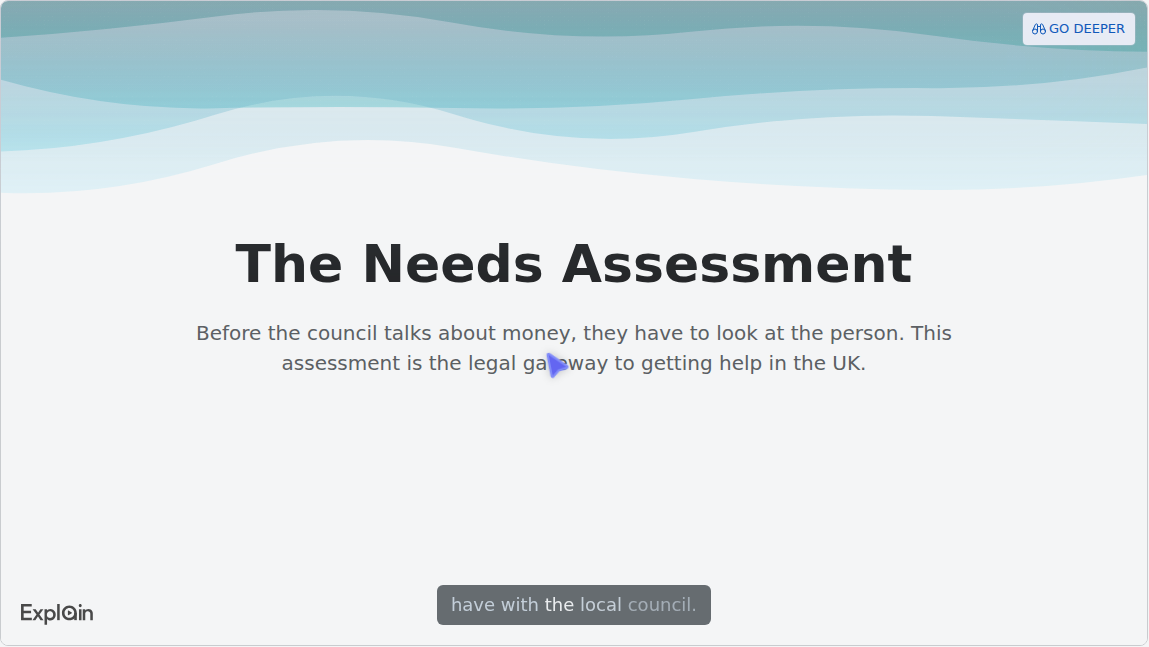
The logo in the corner is the Explain watermark. Scrimba's player docs say it is on by default, and switching it off needs Pro.
Two Ways In
- On scrimba.com/explain, attach the SOP as a PDF, or as images of each page. Save a Word file as PDF first. Signed-in explainers start Public, so set Unlisted before you create one from internal material. Scrimba's guide to turning an SOP into a training video walks through this route, and the slide deck guide covers decks exported to PDF.
- In ChatGPT, install the plugin in a signed-in session, then mention it with the procedure pasted or attached. The reply is an explainer card. Connecting a Scrimba account saves each explainer to it, and each one counts against the allowance. Before you paste company material, read the listing's data notice: "ChatGPT may share relevant chats and memories with this app to help provide context for your requests." The ChatGPT training video guide has the steps.
What a Free Account Covers, and What Needs Pro
Explain is free to start: 1 explainer without an account, 5 on a free account, 100 a month on Pro. A free account also gets 3 edits per explainer and 1 exported explainer. Scrimba's plans page lists what Pro adds:
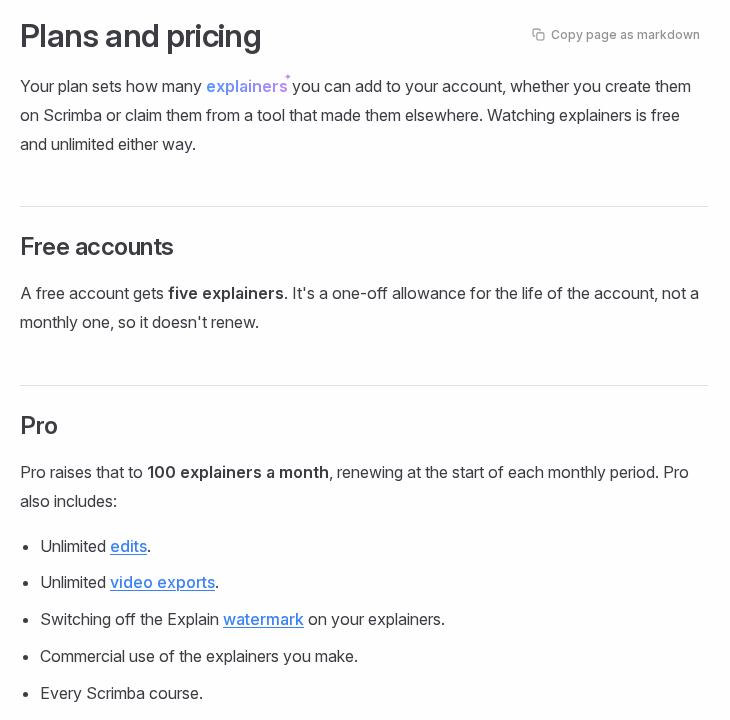
Commercial use sits on the Pro list, and the docs do not state it for free accounts. A company rolling explainers out to staff should therefore budget for Pro, and use a free account only to judge the format.
For a whole team, Scrimba's Teams page now sells Explain for internal training:
"Embed them in your LMS" means an embed or an MP4 inside a course, not a SCORM package. Scrimba's sharing docs describe workspaces where every member can edit an explainer, while "Only the person who made it and the workspace admins can delete it, move it, change its visibility or export it as a video." The docs give no setup steps for a workspace. They list watermark removal and commercial use under Pro, and the Teams page does not say whether a seat includes them.
Export, Edits and Long SOPs
An explainer leaves as an MP4, 1080p by default with 720p and 1440p options, plus a .vtt subtitles file. Per the exporting docs, it must be public or unlisted to render, and any edit retires every saved video, so export again after each change. The edit box rewrites, adds, deletes, reorders and translates slides.
No length limit is documented, so split a long manual into a playlist, one lesson per section, and check each slide against the source. Short pays off anyway: across 6.9 million edX sessions, Guo, Kim and Rubin found that shorter videos are much more engaging.
Every explainer page carries Scrimba's own warning, quoted in its transcript docs: "Explain is AI and can make mistakes. Please do your own diligence." The procedure's owner reviews every slide before release.
What Do You Give Up When You Switch?
Moving from an avatar platform to a narrated explainer gives up the presenter, the brand kit and SCORM tracking, so check what your program depends on.
- Tracking. Explain counts views and likes, nothing per learner, which is all the community docs describe. Its quiz appears only in explainers made on scrimba.com, and Scrimba's quiz docs call it "a ten-second check that you understood the lesson, not an exam."
- A consistent face and brand. Scrimba's docs describe no avatars, brand kits or custom fonts.
- Languages. Explain narrates in 33 languages, each with a native voice. A Translate edit moves an explainer into the new language and retires its saved versions, so keeping two languages side by side means two explainers, each counting against the allowance. Scrimba's upcoming guide to making one training video in many languages covers that workflow.
- Free edits. Three per explainer on a free account.
If two of those matter, Colossyan is the closer switch: it keeps avatars, quizzes and SCORM, on a lower plan than Synthesia or HeyGen.
How to Test a Switch on One Module
Pilot one module before you move a library:
- Pick one module that already exists in Synthesia or HeyGen, ideally a procedure with a written source.
- Rebuild it in the candidate tool from the same SOP or deck. For Explain, that means the PDF on scrimba.com or the text in ChatGPT.
- Have the procedure's owner check every scene or slide against the source.
- Deliver it the way your LMS needs: a SCORM package from Colossyan's Professional plan, or Explain's MP4 or embed inside an existing course. Per the embedding docs, viewers of an embed need no Scrimba account.
- Compare the cost per finished module, including the edits after the next SOP revision.
The employee onboarding guide shows the same test on a handbook.
When Another Tool Fits Better
None of the five covers every training job:
- Click-by-click software tasks. A screen recorder shows the real interface. Explain is not a screen recording, and avatar tools only describe the clicks.
- Signed acknowledgments and audited completions. Build the module in the LMS or a SCORM authoring tool and put the video inside it.
- Hands-on equipment. A filmed or in-person demonstration. Scrimba's guide to AI safety training videos covers what the rules require beyond video.
- A ranked shortlist rather than a switch. The AI video generators for training roundup ranks five tools by job, with SCORM, quizzes and free plans side by side.
Frequently Asked Questions
What is the best Synthesia alternative for training videos?
Colossyan, for teams that need SCORM and quizzes without an Enterprise contract: quizzes on its free plan and SCORM from Professional. For presenter-free procedure videos built from a document, Scrimba Explain is free to start but has no SCORM. Keep Synthesia when one presenter must speak many languages.
Is there a free Synthesia alternative?
Yes, with catches. HeyGen's free plan makes 3 watermarked videos a month, up to 1 minute each. Colossyan's free Starter gives 20 minutes a month with its branded overlay. Scrimba Explain gives a free account 5 explainers, 3 edits each and 1 export, with a watermark. Synthesia's own Basic plan gives 10 watermarked minutes a month.
What is a cheaper HeyGen alternative for internal training?
If the reason is SCORM, Colossyan unlocks it on Professional instead of HeyGen's $149-a-month Business plan. If the reason is credits spent on avatar renders for simple procedure videos, a narrated explainer may be enough: Scrimba Explain is free to start, and Pro covers 100 explainers a month.
Is HeyGen or Synthesia cheaper for training videos?
At the entry tier Synthesia costs less: Starter is $19 a month on monthly billing against $29 for HeyGen Creator, and both cost less billed yearly. The bigger difference is tracking. HeyGen puts SCORM export on Business at $149 a month, while Synthesia keeps it on Enterprise at a custom price.
How do you move existing Synthesia training modules to another tool?
Rebuild each module in the new tool from its script or source SOP, starting with one pilot module. Download the finished videos while your plan allows it (Synthesia lists downloads from Starter), so the LMS keeps working during the switch. Rebuild a SCORM package only for modules that must report completions; Colossyan's Professional plan includes 5 SCORM exports a month.
Is Vyond a good Synthesia alternative?
For animated scenarios with characters, yes. Vyond's plans page lists AI avatars and document-to-video from Starter, at $58 a month billed annually, but no free plan, and SCORM export only on its Enterprise and Agency plans.
Can a company use free Scrimba Explain explainers for staff training?
Scrimba's docs list commercial use of explainers as a Pro feature and do not state it for free accounts, so a company should plan on Pro before rolling explainers out to staff. A free account is enough to test the format: 5 explainers, 3 edits each and 1 export.
Key Takeaways
- Name the reason first. Tracking, the presenter and the format each point to a different move.
- SCORM sits on a different plan at each vendor: Enterprise at Synthesia, Business at HeyGen, Enterprise and Agency at Vyond, Professional at Colossyan.
- Synthesia positions Syren for fast launch and marketing video; by its own account, the editor stays the place for learning and compliance content.
- A narrated explainer fits procedures and policies built from a document, with no presenter and no SCORM.
- Scrimba Explain is free to start, but commercial use, unlimited edits and exports, and watermark removal are listed under Pro.
- Pilot one module and have its owner check every slide before you move a library.
Sources
- Rustici Software. "SCORM Explained 201." https://scorm.com/scorm-explained/
- Guo, P., Kim, J., and Rubin, R. "How video production affects student engagement." L@S 2014. https://dl.acm.org/doi/10.1145/2556325.2566239
- Vendor pages, accessed October 23, 2026: Synthesia pricing, Synthesia Syren launch, Synthesia ChatGPT plugin, HeyGen pricing, HeyGen ChatGPT app, Colossyan pricing, Vyond plans.
- Scrimba, accessed October 23, 2026: introduction, plans and pricing, exporting, editing, privacy and sharing, player controls, quizzes, use cases, Teams, ChatGPT listing.