Free AI Video Tools for Teachers: What Is Actually Free
Which AI video tools are free for teachers, and what is the catch: allowances, length caps, watermarks and verification, from each vendor's own page.

Yes, a teacher can turn chapter notes into a narrated lesson video for $0, but every free tier has a catch, and the catch decides the tool. Gemini Notebook (formerly NotebookLM) makes three narrated Video Overviews a day from your sources, with a visible watermark. Scrimba Explain is free to start: one explainer without an account and ten for the life of a free account, built straight from a chapter PDF. Canva Education and Adobe Express for Education cost nothing for K-12 teachers, but their AI video tools generate clips of 4 to 8 seconds that you assemble into a lesson yourself.
Last verified September 28, 2026: every allowance, length cap and watermark rule below comes from the vendor's own pricing or help page, read that day.
Scrimba publishes this article and makes Scrimba Explain, listed in ChatGPT as Explain Video Generator. It gets one entry below, limits included, like every other tool.
This matters because teachers already pay. In the National Center for Education Statistics' 2020-21 teacher survey, 94.8% of public school teachers spent their own money on classroom supplies without reimbursement, and those who did spent $470 on average. A "free" tool that needs a paid plan before you can download the video is one more line on that bill.
What Does "Free" Mean for an AI Video Tool?
A free AI video tier is a capped allowance, limited by a count, a length, a watermark, an eligibility check or clip-only output.
Five catches recur:
- A count, and how often it resets. Adobe Express Free shows "2 free lifetime uses" for its five-second video generator (Adobe Express pricing). Gemini Notebook resets daily and Fliki monthly; a lifetime cap never comes back.
- A length cap. Fliki's free plan exports up to one minute (Fliki pricing).
- A watermark. Gemini Notebook lists watermark removal only on its paid Pro and Ultra plans (Gemini Notebook Help).
- Who qualifies. Canva Education is free only after Canva verifies that you teach K-12 (Canva Education).
- What the credits buy. A four-second clip and a narrated three-minute lesson are both sold as "AI video". Most free tiers give you the clip.
Free AI Video Tools for Teachers Compared
| Tool | Free for | Free allowance | Length per video | Watermark on free | Narrated lesson from your notes | Quiz in the video |
|---|---|---|---|---|---|---|
| Scrimba Explain | Anyone | Free to start: 1 without an account, 10 for the life of a free account | Not stated | Not stated | Yes: chapter PDF, Word file, notes or photos | Can end with one (scrimba.com only) |
| Gemini Notebook | Anyone with a Google account; most school accounts | 3 Video Overviews a day | Short format about 60 seconds | Yes, visible; removal on Pro and Ultra only | Yes, from the sources you add | No (separate quiz tool) |
| Scholarly | Anyone | 1 AI Creation Credit, total | 2 minutes | Not stated | Yes, once, from one 8 MB upload | No (separate quiz tool) |
| Canva Education | Verified K-12 teachers | Up to 200 Premium or 20 Ultra AI uses a month | 4 to 8 seconds per generated clip | Not stated | No; you assemble it | Not stated |
| Adobe Express | Anyone (Free); K-12 teachers with a school email (Education) | Free plan: 2 lifetime five-second clips; Education: Premium at no cost | 5 seconds per generated clip | Not stated | No; you assemble it | Not stated |
| Google Vids | Personal Google accounts | 50 credits a month; Slides to Vids with AI voiceover costs 5 | Not stated | Not stated | From Google Slides, with AI voiceover | Not stated |
| Fliki | Anyone | 3 credits a month | 1 minute | Yes | From a script, idea or PPT | Not stated |
| CapCut | Anyone | No cap stated | Not stated | CapCut says none | From a typed or AI-written script | Not stated |
Not stated means the vendor's own pricing or help page did not answer that column on September 28, 2026. It does not mean no.
Only three rows turn notes into a narrated lesson at no cost: Gemini Notebook, Scrimba Explain and Scholarly, and Scholarly does it once.
What Each Free Tier Actually Gives a Teacher
Canva Education: free if you are verified, but its AI makes clips
Canva Education is the most generous free offer here if you qualify, and the weakest at turning notes into a narrated lesson. Canva says it "will remain 100% free for K-12 (primary and secondary) educators, their students", verified by an education email or proof of employment "within a few days" (Canva Education). College instructors do not qualify, and teachers re-verify every three years (Canva eligibility).
The catch: the AI video tools make clips. In Magic Media, "Every generated video will be 4 seconds long" (Canva Help), and Canva AI clips run 6 seconds silent at Premium, the default, or 8 seconds with audio at Ultra (AI quality, Canva Help). Canva Education allows up to 200 Premium or 20 Ultra AI uses a month. Canva Free's 20 Standard or Premium uses may cover silent clips, though Canva's allowance page lists clips as Ultra only (Canva AI allowance). Magic Video, on every plan including free, sets your own clips or photos to music as a 60-second video, but does not narrate a lesson from notes (Magic Video). You still build the lesson slide by slide.
Adobe Express: two free clips for life, unless a school email unlocks Premium
Adobe Express Free is a video editor with a token amount of generative video: its plan table shows "2 free lifetime uses" for "Generate 5-second videos" (Adobe Express pricing).
Teachers do better with Adobe Express for Education, which Adobe offers free to K-12 educators, students and administrators who sign up with a school email (Adobe Help). That license "gives you access to Adobe Express Premium at no cost" (Adobe Express for Education). You still assemble the lesson yourself, and Adobe's education pages do not say how many generative video uses it includes.
Google Vids: 50 credits a month on a personal account
Google Vids suits a lesson that already lives in Google Slides: it turns the deck into a narrated video. A personal Google account gets 50 credits a month. "Slides to Vids (with AI voiceovers)" costs 5 credits per use, and AI clips and avatars share a cap of 6 a month (Google Vids Help).
The catch: a school account may get less. Google's table lists no Gemini features in Vids for Education Fundamentals or Education Standard, and on school accounts "your admin controls access to Google Vids".
Gemini Notebook (formerly NotebookLM): three narrated overviews a day
Google renamed NotebookLM to Gemini Notebook on July 16, 2026 (Google). Its Video Overviews turn the sources in a notebook, such as your chapter notes, into a narrated video, either an Explainer or a Short of about 60 seconds (Gemini Notebook Help). The free tier needs only a Gmail account and allows 3 a day.
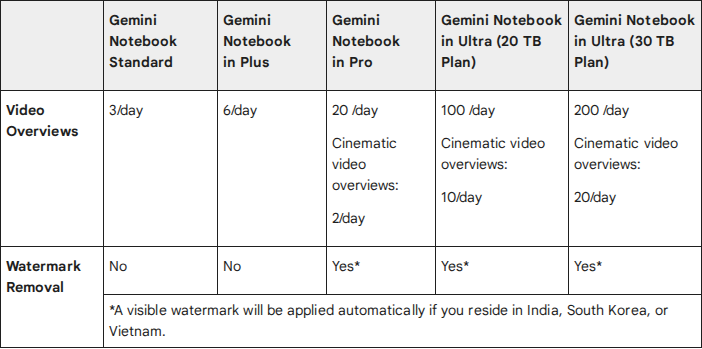
The catch: a visible watermark and a slow render. Google warns that an overview can take "more than 30 minutes" and "may contain inaccuracies or audio glitches". Public notebook links are "currently disabled for Workspace Enterprise or Education accounts", so school accounts download the video and share the file. Education Fundamentals and Standard accounts get the same 3 a day (Gemini Notebook Help).
Scholarly and Fliki: a taste, not a semester
Scholarly's free plan is one video: "1 free AI Creation Credit total", video lectures of 2 minutes and "1 free file upload total (8MB)" (Scholarly pricing). Fliki's renews monthly but stays small: 3 credits a month, 720p, a one-minute export and a Fliki watermark (Fliki pricing).
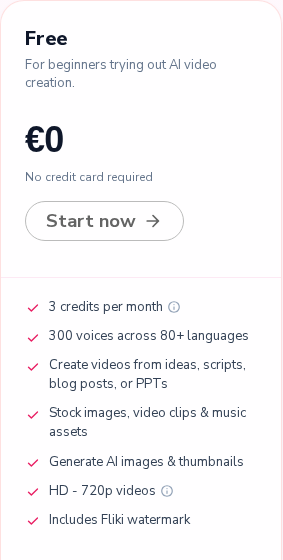
Neither free tier fits a three-minute lesson opener.
CapCut: free with no stated cap, built for social video
CapCut's page makes the boldest claim in this list: "a completely free AI video generator with no hidden fees or watermarks" (CapCut). You type a script or let its AI writer draft one, pick a style and a voiceover, and CapCut assembles the video.
The catch: no usage cap is stated to check that claim against, the page's steps run in the desktop app, which a school laptop may block, and its styles lean toward social media.
Scrimba Explain: free to start, built from the chapter
Scrimba Explain turns a topic or document into a narrated explainer: typed slides, diagrams and a voice, with no one on camera. Its ChatGPT listing calls it a "Free AI explainer video maker" and names this exact job: "Start your class with a 3-minute lesson opener built from the textbook chapter" (Explain Video Generator listing). On scrimba.com you attach the chapter as a PDF, notes or photos of the pages (attaching documents), or as a Word file (scrimba.com/explain).
The allowance is documented to the explainer: one without an account, then "ten explainers" on a free account, which the docs call "a one-off allowance for the life of the account, not a monthly one", and 100 a month on Pro (limits and plans). Drafts made through ChatGPT cost nothing until you claim one. Students watch without an account (embedding).
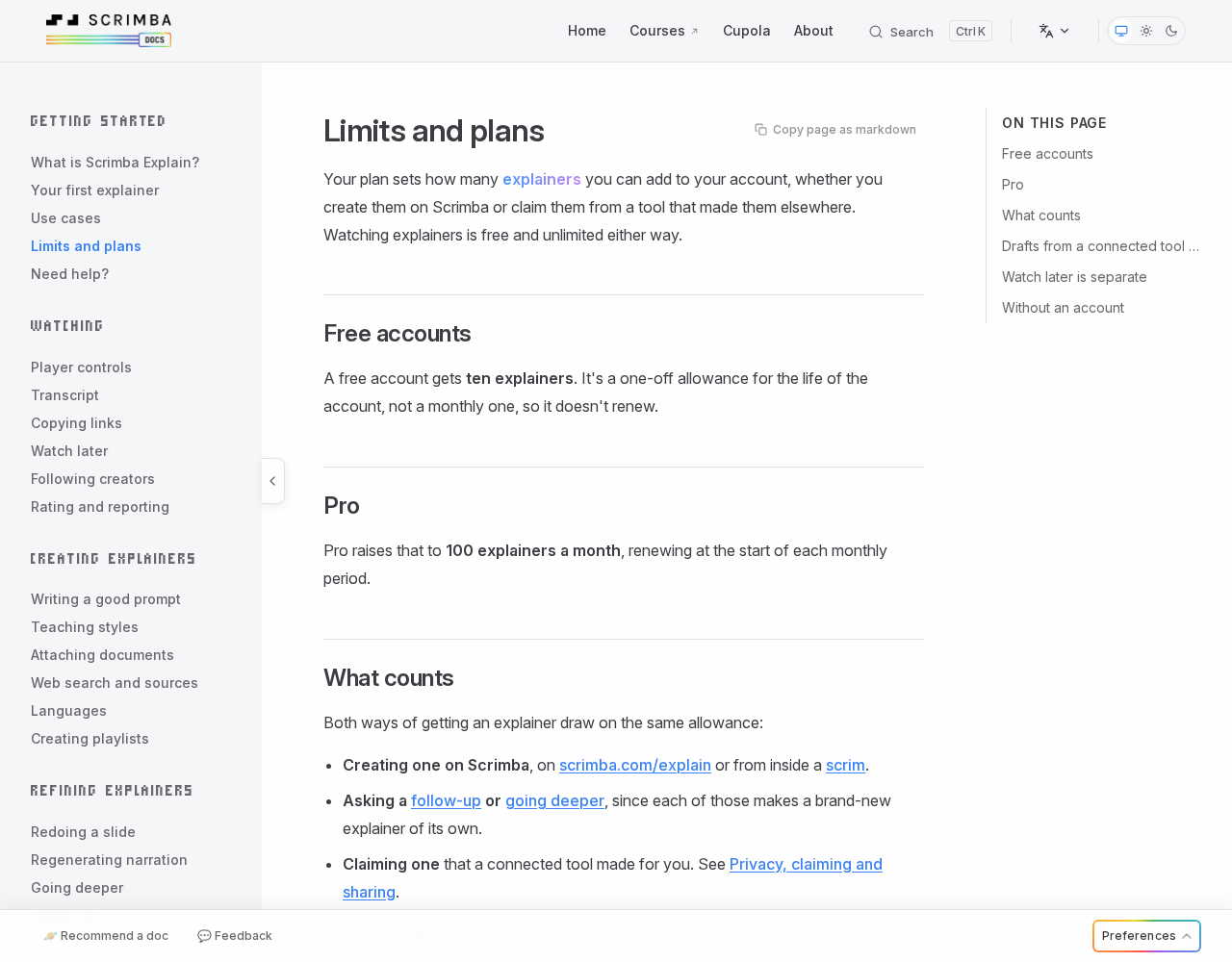
The catch: ten is a lifetime number. Signed in, a new explainer starts as Public and is listed in Scrimba's community, so switch the picker to Unlisted first (your first explainer). Every explainer page says "Explain is AI and can make mistakes. Please do your own diligence." (transcript).
What a Free Explainer from Chapter Notes Looks Like
Scrimba's docs list one published example per subject (use cases). For a history class the closest is History of the Armenian Alphabet, about a minute of typed slides and narration. Pictures the AI draws carry a Generated image tag, and captions highlight each word as it is spoken:
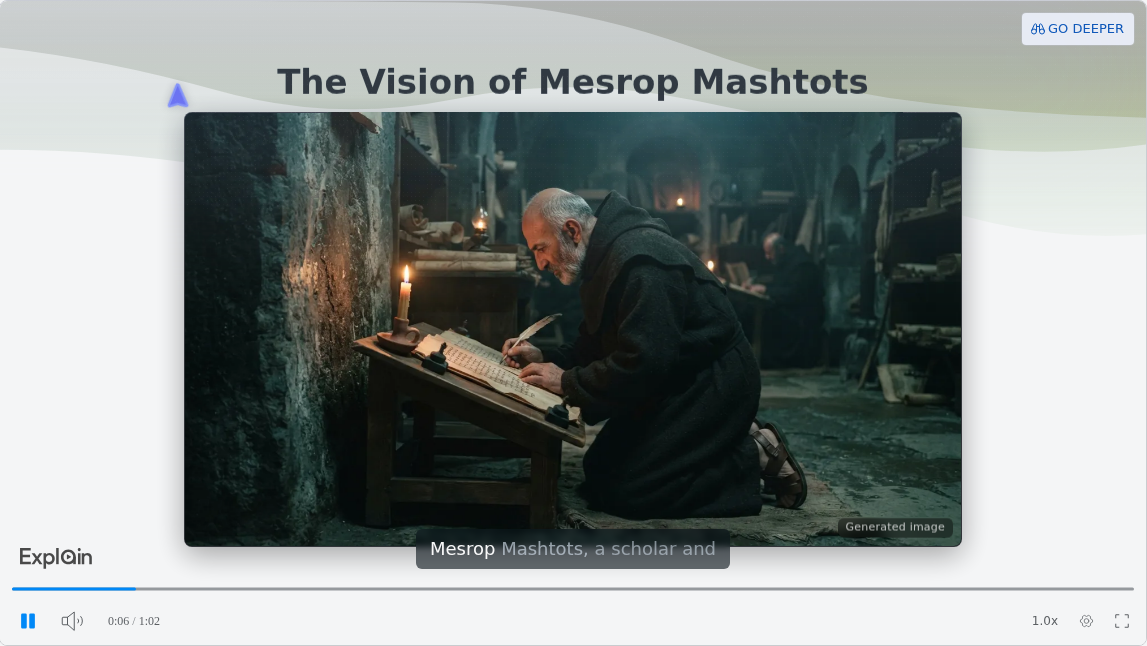
On scrimba.com, what spends the allowance is new material: each explainer you create signed in uses one of the ten, and so does each follow-up or Go deeper (limits and plans). After that, the docs say "using it costs nothing further": redoing a weak slide, regenerating the narration and exporting an MP4 are free, and watching costs your students nothing. The step-by-step version, from attaching the chapter to checking it before class, is Scrimba's guide How to Make a Lesson Opener Video from a Textbook Chapter.
To stay inside ChatGPT, install Explain Video Generator in a signed-in session first (how to install a plugin in ChatGPT), then mention it with your notes. The draft is free until claimed, starts unlisted, and has no quiz or teaching style (teaching styles). The listing warns that "ChatGPT may share relevant chats and memories with this app", so leave student names out. More on that route: can ChatGPT make videos.
How to Make a Free Allowance Last a Semester
Match the cap to the video.
- Daily caps for the routine. Three Gemini Notebook overviews a day cover a review video per class, watermark included.
- Lifetime caps for the keepers. Spend Scrimba Explain's ten, Scholarly's one and Adobe's two clips on lessons you will teach again.
- Count the pieces of a long chapter. Each lesson in a Scrimba playlist "is a normal explainer with its own URL" (playlists), so a five-lesson playlist uses five of your ten.
- Keep the file. A Scrimba explainer exports as an MP4 at 2560x1440 with a .vtt captions file when it is Public or Unlisted (exporting). Gemini Notebook overviews download from the player.
When a Free AI Video Tool Is the Wrong Choice
- You need each student's answers. An Explain quiz tells each student how they did, and Scrimba documents no results report for the teacher. Edpuzzle says "Our basic plan will always be free for teachers" (Edpuzzle), so export the MP4 and add your checks there.
- You want a face on screen. HeyGen's Free plan makes 3 videos a month of up to 1 minute (HeyGen pricing). Synthesia's Basic plan covers up to 10 minutes a month, with downloads listed from the $19-a-month Starter plan (Synthesia pricing).
- Your district requires a signed privacy agreement. Canva states FERPA and COPPA compliance for its education offering and says it signed the National Data Privacy Agreement (Canva Education). Scrimba's Explain docs make no compliance statement.
FAQ
Teachers pay for everything themselves: is there a genuinely free AI video generator for lesson videos from chapter notes?
Yes, with limits. Gemini Notebook makes three narrated Video Overviews a day from your notes, watermarked. Scrimba Explain builds a narrated lesson from a chapter PDF and is free to start: one explainer without an account, ten for the life of a free account. Scholarly gives one free two-minute video.
Which free AI video tools add a watermark?
Fliki's free plan includes a Fliki watermark, and Gemini Notebook removes its watermark only on Pro and Ultra. CapCut says its free generator has none. Canva, Adobe Express, Google Vids, Scholarly and Scrimba Explain state no watermark rule for their free tiers.
Is Canva's AI video generator free for teachers?
Canva Education is free for verified K-12 teachers and includes up to 200 Premium or 20 Ultra AI uses a month. Its AI clips last 6 seconds, or 8 with audio at Ultra. Canva's help pages disagree on whether Canva Free's 20 Standard or Premium uses cover silent clips.
Is NotebookLM free for making lesson videos?
Yes. NotebookLM is now Gemini Notebook, and its free tier allows three Video Overviews a day with a Gmail account. The videos carry a visible watermark, can take over 30 minutes to generate, and cannot be shared by public link from school accounts.
How many free videos does Scrimba Explain give a teacher?
One explainer without an account, then ten for the life of a free account, which do not renew. Pro raises the limit to 100 a month. Drafts made through ChatGPT count only when you claim them, and watching is free.
Do students need an account to watch a free AI lesson video?
Not for Scrimba Explain: public, unlisted and embedded explainers play without a Scrimba account. Gemini Notebook videos from a school account cannot use public links, so download the file and post it on your class page or LMS.
Can I make a free lesson video inside ChatGPT?
Yes, with a plugin. Install Explain Video Generator in a signed-in ChatGPT session, then mention it with your notes. The draft is free until you claim it into a Scrimba account, starts unlisted, and has no quiz or teaching style.
Key Takeaways
- Every free AI video tier has a catch: a count cap, a length cap, a watermark, an eligibility check, or clip-only output.
- Only Gemini Notebook, Scrimba Explain and Scholarly turn notes into a narrated lesson at no cost, and Scholarly does it once.
- Canva Education and Adobe Express for Education are free for K-12 teachers, but their AI video tools generate clips of 4 to 8 seconds.
- Scrimba Explain is free to start: 1 explainer without an account and 10 for the life of a free account.
- Set lesson videos to Unlisted, check them against the chapter, and keep student names out.
Related reading: the free AI video generators roundup, AI video generators for teachers, and how to turn a PDF into a video.
Sources
- NCES teacher survey. https://nces.ed.gov/surveys/ntps/estable/table/ntps/ntps2021_6801_t12ns
- Canva. https://www.canva.com/education/ , https://www.canva.com/education/eligibility-guidelines/ , https://www.canva.com/help/ai-access/ , https://www.canva.com/help/canva-ai-quality-tiers-standard-premium-ultra/ , https://www.canva.com/help/using-magic-media/ , https://www.canva.com/help/video-clip/ , https://www.canva.com/help/magic-video/
- Adobe. https://www.adobe.com/express/pricing , https://www.adobe.com/education/express/ , https://helpx.adobe.com/express/web/adobe-express-for-education/for-educators/set-up.html
- Google. https://support.google.com/gemininotebook/answer/16213268?hl=en , https://support.google.com/gemininotebook/answer/16454555?hl=en , https://support.google.com/gemininotebook/answer/16337734?hl=en , https://blog.google/innovation-and-ai/products/gemini-notebook/notebooklm-gemini-notebook/ , https://support.google.com/docs/answer/15609411?hl=en
- Scholarly, Fliki, HeyGen and Synthesia pricing. https://scholarly.so/pricing , https://fliki.ai/pricing , https://www.heygen.com/pricing , https://www.synthesia.io/pricing
- CapCut and Edpuzzle. https://www.capcut.com/tools/free-ai-video-generator , https://edpuzzle.com/
- Scrimba Explain. https://chatgpt.com/plugins/plugin_asdk_app_69c50381a40081919232f5027201beef , https://docs.scrimba.com/explain/limits-and-plans