Best AI Video Generators for Teachers
Which AI video generator fits a lesson opener, a bell ringer or an animated science diagram: free plans, student accounts and quizzes, checked Sep 28, 2026.

The best AI video generator for a teacher depends on the video's job in the lesson. For a three-minute lesson opener or a bell ringer built from your own chapter or notes, with diagrams and a closing quiz, use a narrated explainer tool such as Scrimba Explain, which is free to start. If your school runs on Canva, Canva Education is free for verified K-12 teachers, though its AI video tools make short clips, not narrated lessons. For a presenter on screen, pick Synthesia or HeyGen. For character animation, Vyond or Powtoon.
Last verified September 28, 2026: every price, free plan, sharing rule and quiz feature below comes from the vendor's own pricing, help or education page, read that day.
Scrimba publishes this article and makes Scrimba Explain, listed in ChatGPT as Explain Video Generator. It gets one entry below, limits included, like every other tool.
In a Gallup and Walton Family Foundation survey of 2,232 public K-12 teachers, six in ten used an AI tool for work in the 2024-25 school year, and weekly users estimated they saved 5.9 hours a week.
What Teachers Ask an AI Video Generator to Do
Teachers keep asking for three things: a three-minute lesson opener from a seventh-grade textbook chapter, a short bell ringer from lesson notes, and a middle school science opener with animated diagrams. All three start from material the teacher already has, and none needs anyone on camera.
"AI video generator" covers five kinds of tool, and only some of them do that job:
- Narrated explainers from your material. The tool turns your chapter or notes into narrated slides and diagrams: Scrimba Explain.
- Template editors. You build the video from templates and stock, with AI helpers: Canva.
- Avatar presenters. A digital presenter reads your script: Synthesia, HeyGen.
- Character animation. Cartoon scenes you direct: Vyond, Powtoon.
- Generative clips. Seconds of footage from a text prompt.
The last kind is easy to mistake for the first. Canva's help center says of Magic Media: "Every generated video will be 4 seconds long" (Canva Help), and Canva AI clips run 6 seconds without audio or 8 with it (Canva Help). That is good b-roll. It is not a lesson.
AI Video Generators for Teachers Compared
| Tool | Free for a teacher | Students need an account to watch? | New videos start as | Quiz inside the video | Math as notation | Narration languages |
|---|---|---|---|---|---|---|
| Scrimba Explain | Free to start: 1 explainer without an account, 10 for the life of a free account, 100 a month on Pro | No | Public when signed in on scrimba.com; Unlisted from ChatGPT or signed out | Can end with a multiple-choice quiz (scrimba.com only) | Yes | 33 |
| Canva Education | Free for verified K-12 teachers | No, with a public view link | Private until you share it | Not in the video; assess in Canva Education | Not stated | Not stated |
| Synthesia | Basic plan $0: 10 minutes of video a month; MP4 downloads start on Starter ($19/mo) | No, with a public link or embed | Shared once you create a link | Quizzes on Enterprise; branching from Creator ($89/mo) | Not stated | 160+ |
| HeyGen | Free plan: 3 videos a month, up to 1 minute each | No, public links need no sign-in | Not stated | Quizzes on Business ($149/mo) | Not stated | 30+ on Free |
| Vyond | No free plan listed; Starter $58/mo billed annually | Not stated | Not stated | Not stated | Not stated | Translation into 95 on Professional |
| Powtoon | Free plan: up to 3 minutes, 720p, watermark; Education $8/mo billed yearly | Not stated | Not stated | Not stated | Not stated | Not stated |
| invideo | No free plan listed; Starter $20 per seat a month | Not stated | Not stated | Not stated | Not stated | Not stated |
Not stated means the vendor's own pricing, help or education page did not answer that column on September 28, 2026. It does not mean no.
Canva Education wins on price outright if you can get verified. In this table, Scrimba Explain is the only row that documents both an end-of-lesson quiz and math notation without a paid plan.
The Best AI Video Generators for Teachers, by Teaching Job
1. Scrimba Explain: best for a lesson opener built from your own chapter
Scrimba Explain turns a topic or document into a narrated explainer: typed slides, diagrams, short animated scenes and a voice, with no one on camera. Its ChatGPT listing names this exact job: "Start your class with a 3-minute lesson opener built from the textbook chapter" (Explain Video Generator listing).
On scrimba.com/explain you attach the chapter as a PDF, a Word file or photos of the pages (Explain docs). The default teaching style, Explain, promises "Simple words, small steps" (teaching styles). Formulas "render as real mathematical notation" (math), and a lesson can end with a short multiple-choice quiz that each student answers on the slide (quizzes). Narration covers 33 languages, which helps with English learners.
Copy fullscreen link opens the lesson with nothing around it, which the docs say "suits sending a lesson to students or a class" (copying links), and students watch without an account (embedding).
Signed in on scrimba.com, a new explainer starts as Public and is listed in the community, so switch the picker to Unlisted first (your first explainer). And every explainer page says "Explain is AI and can make mistakes. Please do your own diligence." (transcript), so watch the lesson against the chapter before class.
It has no presenter, no class roster, no grades and no teacher dashboard. No length limit or coverage guarantee is documented, so split a long chapter into a playlist, one section per lesson. Pricing is free to start: one explainer without an account, ten for the life of a free account, 100 a month on Pro (limits and plans). Watching is free.
2. Canva Education: best free option if your school already uses Canva
In Canva's words: "Canva Education will remain 100% free for K-12 (primary and secondary) educators, their students, as well as qualified school districts and institutions" (Canva Education). Teachers sign up with an education email or proof of employment, and Canva promises verification "within a few days". It connects to Google Classroom, Canvas and other LMS platforms, and Canva says its education offerings are FERPA and COPPA compliant.
The catch is that Canva's AI video tools make short pieces, not narrated lessons. Canva AI video clips count as Ultra AI tools, drawing on Canva Education's monthly allowance of up to 20 Ultra or 200 Premium uses, shared with other AI tools (Canva AI allowance). Beyond clips, Magic Video turns 1 to 10 of your own clips or photos into a 60-second video with templates, transitions and music (Canva Help). A three-minute opener is still something you assemble in the editor. With ten minutes before first period, that is the slow route.
3. Synthesia and HeyGen: best when a presenter should be on screen
Synthesia's free Basic plan includes 10 minutes of video a month in 160+ languages and voices; MP4 downloads start on the $19-a-month Starter plan, interactive branching on the $89 Creator plan and quizzes on Enterprise (Synthesia pricing). HeyGen's Free plan gives 3 videos a month of up to one minute each, in 30+ languages; watermark removal starts on the $29 Creator plan, and quizzes come with interactive video on the $149 Business plan (HeyGen pricing).
Synthesia says "Viewers don't need a Synthesia account to watch a video you share via public link or embed" (Synthesia Help), and HeyGen can generate "a public link that requires no sign-in" (HeyGen Academy).
A presenter earns its place when a face carries the lesson, as in a welcome message or a language lesson where pronunciation matters. In a diagram-heavy science opener, the presenter mostly stands beside scenes you still arrange.
4. Vyond and Powtoon: best for character animation
Vyond lists no free plan: Starter costs $58 a month billed annually and includes document to video, while translation into 95 languages starts on Professional (Vyond pricing). Powtoon's Free plan allows videos up to 3 minutes at 720p with a watermark. Its Education plan costs $8 a month billed yearly and still exports with a "Powtoon for EDU" watermark (Powtoon pricing).
Pick them when the lesson is a story with characters, such as a historical scene. A labeled science diagram that must be exactly right is still yours to build.
5. invideo: best for stock and generative footage
invideo's pricing page lists no free plan. Starter costs $20 per seat a month, with monthly credits spent on generative video models (invideo pricing). It suits a punchy hook, not a narrated walk through the chapter.
What a Published Science Lesson Opener Looks Like
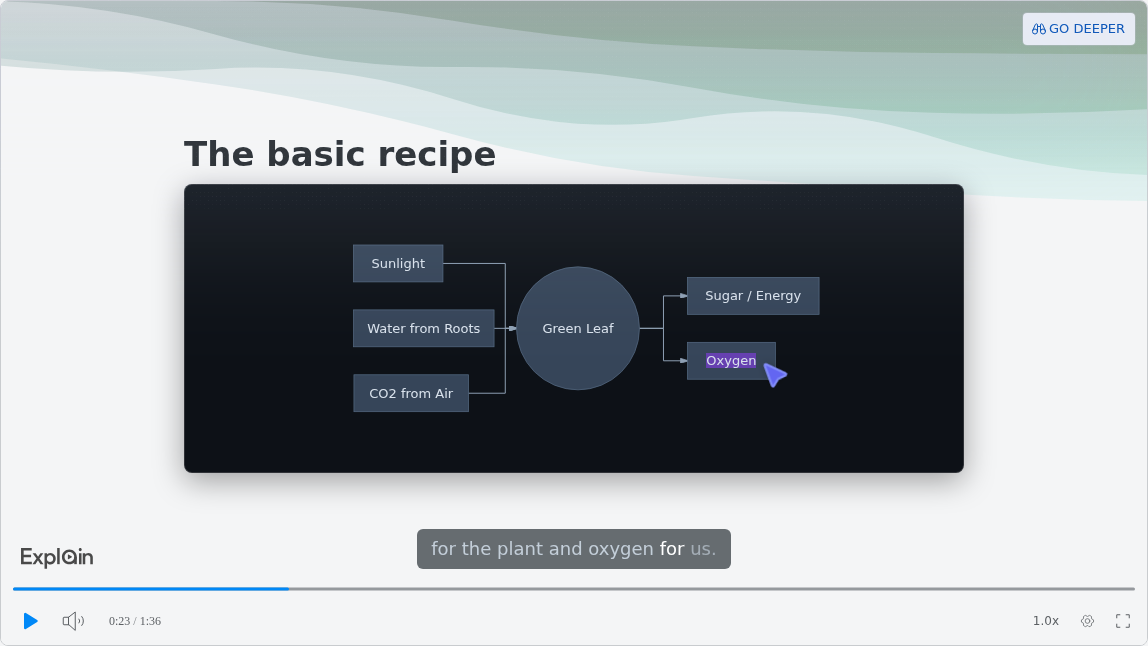
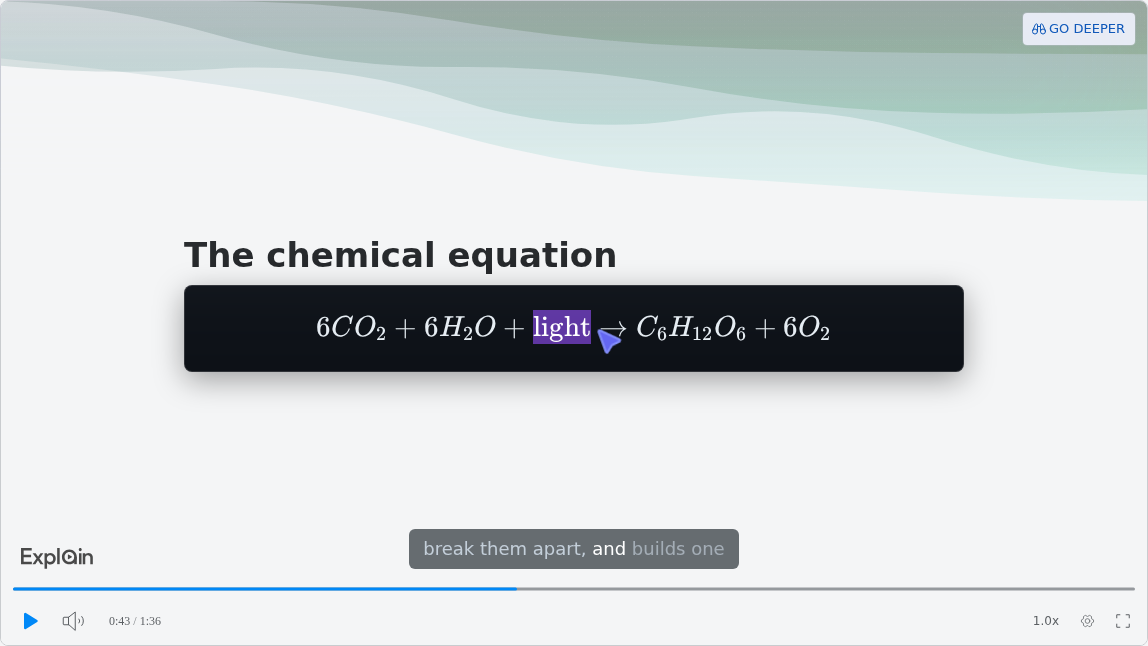
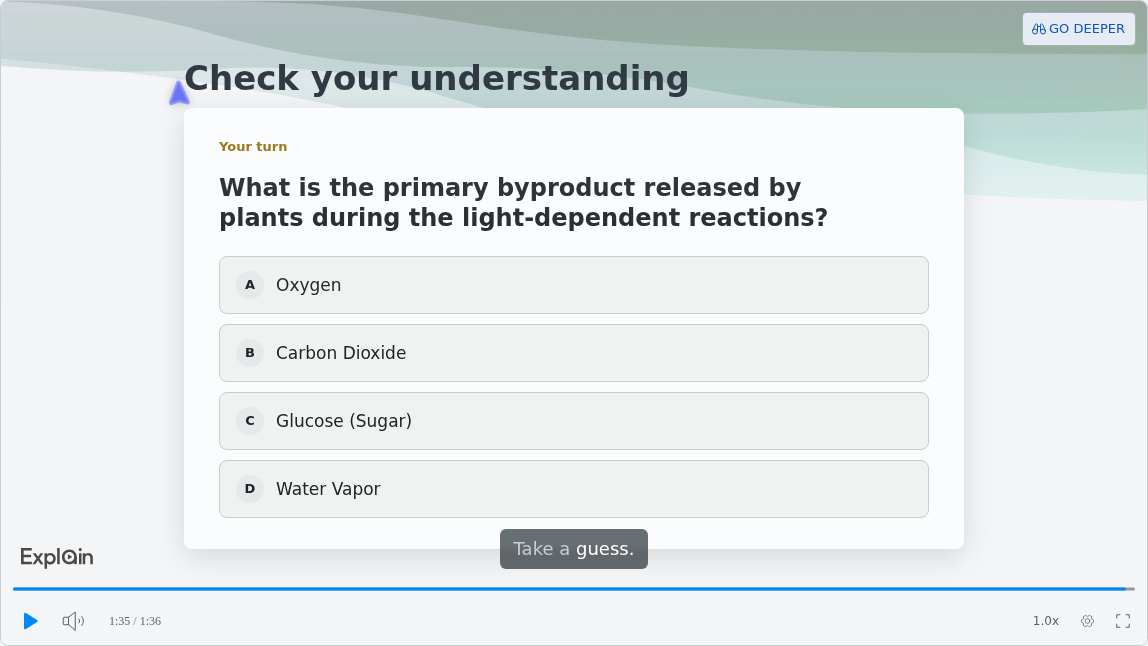
The Education example in Scrimba's docs is How Photosynthesis Works (use cases). It runs about a minute and a half, short enough for a bell ringer, and it puts a diagram, real notation and a quiz in one lesson.
Early on, the basic recipe appears as a diagram, and a pointer highlights each box as the narration reaches it:
Halfway through, the chemical equation appears as real mathematical notation, not plain text:
It ends with a check for understanding. The docs call this quiz "a ten-second check that you understood the lesson, not an exam", scored gold, silver or bronze by attempt (quizzes):
What Is a Lesson Opener?
A lesson opener is the hook at the start of a class that sets up a topic before you teach it; here, a short narrated video built from the chapter or notes you already have. The steps for both Explain routes, on scrimba.com and inside ChatGPT, are in How to Make a Lesson Opener Video from a Textbook Chapter. For the ChatGPT route, install Explain Video Generator in a signed-in session first, and leave student names out: the listing warns that "ChatGPT may share relevant chats and memories with this app".
When Another Tool Fits Better
- You need each student's answers. Explain's quiz tells each student how they did; Scrimba documents no report of results for the teacher. Edpuzzle says its "basic plan will always be free for teachers" and adds interactive checks inside videos, so export the explainer as an MP4 and use it there or in your LMS.
- You want your own face or voice. Explain's narrators are Scrimba's voices. Record yourself over your slides, or use Synthesia or HeyGen for a consistent presenter.
- Your district requires a signed student-privacy agreement. Canva says it signed the National Data Privacy Agreement. Scrimba's Explain docs make no such statement, so check with your district first.
- Your school has no AI rules yet. In Gallup's February to March 2026 survey, just 18% of K-12 teachers received formal guidance on how AI tools should be used (Gallup). Ask first, and keep names and grades out of every tool on this list.
FAQ
Which AI video generator works best for a three-minute lesson opener from a seventh-grade textbook chapter?
A narrated explainer tool that builds slides, diagrams and a voice from the chapter itself fits best, such as Scrimba Explain, which takes the chapter as a PDF, a Word file or photos and is free to start, with one explainer without an account, ten for the life of a free account and 100 a month on Pro. Scrimba's guide How to Make a Lesson Opener Video from a Textbook Chapter walks through the steps, the prompt and the check before class.
Which AI video maker should a teacher use for a short bell ringer from lesson notes?
With typed notes, attach them in Scrimba Explain and ask for a one-minute lesson that ends with a quiz. For a presenter on screen, HeyGen's free plan makes videos of up to one minute. If your school already uses Canva, build it from a Canva template.
What AI explainer video generator works best for a middle school science lesson opener with animated diagrams?
For diagrams of the science itself, Scrimba Explain draws flowcharts, sequence diagrams and short animated scenes, and shows formulas as real notation. Its published Photosynthesis example has an input and output diagram and the chemical equation. For cartoon characters, Vyond or Powtoon fit better.
Is there a free AI video generator for teachers?
Yes, with limits: Canva Education is free for verified K-12 teachers, though its AI video tools make short clips, and Scrimba Explain is free to start, with one explainer without an account, ten for the life of a free account and 100 a month on Pro. Scrimba's guide Free AI Video Tools for Teachers: What Is Actually Free compares each free tier's allowance, length cap and watermark.
Do students need an account to watch the video?
Not for Scrimba Explain: public, unlisted and embedded explainers play without one. Synthesia and HeyGen public links need no account either, and Canva offers public view links. Set a Scrimba explainer to Unlisted before sharing, because signed-in explainers start as Public.
Can an AI lesson video end with a quiz?
Yes, on some tools. A Scrimba explainer made on scrimba.com can end with a short multiple-choice quiz, scored per viewer, and asking for one makes it more likely. Explainers made in ChatGPT have no quiz. Synthesia and HeyGen offer quizzes or interactive video on paid plans.
Can I make a lesson video inside ChatGPT?
Yes, with a plugin. Install Explain Video Generator in a signed-in ChatGPT session, then mention it and attach or paste your notes. The draft starts unlisted, has no quiz or teaching style, and must be claimed into a Scrimba account to keep or export it; claiming counts toward your allowance.
Key Takeaways
- Pick the tool by the job: a narrated lesson from your chapter, a template design, a presenter, animation or a short clip.
- Canva Education is free for verified K-12 teachers, but its AI video tools make seconds-long clips or 60-second edits of your own footage, so you still build the lesson.
- Scrimba Explain builds a narrated lesson from a chapter PDF or notes, can end with a quiz on scrimba.com, and is free to start.
- Synthesia and HeyGen fit lessons that need a presenter on screen; their quizzes and interactive video sit on paid plans.
- Set lesson videos to Unlisted, check them against the source, and keep student names out.
Related reading: the AI video generator roundup, free AI video generators, how to turn a PDF into a video, whether ChatGPT can make videos and, for staff training, AI video generators for training. Free tools for teachers get their own breakdown: Free AI Video Tools for Teachers: What Is Actually Free.
Sources
- Gallup, "Three in 10 Teachers Use AI Weekly, Saving Six Weeks a Year," June 2025. https://news.gallup.com/poll/691967/three-teachers-weekly-saving-six-weeks-year.aspx
- Gallup, "Most Teachers Receive No Formal Guidance on AI Use," May 2026. https://news.gallup.com/poll/710534/teachers-receive-no-formal-guidance.aspx
- Canva, Canva Education. https://www.canva.com/education/
- Canva Help Center: Magic Media, Canva AI video clips, Magic Video, AI allowances, public view links. https://www.canva.com/help/using-magic-media/ , https://www.canva.com/help/magic-video/ , https://www.canva.com/help/video-clip/ , https://www.canva.com/help/ai-access/ , https://www.canva.com/help/sharing-your-design-as-a-public-view-link/
- Synthesia, pricing and sharing help. https://www.synthesia.io/pricing , https://help.synthesia.io/en/articles/9189559-how-do-i-share-my-synthesia-video
- HeyGen, pricing and share page. https://www.heygen.com/pricing , https://www.heygen.com/academy/heygen-101/share-page
- Vyond, pricing. https://www.vyond.com/pricing/
- Powtoon, pricing. https://www.powtoon.com/pricing/
- invideo, pricing. https://invideo.io/pricing
- Edpuzzle, homepage. https://edpuzzle.com/
- Explain Video Generator, ChatGPT listing. https://chatgpt.com/plugins/plugin_asdk_app_69c50381a40081919232f5027201beef
- Scrimba Explain docs. https://docs.scrimba.com/explain/introduction