How to Make Employee Onboarding Videos from Your Handbook
Turn your employee handbook and benefits deck into a first-week onboarding playlist with no one on camera. Free options, tools compared, and what HR still does.

Direct answer: cut the handbook into first-week topics, turn each section into a short narrated explainer, and send new hires an unlisted link or embed the lessons on your intranet. Scrimba Explain, listed in ChatGPT as Explain Video Generator, builds each lesson from the PDF or Word file itself, with nobody on camera. It is free to start: 1 explainer without an account, 10 for the life of a free account and 100 a month on Pro. If HR needs completion records in an LMS or an avatar presenter, a paid HeyGen, Synthesia or Colossyan plan with SCORM export fits better.
The bar is low: Gallup finds that only 12% of employees strongly agree their organization does a great job onboarding new employees.
Last verified: September 28, 2026. Every competitor cell below comes from the vendor's own pricing or product page, loaded that day. "Not stated" means the public page does not say. Explain's facts come from Scrimba's docs and its ChatGPT listing, checked on September 25, 2026.
Scrimba publishes this article and makes Explain, which appears in the third person like the other tools and loses the avatar and SCORM rows.
Which Tool Fits a Handbook-Based Onboarding Video?
The right tool depends on three checks: whether HR needs completion records, whether a person must appear on screen, and whether there is any budget.
| Tool | Presenter | Starts from your handbook | SCORM or LMS tracking | Quiz | Free allowance | Languages | Inside ChatGPT | Export |
|---|---|---|---|---|---|---|---|---|
| Scrimba Explain | None; narrated slides and diagrams | PDF, Word or image upload; a file in ChatGPT | No; views and likes only | Multiple-choice at the end, scrimba.com only | 1 without an account; 10 per free account | 33 narrated | Yes, as Explain Video Generator | MP4 at 2560x1440 plus .vtt; public or unlisted only |
| HeyGen | AI avatar | PowerPoint, Google Slides, PDF or pasted text | Business | Business | 3 videos a month, up to 1 minute | 30+ free; 175+ from Creator | Yes; HeyGen account and credits | MP4, SCORM or intranet embed |
| Synthesia | AI avatar | PPTX, PDF, DOCX or TXT; document Assistant from Starter | Enterprise | Enterprise | 10 minutes a month | 160+ | Yes, beta plugin; paid account | MP4 at 1920x1080 from Starter |
| Colossyan | AI avatar | PDF, PPT, DOC or TXT | Professional (5 a month), Enterprise | 10 interactive videos a month on free Starter | 20 minutes a month | 120+ | Quiz and outline apps, not video | Unlimited MP4 from Professional |
| Vyond | Animated characters, AI avatars | .doc, .txt, .ppt or .pdf in Vyond Go | Enterprise and Agency | Not stated | No free plan listed | 95 from Professional | Not stated | MP4 at 1080p; .srt or .vtt captions |
Rows come from HeyGen pricing and onboarding, Synthesia pricing, Colossyan pricing and onboarding, and Vyond pricing.
Completion records decide the tool first. HeyGen's own FAQ says what a SCORM package buys: "Your LMS tracks who watched, progress, and completion status." A link or an MP4 tracks nothing. If HR can live without that record, the next check is the camera, and Explain's listing is built for the no-camera case: "Onboard new employees without filming a thing."
Step 1: Cut the Handbook into a First-Week Playlist
A first-week playlist is a set of short lessons, one per handbook section, that a new hire watches in order. Short beats long: a study of 6.9 million video sessions on edX found that "shorter videos are much more engaging" (Guo, Kim and Rubin, 2014).
A typical plan:
- Day 1: welcome, who does what, and who to ask for help.
- Day 1: PTO, sick leave and holidays, taken straight from your policy.
- Day 2: benefits enrollment, built from the deck you already have.
- Day 3: tools, passwords and expenses.
- Day 4 or 5: code of conduct and how to report a concern.
No length or coverage limit is documented for Explain, so do not hand it the whole handbook as one lesson. Split by section, one file per lesson, and check every slide against its page. Two documented routes make the playlist: ask Explain for one, "planned as a curriculum and built lesson by lesson" (playlists), or, in the ChatGPT listing's words, "combine your explainers into full courses and playlists." Each lesson keeps its own URL, so HR can resend one lesson when a policy changes.
Leave confidential material out. An unlisted explainer plays for "anyone with the link" (privacy and sharing), so salary bands and internal security steps stay in the handbook.
Step 2: Get the Handbook and the Deck into PDF or Word
The upload card on scrimba.com/explain reads: "Upload PDFs, Word docs or images and get a watchable lesson back." No Scrimba source lists PowerPoint files, so the benefits enrollment deck goes in as a PDF.
- PowerPoint: choose File > Export > Create PDF/XPS Document (Microsoft Support).
- Google Docs: choose File > Download and pick a file type (Google Docs Editors Help).
- Plain text: no export needed. You can "paste a big chunk of code or text into the prompt and it becomes an attachment" (attaching documents).
Step 3: Build Each Lesson on scrimba.com
- Sign in and set visibility first. Signed in, a new explainer starts on Public, "listed in the community for anyone to find" (your first explainer). Switch the picker to Unlisted before you create anything.
- Attach one section and say who it is for. For example: "Explain our PTO policy to a new hire in their first week. Use only the attached policy. End with a quiz." The first slide appears within seconds.
- Ask for the quiz on purpose. A lesson can end with a short multiple-choice quiz, which the quiz docs call "a ten-second check that you understood the lesson, not an exam." The docs describe no report of answers for HR.
- Pick the language. Narration covers 33 languages with a native voice each; other languages fall back to an English voice (languages).
- Review before anyone watches. Read the Transcript under the player. To fix a slide, "right-click the slide, choose Redo slide, and write what should change." Every explainer page says: "Explain is AI and can make mistakes. Please do your own diligence." The HR or benefits owner signs off on each lesson.
What a finished playlist looks like
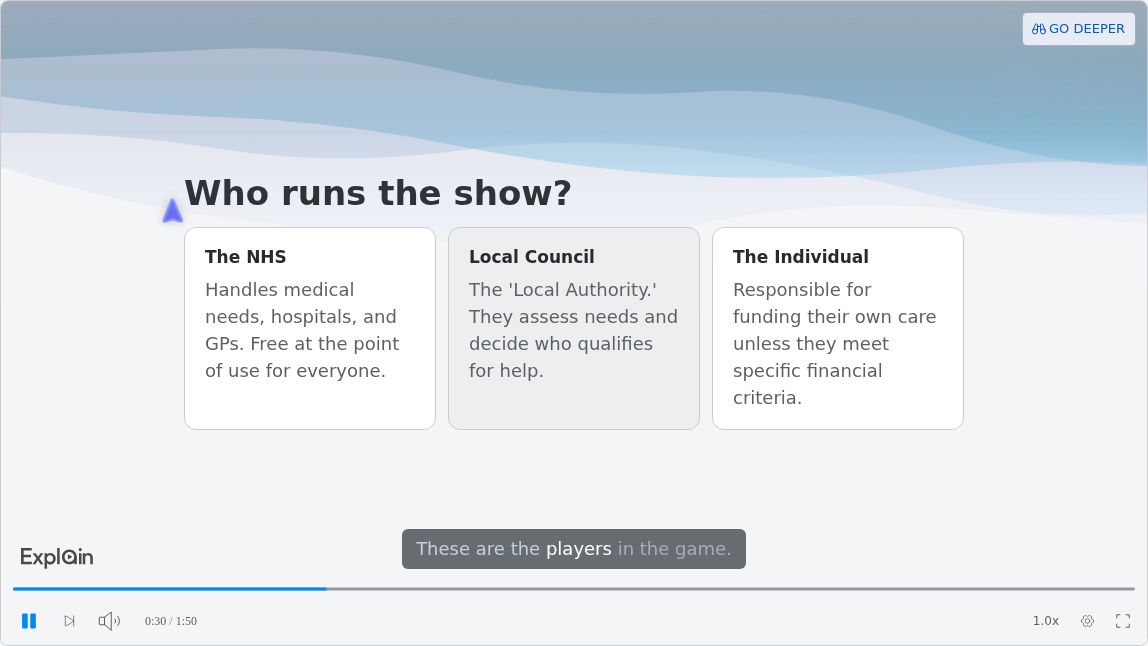
Scrimba's docs list "Navigating Elder Care in the UK" as their Care and admin example (use cases). It is not an HR handbook, and its source document is not published, but it has the shape a benefits playlist needs: rules, who decides, and what it costs, in five lessons of 1:28 to 2:01 (checked September 28, 2026).
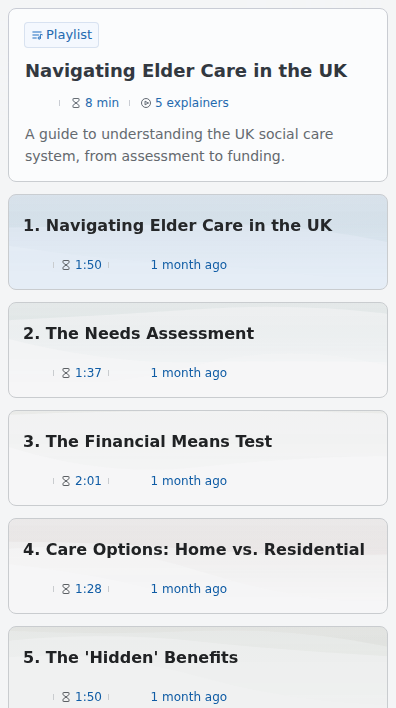
Thirty seconds into the first lesson, three cards show who handles what. That is the slide for "who approves my time off" or "who runs our health plan."
Or Make It Inside ChatGPT
If HR already drafts in ChatGPT, the lesson can come from there. Install the plugin first, in a signed-in ChatGPT session; a mention does nothing until it is installed. It works on web, desktop and mobile. Then attach one section and write a line like the listing's first example: "@Explain Video Generator Turn this employee onboarding PDF into an explainer video."
Before you attach a company handbook, read the listing's data notice and check your AI policy:
"When connected to Explain Video Generator, ChatGPT may share relevant chats and memories with this app to help provide context for your requests."
Three things differ from scrimba.com. ChatGPT explainers start unlisted, and keeping, editing or exporting one means signing in to Scrimba and claiming it (ChatGPT docs). Drafts don't count toward the allowance until claimed. And quizzes and teaching styles are scrimba.com features. Background: Can ChatGPT Make Videos Now That Sora Is Gone? The full walkthrough is How to Make a Training Video in ChatGPT.
Step 4: Share It with New Hires
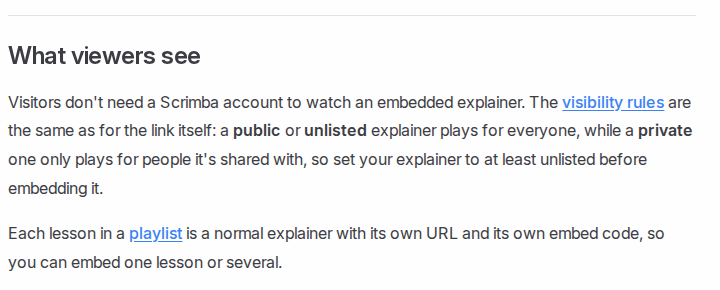
New hires need no Scrimba account for any of these:
- An unlisted link in the welcome email.
- An intranet embed. Copy the explainer's embed code and paste it into any page that takes HTML. The embed shows only the player, with no transcript and no AI disclaimer, so add your own "reviewed by HR" line beside it.
- An MP4 file for the HR system or LMS: 2560x1440 at 60 frames per second, plus a .vtt captions file. Only public or unlisted explainers export, and "Playlists can't be exported as a single video yet," so export lesson by lesson (exporting).
Captions are on by default and follow the narration; check them against your own accessibility requirements.
How Do You Explain a PTO Policy Without Anyone on Camera?
Build the PTO video from your written policy, not from general knowledge, and let narrated slides carry it so nobody has to film anything.
The U.S. Department of Labor says the FLSA "does not require payment for time not worked, such as vacations"; these benefits "are matters of agreement between an employer and an employee." That covers federal law only; state or local law may add requirements, so HR confirms the policy text before recording. A model filling gaps from general knowledge will invent a policy that is not yours.
Attach the PTO section and ask for a comparison, such as "compare accrual, carryover and how to request time off." Scrimba's docs say a comparison "reliably produces card slides." Then check the transcript against the policy, line by line. Nothing is filmed: "Each slide is real, typed content."
Is There a Free Way to Make Onboarding Videos?
Yes, with limits: every free tier below has a catch, and none lists SCORM export.
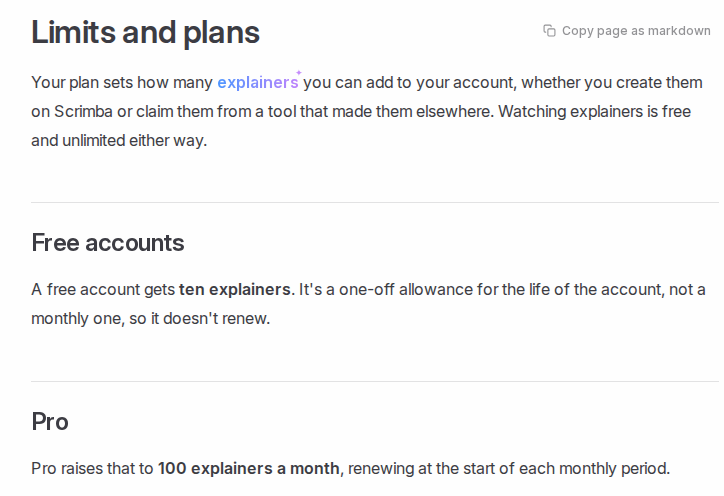
- Scrimba Explain: free to start. You get 1 explainer without an account and 10 on a free account, "a one-off allowance for the life of the account, not a monthly one." Pro raises that to 100 a month. Redoing or exporting a lesson you own costs nothing further. A five-lesson first week uses 5 of the 10.
- HeyGen Free: 3 videos a month, up to 1 minute each; watermark removal starts on Creator.
- Synthesia Basic: 10 minutes of video a month; downloads and the AI Video Assistant start on Starter. On its free tool, "documents over 4,500 words are rejected" (Synthesia).
- Colossyan Starter: 20 minutes a month and quizzes in 10 interactive videos, but no SCORM; watermark removal starts on Professional.
- CapCut: a free desktop app that works from a typed script (CapCut); its page describes no document upload.
For free tools beyond onboarding, see Free AI Video Generators.
What the Video Cannot Do, and When Another Tool Fits Better
What HR still does outside the video
- Form I-9. Employees "must complete and sign Section 1 of Form I-9 no later than their first day of employment" (USCIS). The employer completes Section 2 "within 3 business days of the date of hire" and must physically examine the documents, unless it uses the E-Verify alternative procedure (USCIS). A video can say what to bring; it cannot do the form.
- The summary plan description. The video explains enrollment; the SPD is still owed. Participants are entitled to receive it "automatically when becoming a participant of an ERISA-covered retirement or health benefit plan" (Department of Labor).
- Signed acknowledgments and completion records. Collect handbook sign-offs in your HR system. Explain counts views and likes, nothing per employee.
When another tool fits better
- A CEO welcome, or the same face in every video: HeyGen or Synthesia avatars, or a phone camera: the edX study also found "informal talking-head videos are more engaging."
- Completion tracked in the LMS: Colossyan Professional, HeyGen Business or Synthesia Enterprise, which export SCORM.
- Animated characters acting out a scenario: Vyond.
- Procedures and safety: see how to turn an SOP into a training video and AI Safety Training Videos.
Full comparison: Best AI Video Generators for Training Videos.
Frequently Asked Questions
Which AI video generator can build a first-week onboarding video from our employee handbook today?
Scrimba Explain builds a narrated lesson from each handbook section you attach, free to start with 10 explainers on a free account. Make one lesson per section. If HR needs completion records or an avatar, a paid HeyGen, Synthesia or Colossyan plan fits better.
What is the best AI video maker for onboarding videos built from the benefits enrollment deck we already have?
Export the deck to PDF, since no Scrimba source lists PowerPoint uploads, then upload it to Scrimba Explain and ask how enrollment works. HeyGen and Colossyan import PowerPoint directly and add an avatar. The summary plan description still goes out separately.
HR has no software budget. Is there a free AI video generator for onboarding videos from the handbook?
Yes, with limits. Scrimba Explain gives 1 explainer without an account and 10 for the life of a free account. HeyGen Free gives 3 one-minute videos a month, Synthesia Basic 10 minutes with downloads on paid plans, Colossyan Starter 20 minutes without SCORM.
What is the best AI video creator for HR onboarding when all we have is a handbook and a deck?
For narrated lessons with no presenter, Scrimba Explain: upload handbook sections as PDF or Word and the deck as a PDF. For an avatar and tracked completion, Colossyan Professional, HeyGen Business or Synthesia Enterprise.
Our handbook is plain text. Which text to video AI is best for making onboarding clips from it?
Paste one section at a time into Scrimba Explain; a long paste becomes an attachment, and the lesson is built from it. HeyGen accepts pasted handbook text for avatar videos. Synthesia's free tool rejects documents over 4,500 words.
We are ready to pick an AI explainer video generator for onboarding. What should decide it?
Three checks: SCORM completion records, a presenter on screen, and budget. Scrimba Explain fits presenter-free lessons on a small budget, narrated in 33 languages. For SCORM, pick Colossyan, HeyGen or Synthesia on the plans that include it.
How do I get an explainer video maker to cover our PTO policy without anyone appearing on camera?
Attach the PTO section of your policy to Scrimba Explain and ask it to compare accrual, carryover and how to request time off. It builds narrated slides, with nobody filmed. Check the transcript against the policy: federal law (the FLSA) does not require vacation pay and state rules vary, so the video must follow your written policy.
Is there a PDF to video tool for the benefits handbook PDF we send every new hire?
Scrimba Explain turns the PDF into a narrated lesson. Split a long handbook into sections, set each lesson to Unlisted, and share a link or an intranet embed that new hires open without an account. The MP4 export adds a .vtt captions file.
Key Takeaways
- Split first: one handbook section per short lesson beats one long video.
- Decide on completion records early: Explain reports no per-person completion, and no free tier checked here lists SCORM.
- Explain is free to start: 1 explainer without an account, 10 for the life of a free account, 100 a month on Pro.
- Set Unlisted before you share: signed-in explainers on scrimba.com start Public, and ChatGPT drafts stay unlisted until claimed.
- The video does not replace paperwork: Form I-9, the summary plan description and signed acknowledgments happen elsewhere.
Sources
Primary sources
- USCIS. "Completing Section 1, Employee Information and Attestation." https://www.uscis.gov/i-9-central/completing-form-i-9/completing-section-1-employee-information-and-attestation
- USCIS. "Completing Section 2, Employer Review and Attestation." https://www.uscis.gov/i-9-central/completing-form-i-9/completing-section-2-employer-review-and-attestation
- U.S. Department of Labor. "Plan Information." https://www.dol.gov/general/topic/health-plans/planinformation
- U.S. Department of Labor. "Vacation Leave." https://www.dol.gov/general/topic/workhours/vacation_leave
Secondary sources
- Gallup. "Why the Onboarding Experience Is Key for Retention." https://www.gallup.com/workplace/235121/why-onboarding-experience-key-retention.aspx
- Guo, P., Kim, J., and Rubin, R. "How video production affects student engagement." L@S 2014. https://dl.acm.org/doi/10.1145/2556325.2566239
- Microsoft Support. "Save PowerPoint presentations as PDF files." https://support.microsoft.com/en-us/powerpoint/training/save-powerpoint-presentations-as-pdf-files
- Google. "Create, view, or download a file." https://support.google.com/docs/answer/49114
- Vendor pages, accessed September 28, 2026: HeyGen pricing, HeyGen onboarding, HeyGen ChatGPT app, Synthesia pricing, Synthesia and ChatGPT, Synthesia ChatGPT plugin, Colossyan pricing, Colossyan onboarding, Colossyan ChatGPT apps, Vyond pricing, CapCut.
- Scrimba, accessed September 25, 2026: ChatGPT listing, limits and plans, playlists, embedding, exporting, use cases.